Write a program that allows a user to view a table of temperature conversion. The user...
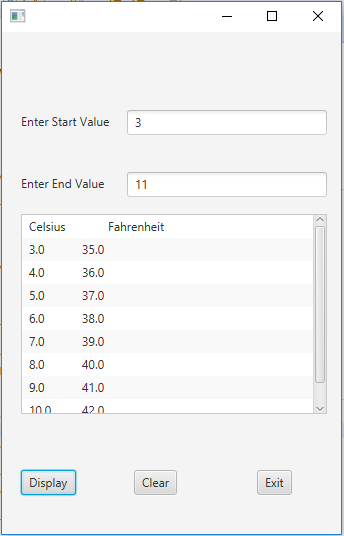
Write a program that allows a user to view a table of temperature conversion. The user should be able to enter a starting value and an ending value in to textboxes. Your program will display a list of temperature conversion from Celsius to Fahrenheit in a text area like the example below: You can choose any color, design and font for this interface. Use javafx scene builder for program. When you click on "Display" button it read values from text boxes in Celsius and converts them into Fahrenheit and display in text area. The "Clear" button resets the screen by clearing all text components from text boxes and text area. The "Exit" button exits the program.
Homework Answers
MAIN.java
import java.io.IOException;
import javafx.application.Application;
import javafx.event.ActionEvent;
import javafx.event.EventHandler;
import javafx.fxml.FXMLLoader;
import javafx.scene.Scene;
import javafx.scene.control.Button;
import javafx.scene.control.TextField;
import javafx.scene.layout.Pane;
import javafx.scene.layout.StackPane;
import javafx.scene.layout.TilePane;
import javafx.stage.Stage;
public class MAIN extends Application {
@Override
public void start(Stage primaryStage) {
try {
Pane mainPane =(Pane)
FXMLLoader.load(MAIN.class.getResource("Sample.fxml"));
primaryStage.setScene(new Scene(mainPane));
primaryStage.show();
} catch (IOException e) {
// TODO Auto-generated catch block
e.printStackTrace();
}
}
public static void main(String[] args) {
launch(args);
}
}
Controller.java
import java.net.URL;
import java.util.ArrayList;
import java.util.ResourceBundle;
import javafx.collections.FXCollections;
import javafx.collections.ObservableList;
import javafx.event.ActionEvent;
import javafx.fxml.FXML;
import javafx.scene.control.Button;
import javafx.scene.control.ListView;
import javafx.scene.control.TextField;
import javafx.stage.Stage;
public class Controller {
@FXML
private ResourceBundle resources;
@FXML
private URL location;
@FXML
private Button clrBtn;
@FXML
private Button disButton;
@FXML
private TextField endField;
@FXML
private Button exitBtn;
@FXML
private ListView<String> listView;
@FXML
private TextField startField;
@FXML
void clear(ActionEvent event) {
ObservableList<String>
list=FXCollections.observableArrayList();
listView.setItems(list);
}
@FXML
void close(ActionEvent event) {
// get a handle to the stage
// do what you have to do
Stage stage = (Stage) exitBtn.getScene().getWindow();
stage.close();
}
@FXML
void display(ActionEvent event) {
double start=Double.parseDouble(startField.getText());
double end=Double.parseDouble(endField.getText());
ObservableList<String>
list=FXCollections.observableArrayList();
list.add("Celsius\t\tFahrenheit");
list.add("-------------------------------------");
for(;start<end;start++){
double Fahrenheit = (9/5) * start + 32;
String temp = start + "\t\t" +Fahrenheit;
list.add(temp);
}
listView.setItems(list);
}
@FXML
void initialize() {
assert clrBtn != null : "fx:id=\"clrBtn\" was not injected: check
your FXML file 'Sample.fxml'.";
assert disButton != null : "fx:id=\"disButton\" was not injected:
check your FXML file 'Sample.fxml'.";
assert endField != null : "fx:id=\"endField\" was not injected:
check your FXML file 'Sample.fxml'.";
assert exitBtn != null : "fx:id=\"exitBtn\" was not injected: check
your FXML file 'Sample.fxml'.";
assert listView != null : "fx:id=\"listView\" was not injected:
check your FXML file 'Sample.fxml'.";
assert startField != null : "fx:id=\"startField\" was not injected:
check your FXML file 'Sample.fxml'.";
}
}
Sample.fxml
<?xml version="1.0" encoding="UTF-8"?>
<?import java.lang.*?>
<?import java.util.*?>
<?import javafx.scene.control.*?>
<?import javafx.scene.layout.*?>
<?import javafx.scene.paint.*?>
<AnchorPane id="AnchorPane" maxHeight="-Infinity"
maxWidth="-Infinity" minHeight="-Infinity" minWidth="-Infinity"
prefHeight="502.0" prefWidth="338.9998779296875"
xmlns:fx="http://javafx.com/fxml/1"
xmlns="http://javafx.com/javafx/2.2"
fx:controller="Controller">
<children>
<Label layoutX="19.0" layoutY="81.0" text="Enter Start Value"
/>
<Label layoutX="19.0" layoutY="143.0" text="Enter End Value"
/>
<TextField fx:id="startField" layoutX="125.0" layoutY="78.0"
prefWidth="200.0" />
<TextField fx:id="endField" layoutX="125.0" layoutY="140.0"
prefWidth="200.0" />
<ListView fx:id="listView" layoutX="19.0" layoutY="182.0"
prefHeight="200.0" prefWidth="306.0" />
<Button fx:id="disButton" layoutX="19.0" layoutY="438.0"
mnemonicParsing="false" onAction="#display" text="Display"
/>
<Button fx:id="clrBtn" layoutX="132.0" layoutY="438.0"
mnemonicParsing="false" onAction="#clear" text="Clear" />
<Button fx:id="exitBtn" layoutX="255.0" layoutY="438.0"
mnemonicParsing="false" onAction="#close" text="Exit" />
</children>
</AnchorPane>
Output:
- O X Enter Start Value 3 Enter End Value 11 Celsius 5.0 6.0 Fahrenheit 35.0 36.0 37.0 38.0 39.0 40.0 41.0 420 9.0 100 | Disp
Add Answer to:
Write a program that allows a user to view a table of
temperature conversion. The user...
Programming Exercise 8.3 | Instructions Write a GUI-based program that allows the user to convert temperature...
 Programming Exercise 8.3 | Instructions Write a GUI-based program that allows the user to convert temperature values between degrees Fahrenheit and degrees Celsius. The interface should have labeled entry fields for these two values. breezypythongui.py temperatureconvert... + 1 2 File: temperatureconverter.py 3 Project 8.3 4 Temperature conversion between Fahrenheit and Celsius. 5 Illustrates the use of numeric data fields. 6 • These components should be arranged in a grid where the labels occupy the first row and the corresponding fields...
Write a C++ program that prompts a user to enter a temperature in Fahrenheit as a...
Write a C++ program that prompts a user to enter a temperature in Fahrenheit as a real number. After the temperature is entered display the temperature in Celsius. Your program will then prompt the user if they want to continue. If the character n or N is entered the program will stop; otherwise, the program will continue. After your program stops accepting temperatures display the average of all the temperatures entered in both Fahrenheit and Celsius. Be sure to use...
VII JAVA ASSIGNMENT. Write a program with a graphical interface that allows the user to convert...
VII JAVA ASSIGNMENT. Write a program with a graphical interface that allows the user to convert an amount of money between U.S. dollars (USD), euros (EUR), and British pounds (GBP). The user interface should have the following elements: a text box to enter the amount to be converted, two combo boxes to allow the user to select the currencies, a button to make the conversion, and a label to show the result. Display a warning if the user does not...
C# Temp. Converter program. Create a Celsius and Fahrenheit Temperature Converter application. The application must have...
 C# Temp. Converter program.
Create a Celsius and Fahrenheit Temperature Converter
application. The application must have 2 Labels (each one of them
assigned only to Celsius and Fahrenheit), 2 TextBoxes (each one of
them assigned only to Celsius and Fahrenheit), only 1 Convert
Button, 1 Clear Button, and 1 Exit Button. Also, 1 Error message
label which will display the error messages.
The application should only allow the user to enter the
desired temperature just in one of the TextBoxes...
C# Temp. Converter program.
Create a Celsius and Fahrenheit Temperature Converter
application. The application must have 2 Labels (each one of them
assigned only to Celsius and Fahrenheit), 2 TextBoxes (each one of
them assigned only to Celsius and Fahrenheit), only 1 Convert
Button, 1 Clear Button, and 1 Exit Button. Also, 1 Error message
label which will display the error messages.
The application should only allow the user to enter the
desired temperature just in one of the TextBoxes...
Write python program using IDLE Write a full program that asks the user to enter his/her...
Write python program using IDLE Write a full program that asks the user to enter his/her name then repeatedly ask to enter the temperature in Fahrenheit and convert it to Celsius, the program should then prompt the user if he/she wants to continue or exit the program. The formula for the conversion is: °C = (°F - 32) x 5/9 The program should use a function for the conversion. An Example of a sample run should appear on the screen...
write in python idle Write full program that asks the user to enter his/her name then...
write in python idle Write full program that asks the user to enter his/her name then repeatedly ask to enter the temperature in Fahrenheit and convert it to Celsius, the program should then prompt the user if he/she wants to continue or exit the program. The formula for conversion is: °C = (°F - 32) x 5/9 The program should use a function for the conversion. An Example of a sample run should appear on the screen like the text...
Write a program named FahrenheitToCelsius that accepts a temperature in Fahrenheit from a user and converts...
Write a program named FahrenheitToCelsius that accepts a temperature in Fahrenheit from a user and converts it to Celsius by subtracting 32 from the Fahrenheit value and multiplying the result by 5/9. Display both values to one decimal place. For example, if 88.5 degrees is input, the output would be: 88.5 F is 31.4 C Answer in C# (Posting incomplete code i have so far that wont run correctly.) using System; using static System.Console; class FahrenheitToCelsius { static void Main()...
(in python) Write a GUI application that converts Celsius temperatures to Fahrenheit temperatures. The user s......
(in python) Write a GUI application that converts Celsius temperatures to Fahrenheit temperatures. The user s... Write a GUI application that converts Celsius temperatures to Fahrenheit temperatures. The user should be able to enter a Celsius temperature, click a button, and then see the equivalent Fahrenheit temperature. Use the following formula to make the conversion ( F=9/5 C + 32) where F is the Fahrenheit temperature and C is the Celsius temperature
This program will take the user's input as a temperature in degrees Fahrenheit. The user will...
 This program will take the user's input as a temperature in degrees
Fahrenheit. The user will then click a radio button indicating
whether a table of temperatures, starting with the entered value,
will be displayed in increments of 5 degrees F or 10 degrees F.
When a submit button is clicked your code will display a HTML table
of temperature values. The first column will be temperatures in
degrees Fahrenheit, given in increments of 5 or 10 degrees F,
depending...
This program will take the user's input as a temperature in degrees
Fahrenheit. The user will then click a radio button indicating
whether a table of temperatures, starting with the entered value,
will be displayed in increments of 5 degrees F or 10 degrees F.
When a submit button is clicked your code will display a HTML table
of temperature values. The first column will be temperatures in
degrees Fahrenheit, given in increments of 5 or 10 degrees F,
depending...
Develop a C# UWP application that would have: a text block that reads Enter Current Temperature:...
Develop a C# UWP application that would have: a text block that reads Enter Current Temperature: the text box would follow the text block. 4 buttons: One that reads Convert to Celsius One that reads Convert to Fahrenheit One that reads Clear One that reads: Exit If the user clicks Convert to Celsius button, the temperature entered would be converted to Celsius and the converted temperature would be displayed. If the user clicks Convert to Fahrenheit...
 Programming Exercise 8.3 | Instructions Write a GUI-based program that allows the user to convert temperature values between degrees Fahrenheit and degrees Celsius. The interface should have labeled entry fields for these two values. breezypythongui.py temperatureconvert... + 1 2 File: temperatureconverter.py 3 Project 8.3 4 Temperature conversion between Fahrenheit and Celsius. 5 Illustrates the use of numeric data fields. 6 • These components should be arranged in a grid where the labels occupy the first row and the corresponding fields...
 C# Temp. Converter program.
Create a Celsius and Fahrenheit Temperature Converter
application. The application must have 2 Labels (each one of them
assigned only to Celsius and Fahrenheit), 2 TextBoxes (each one of
them assigned only to Celsius and Fahrenheit), only 1 Convert
Button, 1 Clear Button, and 1 Exit Button. Also, 1 Error message
label which will display the error messages.
The application should only allow the user to enter the
desired temperature just in one of the TextBoxes...
C# Temp. Converter program.
Create a Celsius and Fahrenheit Temperature Converter
application. The application must have 2 Labels (each one of them
assigned only to Celsius and Fahrenheit), 2 TextBoxes (each one of
them assigned only to Celsius and Fahrenheit), only 1 Convert
Button, 1 Clear Button, and 1 Exit Button. Also, 1 Error message
label which will display the error messages.
The application should only allow the user to enter the
desired temperature just in one of the TextBoxes...
 This program will take the user's input as a temperature in degrees
Fahrenheit. The user will then click a radio button indicating
whether a table of temperatures, starting with the entered value,
will be displayed in increments of 5 degrees F or 10 degrees F.
When a submit button is clicked your code will display a HTML table
of temperature values. The first column will be temperatures in
degrees Fahrenheit, given in increments of 5 or 10 degrees F,
depending...
This program will take the user's input as a temperature in degrees
Fahrenheit. The user will then click a radio button indicating
whether a table of temperatures, starting with the entered value,
will be displayed in increments of 5 degrees F or 10 degrees F.
When a submit button is clicked your code will display a HTML table
of temperature values. The first column will be temperatures in
degrees Fahrenheit, given in increments of 5 or 10 degrees F,
depending...
Most questions answered within 3 hours.
-
Where is the error in this code sequence?
String s1 = "Hello";
String s2 = "ello";...
asked 10 months ago -
Financial data for Joel de Paris, Inc., for last year
follow:
Joel de Paris, Inc.
Balance...
asked 10 months ago -
Consider this reaction:
Al2(SO4)3 (aq)+ BaCl3
(aq) Al2Cl6 (aq)- +
3BaSO4(s) . What is the...
asked 10 months ago -
Suppose that Savneet is considering increasing her
recent random sample from 20 car rentals to 40...
asked 10 months ago -
Trucks arrive at an unloading terminal at an average rate of 120
per hour.
Trucks arrive...
asked 10 months ago -
Why are methanol and ethanol completely soluble in water while
octanol is not very little soluble....
asked 10 months ago -
A facilities manager at a university reads in a research report
that the mean amount of...
asked 10 months ago -
When the CuSO4 is rehydrated by adding water to the anhydrous
compound, is this an endothermic...
asked 10 months ago -
A ray of sunlight is passing from diamond into crown glass; the
angle of incidence is...
asked 10 months ago -
A block of mass 0.249 kg is placed on top of a light, vertical
spring of...
asked 10 months ago -
how do the kidneys compensate in the presences of acidosis
a) trigger hyperventilate
b) reserve acid...
asked 10 months ago -
Question 501 pts
The rental rate of capital to the firm increases. Which of the
following...
asked 10 months ago