Create simple baking program and Add filing to it (Save / Load database or customer information)...
Create simple baking program and Add filing to it (Save / Load
database or customer information) and Explain this program if
possible create small report explaining this program
( PROGRAM MUST BE IN C LANGUAGE )
Format of output should be like:
1. Create New Account
2. Cash Deposit
3. Cash Withdraw
4. Low Balance Enquiry
5. Load
6. Save
7. Exit
Homework Answers
/*
Following program executed on DEV C++ . you may try other compiler also.
Important Note:
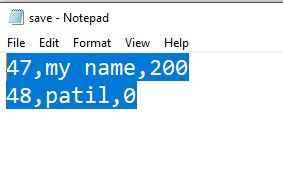
Program data saved in "save.txt" file which created at working directory
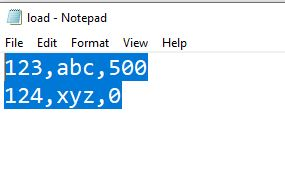
Program Load data from file name entered by user. It mean file should be present in working directory. in my program i am using file "load.txt"
you can used my file also
for load.txt you should used following format (one record on one line)
accountno,accountholdername,balance
like 123,abc,500
*/
#include <stdio.h>
#include <string.h>
#include<stdlib.h>
struct Bank_Account_Holder
{
int account_no;
char name[80];
int balance;
};
int n;
void accept(struct Bank_Account_Holder[], int);
void display(struct Bank_Account_Holder[], int);
void save(struct Bank_Account_Holder[], int);
void load(struct Bank_Account_Holder[], int);
int search(struct Bank_Account_Holder[], int, int);
void deposit(struct Bank_Account_Holder[], int, int, int);
void withdraw(struct Bank_Account_Holder[], int, int, int);
int lowBalenquiry(int,int);
int main()
{
struct Bank_Account_Holder data[20];
int choice, account_no, amount, index;
printf("ISEEISEE Banking System\n\n");
printf("Enter the count of records: ");
scanf("%d", &n);
accept(data, n);
do
{
printf("\nISEEISEE
Banking System Menu :\n");
printf("Press 1 to
display all records.\n");
printf("Press 2 to
search a record.\n");
printf("Press 3 to
deposit amount.\n");
printf("Press 4 to
withdraw amount.\n");
printf("Press 5 to save
all records to file.\n");
printf("Press 6 to load
Records from file.\n");
printf("Press 0 to
exit\n");
printf("\nEnter
choice(0-4) : ");
scanf("%d",
&choice);
switch (choice)
{
case 1:
display(data, n);
break;
case 2:
printf("Enter account number to search : ");
scanf("%d", &account_no);
index = search(data, n, account_no);
if (index == - 1)
{
printf("Record not found : ");
}
else
{
printf("A/c Number: %d\nName: %s\nBalance: %d\n",
data[index].account_no, data[index].name,
data[index].balance);
}
break;
case 3:
printf("Enter account number : ");
scanf("%d", &account_no);
printf("Enter amount to deposit : ");
scanf("%d", &amount);
deposit(data, n, account_no, amount);
break;
case 4:
printf("Enter account number : ");
scanf("%d", &account_no);
printf("Enter amount to withdraw : ");
scanf("%d", &amount);
withdraw(data, n, account_no, amount);
break;
case 5:
save(data, n);
break;
case 6:
load(data, n);
break;
default:
printf("\nWrong choice");
case 0:
return 0;
}
}
while (choice != 0);
return 0;
}
void accept(struct Bank_Account_Holder array[80], int s)
{
int i;
for (i = 0; i < s; i++)
{
printf("\nEnter data for
Record #%d", i + 1);
printf("\n Enter
account_no : ");
scanf("%d",
&array[i].account_no);
fflush(stdin);
printf("Enter name of
account Holder : ");
gets(array[i].name);
array[i].balance =
0;
}
}
void load(struct Bank_Account_Holder array[80], int s)
{
int i;
char fname[20];
printf("\nEnter File with extention for
loading::");
scanf("%s",&fname);
FILE * fp;
char dataToBeRead[50];
fp = fopen(fname, "r");
if ( fp == NULL )
{
printf( "\n File Cannot
Find" ) ;
}
else
{
printf("\n The file is
now opened.\n") ;
// Read the dataToBeRead
from the file
// using fgets()
method
while( fgets (
dataToBeRead, 50, fp ) != NULL )
{
char *ptr =
strtok(dataToBeRead, ",");
array[n].account_no=atoi(ptr);
ptr = strtok(NULL,
",");
//printf("'%s'\n",
ptr);
strcpy(array[n].name,ptr);
ptr = strtok(NULL,
",");
//printf("'%s'\n",
ptr);
array[n].balance=atoi(ptr);
ptr = strtok(NULL,
",");
n=n+1;
}
// Closing the file
using fclose()
fclose(fp) ;
printf("Data
successfully read from file\n");
printf("The file is now
closed.") ;
}
}
void display(struct Bank_Account_Holder array[80], int s)
{
int i;
printf("\n\nA/c No\tName\tBalance\n");
for (i = 0; i < s; i++)
{
printf("%d\t%s\t%d\n",
array[i].account_no, array[i].name,
array[i].balance);
}
}
// save records to file
void save(struct Bank_Account_Holder array[80], int s)
{
int i;
FILE *fp ;
fp = fopen("save.txt", "w");
for (i = 0; i < s; i++)
{
//each line represent single record
and field seperated by comma
fprintf(fp, "%d,%s,%d\n", array[i].account_no, array[i].name,
array[i].balance);
}
fclose(fp);
printf("\nSaved Sucessfully to file");
}
int search(struct Bank_Account_Holder array[80], int s, int
number)
{
int i;
for (i = 0; i < s; i++)
{
if (array[i].account_no
== number)
{
return i;
}
}
return - 1;
}
void deposit(struct Bank_Account_Holder array[], int s, int
number, int amt)
{
int i = search(array, s, number);
if (i == - 1)
{
printf("Record not
found");
}
else
{
array[i].balance +=
amt;
}
}
void withdraw(struct Bank_Account_Holder array[], int s, int
number, int amt)
{
int i = search(array, s, number);
if (i == - 1)
{
printf("Record not
found\n");
}
else if
(lowBalenquiry(array[i].balance,amt))
{
printf("Insufficient
balance\n");
}
else
{
array[i].balance -=
amt;
}
}
int lowBalenquiry(int bal,int amt){
if(bal < amt)
return 1;
return 0;
}
/*
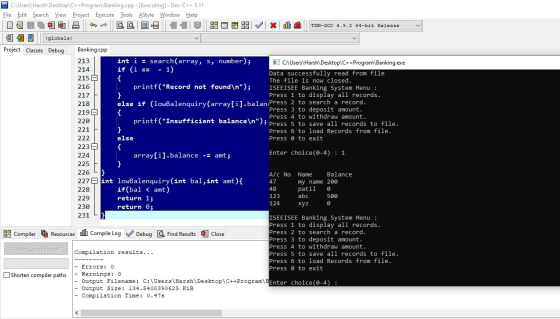
output
ISEEISEE Banking System
Enter the count of records: 2
Enter data for Record #1
Enter account_no : 47
Enter name of account Holder : my name
Enter data for Record #2
Enter account_no : 48
Enter name of account Holder : patil
ISEEISEE Banking System Menu :
Press 1 to display all records.
Press 2 to search a record.
Press 3 to deposit amount.
Press 4 to withdraw amount.
Press 5 to save all records to file.
Press 6 to load Records from file.
Press 0 to exit
Enter choice(0-4) : 1
A/c No Name Balance
47 my name 0
48 patil 0
ISEEISEE Banking System Menu :
Press 1 to display all records.
Press 2 to search a record.
Press 3 to deposit amount.
Press 4 to withdraw amount.
Press 5 to save all records to file.
Press 6 to load Records from file.
Press 0 to exit
Enter choice(0-4) : 3
Enter account number : 47
Enter amount to deposit : 500
ISEEISEE Banking System Menu :
Press 1 to display all records.
Press 2 to search a record.
Press 3 to deposit amount.
Press 4 to withdraw amount.
Press 5 to save all records to file.
Press 6 to load Records from file.
Press 0 to exit
Enter choice(0-4) : 4
Enter account number : 47
Enter amount to withdraw : 501
Insufficient balance
ISEEISEE Banking System Menu :
Press 1 to display all records.
Press 2 to search a record.
Press 3 to deposit amount.
Press 4 to withdraw amount.
Press 5 to save all records to file.
Press 6 to load Records from file.
Press 0 to exit
Enter choice(0-4) : 4
Enter account number : 47
Enter amount to withdraw : 300
ISEEISEE Banking System Menu :
Press 1 to display all records.
Press 2 to search a record.
Press 3 to deposit amount.
Press 4 to withdraw amount.
Press 5 to save all records to file.
Press 6 to load Records from file.
Press 0 to exit
Enter choice(0-4) : 1
A/c No Name Balance
47 my name 200
48 patil 0
ISEEISEE Banking System Menu :
Press 1 to display all records.
Press 2 to search a record.
Press 3 to deposit amount.
Press 4 to withdraw amount.
Press 5 to save all records to file.
Press 6 to load Records from file.
Press 0 to exit
Enter choice(0-4) : 5
Saved Sucessfully to file
ISEEISEE Banking System Menu :
Press 1 to display all records.
Press 2 to search a record.
Press 3 to deposit amount.
Press 4 to withdraw amount.
Press 5 to save all records to file.
Press 6 to load Records from file.
Press 0 to exit
Enter choice(0-4) : 6
Enter File with extention for loading::load.txt
The file is now opened.
Data successfully read from file
The file is now closed.
ISEEISEE Banking System Menu :
Press 1 to display all records.
Press 2 to search a record.
Press 3 to deposit amount.
Press 4 to withdraw amount.
Press 5 to save all records to file.
Press 6 to load Records from file.
Press 0 to exit
Enter choice(0-4) : 1
A/c No Name Balance
47 my name 200
48 patil 0
123 abc 500
124 xyz 0
ISEEISEE Banking System Menu :
Press 1 to display all records.
Press 2 to search a record.
Press 3 to deposit amount.
Press 4 to withdraw amount.
Press 5 to save all records to file.
Press 6 to load Records from file.
Press 0 to exit
Enter choice(0-4) :
*/
/*
save.txt
47,my name,200
48,patil,0
load.txt
123,abc,500
124,xyz,0
*/
Add Answer to:
Create simple baking program and Add filing to it (Save / Load
database or customer information)...
I am trying to create a ATM style bank program that accept the customer id ,...
I am trying to create a ATM style bank program that accept the customer id , in the welcoming panel ,but how do i make when the customer input their id# and click on the ok button then they have 3 or so tries to input the correct id# and if successful then send to the other panel where they choose which transaction to they want to make for example savings , checking account , make and deposit , and...
Create a 'simple' calculator. The calculator should be able to add, subtract, multiply, and divide two...
Create a 'simple' calculator. The calculator should be able to add, subtract, multiply, and divide two numbers. You can use whatever format you want to receive the numbers (such as textboxes). You also can use whatever method (such as a button for each operation +, -, *, /) to determine what operation the user wants to accomplish. The output should be displayed in a similar format to "1 + 2 = 3" or "1 - 2 = -1". Make sure...
The Program (Java) You will create a pet database program with the following operations incrementally as...
The Program (Java) You will create a pet database program with the following operations incrementally as describe in the Milestones section. You are not required to save the pet data into a file. You must use appropriate design and make use of Object-Oriented Design. See milestones. • Add pets o Let the user add as many pets as they want. A pet is entered as a single line consisting of a name and an integer which represents the age of...
C++ Design a class bankAccount that defines a bank account as an ADT and implements the...
C++ Design a class bankAccount that defines a bank account as an ADT and implements the basic properties of a bank account. The program will be an interactive, menu-driven program. a. Each object of the class bankAccount will hold the following information about an account: account holder’s name account number balance interest rate The data members MUST be private. Create an array of the bankAccount class that can hold up to 20 class objects. b. Include the member functions to...
Purpose: Demonstrate the ability to create and manipulate classes, data members, and member functions. This assignment...
Purpose: Demonstrate the ability to create and manipulate classes, data members, and member functions. This assignment also aims at creating a C++ project to handle multiple files (one header file and two .cpp files) at the same time. Remember to follow documentation and variable name guidelines. Create a C++ project to implement a simplified banking system. Your bank is small, so it can have a maximum of 100 accounts. Use an array of pointers to objects for this. However, your...
Overview: Database management plays an integral role in nearly every area of business. Databases house customer, accoun...
 Overview: Database management plays an integral role in nearly every area of business. Databases house customer, accounting, and employee data, and these different data sets must all be efficiently managed in order to make the data accessible. Companies rely on database engineers to ensure that their records are accurate, updated, and tracked in real time. This course covers structured query language (SQL) and how it can be used to manage database schemas, manipulate data, and analyze data. For your final...
1. Objective This challenge lab will enable you to apply, in a practical scenario, the topics...
1. Objective This challenge lab will enable you to apply, in a practical scenario, the topics we have introduced in the class so far: input/output including files, variables, conditionals and loops. 2. Learning outcomes After completing this assignment, you will be able to: • Analyze problems and express a solution algorithm using pseudocode. • Implement a pseudocode algorithm in a high-level language, including the correct use of arithmetic and logical expression and simple input/output operations. • Use the syntax and...
This program is used to create a phonebook for storing contact information into a text file....
This program is used to create a phonebook for storing contact information into a text file. The program begins by asking the user to provide a name for the file that will contain their phone book information. It will then ask the user to provide the names and numbers of their contacts. It should keep asking the user for contact information until they type in Done (case-sensitive). After the user types Done, store all contact information into the file name...
Description Data Engineers regularly collect, process and store data. In this task you will develop a...
Description Data Engineers regularly collect, process and store data. In this task you will develop a deeper understanding of how C programming language can be used for collecting, processing and storing data. In this assignment you get the opportunity to build an interactive program that can manage the list of flights departing Sydney Airport. The list is stored as an array of flight_t type structures flight_t flights [MAX_NUM_FLIGHTS]; The flight_t is a structure typedef for struct flight. The struct flight...
The goal of this homework is to write a small database system for an Animal Shelter....
The goal of this homework is to write a small database system for an Animal Shelter. This is a no-kill shelter like the one just west of the Addition Airport. You will accept animal “donations” to the shelter, but mostly only dogs and cats. (But yes, there may be the occasional hamster or other nondog, non-cat animal donation.) At present, all we need to do is write the skeleton of a database that will track all the animals in the...
 Overview: Database management plays an integral role in nearly every area of business. Databases house customer, accounting, and employee data, and these different data sets must all be efficiently managed in order to make the data accessible. Companies rely on database engineers to ensure that their records are accurate, updated, and tracked in real time. This course covers structured query language (SQL) and how it can be used to manage database schemas, manipulate data, and analyze data. For your final...
Most questions answered within 3 hours.
-
Where is the error in this code sequence?
String s1 = "Hello";
String s2 = "ello";...
asked 10 months ago -
Financial data for Joel de Paris, Inc., for last year
follow:
Joel de Paris, Inc.
Balance...
asked 10 months ago -
Consider this reaction:
Al2(SO4)3 (aq)+ BaCl3
(aq) Al2Cl6 (aq)- +
3BaSO4(s) . What is the...
asked 10 months ago -
Suppose that Savneet is considering increasing her
recent random sample from 20 car rentals to 40...
asked 10 months ago -
Trucks arrive at an unloading terminal at an average rate of 120
per hour.
Trucks arrive...
asked 10 months ago -
Why are methanol and ethanol completely soluble in water while
octanol is not very little soluble....
asked 10 months ago -
A facilities manager at a university reads in a research report
that the mean amount of...
asked 10 months ago -
When the CuSO4 is rehydrated by adding water to the anhydrous
compound, is this an endothermic...
asked 10 months ago -
A ray of sunlight is passing from diamond into crown glass; the
angle of incidence is...
asked 10 months ago -
A block of mass 0.249 kg is placed on top of a light, vertical
spring of...
asked 10 months ago -
how do the kidneys compensate in the presences of acidosis
a) trigger hyperventilate
b) reserve acid...
asked 10 months ago -
Question 501 pts
The rental rate of capital to the firm increases. Which of the
following...
asked 10 months ago