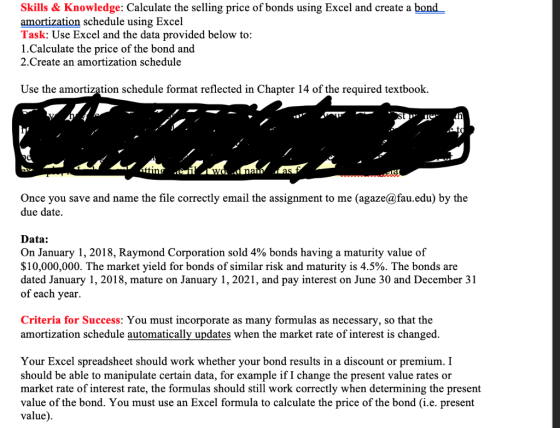
Create an amortization schedule via excel, using the following data listed above.
Homework Answers
| Rate | Semi annual Market Yield=(4.5/2)% | 2.25% | ||||||||
| Nper | Number of Aemi annual period (Jan1,18 to Jan1,21) | 6 | ||||||||
| Pmt | Semi annual Coupon Payment (10 million*4%)/2 | $200,000 | ||||||||
| FV | Payment at maturity | $10,000,000 | ||||||||
| PV | Bond Issue Price | $9,861,138 | (Using PV function of excel with Rate=2.25%, Nper=6, Pmt=-200000, Fv=-10000000) | |||||||
| FV-PV | Bond Discount (10000000-9861138) | $138,862 | ||||||||
| AMORTIZATION SCHEDULE | ||||||||||
| (4/2)=2% *10 million | Market rate(4.5/2)=2.25% *Previous Book value | |||||||||
| A | B | C | D=C-B | E | F | G=F-E | ||||
| Date | Interest payment | Interest Expense | Amortization of Discount | Debit Balance in Bond Discount Account | Credit Balance in Bond Payable Account | Book value of the Bond | ||||
| Jan1,2018 | $138,862 | $10,000,000 | $9,861,138 | |||||||
| June30,2018 | $200,000 | $221,875.61 | $21,875.61 | $116,986.31 | $10,000,000 | $9,883,014 | ||||
| Dec31,2018 | $200,000 | $222,367.81 | $22,367.81 | $94,618.51 | $10,000,000 | $9,905,381 | ||||
| June30,2019 | $200,000 | $222,871.08 | $22,871.08 | $71,747.42 | $10,000,000 | $9,928,253 | ||||
| Dec31,2019 | $200,000 | $223,385.68 | $23,385.68 | $48,361.74 | $10,000,000 | $9,951,638 | ||||
| June30,2020 | $200,000 | $223,911.86 | $23,911.86 | $24,449.88 | $10,000,000 | $9,975,550 | ||||
| Dec31,2020 | $200,000 | $224,449.88 | $24,449.88 | ($0.00) | $10,000,000 | $10,000,000 | ||||
 |
||||||||||
Add Answer to:
Create an amortization schedule via excel, using the following
data listed above.
Skills & Knowledge: Calculate...
You must incorporate as many formulas as necessary so that the worksheet automatically updates when the...
 You must incorporate as many formulas as necessary so that the worksheet automatically updates when the market rate of interest is changed. Your Excel spreadsheet should work whether your bond results in a discount or premium. I should be able to manipulate certain data, for example, if I change the present value rates or market rate of interest rate, the formulas should still work correctly when determining the present value of the bond. On January 1, 2018, Raymond Corporation sold...
You must incorporate as many formulas as necessary so that the worksheet automatically updates when the...
You must incorporate as many formulas as necessary so that the worksheet automatically updates when the market rate of interest is changed. Your Excel spreadsheet should work whether your bond results in a discount or premium. I should be able to manipulate certain data, for example, if I change the present value rates or market rate of interest rate, the formulas should still work correctly when determining the present value of the bond. On January 1, 2018, Raymond Corporation sold...
Read the problem. Identify and list the following data relevant to preparing an amortization schedule: Face...
 Read the problem. Identify and list the following data relevant to preparing an amortization schedule: Face amount Discount or premium Carrying value (Price of bonds) Term (years) Number of Periods Stated rate of interest (annual %) Stated rate per period Market rate of interest (annual %) Market rate per period The ABC Company issued $800,000 face value, 6%, 10 year bonds on January 1, 2015, with bond interest payments each June 30 and December 31. The bonds sold for $691,287...
You will be using Excel as a tool to assist in solving this accounting problem. Students...
 You will be using Excel as a tool to assist in solving this accounting problem. Students completing this assignment will demonstrate the ability to: Use arithmetic operators (addition, subtraction, multiplication, and division) in spreadsheets. Enter simple formulas into spreadsheets to calculate values Copy formulas from one cell to another. Use the sum function. Format cells using decimal points, currency, etc. Right Click; Click Format cells; Click Number; Click Currency or Date Use underline, bold, spacing (left, center, right) functions. Create...
You should turn in your answers in ONE Excel document. Use financial formulas in Excel to...
You should turn in your answers in ONE Excel document. Use financial formulas in Excel to show work for Requirement #1 and #5 of each part. An assignment submitted that doesn’t demonstrate your formulas within Excel will receive an unsatisfactory grade. PART A Sparty Corporation issued five-year, 8% bonds with a total face value of $500,000 on January 1, 2019. Interest is paid annually on December 31. The market rate of interest on this date was 6%. Sparty uses the...
1. how to create an amortization schedule in excel 2.How to calculate interest and principal payments...
1. how to create an amortization schedule in excel 2.How to calculate interest and principal payments for loan or investment session in excel 3.how to calculate depreciation schedule in excel
Use financial formulas in Excel to show work for Requirement #1 and #5 of each part...
Use financial formulas in Excel to show work for Requirement #1 and #5 of each part Bill Corporation issued six-year, 7% bonds with a total face value of $1,250,000 on January 1, 2019. Interest is paid semi-annually on June 30 and December 31. The market rate of interest on this date was 10.0%. Bill uses the effective interest rate method. Required: Determine the proceeds of the bond sale on 1/1/19. Explain your method of calculation. Using the present value of...
Ch 14 Excel Simulation G 1 Calculate the price of a bond using the Excel PV...
 Ch 14 Excel Simulation G 1 Calculate the price of a bond using the Excel PV function. Bond Pricing- Excel 4 Sign In FILE HOME INSERT PAGE LAYOUT FORMULAS DATA REVIEWVIEW Calibri 11 A A B IU-AAlignment Number Conditional Format as Cell Cells Editing FormattingTableStyles- A1 vXOn January 1, Ruiz Company issued bonds as follows: 1 On January 1, Ruiz Company issued bonds as fbllows: 2 Face Value 500,000 3 Number of Years: 4 Stated Interest Rate: 7% 5 Interest...
Computing Bond Issue Price and Preparing an Amortization Table in Excel On January 1, 2017, Springfield...
Computing Bond Issue Price and Preparing an Amortization Table in Excel On January 1, 2017, Springfield Inc. issues $400,000 of 8% bonds that pay interest semiannually and mature in 10 years (December 31, 2026). a. Using the Excel PRICE function, compute the issue price assuming that the bonds’ market rate is 7% per year compounded semiannually. (Use 100 for the redemption value to get a price as a percentage of the face amount, and use 1 for the basis.) b....
Computing Bond Issue Price and Preparing an Amortization Table in Excel On January 1, 2017, Springfield...
Computing Bond Issue Price and Preparing an Amortization Table in Excel On January 1, 2017, Springfield Inc. issues $400,000 of 8% bonds that pay interest semiannually and mature in 10 years (December 31, 2026). a. Using the Excel PRICE function, compute the issue price assuming that the bonds’ market rate is 7% per year compounded semiannually. (Use 100 for the redemption value to get a price as a percentage of the face amount, and use 1 for the basis.) b....
 You must incorporate as many formulas as necessary so that the worksheet automatically updates when the market rate of interest is changed. Your Excel spreadsheet should work whether your bond results in a discount or premium. I should be able to manipulate certain data, for example, if I change the present value rates or market rate of interest rate, the formulas should still work correctly when determining the present value of the bond. On January 1, 2018, Raymond Corporation sold...
 Read the problem. Identify and list the following data relevant to preparing an amortization schedule: Face amount Discount or premium Carrying value (Price of bonds) Term (years) Number of Periods Stated rate of interest (annual %) Stated rate per period Market rate of interest (annual %) Market rate per period The ABC Company issued $800,000 face value, 6%, 10 year bonds on January 1, 2015, with bond interest payments each June 30 and December 31. The bonds sold for $691,287...
 You will be using Excel as a tool to assist in solving this accounting problem. Students completing this assignment will demonstrate the ability to: Use arithmetic operators (addition, subtraction, multiplication, and division) in spreadsheets. Enter simple formulas into spreadsheets to calculate values Copy formulas from one cell to another. Use the sum function. Format cells using decimal points, currency, etc. Right Click; Click Format cells; Click Number; Click Currency or Date Use underline, bold, spacing (left, center, right) functions. Create...
 Ch 14 Excel Simulation G 1 Calculate the price of a bond using the Excel PV function. Bond Pricing- Excel 4 Sign In FILE HOME INSERT PAGE LAYOUT FORMULAS DATA REVIEWVIEW Calibri 11 A A B IU-AAlignment Number Conditional Format as Cell Cells Editing FormattingTableStyles- A1 vXOn January 1, Ruiz Company issued bonds as follows: 1 On January 1, Ruiz Company issued bonds as fbllows: 2 Face Value 500,000 3 Number of Years: 4 Stated Interest Rate: 7% 5 Interest...
Most questions answered within 3 hours.
-
Where is the error in this code sequence?
String s1 = "Hello";
String s2 = "ello";...
asked 10 months ago -
Financial data for Joel de Paris, Inc., for last year
follow:
Joel de Paris, Inc.
Balance...
asked 10 months ago -
Consider this reaction:
Al2(SO4)3 (aq)+ BaCl3
(aq) Al2Cl6 (aq)- +
3BaSO4(s) . What is the...
asked 10 months ago -
Suppose that Savneet is considering increasing her
recent random sample from 20 car rentals to 40...
asked 10 months ago -
Trucks arrive at an unloading terminal at an average rate of 120
per hour.
Trucks arrive...
asked 10 months ago -
Why are methanol and ethanol completely soluble in water while
octanol is not very little soluble....
asked 10 months ago -
A facilities manager at a university reads in a research report
that the mean amount of...
asked 10 months ago -
When the CuSO4 is rehydrated by adding water to the anhydrous
compound, is this an endothermic...
asked 10 months ago -
A ray of sunlight is passing from diamond into crown glass; the
angle of incidence is...
asked 10 months ago -
A block of mass 0.249 kg is placed on top of a light, vertical
spring of...
asked 10 months ago -
how do the kidneys compensate in the presences of acidosis
a) trigger hyperventilate
b) reserve acid...
asked 10 months ago -
Question 501 pts
The rental rate of capital to the firm increases. Which of the
following...
asked 10 months ago