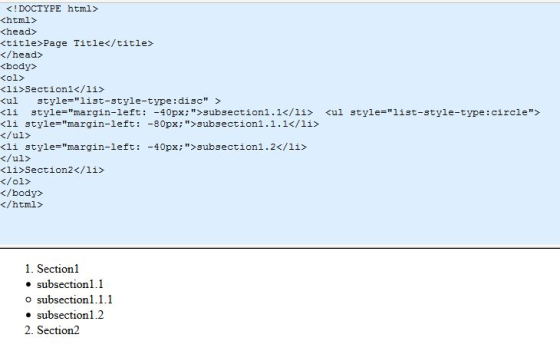
Writ the corresponding HTML code that represent the following output list. 1. Section1 • Subsection1.1 o ...
Writ the corresponding HTML code that represent the following
output list.
1. Section1
• Subsection1.1
o Subsection1.1.1
• Subsection1.2
2. Section2
Homework Answers
<!- by default list inside list gets 40px margin we need to cancel it. ->
<!DOCTYPE html>
<html>
<head>
<title>Page Title</title>
</head>
<body>
<ol>
<li>Section1</li>
<ul style="list-style-type:disc" >
<li style="margin-left: -40px;">subsection1.1</li>
<ul style="list-style-type:circle">
<li style="margin-left:
-80px;">subsection1.1.1</li>
</ul>
<li style="margin-left:
-40px;">subsection1.2</li>
</ul>
<li>Section2</li>
</ol>
</body>
</html>
Add Answer to:
Writ the corresponding HTML code that represent the following
output list.
1. Section1
• Subsection1.1
o ...
Question 1: Given the following HTML code segment <p>While this is a <b> very basic HTML...
Question 1: Given the following HTML code segment <p>While this is a <b> very basic HTML document </b>, it actually serves as a detailed example of the document object model. </p> How many text nodes will be added to the DOM tree to represent the structure of text content in this HTML code segment A. 1 B. 2 C. 3 D. 4 Question 2: Assume in an HTML document named “index.html”, the following <script> element is added <script src="grocery.js"></script> This...
How to do this code? HW13.11. Create an HTML list from a Python list The function...
 How to do this code?
HW13.11. Create an HTML list from a Python list The function below takes one parameter: a list, that contains only strings. Complete the function to create a unordered HTML list, as a string, and returns it. An empty list should return an empty HTML list with no list items. Do not add any extraneous whitespace to the HTML. For example, if given the list ["one", "two"], the function should return "<ul><li>one</li><li>two</li> </ul>". student.py IT TI...
How to do this code?
HW13.11. Create an HTML list from a Python list The function below takes one parameter: a list, that contains only strings. Complete the function to create a unordered HTML list, as a string, and returns it. An empty list should return an empty HTML list with no list items. Do not add any extraneous whitespace to the HTML. For example, if given the list ["one", "two"], the function should return "<ul><li>one</li><li>two</li> </ul>". student.py IT TI...
QUESTION Z What is the output of the following code: int list[] = {1, 2, 3,...
 QUESTION Z What is the output of the following code: int list[] = {1, 2, 3, 4, 5, 6}; for (int i = 1; i < 6; i++) list[i] = list[i - 1]; for (int i = 0; i < 6; i++) cout << list[i] << ""; 0 1 2 3 4 5 6 0 2345 61 0 111111 0 234 566
Look at the HTML code below then list the line numbers of just those HTML tags...
Look at the HTML code below then list the line numbers of just those HTML tags that are required to create a web page: <!DOCTYPE html> <html> <head> <link rel="stylesheet" href="MyStyle.css"> </head> <body> <nav> <a href="GroceryHome.html">Home</a> | <a href="Products.html">Products</a> | <a href="AboutUs.html">About Us</a> | <a href="Contact.html">Contact</a> </nav> <header> <h1> My Contact Page</h1> </header> <article> Thank you for your interest in our grocery store. We offer delivery or call-ahead pickup services. Please provide your contact information, and indicate your family's food...
The following HTML code displays a webpage correctly but is not valid HTML. Rewrite the code...
The following HTML code displays a webpage correctly but is not valid HTML. Rewrite the code in valid HTML. <!DOCTYPE html> <title>Fish</title> <h1>Fish</h1> <hr> <p>Facts for Fish</p> <ul> <li>Fish are friends, not food</li> <li>Fish feel:</li> <ul> <li>Good</li> <li>No pain</li> </ul> <li>Fish <b>love</b> other fish</li> </ul> <img src="fish.jpg" alt="fish"> </html>
List the values of "a" as the output of the following code? { int a =...
List the values of "a" as the output of the following code? { int a = 5; for (int i = 5; I > 0; i --) { a = a * i ; cout << a ; } return 0; }
ngu Cons eY Ja Question 1 a) Write pseudo code to output a singly-linked list in...
 ngu Cons eY Ja Question 1 a) Write pseudo code to output a singly-linked list in reverse order when you are NOT allowed to allocate memory dynamically. What is the running time of the algorithm? b) Write pseudo code to output a singly-linked list in reverse order when you are ALLOWED to allocate memory dynamically. What is the running time of the algorithm? c) You have an increasingly-sorted circular list (using an array) of n elements that is full. The...
In oython 3. HTML supports ordered and unordered lists. An ordered list is defined using element ol and each item of th...
 In oython
3. HTML supports ordered and unordered lists. An ordered list is defined using element ol and each item of the list is defined using element li. An unordered list is defined using element ul and each item of the list is defined using element li as well. For example, the unordered list in file w3c html is described using HTML code ul> <li>Web for All</li> <li>Web on Everything</li> </ul- Develop class ListCollector as a subclass of HTML Parser...
In oython
3. HTML supports ordered and unordered lists. An ordered list is defined using element ol and each item of the list is defined using element li. An unordered list is defined using element ul and each item of the list is defined using element li as well. For example, the unordered list in file w3c html is described using HTML code ul> <li>Web for All</li> <li>Web on Everything</li> </ul- Develop class ListCollector as a subclass of HTML Parser...
Writ a chunk of code for the TM4C board that does the following Essentially take the...
Writ a chunk of code for the TM4C board that does the following Essentially take the program we did for lab 2 and modify it so that the frequency that the light cycle goes through changes when a button is pressed. Have it start from 1Hz and for each button press have it increase by 1Hz until 10Hz, at which start over from 1Hz. Lab 2 code below: #include <tm4c123gh6pm.h> int main() { int i,j; SYSCTL->RCGCGPIO |= 0x20;...
 How to do this code?
HW13.11. Create an HTML list from a Python list The function below takes one parameter: a list, that contains only strings. Complete the function to create a unordered HTML list, as a string, and returns it. An empty list should return an empty HTML list with no list items. Do not add any extraneous whitespace to the HTML. For example, if given the list ["one", "two"], the function should return "<ul><li>one</li><li>two</li> </ul>". student.py IT TI...
How to do this code?
HW13.11. Create an HTML list from a Python list The function below takes one parameter: a list, that contains only strings. Complete the function to create a unordered HTML list, as a string, and returns it. An empty list should return an empty HTML list with no list items. Do not add any extraneous whitespace to the HTML. For example, if given the list ["one", "two"], the function should return "<ul><li>one</li><li>two</li> </ul>". student.py IT TI...
 QUESTION Z What is the output of the following code: int list[] = {1, 2, 3, 4, 5, 6}; for (int i = 1; i < 6; i++) list[i] = list[i - 1]; for (int i = 0; i < 6; i++) cout << list[i] << ""; 0 1 2 3 4 5 6 0 2345 61 0 111111 0 234 566
 ngu Cons eY Ja Question 1 a) Write pseudo code to output a singly-linked list in reverse order when you are NOT allowed to allocate memory dynamically. What is the running time of the algorithm? b) Write pseudo code to output a singly-linked list in reverse order when you are ALLOWED to allocate memory dynamically. What is the running time of the algorithm? c) You have an increasingly-sorted circular list (using an array) of n elements that is full. The...
 In oython
3. HTML supports ordered and unordered lists. An ordered list is defined using element ol and each item of the list is defined using element li. An unordered list is defined using element ul and each item of the list is defined using element li as well. For example, the unordered list in file w3c html is described using HTML code ul> <li>Web for All</li> <li>Web on Everything</li> </ul- Develop class ListCollector as a subclass of HTML Parser...
In oython
3. HTML supports ordered and unordered lists. An ordered list is defined using element ol and each item of the list is defined using element li. An unordered list is defined using element ul and each item of the list is defined using element li as well. For example, the unordered list in file w3c html is described using HTML code ul> <li>Web for All</li> <li>Web on Everything</li> </ul- Develop class ListCollector as a subclass of HTML Parser...
Most questions answered within 3 hours.
-
Where is the error in this code sequence?
String s1 = "Hello";
String s2 = "ello";...
asked 10 months ago -
Financial data for Joel de Paris, Inc., for last year
follow:
Joel de Paris, Inc.
Balance...
asked 10 months ago -
Consider this reaction:
Al2(SO4)3 (aq)+ BaCl3
(aq) Al2Cl6 (aq)- +
3BaSO4(s) . What is the...
asked 10 months ago -
Suppose that Savneet is considering increasing her
recent random sample from 20 car rentals to 40...
asked 10 months ago -
Trucks arrive at an unloading terminal at an average rate of 120
per hour.
Trucks arrive...
asked 10 months ago -
Why are methanol and ethanol completely soluble in water while
octanol is not very little soluble....
asked 10 months ago -
A facilities manager at a university reads in a research report
that the mean amount of...
asked 10 months ago -
When the CuSO4 is rehydrated by adding water to the anhydrous
compound, is this an endothermic...
asked 10 months ago -
A ray of sunlight is passing from diamond into crown glass; the
angle of incidence is...
asked 10 months ago -
A block of mass 0.249 kg is placed on top of a light, vertical
spring of...
asked 10 months ago -
how do the kidneys compensate in the presences of acidosis
a) trigger hyperventilate
b) reserve acid...
asked 10 months ago -
Question 501 pts
The rental rate of capital to the firm increases. Which of the
following...
asked 10 months ago