Please design a Java GUI application with two JTextField for user to enter the first name...
Please design a Java GUI application with two JTextField for user to enter the first name and last name. Add two JButtons with action events so when user click on one button to generate a full name message from the user input and put it in a third JTextField which is not editable; and click on the other button to clear all three JTextField boxes. Please run the attached nameFrame.class file (Note: because there is an actionhandler inner class in this program, another class file nameFrame$actionhandler.class was generated when you compile the .java file, you need both files in the same directory in order to run) to see the sample output. You need to design your program with a similar look and have your name as the author in a JLabel.
nameFrame.class:
import java.awt.Color;
import java.awt.FlowLayout;
import javax.swing.JButton;
import javax.swing.JFrame;
import javax.swing.JLabel;
import javax.swing.JTextField;


public class nameFrame
  extends JFrame
{
  private JTextField txtFirstName;
  private JTextField txtLastName;
  private JTextField txtFullName;
  private JLabel lblFirstName;
  private JLabel lblLastName;
  private JLabel lblFullName;
  private JButton btnName;
  private JButton btnClear;
  private JLabel lblAuthor;

  public nameFrame()
  {
    super("Enter names");
    setLayout(new FlowLayout());

    lblFirstName = new JLabel("First Name:");
    add(lblFirstName);
    txtFirstName = new JTextField(10);
    add(txtFirstName);

    lblLastName = new JLabel("Last Name:");
    add(lblLastName);
    txtLastName = new JTextField(10);
    add(txtLastName);

    txtFullName = new JTextField(20);
    add(txtFullName);
    txtFullName.setBackground(Color.WHITE);
    txtFullName.setEditable(false);


    btnName = new JButton("Name");
    add(btnName);
    btnClear = new JButton("Clear");
    add(btnClear);

    lblAuthor = new JLabel("Author: James Gao");
    add(lblAuthor);
    lblAuthor.setBackground(Color.gray);

    nameFrame.actionhandler localActionhandler = new nameFrame.actionhandler(this);
    btnName.addActionListener(localActionhandler);
    btnClear.addActionListener(localActionhandler);
  }


  public static void main(String[] paramArrayOfString)
  {
    nameFrame localNameFrame = new nameFrame();
    localNameFrame.setDefaultCloseOperation(3);
    localNameFrame.setSize(400, 150);
    localNameFrame.setVisible(true);
  }
}Homework Answers
//Java Code
import java.awt.Color;
import java.awt.FlowLayout;
import java.awt.event.ActionEvent;
import java.awt.event.ActionListener;
import javax.swing.JButton;
import javax.swing.JFrame;
import javax.swing.JLabel;
import javax.swing.JTextField;


public class nameFrame
        extends JFrame
{
    private JTextField txtFirstName;
    private JTextField txtLastName;
    private JTextField txtFullName;
    private JLabel lblFirstName;
    private JLabel lblLastName;
    private JLabel lblFullName;
    private JButton btnName;
    private JButton btnClear;
    private JLabel lblAuthor;

    public nameFrame()
    {
        super("Enter names");
        setLayout(new FlowLayout());

        lblFirstName = new JLabel("First Name:");
        add(lblFirstName);
        txtFirstName = new JTextField(10);
        add(txtFirstName);

        lblLastName = new JLabel("Last Name:");
        add(lblLastName);
        txtLastName = new JTextField(10);
        add(txtLastName);

        txtFullName = new JTextField(20);
        add(txtFullName);
        txtFullName.setBackground(Color.WHITE);
        txtFullName.setEditable(false);


        btnName = new JButton("Name");
        add(btnName);
        btnClear = new JButton("Clear");
        add(btnClear);

        lblAuthor = new JLabel("Author: James Gao");
        add(lblAuthor);
        lblAuthor.setBackground(Color.gray);

        nameFrame.actionhandler localActionhandler = new nameFrame.actionhandler(this);
        btnName.addActionListener(localActionhandler);
        btnClear.addActionListener(localActionhandler);
    }


    public static void main(String[] paramArrayOfString)
    {
        nameFrame localNameFrame = new nameFrame();
        localNameFrame.setDefaultCloseOperation(3);
        localNameFrame.setSize(400, 150);
        localNameFrame.setVisible(true);
    }

    private class actionhandler implements ActionListener {
        public actionhandler(nameFrame nameFrame) {

        }

        @Override
        public void actionPerformed(ActionEvent e) {
            if(e.getSource().equals(btnClear))
            {
                txtFirstName.setText("");
                txtLastName.setText("");
                txtFullName.setText("");
            }
            if(e.getSource().equals(btnName))
            {
                String fname = txtFirstName.getText();
                String lname = txtLastName.getText();
                txtFullName.setText(fname+" "+lname);
            }
        }
    }
}
//Output

//If you need any help regarding this solution ...........please leave a comment...... thanks
Add Answer to:
Please design a Java GUI application with two JTextField for
user to enter the first name...
Why when executed my frame does not contain what i have added to it? Here is...
Why when executed my frame does not contain what i have added to it? Here is my code import java.awt.Panel; import java.awt.event.ActionEvent; import java.awt.event.ActionListener; import javax.swing.JButton; import javax.swing.JFrame; import javax.swing.JLabel; import javax.swing.JTextArea; import javax.swing.JTextField; import javax.swing.JPanel; @SuppressWarnings("serial") public class AddressBook1 extends JFrame implements ActionListener { /** * */ JLabel name = new JLabel("Name: "); JLabel address = new JLabel("Address: "); JLabel phone = new JLabel("Phone: "); JLabel email = new JLabel("Email: ");...
Swing File Adder: Build a GUI that contains an input file, text box and Infile button....
Swing File Adder: Build a GUI that contains an input file, text box and Infile button. It also must contain and output file, text box and Outfile button. Must also have a process button must read the infile and write to the outfile if not already written that is already selected and clear button. It must pull up a JFile chooser that allows us to brows to the file and places the full path name same with the output file. Program...
please help me debug this Create a GUI for an application that lets the user calculate...
please help me debug this Create a GUI for an application that lets the user calculate the hypotenuse of a right triangle. Use the Pythagorean Theorem to calculate the length of the third side. The Pythagorean Theorem states that the square of the hypotenuse of a right-triangle is equal to the sum of the squares of the opposite sides: alidate the user input so that the user must enter a double value for side A and B of the triangle....
Need help debugging Create a GUI application that accepts student registration data. Specifications: The text box...
Need help debugging Create a GUI application that accepts student registration data. Specifications: The text box that displays the temporary password should be read-only. The temporary password consists of the user’s first name, an asterisk (*), and the user’s birth year. If the user enters data in the first three fields, display a temporary password in the appropriate text field and a welcome message in the label below the text fields. If the user does not enter data, clear the...
Modify Java Code below: - Remove Button Try the Number -Instead of Try the Number button...
Modify Java Code below: - Remove Button Try the Number -Instead of Try the Number button just hit enter on keyboard to try number -Remove Button Quit import javax.swing.*; import java.awt.*; import java.awt.event.ActionEvent; import java.awt.event.ActionListener; import java.util.Random; // Main Class public class GuessGame extends JFrame { // Declare class variables private static final long serialVersionUID = 1L; public static Object prompt1; private JTextField userInput; private JLabel comment = new JLabel(" "); private JLabel comment2 = new JLabel(" "); private int...
Write a Java application that displays the following ClickMe When the user clicks on "Click Me"...
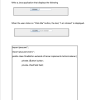 Write a Java application that displays the following ClickMe When the user clicks on "Click Me" button, the text, "l am clicked" is displayed. ClickMe am clicked import java.awt.*; import java.awt.event.*; public class OneButton extends JFrame implements ActionListener private JButton button; private JTextField field; public static void main(String args)( OneButton myCoolButton new OneButton0;
22. Fill in the codes that creates a Java GUI application that contains a label and...
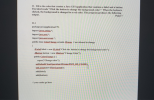 22. Fill in the codes that creates a Java GUI application that contains a label and a button. The label reads "Click the button to change the background color." When the button is clicked, the background is changed to a red color. The program produces the following output. Point 7 22.1 package javaapplication 179; import javax.swing": import java.ant": import java.awt.exst. public class ColorChange extends JFrame / not allowed to change JLabel label - new JLabel("Click the button to change the...
Java please answer A and B a. Describe the purpose of action listener in push button...
Java please answer A and B a. Describe the purpose of action listener in push button jbtnCompare.(from the code below) b. Explain why there are not action listeners added to text fields of this program.(from the code below) code import java.awt.*; import java.awt.event.*; import javax.swing.*; import java.io.*; class SwingFC implements ActionListener { JTextField jtfFirst; // holds the first file name JTextField jtfSecond; // holds the second file name JButton jbtnComp; // button to compare the files JLabel jlabFirst, jlabSecond; //...
JAVA Hello I am trying to add a menu to my Java code if someone can...
JAVA Hello I am trying to add a menu to my Java code if someone can help me I would really appreacite it thank you. I found a java menu code but I dont know how to incorporate it to my code this is the java menu code that i found. import java.awt.event.ActionEvent; import java.awt.event.ActionListener; import javax.swing.ButtonGroup; import javax.swing.JCheckBoxMenuItem; import javax.swing.JFrame; import javax.swing.JMenu; import javax.swing.JMenuBar; import javax.swing.JMenuItem; import javax.swing.JRadioButtonMenuItem; public class MenuExp extends JFrame { public MenuExp() { setTitle("Menu Example");...
In Java Swing, in my ButtonHandler class, I need to have 2 different showDialog messages show...
In Java Swing, in my ButtonHandler class, I need to have 2 different showDialog messages show when my acceptbutton1 is pressed. One message is if the mouse HAS been dragged. One is if the mouse HAS NOT been dragged. /// I tried to make the Points class or the Mouse Dragged function return a boolean of true, so that I could construct an IF/THEN statement for the showDialog messages, but my boolean value was never accepted by ButtonHandler. *************************ButtonHandler class************************************...
 Write a Java application that displays the following ClickMe When the user clicks on "Click Me" button, the text, "l am clicked" is displayed. ClickMe am clicked import java.awt.*; import java.awt.event.*; public class OneButton extends JFrame implements ActionListener private JButton button; private JTextField field; public static void main(String args)( OneButton myCoolButton new OneButton0;
 22. Fill in the codes that creates a Java GUI application that contains a label and a button. The label reads "Click the button to change the background color." When the button is clicked, the background is changed to a red color. The program produces the following output. Point 7 22.1 package javaapplication 179; import javax.swing": import java.ant": import java.awt.exst. public class ColorChange extends JFrame / not allowed to change JLabel label - new JLabel("Click the button to change the...
Most questions answered within 3 hours.
-
Where is the error in this code sequence?
String s1 = "Hello";
String s2 = "ello";...
asked 11 months ago -
Financial data for Joel de Paris, Inc., for last year
follow:
Joel de Paris, Inc.
Balance...
asked 11 months ago -
Consider this reaction:
Al2(SO4)3 (aq)+ BaCl3
(aq) Al2Cl6 (aq)- +
3BaSO4(s) . What is the...
asked 11 months ago -
Suppose that Savneet is considering increasing her
recent random sample from 20 car rentals to 40...
asked 11 months ago -
Trucks arrive at an unloading terminal at an average rate of 120
per hour.
Trucks arrive...
asked 11 months ago -
Why are methanol and ethanol completely soluble in water while
octanol is not very little soluble....
asked 11 months ago -
A facilities manager at a university reads in a research report
that the mean amount of...
asked 11 months ago -
When the CuSO4 is rehydrated by adding water to the anhydrous
compound, is this an endothermic...
asked 11 months ago -
A ray of sunlight is passing from diamond into crown glass; the
angle of incidence is...
asked 11 months ago -
A block of mass 0.249 kg is placed on top of a light, vertical
spring of...
asked 11 months ago -
how do the kidneys compensate in the presences of acidosis
a) trigger hyperventilate
b) reserve acid...
asked 11 months ago -
Question 501 pts
The rental rate of capital to the firm increases. Which of the
following...
asked 11 months ago