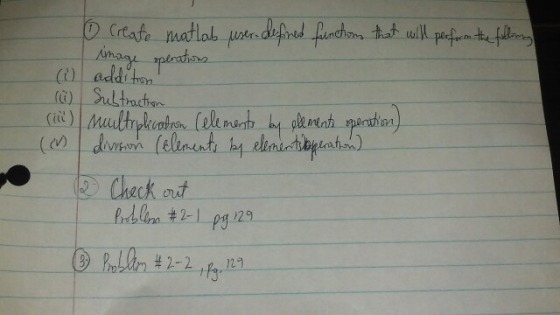
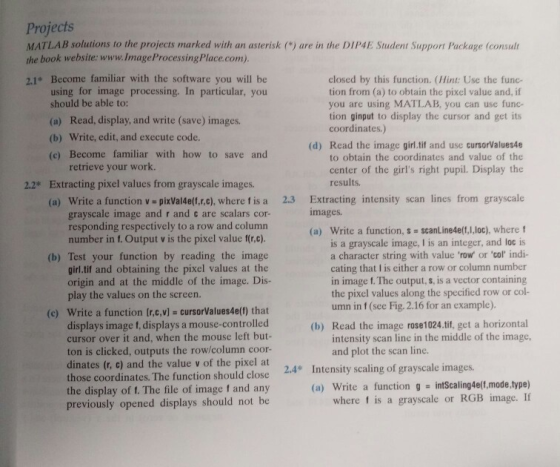
please for the picture on the right just do 2.1 and
2.2
Homework Answers
The solution is presented below:
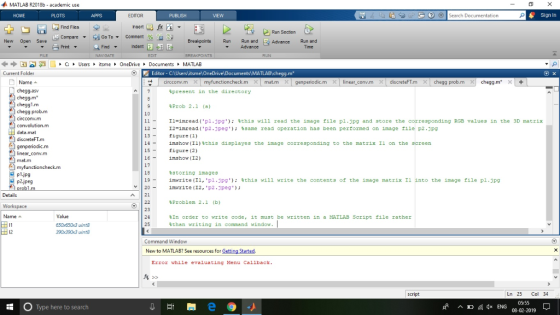
%this program performs imaage operations in MATLAB
clear all %this clears the workspace
clc %this clears the command window.
%Thw image files which will be called here i.e. p1.jpg and
p2.jpg must be
%present in the directory
%Prob 2.1 (a)
I1=imread('p1.jpg'); %this will read the image file p1.jpg and
store the corresponding RGB values in the 3D matrix I1
I2=imread('p2.jpeg'); %same read operation has been performed on
image file p2.jpg
figure(1)
imshow(I1)%this displayes the image corresponding to the matrix I1
on the screen
figure(2)
imshow(I2)
%storing images
imwrite(I1,'p1.jpg'); %this will write the contents of the image
matrix I1 into the image file p1.jpg
imwrite(I2,'p2.jpeg');
%Problem 2.1 (b)
%In order to write code, it must be written in a MATLAB Script
file rather
%than writing in command window.
%then code can be edited and saved from this command window as it
has been
%done in this case.
%Press run switch at the top to execute
%2.1 (c)
%In order to save work just press Ctrl+s and it will be
saved.
%Later the saved file can be retrived.
Output Images:
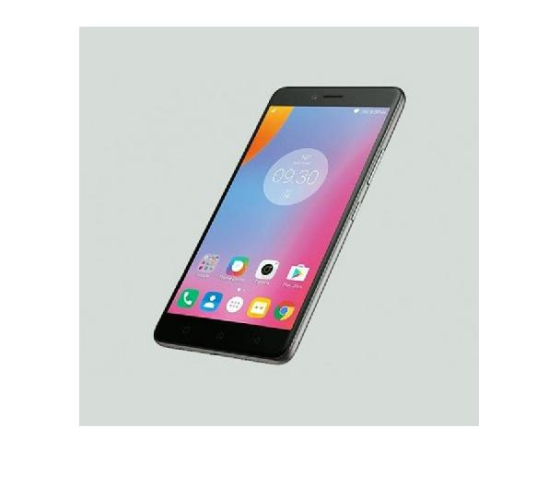
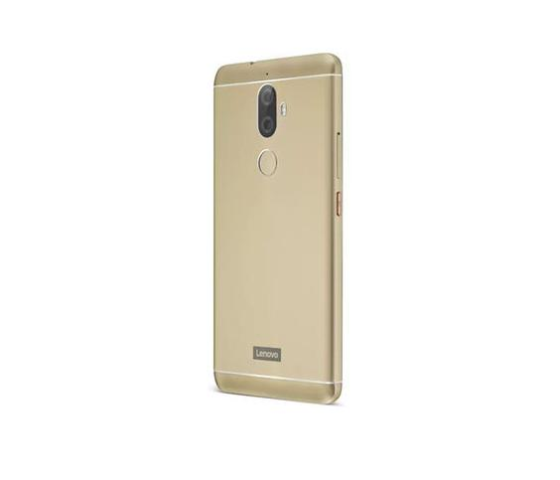
As per guideline, only the first problem has been solved.
Hope this helps.
Add Answer to:
please for the picture on the right just do 2.1 and
2.2
(addi ton Lt Py...
The ACME Manufacturing Company has hired you to help automate their production assembly line. Cameras have...
 The ACME Manufacturing Company has hired you to help automate
their production assembly line. Cameras have been placed above a
conveyer belt to enables parts on the belt to be photographed and
analyzed. You are to augment the system that has been put in place
by writing C code to detect the number of parts on the belt, and
the positions of each object. The process by which you will do this
is called Connected Component Labeling (CCL). These positions...
The ACME Manufacturing Company has hired you to help automate
their production assembly line. Cameras have been placed above a
conveyer belt to enables parts on the belt to be photographed and
analyzed. You are to augment the system that has been put in place
by writing C code to detect the number of parts on the belt, and
the positions of each object. The process by which you will do this
is called Connected Component Labeling (CCL). These positions...
% BACKGROUND:Image processing is the generation of a new image from one or more existing images....
% BACKGROUND:Image processing is the generation of a new image from one or more existing images. % MATLAB makes it easy to work with images by providing some basic functions % that allow you to read and write images in standard image -file formats, such as JPEG % Locate the attached photo of a blue bird stored in JPEG format, bbird.jpg (must be on same folder as script). % Fill in the ? in the code with correct values to...
the picture above is the one you are supposed to use for the MATlab code please...
 the picture above is the one you are supposed to use for the
MATlab code please help
Problems. Grayscale images are composed of a 2D matrix of light intensities from O (Black) to 255 (White). In this lab you will be using grayscale images and do 2D-array operations along with loops and iflelse branches. 1. We can regard 2D grayscale images as 2D arrays. Now load the provided image of scientists at the Solvay Conference in 1927 using the imread)...
the picture above is the one you are supposed to use for the
MATlab code please help
Problems. Grayscale images are composed of a 2D matrix of light intensities from O (Black) to 255 (White). In this lab you will be using grayscale images and do 2D-array operations along with loops and iflelse branches. 1. We can regard 2D grayscale images as 2D arrays. Now load the provided image of scientists at the Solvay Conference in 1927 using the imread)...
Python Project
 AssignmentBitmap files map three 8-bit (1-byte) color channels per pixel. A pixel is a light-emitting "dot" on your screen. Whenever you buy a new monitor, you will see the pixel configuration by its width and height, such as 1920 x 1080 (1080p) or 3840x2160 (4K). This tells us that we have 1080 rows (height), and each row has 1920 (width) pixels.The bitmap file format is fairly straight forward where we tell the file what our width and height are. When...
use MATLAB to upload the following: an image that you want to process (can be taken...
 use MATLAB to upload the following:
an image that you want to process (can be taken yourself or
downloaded from the internet)
a script that processes the image in TWO ways.
manipulates the colors
averages pixels together
Please make sure the script displays the images (like how I did
with the 40 and 80 pixel averaging) so I can easily compare them to
the original. Make sure to COMMENT your code as well.
Homework 13 Please upload the following: an...
use MATLAB to upload the following:
an image that you want to process (can be taken yourself or
downloaded from the internet)
a script that processes the image in TWO ways.
manipulates the colors
averages pixels together
Please make sure the script displays the images (like how I did
with the 40 and 80 pixel averaging) so I can easily compare them to
the original. Make sure to COMMENT your code as well.
Homework 13 Please upload the following: an...
Mountain Paths (Part 1) Objectives 2d arrays Store Use Nested Loops Parallel data structures (i.e...
Mountain Paths (Part 1) in C++ Objectives 2d arrays Store Use Nested Loops Parallel data structures (i.e. parallel arrays … called multiple arrays in the zyBook) Transform data Read from files Write to files structs Code Requirements Start with this code: mtnpathstart.zip Do not modify the function signatures provided. Do not #include or #include Program Flow Read the data into a 2D array Find min and max elevation to correspond to darkest and brightest color, respectively Compute the shade of...
Mountain Paths (Part 1) in C++ Objectives 2d arrays Store Use Nested Loops Parallel data structures...
Mountain Paths (Part 1) in C++ Objectives 2d arrays Store Use Nested Loops Parallel data structures (i.e. parallel arrays … called multiple arrays in the zyBook) Transform data Read from files Write to files structs Code Requirements Start with this code: mtnpathstart.zip Do not modify the function signatures provided. Do not #include or #include Program Flow Read the data into a 2D array Find min and max elevation to correspond to darkest and brightest color, respectively Compute the shade of...
Program is in C++, program is called airplane reservation. It is suppose to display a screen...
Program is in C++, program is called airplane reservation. It is suppose to display a screen of seating chart in the format 1 A B C D E F through 10. I had a hard time giving the seats a letter value. It displays a correct screen but when I reserve a new seat the string seats[][] doesn't update to having a X for that seat. Also there is a file for the struct called systemUser.txt it has 4 users...
Make sure to include: Ship.java, ShipTester.java, Location.java, LocationTester.java, Grid.java, GridTester.java, Player.java, PlayerTester.java, battleship.java. please do every...
Make sure to include: Ship.java, ShipTester.java, Location.java, LocationTester.java, Grid.java, GridTester.java, Player.java, PlayerTester.java, battleship.java. please do every part, and include java doc and comments Create a battleship program. Include Javadoc and comments. Grade 12 level coding style using java only. You will need to create a Ship class, Location class, Grid Class, Add a ship to the Grid, Create the Player class, the Battleship class, Add at least one extension. Make sure to include the testers. Starting code/ sample/methods will be...
 The ACME Manufacturing Company has hired you to help automate
their production assembly line. Cameras have been placed above a
conveyer belt to enables parts on the belt to be photographed and
analyzed. You are to augment the system that has been put in place
by writing C code to detect the number of parts on the belt, and
the positions of each object. The process by which you will do this
is called Connected Component Labeling (CCL). These positions...
The ACME Manufacturing Company has hired you to help automate
their production assembly line. Cameras have been placed above a
conveyer belt to enables parts on the belt to be photographed and
analyzed. You are to augment the system that has been put in place
by writing C code to detect the number of parts on the belt, and
the positions of each object. The process by which you will do this
is called Connected Component Labeling (CCL). These positions...
 the picture above is the one you are supposed to use for the
MATlab code please help
Problems. Grayscale images are composed of a 2D matrix of light intensities from O (Black) to 255 (White). In this lab you will be using grayscale images and do 2D-array operations along with loops and iflelse branches. 1. We can regard 2D grayscale images as 2D arrays. Now load the provided image of scientists at the Solvay Conference in 1927 using the imread)...
the picture above is the one you are supposed to use for the
MATlab code please help
Problems. Grayscale images are composed of a 2D matrix of light intensities from O (Black) to 255 (White). In this lab you will be using grayscale images and do 2D-array operations along with loops and iflelse branches. 1. We can regard 2D grayscale images as 2D arrays. Now load the provided image of scientists at the Solvay Conference in 1927 using the imread)...
 use MATLAB to upload the following:
an image that you want to process (can be taken yourself or
downloaded from the internet)
a script that processes the image in TWO ways.
manipulates the colors
averages pixels together
Please make sure the script displays the images (like how I did
with the 40 and 80 pixel averaging) so I can easily compare them to
the original. Make sure to COMMENT your code as well.
Homework 13 Please upload the following: an...
use MATLAB to upload the following:
an image that you want to process (can be taken yourself or
downloaded from the internet)
a script that processes the image in TWO ways.
manipulates the colors
averages pixels together
Please make sure the script displays the images (like how I did
with the 40 and 80 pixel averaging) so I can easily compare them to
the original. Make sure to COMMENT your code as well.
Homework 13 Please upload the following: an...
Most questions answered within 3 hours.
-
Where is the error in this code sequence?
String s1 = "Hello";
String s2 = "ello";...
asked 10 months ago -
Financial data for Joel de Paris, Inc., for last year
follow:
Joel de Paris, Inc.
Balance...
asked 10 months ago -
Consider this reaction:
Al2(SO4)3 (aq)+ BaCl3
(aq) Al2Cl6 (aq)- +
3BaSO4(s) . What is the...
asked 10 months ago -
Suppose that Savneet is considering increasing her
recent random sample from 20 car rentals to 40...
asked 10 months ago -
Trucks arrive at an unloading terminal at an average rate of 120
per hour.
Trucks arrive...
asked 10 months ago -
Why are methanol and ethanol completely soluble in water while
octanol is not very little soluble....
asked 10 months ago -
A facilities manager at a university reads in a research report
that the mean amount of...
asked 10 months ago -
When the CuSO4 is rehydrated by adding water to the anhydrous
compound, is this an endothermic...
asked 10 months ago -
A ray of sunlight is passing from diamond into crown glass; the
angle of incidence is...
asked 10 months ago -
A block of mass 0.249 kg is placed on top of a light, vertical
spring of...
asked 10 months ago -
how do the kidneys compensate in the presences of acidosis
a) trigger hyperventilate
b) reserve acid...
asked 10 months ago -
Question 501 pts
The rental rate of capital to the firm increases. Which of the
following...
asked 10 months ago