Create a new program in Mu and save it as ps3.4.2.py and take the code below...
Create a new program in Mu and save it as ps3.4.2.py and take the code below and fix it as indicated in the comments:
# A year is considered a leap year if it abides by the
# following rules:
#
#  - Every 4th year IS a leap year, EXCEPT...
#  - Every 100th year is NOT a leap year, EXCEPT...
#  - Every 400th year IS a leap year.
#
# This starts at year 0. For example:
#
#  - 1993 is not a leap year because it is not a multiple of 4.
#  - 1996 is a leap year because it is a multiple of 4.
#  - 1900 is not a leap year because it is a multiple of 100,
#    even though it is a multiple of 4.
#  - 2000 is a leap year because it is a multiple of 400,
#    even though it is a multiple of 100.
#
# Write a function called is_leap_year. is_leap_year should
# take one parameter: year, an integer. It should return the
# boolean True if that year is a leap year, the boolean False
# if it is not.

# Write your function here!

# Below are some lines of code that will test your function.
# You can change the value of the variable(s) to test your
# function with different inputs.
#
# If your function works correctly, this will originally
# print False, True, False, and True, each preceded by the
# label "[year] is a leap year:".
print("1993 is a leap year:", is_leap_year(1993))
print("1996 is a leap year:", is_leap_year(1996))
print("1900 is a leap year:", is_leap_year(1900))
print("2000 is a leap year:", is_leap_year(2000))Homework Answers
Answer:
CODE: Python Programming in Mu
# A year is considered a leap year if it abides by the
# following rules:
#
# - Every 4th year IS a leap year, EXCEPT...
# - Every 100th year is NOT a leap year, EXCEPT...
# - Every 400th year IS a leap year.
#
# This starts at year 0. For example:
#
# - 1993 is not a leap year because it is not a multiple of
4.
# - 1996 is a leap year because it is a multiple of 4.
# - 1900 is not a leap year because it is a multiple of 100,
# even though it is a multiple of 4.
# - 2000 is a leap year because it is a multiple of 400,
# even though it is a multiple of 100.
#
# Write a function called is_leap_year. is_leap_year should
# take one parameter: year, an integer. It should return the
# boolean True if that year is a leap year, the boolean False
# if it is not.
# Write your function here!
def is_leap_year(year):
if(year % 4)== 0:
if(year % 100 ==
0):
if(year % 400 == 0):
return True
else:
return False
else:
return True
else:
return False
# Below are some lines of code that will test your function.
# You can change the value of the variable(s) to test your
# function with different inputs.
#
# If your function works correctly, this will originally
# print False, True, False, and True, each preceded by the
# label "[year] is a leap year:".
print("1993 is a leap year:", is_leap_year(1993))
print("1996 is a leap year:", is_leap_year(1996))
print("1900 is a leap year:", is_leap_year(1900))
print("2000 is a leap year:", is_leap_year(2000))
print("2016 is a leap year:", is_leap_year(2016))
print("2020 is a leap year:", is_leap_year(2020))
print("2021 is a leap year:", is_leap_year(2021))
=============================================================================
SCREENSHOT OF THE CODE:

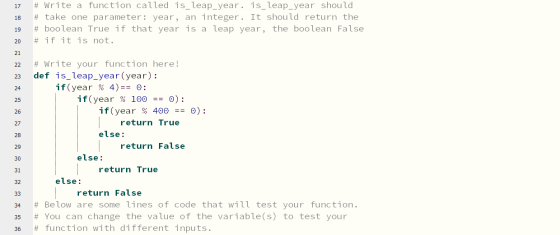
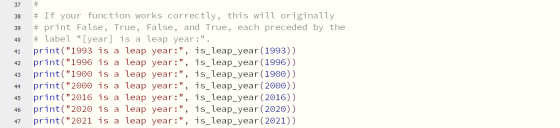
OUTPUT:

Thank you.
Add Answer to:
Create a new program in Mu and save it as
ps3.4.2.py and take the code below...
Create a new program in Mu and save it as ps4.2.2.py and take the code below...
Create a new program in Mu and save it as ps4.2.2.py and take the code below and fix it as indicated in the comments: # Write a function called "in_parentheses" that accepts a # single argument, a string representing a sentence that # contains some words in parentheses. Your function should # return the contents of the parentheses. # # For example: # in_parentheses("This is a sentence (words!)") -> "words!" # # If no text appears in parentheses, return an...
Create a new program in Mu and save it as ps4.2.1.py and take the code below...
Create a new program in Mu and save it as ps4.2.1.py and take the code below and fix it as indicated in the comments: # Write function called third_character that accepts a # string as an argument and returns the third character # of the string. If the user inputs a string with fewer than # 3 characters, return "Too short". # Write your function here! # Below are some lines of code that will test your function. # You...
Create a new program in Mu and save it as ps3.3.1.py and take the code below...
Create a new program in Mu and save it as ps3.3.1.py and take the code below and fix it as indicated in the comments: mystery_int = 50 # You may modify the lines of code above, but don't move them! # When you Submit your code, it should work with # different values for the variables. # Write a for loop that prints every third number from 1 to # mystery_int inclusive (meaning that if mystery_int is 7, it #...
Create a new program in Mu and save it as ps4.4.1.py and take the code below...
Create a new program in Mu and save it as ps4.4.1.py and take the code below and fix it as indicated in the comments: # Write a function called "save_leaderboard" that accepts a # single list of tuples as a parameter. The tuples are of the # form (leader_name, score) # The function should open a file called "leaderboard.txt", # and write each of the tuples in the list to a line in the file. # The name and score...
Create a new program in Mu and save it as ps2.3.3.py Take the code below and...
Create a new program in Mu and save it as ps2.3.3.py Take the code below and fix it as indicated in the comments: busy = True hungry = False tired = True stressed = False # You may modify the lines of code above, but don't move them! # Your code should work with different values for the variables. # Logical operators get more complex when we start using them # with the results of other logical operators. So, let's...
Create a new program in Mu and save it as ps4.5.1.py and take the code below...
Create a new program in Mu and save it as ps4.5.1.py and take the code below and fix it as indicated in the comments: # Write a function called phonebook that takes two lists as # input: # # - names, a list of names as strings # - numbers, a list of phone numbers as strings # # phonebook() should take these two lists and create a # dictionary that maps each name to its phone number. For #...
Create a new program in Mu and save it as ps4.3.2.py and take the code below...
Create a new program in Mu and save it as ps4.3.2.py and take the code below and fix it as indicated in the comments: # Write a function called find_max_sales. find_max_sales will # have one parameter: a list of tuples. Each tuple in the # list will have two items: a string and an integer. The # string will represent the name of a movie, and the integer # will represent that movie's total ticket sales (in millions # of...
Create a new program in Mu and save it as ps4.3.1.py and take the code below...
Create a new program in Mu and save it as ps4.3.1.py and take the code below and fix it as indicated in the comments: # Write a function called grade_scantron. grade_scantron should # take as input two lists: answers and key. Each list contain # strings. Each string will be only one letter, a character # from A to E. grade_scantron should return how many questions # the student got "right", where a student gets a question # right if...
Create a new program in Mu and save it as ps3.4.3.py and take the code below...
Create a new program in Mu and save it as ps3.4.3.py and take the code below and fix it as indicated in the comments: # Consult this blood pressures chart: http://bit.ly/2CloACs # # Write a function called check_blood_pressure that takes two # parameters: a systolic blood pressure and a diastolic blood # pressure, in that order. Your function should return "Low", # "Ideal", "Pre-high", or "High" -- whichever corresponds to # the given systolic and diastolic blood pressure. # #...
Create a new program in Mu and save it as ps4.3.3.py and take the code below...
Create a new program in Mu and save it as ps4.3.3.py and take the code below and fix it as indicated in the comments: # Imagine you're writing some code for an exercise tracker. # The tracker measures heart rate, and should display the # average heart rate from an exercise session. # # However, the tracker doesn't automatically know when the # exercise session began. It assumes the session starts the # first time it sees a heart rate...
Most questions answered within 3 hours.
-
Where is the error in this code sequence?
String s1 = "Hello";
String s2 = "ello";...
asked 10 months ago -
Financial data for Joel de Paris, Inc., for last year
follow:
Joel de Paris, Inc.
Balance...
asked 10 months ago -
Consider this reaction:
Al2(SO4)3 (aq)+ BaCl3
(aq) Al2Cl6 (aq)- +
3BaSO4(s) . What is the...
asked 10 months ago -
Suppose that Savneet is considering increasing her
recent random sample from 20 car rentals to 40...
asked 10 months ago -
Trucks arrive at an unloading terminal at an average rate of 120
per hour.
Trucks arrive...
asked 10 months ago -
Why are methanol and ethanol completely soluble in water while
octanol is not very little soluble....
asked 10 months ago -
A facilities manager at a university reads in a research report
that the mean amount of...
asked 10 months ago -
When the CuSO4 is rehydrated by adding water to the anhydrous
compound, is this an endothermic...
asked 10 months ago -
A ray of sunlight is passing from diamond into crown glass; the
angle of incidence is...
asked 10 months ago -
A block of mass 0.249 kg is placed on top of a light, vertical
spring of...
asked 10 months ago -
how do the kidneys compensate in the presences of acidosis
a) trigger hyperventilate
b) reserve acid...
asked 10 months ago -
Question 501 pts
The rental rate of capital to the firm increases. Which of the
following...
asked 10 months ago