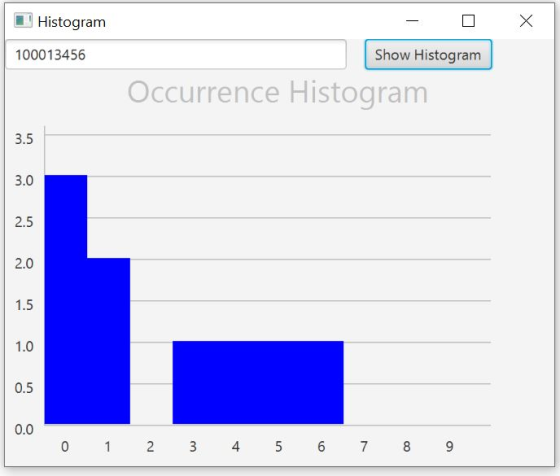
Write a program that displays a histogram to show the number
occurrences of each number in an input sequence. There should be a
text filed to accept users input numbers and button to show the
histogram. Enter your student number to generate your unique
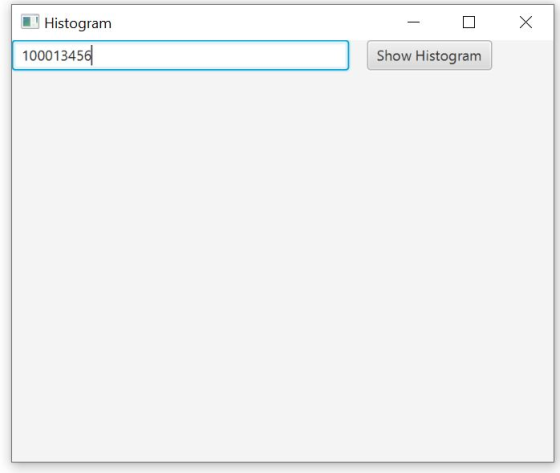
histogram. A student with 100013456 will give a histogram like the
following one (note the text filed and button are not shown in the
following histogram, BUT is required for the application) java code
is needed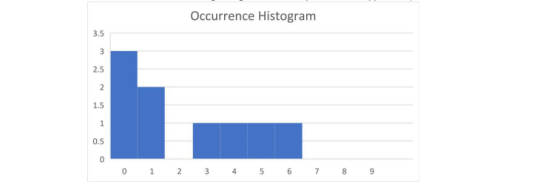
Homework Answers
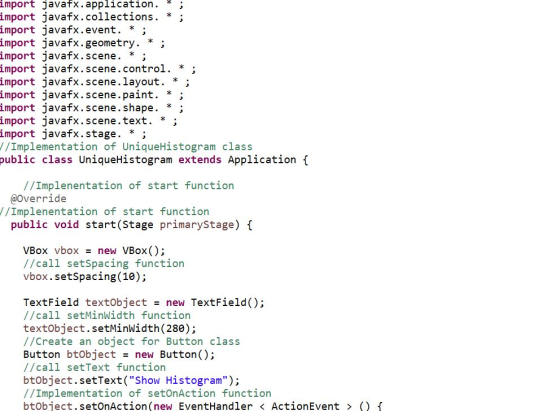
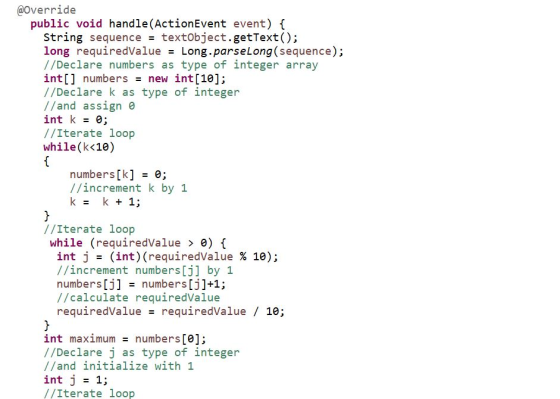
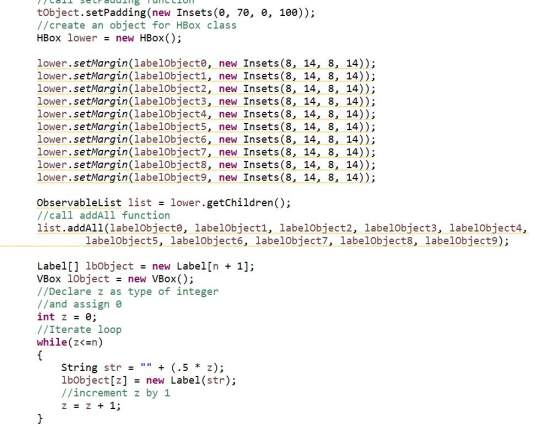
Code Image:
![(J<10) { // check numbers[j] is greater than maximum if (numbers[j] > maximum) { maximum = numbers[j]; } //increment j by 1 j](http://img.homeworklib.com/questions/b2e436e0-009f-11eb-938d-e57dad4fb998.png?x-oss-process=image/resize,w_560)
![Group gobject = new Group; //call add function gobject.getChildren().add(vobj); gobject.getChildren().add(hobi); Line[] lines](http://img.homeworklib.com/questions/b3946820-009f-11eb-91e1-09995ee6f8d8.png?x-oss-process=image/resize,w_560)
![* 1); //Iterate loop while(c<10) { //Call new Rectangle r[c] = new Rectangle(); r[c].setHeight(2 * numbers [c] edgeValue); r[](http://img.homeworklib.com/questions/b440bf40-009f-11eb-9856-db98900c180b.png?x-oss-process=image/resize,w_560)
![//call setMargin function 1object.setMargin(lbobject[n], new Insets (240 - n * edgeValue, 8, 9, 8)); //Declare f as type of i](http://img.homeworklib.com/questions/b5c167d0-009f-11eb-a495-837155e59933.png?x-oss-process=image/resize,w_560)
 Sample
Output:
Sample
Output:
Code to Copy:
import javafx.application. * ;
import javafx.collections. * ;
import javafx.event. * ;
import javafx.geometry. * ;
import javafx.scene. * ;
import javafx.scene.control. * ;
import javafx.scene.layout. * ;
import javafx.scene.paint. * ;
import javafx.scene.shape. * ;
import javafx.scene.text. * ;
import javafx.stage. * ;
//Implementation of UniqueHistogram class
public class UniqueHistogram extends Application {
//Implementation of start function
@Override
//Implenentation of start function
public void start(Stage primaryStage) {
VBox vbox = new VBox();
//call setSpacing function
vbox.setSpacing(10);
TextField textObject = new TextField();
//call setMinWidth function
textObject.setMinWidth(280);
//Create an object for Button class
Button btObject = new Button();
//call setText function
btObject.setText("Show Histogram");
//Implementation of setOnAction function
btObject.setOnAction(new EventHandler < ActionEvent > () {
@Override
public void handle(ActionEvent event) {
String sequence = textObject.getText();
long requiredValue = Long.parseLong(sequence);
//Declare numbers as type of integer array
int[] numbers = new int[10];
//Declare k as type of integer
//and assign 0
int k = 0;
//Iterate loop
while(k<10)
{
numbers[k] = 0;
//increment k by 1
k = k + 1;
}
//Iterate loop
while (requiredValue > 0) {
int j = (int)(requiredValue % 10);
//increment numbers[j] by 1
numbers[j] = numbers[j]+1;
//calculate requiredValue
requiredValue = requiredValue / 10;
}
int maximum = numbers[0];
//Declare j as type of integer
//and initialize with 1
int j = 1;
//Iterate loop
while(j<10)
{
//check numbers[j] is greater than maximum
if (numbers[j] > maximum) {
maximum = numbers[j];
}
//increment j by 1
j = j + 1;
}
//call clear function
vbox.getChildren().clear();
//Declare n as type of integer
int n = 2 * maximum + 1;
//Declare r as type of Rectangle array
Rectangle[] r = new Rectangle[10];
//Declare vObj as type of Line
Line vObj = new Line();
Line hObj = new Line();
vObj.setStartX(5);
vObj.setStartY(5);
vObj.setEndX(5);
vObj.setEndY(250);
vObj.setStroke(Color.SILVER);
//call setStartx function
hObj.setStartX(5);
hObj.setStartY(250);
hObj.setEndX(370);
hObj.setEndY(250);
hObj.setStroke(Color.SILVER);
Group gObject = new Group();
//call add function
gObject.getChildren().add(vObj);
gObject.getChildren().add(hObj);
Line[] lines = new Line[n];
int edgeValue = 240 / n;
int ehl = 35;
//Declare x as type of integer
int x = 0;
//Iterate loop
while(x<n)
{
//call new Line()
lines[x] = new Line();
lines[x].setStartX(5);
lines[x].setStartY(250 - edgeValue * (x + 1));
lines[x].setEndX(370);
lines[x].setEndY(250 - edgeValue * (x + 1));
//call stetStroke function
lines[x].setStroke(Color.SILVER);
gObject.getChildren().add(lines[x]);
//increment x by 1
x = x + 1;
}
//Declare c as type of integer and assign 0
int c = 0;
//Iterate loop
while(c<10)
{
//Call new Rectangle
r[c] = new Rectangle();
r[c].setHeight(2 * numbers[c] * edgeValue);
r[c].setWidth(ehl);
r[c].setX(5 + ((ehl * (c))));
//call setY function
r[c].setY(250 - 2 * numbers[c] * edgeValue - 1);
r[c].setFill(Color.BLUE);
//call add function
gObject.getChildren().add(r[c]);
//increment c by 1
c = c + 1;
}
//create lables
Label labelObject0 = new Label("0");
Label labelObject1 = new Label("1");
Label labelObject2 = new Label("2");
Label labelObject3 = new Label("3");
Label labelObject4 = new Label("4");
Label labelObject5 = new Label("5");
Label labelObject6 = new Label("6");
Label labelObject7 = new Label("7");
Label labelObject8 = new Label("8");
Label labelObject9 = new Label("9");
Label[] lbObjects = new Label[n];
Label tObject = new Label("Occurrence Histogram");
tObject.setFont(new Font(25));
tObject.setTextFill(Color.SILVER);
//call setPadding function
tObject.setPadding(new Insets(0, 70, 0, 100));
//create an object for HBox class
HBox lower = new HBox();
lower.setMargin(labelObject0, new Insets(8, 14, 8, 14));
lower.setMargin(labelObject1, new Insets(8, 14, 8, 14));
lower.setMargin(labelObject2, new Insets(8, 14, 8, 14));
lower.setMargin(labelObject3, new Insets(8, 14, 8, 14));
lower.setMargin(labelObject4, new Insets(8, 14, 8, 14));
lower.setMargin(labelObject5, new Insets(8, 14, 8, 14));
lower.setMargin(labelObject6, new Insets(8, 14, 8, 14));
lower.setMargin(labelObject7, new Insets(8, 14, 8, 14));
lower.setMargin(labelObject8, new Insets(8, 14, 8, 14));
lower.setMargin(labelObject9, new Insets(8, 14, 8, 14));
ObservableList list = lower.getChildren();
//call addAll function
list.addAll(labelObject0, labelObject1, labelObject2, labelObject3, labelObject4,
labelObject5, labelObject6, labelObject7, labelObject8, labelObject9);
Label[] lbObject = new Label[n + 1];
VBox lObject = new VBox();
//Declare z as type of integer
//and assign 0
int z = 0;
//Iterate loop
while(z<=n)
{
String str = "" + (.5 * z);
lbObject[z] = new Label(str);
//increment z by 1
z = z + 1;
}
//call setMargin function
lObject.setMargin(lbObject[n], new Insets(240 - n * edgeValue, 8, 0, 8));
//Declare f as type of integer
//and assign n-1
int f = n - 1;
//Iterate loop
while(f >= 0)
{
//call setMargin function
lObject.setMargin(lbObject[f], new Insets((edgeValue) / 2, 8, 0, 8));
//decrement f by 1
f = f - 1;
}
ObservableList lstObject1 = lObject.getChildren();
//Declare i as type of integer
//and assign n
int m = n;
//iterate loop
while(m>=0)
{
lstObject1.add(lbObject[m]);
//decrement m by 1
m = m - 1;
}
//Create object for VBox class
VBox vObject = new VBox();
vObject.getChildren().add(gObject);
vObject.getChildren().add(lower);
//create mobject as type of HBox
HBox mObject = new HBox();
mObject.getChildren().add(lObject);
mObject.getChildren().add(vObject);
//call add function
vbox.getChildren().add(tObject);
vbox.getChildren().add(mObject);
}
});
//Create object for HBox
HBox horbox = new HBox();
//call setSpacing function
horbox.setSpacing(15);
//call add function
horbox.getChildren().add(textObject);
horbox.getChildren().add(btObject);
//create an object for StackPane class
StackPane stObject = new StackPane();
stObject.getChildren().add(horbox);
//Create object for VBox
VBox grbox = new VBox();
//call add function
grbox.getChildren().add(stObject);
grbox.getChildren().add(vbox);
Scene scene = new Scene(grbox, 450, 350);
//call setTitle function
primaryStage.setTitle("Histogram");
primaryStage.setScene(scene);
//call show function
primaryStage.show();
}
//Implementation of main function
public static void main(String[] args) {
//call launch function
launch(args);
}
}
Add Answer to:
Write a program that displays a histogram to show the number
occurrences of each number in...
JavaFX Write a program that displays a histogram to show the number occurrences of each number...
 JavaFX
Write a program that displays a histogram to show the number
occurrences of each number in an input sequence. There should be a
text filed to accept users input numbers and button to show the
histogram. Enter your student number (9 digit number) to generate
your unique histogram. A student with ID 100013456 will give a
histogram like the following one (note the text filed and button
are not shown in the following histogram, BUT is required for the...
JavaFX
Write a program that displays a histogram to show the number
occurrences of each number in an input sequence. There should be a
text filed to accept users input numbers and button to show the
histogram. Enter your student number (9 digit number) to generate
your unique histogram. A student with ID 100013456 will give a
histogram like the following one (note the text filed and button
are not shown in the following histogram, BUT is required for the...
Write a program that displays a convex regular polygon with m or n sides, where m...
Write a program that displays a convex regular polygon with m or n sides, where m is the last digit of your student number plus 3, n is the second last digit plus 3. Use two buttons named “before” and “after” to change the number of sides of the polygon. Click on “before” button will show a convex regular polygon with m sides and click on “after” will show a convex regular polygon with n sides. For example, a student...
Count Occurrences in Seven Integers Using Java Single Dimension Arrays In this assignment, you will design...
 Count Occurrences in Seven Integers Using Java Single Dimension
Arrays
In this assignment,
you will design and code a Java console application that reads in
seven integer values and prints out the number of occurrences of
each value. The application uses the Java single dimension array
construct to implement its functionality.
Your program output
should look like the sample output provided in the "Count
Occurrences in Seven Integers Using Java Single Dimension Arrays
Instructions" course file resource. Full instructions for...
Count Occurrences in Seven Integers Using Java Single Dimension
Arrays
In this assignment,
you will design and code a Java console application that reads in
seven integer values and prints out the number of occurrences of
each value. The application uses the Java single dimension array
construct to implement its functionality.
Your program output
should look like the sample output provided in the "Count
Occurrences in Seven Integers Using Java Single Dimension Arrays
Instructions" course file resource. Full instructions for...
Write a Java program called Histogram.java that displays a list of distinct characters in an input...
 Write a Java program called Histogram.java that displays a list of distinct characters in an input tile and the occurrence of each eharacte. Your iogram should 1ead an input file name from a use. After that, your program should read characters in the file and display a list of distinct characters and their occurTeces. Finally, your program should draw a veril bafo the occuences For the assignment, your program has.to display the result exactly as the sample run. For instance,...
Write the code in python programming Language String Statistics: Write a program that reads a string...
Write the code in python programming Language String Statistics: Write a program that reads a string from the user and displays the following information about the string: (a) the length of the string, (b) a histogram detailing the number of occurrences of each vowel in the string (details provided below), (c) the number of times the first character of the string occurs throughout the entire string, (d) the number of times the last character of the string occurs throughout the...
Write a python program that will create a histogram of the number of times each character occurs ...
 Write a python program that will create a histogram of the
number of times each character occurs in a file. Check
https://en.wikipedia.org/wiki/Histogram and
http://interactivepython.org/runestone/static/thinkcspy/Functions/ATurtleBarChart.html
for help. Your program will read any input text file and print the
histogram. If you have a huge file you should have a graph similar
to:
Note the y-axis shows the percentage of each
letter. The height of each bar is percentage of that
letter. Program MUST show the graph with percentage marks
on y-axis...
Write a python program that will create a histogram of the
number of times each character occurs in a file. Check
https://en.wikipedia.org/wiki/Histogram and
http://interactivepython.org/runestone/static/thinkcspy/Functions/ATurtleBarChart.html
for help. Your program will read any input text file and print the
histogram. If you have a huge file you should have a graph similar
to:
Note the y-axis shows the percentage of each
letter. The height of each bar is percentage of that
letter. Program MUST show the graph with percentage marks
on y-axis...
Character Count Write a program that reads a file and counts the number of occurrences of...
Character Count Write a program that reads a file and counts the number of occurrences of each character in the file (case sensitive). The file name is "char.txt". You should use a dictionary to hold the number of occurrences of each character, and print out that dictionary. For example, if the file contains only six characters, "tactic", your dictionary should contain the following key-value pairs (order can be different): {'a': 1, 'c': 2, 'i': 1, 't': 2} Sample Input: Follow...
Write a JAVA program that prompts the user for student grades and displays the highest and...
Write a JAVA program that prompts the user for student grades and displays the highest and lowest grades in the class. The user should enter a character to stop providing values. Starter code: import java.util.Scanner; public class MaxMinGrades{ public static void main(String[] args){ Scanner input = new Scanner(System.in); System.out.println("Enter as many student grades as you like. Enter a character to stop."); double grade = input.nextDouble(); double minGrade = Double.MAX_VALUE; double maxGrade = Double.MIN_VALUE; while (Character.isDigit(grade)) { if (grade == 0)...
Write a C++ program main.cpp that implements a simple number guessing game with multiple questions /...
Write a C++ program main.cpp that implements a simple number guessing game with multiple questions / answers. For each game, the program generates a random number between 1 and 10. User enters an answer with a numeric input. If the user input number matches the generated number, then print a message to inform users that he/she has a correct guess. If the guess is not correct, allow the user to have two more chances to guess the correct number. At...
Develop the Change Calculator application In this exercise, you’ll create an application that displays the minimum...
Develop the Change Calculator application In this exercise, you’ll create an application that displays the minimum number of quarters, dimes, nickels, and pennies that make up the number of cents specified by the user. Without the use of a JavaScript Library (for coins). 1. Open the HTML and JavaScript files below: 2. In the JavaScript file, note that three functions are supplied. The $ function. The start of a calculateChange function. And an onload event handler that attaches the calculateChange...
 JavaFX
Write a program that displays a histogram to show the number
occurrences of each number in an input sequence. There should be a
text filed to accept users input numbers and button to show the
histogram. Enter your student number (9 digit number) to generate
your unique histogram. A student with ID 100013456 will give a
histogram like the following one (note the text filed and button
are not shown in the following histogram, BUT is required for the...
JavaFX
Write a program that displays a histogram to show the number
occurrences of each number in an input sequence. There should be a
text filed to accept users input numbers and button to show the
histogram. Enter your student number (9 digit number) to generate
your unique histogram. A student with ID 100013456 will give a
histogram like the following one (note the text filed and button
are not shown in the following histogram, BUT is required for the...
 Count Occurrences in Seven Integers Using Java Single Dimension
Arrays
In this assignment,
you will design and code a Java console application that reads in
seven integer values and prints out the number of occurrences of
each value. The application uses the Java single dimension array
construct to implement its functionality.
Your program output
should look like the sample output provided in the "Count
Occurrences in Seven Integers Using Java Single Dimension Arrays
Instructions" course file resource. Full instructions for...
Count Occurrences in Seven Integers Using Java Single Dimension
Arrays
In this assignment,
you will design and code a Java console application that reads in
seven integer values and prints out the number of occurrences of
each value. The application uses the Java single dimension array
construct to implement its functionality.
Your program output
should look like the sample output provided in the "Count
Occurrences in Seven Integers Using Java Single Dimension Arrays
Instructions" course file resource. Full instructions for...
 Write a Java program called Histogram.java that displays a list of distinct characters in an input tile and the occurrence of each eharacte. Your iogram should 1ead an input file name from a use. After that, your program should read characters in the file and display a list of distinct characters and their occurTeces. Finally, your program should draw a veril bafo the occuences For the assignment, your program has.to display the result exactly as the sample run. For instance,...
 Write a python program that will create a histogram of the
number of times each character occurs in a file. Check
https://en.wikipedia.org/wiki/Histogram and
http://interactivepython.org/runestone/static/thinkcspy/Functions/ATurtleBarChart.html
for help. Your program will read any input text file and print the
histogram. If you have a huge file you should have a graph similar
to:
Note the y-axis shows the percentage of each
letter. The height of each bar is percentage of that
letter. Program MUST show the graph with percentage marks
on y-axis...
Write a python program that will create a histogram of the
number of times each character occurs in a file. Check
https://en.wikipedia.org/wiki/Histogram and
http://interactivepython.org/runestone/static/thinkcspy/Functions/ATurtleBarChart.html
for help. Your program will read any input text file and print the
histogram. If you have a huge file you should have a graph similar
to:
Note the y-axis shows the percentage of each
letter. The height of each bar is percentage of that
letter. Program MUST show the graph with percentage marks
on y-axis...
Most questions answered within 3 hours.
-
Where is the error in this code sequence?
String s1 = "Hello";
String s2 = "ello";...
asked 11 months ago -
Financial data for Joel de Paris, Inc., for last year
follow:
Joel de Paris, Inc.
Balance...
asked 11 months ago -
Consider this reaction:
Al2(SO4)3 (aq)+ BaCl3
(aq) Al2Cl6 (aq)- +
3BaSO4(s) . What is the...
asked 11 months ago -
Suppose that Savneet is considering increasing her
recent random sample from 20 car rentals to 40...
asked 11 months ago -
Trucks arrive at an unloading terminal at an average rate of 120
per hour.
Trucks arrive...
asked 11 months ago -
Why are methanol and ethanol completely soluble in water while
octanol is not very little soluble....
asked 11 months ago -
A facilities manager at a university reads in a research report
that the mean amount of...
asked 11 months ago -
When the CuSO4 is rehydrated by adding water to the anhydrous
compound, is this an endothermic...
asked 11 months ago -
A ray of sunlight is passing from diamond into crown glass; the
angle of incidence is...
asked 11 months ago -
A block of mass 0.249 kg is placed on top of a light, vertical
spring of...
asked 11 months ago -
how do the kidneys compensate in the presences of acidosis
a) trigger hyperventilate
b) reserve acid...
asked 11 months ago -
Question 501 pts
The rental rate of capital to the firm increases. Which of the
following...
asked 11 months ago