In this project, you will complete the entire game. Be certain to read the bulleted points...
In this project, you will complete the entire game. Be certain to read the bulleted points below to ensure you have completed all of the required functionality.
- Copy ALL of the contents in the public_html/csci2447/project6 folder into the public_html/csci2447/project7 folder. This ensures that you will not overwrite your work for the previous project. You will do this for each project from here on out. If you do not do this, there is no way for me to grade your previous project.
- (25 pts) One of the few tasks which remains is to make the randomly appearing moles, disappear at random! Each randomly added mole should also disappear after a separately random time. There are several techniques which would solve this problem. Any will do. One such method requires you to generate unique IDs dynamically. See the citWebDev article for more information.
- (25 pts) Add code to ensure that all of the game events stop as soon as time runs out. This includes but is not limited to: the timer, the adding of moles, and the click-ability of moles. This part is important because the game must end at some point. Your timer should not count below 0 seconds. See bullet list below.
By then end of this project, the game should be totally functional. Your game should do the following:
- A mole should disappear when clicked.
- Multiple moles should appear at a timed interval randomly around #gamespace.
- The timing of the moles appearing should be randomized now.
- The timer should stop decrementing once time has run out.
- The score increments when you click on a mole.
- The moles should disappear random without user interaction. This makes the game more difficult.
- Once the game is started, you want to turn off the click ability of the button. Once the game is over, the button can be clicked to start a new game.
- Moles should not be visible on the #gamespace or should not be clickable after time runs out.
- Once the game ends, an alert will appear indicating the score. It is possible to refresh the page once the viewer clicks the ok button. It will allow the user to start over again.
- Make sure to utilize clearTimeOut, if you utilized any setTimeOut methods.
Here is what I have so far:
<!DOCTYPE html>
<html>
<head>
<title>Whack-A-Mole (CSCI2447)</title>
<script src="js/jquery-3.5.1.min.js"></script>
<script src="ui/jquery-ui.min.js"></script>
<script>
var score = 0;
var timer = 30;
var clock;
var t;
var randX;
var randY;
$(document).ready( function() {
$("#start_button").click(function(){
startGame();
});
$("#gamespace").on("click","img", function(){
incScore();
$(this).toggle("fold");
});
});
function startGame() {
decTimer();
addMole();
$("#gamespace").css("background-color", "#00bfff");
$("h1").css("color", "#ff6347");
}
function randPosX() {
return Math.floor(Math.random() * 280);
}
function randPosY() {
return Math.floor(Math.random() * 500);
}
function incScore() {
score += 1;
$("#score").html(score + " points");
}
function decTimer() {
if(timer <0) {
clearTimeout(clock);
}
else {
$("#timer").show();
$("#timer").html(timer + " seconds left");
clock = setTimeout("decTimer()",1000);
timer -=1;
}
}
function addMole() {
if(timer <0) {
clearTimeout(t);
}
else {
randX = randPosX();
randY = randPosY();
$("#gamespace").append("<img src= 'img/mole.png' style='top:"+randX+"px; left:"+randY+"px; '/>");
var r = Math.floor(Math.random()*2000);
t = setTimeout("addMole()", r);
}
}
</script>
<!-- CSS styles: This is for me to worry about; not you. -->
<link href="css/game.css" rel="stylesheet" />
</head>
<body>
<div id="content">
<h1>Whack-A-Mole</h1>
<p>After clicking "start", you will have 30 seconds to click
as many moles as you can. The moles appear randomly so be ready! </p>
<div id="controls">
<span id="score">0 pts</span>
<button type="button" id="start_button">Start!</button>
</div>
<div id="timer">30 seconds left</div>
<div id="gamespace">
</div>
</div>
</body>
</html>
Homework Answers
Working code implemented in HTML, CSS & JS and appropriate comments provided for better understanding:
Here I am attaching code for these files:
- index.html
- game.css
- Download "jquery-3.1.1.min.js" and put it into folder called "js"
Source code for index.html:
<!DOCTYPE html>
<html>
<head>
<script
src="js/jquery-3.1.1.min.js"></script>
<script
src="jQueryUI/jquery-ui.min.js"></script>
<link href="jQueryUI/jquery-ui.min.css"
rel="stylesheet">
<title>Whack-A-Mole (CSCI2447)</title>
<!-- CSS styles: This is for me to worry about;
not you.-->
<link href="css/game.css" rel="stylesheet"
/>
<script>
var t;
var time = 30;
var score = 0;
var points = 1;
var moleCount = 1;
var timeInterval =
Math.floor((Math.random() * 2000) + 1);
var m;
var moleList = [];
$(document).ready( function()
{
$('#gamespace').css('background-color','#f49dca');
$('#start_button').click(function () {
start();
});
});
function start() {
$('#gamespace').css('background-color','#0000ff');
$('#timer').show();
addMole();
keepTime();
keepScore();
};
//setTimeOut() and clearTimeOut are opposites. The first one
repeats an action and;
//the second one stops it.Here the start_button is set to be active
as long as the timer didnt hit zero
function keepTime() {
if(time > 0)
{
time = time - 1;
t = setTimeout('keepTime()','1000');
$("#start_button").off("click");
removeMole();
} else {
$('#timer').stop();
endGame();
}
$('#timer').html(time + ' seconds left');
}
//Moles are added to the #gamespace using append() and the
moleCount gets track of that. The two random
//number generators(generateXpos(), and generateYpos()) provide the
coordinates to postion each mole randomly.
//The moleCount values are used to name an id for each img
added.
function addMole() {
xValue =
generateXpos();
yValue =
generateYpos();
$('h1').css('color' , '#906fc2');
$('#gamespace').append('<img src="img/mole2.png" id
="mole'+moleCount+'" style="top:'+yValue+'px;
left:'+xValue+'px;"/>');
moleCount++;
m =
setTimeout('addMole()',timeInterval);
}
//upon click on img, score increments by one and be shown using
html(). img will then be removed.
function keepScore() {
$('#gamespace').on('click', 'img',function () {
score = score + points;
$('#score').html(score);
$(this).remove();
})
}
//captures the id of every img added using attr() and stores them
into an array. provides an index number is
// generated randomly to remove the lucky img using fadeOut(). Fade
out time is also set to random-->
function removeMole() {
$('img').each(function () {
var mole = $(this).attr("id");
moleList.push(mole);
var selectMole = Math.floor((Math.random() *
moleList.length) + 1);
$('#mole'+selectMole).fadeOut(timeInterval);
})
}
//The two clearTimeOut() stop addMole() and keepTime() from
repeating. When timer hits zero, the off()
//stops the clickabilty of img.-->
function endGame() {
clearTimeout(m);
$("#gamespace").off("click","img");
restartGame();
clearTimeout(t);
}
//locaton.reload refreshes the entire page if user clicks OK to the
alert box. If not, 'else' executes.-->
function restartGame() {
var r =
confirm("Time is up. Your Score is: " + score +" would you like to
play again?");
if (r == true)
{
location.reload();
}
else {
alert("Have a great day!");
}
}
//generates number between 1 and 300.(width)-->
function generateYpos() {
return
Math.floor((Math.random() * 300) + 1);
}
//generates number between 1 and 500.(height)-->
function generateXpos() {
return
Math.floor((Math.random() * 500) + 1);
}
</script>
</head>
<body>
<div id="content">
<h1>Whack-A-Mole</h1>
<p>After clicking "start", you will have 30
seconds to click
as many moles as you can. The moles
appear randomly so be ready! </p>
<div id="controls">
<span id="score">0
pts</span>
<button type="button"
id="start_button">Start!</button>
</div>
<div id="timer">30 seconds left</div>
<div id="gamespace">
</div>
</div>
</body>
</html>
Source code for game.css:
/* CSS Document */
html, body {
width: 700px;
margin: 0 auto;
font-family: sans-serif;
font-size: 13px;
color: #333;
background-color: #336699; }
h1 {
margin: 2px;}
button {
font-size: 12px;
font-weight: bold;
padding: 8px; }
div#content {
padding: 20px;
background-color: #EEE ; }
div#controls {
text-align: right; }
div#controls span {
font-weight: bold;
color: #990000; }
div#controls button {
margin-left: 20px; }
div#timer {
display: none;
font-weight: bold;
margin-left: 20px;
color: #336699; }
div#gamespace {
margin: 20px;
padding: 10px;
height: 350px;
background-color: #FFF;
border: 2px solid #CCC;
position: relative;}
div#gamespace img {
position: absolute; }
Sample Output Screenshots:
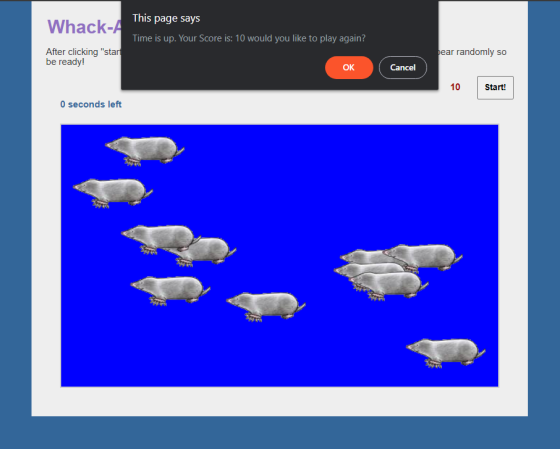
Hope it helps, if you like the answer give it a thumbs up. Thank you.
Add Answer to:
In this project, you will complete the entire game. Be certain
to read the bulleted points...
Please make my project more perfect, and add a button to control Turn sound (On / Off)...
please make my project more perfect, and add a button to control Turn sound (On / Off) . and help me change some place that i wrote wrong or not perfect. thanks thanks first.html <!DOCTYPE html> <html lang="en"> <head> <meta charset="UTF-8"> <title>打地鼠</title> <link rel="stylesheet" href="first.css"> </head> <body> <section> </section> <!-- 添加积分器 --> <span id="count">得分 为0</span> <!-- 添加音频 hidden="true" --> <audio src="audio/music.mp3" loop="true"autoplay="autoplay" loop="loop"></audio> <div id="dazhong"></div> <script src="jquery.js"></script> <script src="first.js"></script> </body> </html> 得分 为0 first.js for(var i=1;i<17;i++){ $('section').append(' '); } $('section...
finished the web page ********************************************************* .js // I've added a span with the id "count" which...
finished the web page ********************************************************* .js // I've added a span with the id "count" which you can use to modify // the number of clicks on the page // you can do this by getting the value; incrementing it and then // modifying the value of the span function changeColor(){ const colors = ['red', 'green', 'blue', 'cyan', 'yellow', 'black', 'silver', 'tan']; // Choose a random float from [0, 1) the multiply by length to get random index // Math.floor()...
Rewrite the Dice example (that rolls 4 dice simultaneously) to roll 10 dice instead, using arrays...
Rewrite the Dice example (that rolls 4 dice simultaneously) to roll 10 dice instead, using arrays. (html and javascript) Define an array of 10 elements called "imgObjects" where each element is an object reference to one of the html elements. Define an array of 6 string elements called "imgFileNames" where each element is a file name, for example, the value in imgFileNames[0] would be "die1.png" Rewrite function rollDice, to accept an array as the argument and use a for..in loop...
<!DOCTYPE html> <html> <head> <!-- JavaScript 6th Edition Chapter 4 Hands-on Project 4-3 Author: Da...
<!DOCTYPE html> <html> <head> <!-- JavaScript 6th Edition Chapter 4 Hands-on Project 4-3 Author: Date: Filename: index.htm --> <meta charset="utf-8" /> <meta name="viewport" content="width=device-width, initial-scale=1.0" /> <title>Hands-on Project 4-3</title> <link rel="stylesheet" href="styles.css" /> <script src="modernizr.custom.05819.js"></script> </head> <body> <header> <h1> Hands-on Project 4-3 </h1> </header> <article> <div id="results"> <p id="resultsExpl"></p> <ul> <li id="item1"></li> <li id="item2"></li> <li id="item3"></li> <li id="item4"></li> <li id="item5"></li> </ul> </div> <form> <fieldset> <label for="placeBox" id="placeLabel"> Type the name of a place, then click Submit: </label> <input type="text" id="placeBox"...
Trying to understand java script.. The code provided prints out a game board of cells that...
 Trying to understand java script.. The code provided prints out
a game board of cells that are 10 x 10. I currnetly
have it printed out so that it will print out pink squares. how can
i create a click even on any of the pink squares that when they are
clicked it will turn the square black... then any
square that is black when it is clicked it will change back to the
color pink
html/js code and css...
Trying to understand java script.. The code provided prints out
a game board of cells that are 10 x 10. I currnetly
have it printed out so that it will print out pink squares. how can
i create a click even on any of the pink squares that when they are
clicked it will turn the square black... then any
square that is black when it is clicked it will change back to the
color pink
html/js code and css...
Please advise what is being doing wrong. Requirement. See if you can modify the code of...
Please advise what is being doing wrong. Requirement. See if you can modify the code of Listings 17.1 and 17.3 to present a message to the user while waiting for an Ajax request to complete. //Code <!DOCTYPE html> <html> <head> <title>Keywords Grabber</title> <script src="myAjaxLib.js"></script> <script> function display(content) { document.getElementById("displaydiv").innerHTML = content; </script> <script> function getXMLHttpRequest() { try { try { return new ActiveXObject("Microsoft.XMLHTTP"); } catch(e) { return new ActiveXObject("Msxml2.XMLHTTP"); } } catch(e) { return new XMLHttpRequest(); } } function doAjax(url,...
NEED HELP with HTML with Javascript embedding for form validation project below. I have my code...
 NEED HELP with HTML with Javascript embedding
for form validation project below. I have my code
below but I'm stuck with validation. If anyone can fix it, I'd
really appreciate.
******************************************************************************
CODE:
<!DOCTYPE html>
<!--
To change this license header, choose License Headers in Project
Properties.
To change this template file, choose Tools | Templates
and open the template in the editor.
-->
<html>
<head>
<title>Nice</title>
<meta charset="UTF-8">
<meta name="viewport" content="width=device-width,
initial-scale=1.0">
<script>
var textFromTextArea;
function getWords(){
var text =...
NEED HELP with HTML with Javascript embedding
for form validation project below. I have my code
below but I'm stuck with validation. If anyone can fix it, I'd
really appreciate.
******************************************************************************
CODE:
<!DOCTYPE html>
<!--
To change this license header, choose License Headers in Project
Properties.
To change this template file, choose Tools | Templates
and open the template in the editor.
-->
<html>
<head>
<title>Nice</title>
<meta charset="UTF-8">
<meta name="viewport" content="width=device-width,
initial-scale=1.0">
<script>
var textFromTextArea;
function getWords(){
var text =...
URGENT HELP NEEDED: JQuery. PLEASE POST SCREEN SHOTS Task 1: Downloading jQuery Right-click the link to...
URGENT HELP NEEDED: JQuery. PLEASE POST SCREEN SHOTS Task 1: Downloading jQuery Right-click the link to download the uncompressed latest version of jQuery Copy the jQuery.x.x.x.js file in the folder and specified as source file. Task 2: Download and install HTML-Kit 1. Navigate to htmlkit.com. 2. Click Download HTML-Kit 292. After it downloads, launch HKSetup.exe. Choose Full installation (the default) Uncheck Yes, download and install HTML-Kit Tools Trial. 6. Click Next>Finish. Task 3: Creating a Simple jQuery Application Launch HTML-Kit....
In this problem, you will create a selectable “To Do” List. To add a task to...
 In this problem, you will create a selectable “To Do” List. To
add a task to this list, the user clicks the Add Task button and
enters a description of the task. To delete a task from the list,
the user selects the task and then clicks the Delete Task
button.
Open the HTML and JavaScript files provided as start-up files
(index.html from within todo_list_Q.zip file). Then,
review the HTML in this file. Note, within the div element, there
is...
In this problem, you will create a selectable “To Do” List. To
add a task to this list, the user clicks the Add Task button and
enters a description of the task. To delete a task from the list,
the user selects the task and then clicks the Delete Task
button.
Open the HTML and JavaScript files provided as start-up files
(index.html from within todo_list_Q.zip file). Then,
review the HTML in this file. Note, within the div element, there
is...
I can't figure this one out at all. Any help would be appreciated. Here's the question:...
I can't figure this one out at all. Any help would be appreciated. Here's the question: You will need to complete the functions to Toggle the Fries and Drinks sections by adding or removing the 'hide' CSS class I created. I have already created the function to Toggle Burgers and you can use that as an example to build out the full functionality. I have also made created the function to reset the form. Finally, to calculate the total, you...
 Trying to understand java script.. The code provided prints out
a game board of cells that are 10 x 10. I currnetly
have it printed out so that it will print out pink squares. how can
i create a click even on any of the pink squares that when they are
clicked it will turn the square black... then any
square that is black when it is clicked it will change back to the
color pink
html/js code and css...
Trying to understand java script.. The code provided prints out
a game board of cells that are 10 x 10. I currnetly
have it printed out so that it will print out pink squares. how can
i create a click even on any of the pink squares that when they are
clicked it will turn the square black... then any
square that is black when it is clicked it will change back to the
color pink
html/js code and css...
 NEED HELP with HTML with Javascript embedding
for form validation project below. I have my code
below but I'm stuck with validation. If anyone can fix it, I'd
really appreciate.
******************************************************************************
CODE:
<!DOCTYPE html>
<!--
To change this license header, choose License Headers in Project
Properties.
To change this template file, choose Tools | Templates
and open the template in the editor.
-->
<html>
<head>
<title>Nice</title>
<meta charset="UTF-8">
<meta name="viewport" content="width=device-width,
initial-scale=1.0">
<script>
var textFromTextArea;
function getWords(){
var text =...
NEED HELP with HTML with Javascript embedding
for form validation project below. I have my code
below but I'm stuck with validation. If anyone can fix it, I'd
really appreciate.
******************************************************************************
CODE:
<!DOCTYPE html>
<!--
To change this license header, choose License Headers in Project
Properties.
To change this template file, choose Tools | Templates
and open the template in the editor.
-->
<html>
<head>
<title>Nice</title>
<meta charset="UTF-8">
<meta name="viewport" content="width=device-width,
initial-scale=1.0">
<script>
var textFromTextArea;
function getWords(){
var text =...
 In this problem, you will create a selectable “To Do” List. To
add a task to this list, the user clicks the Add Task button and
enters a description of the task. To delete a task from the list,
the user selects the task and then clicks the Delete Task
button.
Open the HTML and JavaScript files provided as start-up files
(index.html from within todo_list_Q.zip file). Then,
review the HTML in this file. Note, within the div element, there
is...
In this problem, you will create a selectable “To Do” List. To
add a task to this list, the user clicks the Add Task button and
enters a description of the task. To delete a task from the list,
the user selects the task and then clicks the Delete Task
button.
Open the HTML and JavaScript files provided as start-up files
(index.html from within todo_list_Q.zip file). Then,
review the HTML in this file. Note, within the div element, there
is...
Most questions answered within 3 hours.
-
Where is the error in this code sequence?
String s1 = "Hello";
String s2 = "ello";...
asked 10 months ago -
Financial data for Joel de Paris, Inc., for last year
follow:
Joel de Paris, Inc.
Balance...
asked 10 months ago -
Consider this reaction:
Al2(SO4)3 (aq)+ BaCl3
(aq) Al2Cl6 (aq)- +
3BaSO4(s) . What is the...
asked 10 months ago -
Suppose that Savneet is considering increasing her
recent random sample from 20 car rentals to 40...
asked 10 months ago -
Trucks arrive at an unloading terminal at an average rate of 120
per hour.
Trucks arrive...
asked 10 months ago -
Why are methanol and ethanol completely soluble in water while
octanol is not very little soluble....
asked 10 months ago -
A facilities manager at a university reads in a research report
that the mean amount of...
asked 10 months ago -
When the CuSO4 is rehydrated by adding water to the anhydrous
compound, is this an endothermic...
asked 10 months ago -
A ray of sunlight is passing from diamond into crown glass; the
angle of incidence is...
asked 10 months ago -
A block of mass 0.249 kg is placed on top of a light, vertical
spring of...
asked 10 months ago -
how do the kidneys compensate in the presences of acidosis
a) trigger hyperventilate
b) reserve acid...
asked 10 months ago -
Question 501 pts
The rental rate of capital to the firm increases. Which of the
following...
asked 10 months ago