
Homework Answers
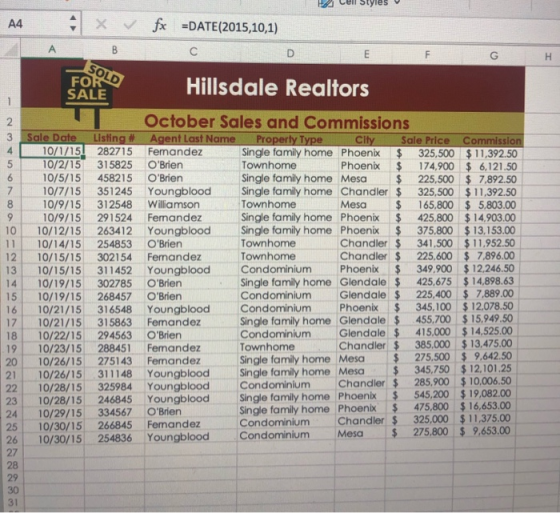
1) Open the file HROctSales.xlsx
2) To save the workbook, go to the file menu, Click Save option and name it as EL2-C4-VB-HROctSales, then save it.
3) Now select the whole table, Click on Insert Menu, then select pivot table option, a window appears where to place the pivot table, selct the option New worksheet. You will be taken to the new worksheet with the pivot table. Now in the right hand side, pivot table fields will be displayed. Do the following one by one.
- Select City, it will be displayed under rows, if not drag it under rows.
- Select Home Type, it will be displayed under Values, drag it from Vlaues to columns
- Select the sales price
Click on anywhere in the table, click on Design menu, Many table styles will be displayed on the right side of teh ribbon. Click on the drop down button to see all the styles. Various styles will be displayed under Light, Medium, Dark. Under Medium, select 11 th table style.
Next, to change the column width to 18 characters select the columns of the table, Go to Home Tab, Select Format option in the ribbon, then select column width, a window opens , give column width:18 , Ok.
Now at the bottom of the worksheet, double click the name of the worksheet and type it as Pivot Table to rename it.
4) Select the Pivot table you have just created, Go to Insert Tab, Click on Pivot Chart, a Pivot chart is created.
Now, click anywhere on the pivot chart, Go to Design tab, click on change chart type, keep the cursor on the column option, chart types will be displayed. Click the chart under 3-D column type.
At the center of the tab many chart styles are visible, select the 11th style.
Cut the Pivot table and paste into the new work sheet.
5) To print the pivot table and pivot chart worksheets, go to file menu and click on print option.
6) Save the workbook and close it.
Add Answer to:
please help me solve and explain how you go about it in excel.
DETAILED
1. Open...
Most questions answered within 3 hours.
-
Where is the error in this code sequence?
String s1 = "Hello";
String s2 = "ello";...
asked 10 months ago -
Financial data for Joel de Paris, Inc., for last year
follow:
Joel de Paris, Inc.
Balance...
asked 10 months ago -
Consider this reaction:
Al2(SO4)3 (aq)+ BaCl3
(aq) Al2Cl6 (aq)- +
3BaSO4(s) . What is the...
asked 10 months ago -
Suppose that Savneet is considering increasing her
recent random sample from 20 car rentals to 40...
asked 10 months ago -
Trucks arrive at an unloading terminal at an average rate of 120
per hour.
Trucks arrive...
asked 10 months ago -
Why are methanol and ethanol completely soluble in water while
octanol is not very little soluble....
asked 10 months ago -
A facilities manager at a university reads in a research report
that the mean amount of...
asked 10 months ago -
When the CuSO4 is rehydrated by adding water to the anhydrous
compound, is this an endothermic...
asked 10 months ago -
A ray of sunlight is passing from diamond into crown glass; the
angle of incidence is...
asked 10 months ago -
A block of mass 0.249 kg is placed on top of a light, vertical
spring of...
asked 10 months ago -
how do the kidneys compensate in the presences of acidosis
a) trigger hyperventilate
b) reserve acid...
asked 10 months ago -
Question 501 pts
The rental rate of capital to the firm increases. Which of the
following...
asked 10 months ago