
Homework Answers
The Code for Graph_Data.py is
from matplotlib import pyplot #used matplotlib to plot the graphs to install matplotlib use command "python -m pip install matplotlib" log = {"name":[],"category":[],"price":[]} #used hybrid(dictionary,lists) data structure as storage element """ BarGraph LineGraph SaveGraph Main Code Section """ def BarGraph(x_data,y_data,x_label,y_label,title): pyplot.bar(x_data,y_data) pyplot.xlabel(x_label) pyplot.ylabel(y_label) pyplot.title(title) pyplot.show() def LineGraph(x_data,y_data,x_label,y_label,title): pyplot.plot(x_data,y_data) pyplot.xlabel(x_label) pyplot.ylabel(y_label) pyplot.title(title) pyplot.show() def SaveGraph(x_data,y_data,x_label,y_label,title): pyplot.bar(x_data,y_data) pyplot.xlabel(x_label) pyplot.ylabel(y_label) pyplot.title(title) pyplot.savefig(title+".png") if __name__=="__main__": print("::Menu::") #printed the menu only once if you want it repeatedly place it in while loop print("1.Log a new item") print("2.Create a bar graph of the existing data") print("3.Create a line graph of the existing data") print("4.Save the existing data's graph") print("5.Exit") while True: #executes until 5.Exit option is selected opt = input("opt >> ") if opt == "1": #1.Logging a new item, (name,category,price) are stored in log data structure name = input("enter item name:") category = input("enter item category:") price = int(input("enter item price:")) log["name"].append(name) log["category"].append(category) log["price"].append(price) elif opt == "2": #2.Creating a bar graph with the existing log data query = input("based on 1.price or 2.category ?:") #based on selected ones graphing takes place if query=="1": BarGraph(log["name"],log["price"],"Names","Prices","Prices of Items") # Names vs Prices bar graph else: BarGraph(log["name"],log["category"],"Names","Categories","Categories of Items") # Names vs Categories bar graph elif opt == "3": query = input("based on 1.price or 2.category ?:") if query=="1": LineGraph(log["name"],log["price"],"Names","Prices","Prices of Items") # Names vs Prices line graph else: LineGraph(log["name"],log["category"],"Names","Categories","Categories of Items") # Names vs Categories line graph elif opt == "4": query = input("based on 1.price or 2.category ?:") if query=="1": SaveGraph(log["name"],log["price"],"Names","Prices","Prices of Items") # Names vs Prices bar graph is saved as png else: SaveGraph(log["name"],log["category"],"Names","Categories","Categories of Items") # Names vs Categories bar graph is saved as png elif opt == "5": #5.Exit - exiting the loop break else: #if any other input is placed it shows invalid option print("Invalid option") Explanation of the code is given in the comments section of the code. Please go through that and feel free to ask queries if any.
Sample output of the code:

Graphs produced from option 2 to 4 are
After entering the same data using option 1
choosing option 2 then 1 produces below graph

choosing option 2 then 2 produces below graph

choosing option 3 then 1 produces below graph

choosing option 3 then 2 produces below graph

choosing option 4 then 1 produces below graph
Entering option 5 exits the loop there by execution as well.
Thank you, feel to ask queries if any. Don't forget to like.
Add Answer to:
Expected submission: 1 Python file, Graph_Data.py Make a file called Graph_data Inside this file create 3...
Assignment: USING PYTHON Expected submission: TWO (2) Python files, main.py and HelperClasses.py Make a file called...
Assignment: USING PYTHON Expected submission: TWO (2) Python files, main.py and HelperClasses.py Make a file called HelperClasses and create a class inside it called Helpers Inside Helpers, create 8 static methods as follows: 1.) Max, Min, Standard_Deviation, Mean a.) Each of these should take a list as a parameter and return the calculated value 2.) Bubble a.) This should take a list as a parameter and return the sorted list 3.) Median a.) This should take a list as a...
I need help building code in python for this: Create a program that: Creates a sales...
I need help building code in python for this: Create a program that: Creates a sales receipt, displays the receipt entries and totals, and saves the receipt entries to a file Prompt the user to enter the Item Name Item Quantity Item Price Display the item name, the quantity, and item price, and the extended price (Item Quantity multiplied by Item Price) after the entry is made Save the item name, quantity, item price, and extended price to a file...
python 3 Define a function that uses two lists similar to the following to create a...
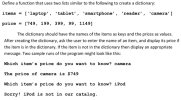 python 3
Define a function that uses two lists similar to the following to create a dictionary: items = ['laptop', 'tablet', 'smartphone', 'reader', 'camera'] price = [749, 199, 399, 99, 1149] The dictionary should have the names of the items as keys and the prices as values. After creating the dictionary, ask the user to enter the name of an item, and display its price if the item is in the dictionary. If the item is not in the dictionary...
python 3
Define a function that uses two lists similar to the following to create a dictionary: items = ['laptop', 'tablet', 'smartphone', 'reader', 'camera'] price = [749, 199, 399, 99, 1149] The dictionary should have the names of the items as keys and the prices as values. After creating the dictionary, ask the user to enter the name of an item, and display its price if the item is in the dictionary. If the item is not in the dictionary...
This question is for Python 3. I can get the first couple of steps in this...
This question is for Python 3. I can get the first couple of steps in this question but I get errors. Create a program that: Creates a sales receipt, displays the receipt entries and totals, and saves the receipt entries to a file Prompt the user to enter the Item Name Item Quantity Item Price Display the item name, the quantity, and item price, and the extended price (Item Quantity multiplied by Item Price) after the entry is made Save...
java Part 1 Create a NetBeans project that asks for a file name. The file should...
java Part 1 Create a NetBeans project that asks for a file name. The file should contain an unknown quantity of double numeric values with each number on its own line. There should be no empty lines. Open the file and read the numbers. Print the sum, average, and the count of the numbers. Be sure to label the outputs very clearly. Read the file values as Strings and use Double.parseDouble() to convert them. Part 2 Create a NetBeans project...
In Python and in one file please. (Simple functions with an expressions) Create a function called...
In Python and in one file please. (Simple functions with an expressions) Create a function called load_inventory(filename). The filename argument in this case specifies the name of a file that contains all the inventory/product information for the store, including product names, descriptions, prices, and stock levels. This function should clear any information already in the product list (i.e., a fresh start) and then re-initialize the product list using the file specified by the filename argument. You can structure your file...
In Python and in one file please. (Simple functions with an expressions) Create a function called load_inventory(filenam...
In Python and in one file please. (Simple functions with an expressions) Create a function called load_inventory(filename). The filename argument in this case specifies the name of a file that contains all the inventory/product information for the store, including product names, descriptions, prices, and stock levels. This function should clear any information already in the product list (i.e., a fresh start) and then re-initialize the product list using the file specified by the filename argument. You can structure your file...
(IN PYTHON) You are to develop a Python program that will read the file Grades-1.txt that...
(IN PYTHON) You are to develop a Python program that will read the file Grades-1.txt that you have been provided on Canvas. That file has a name and 3 grades on each line. You are to ask the user for the name of the file and how many grades there are per line. In this case, it is 3 but your program should work if the files was changed to have more or fewer grades per line. The name and...
***NEED SOLUTION IN PYTHON *** 1. Create a main function which only gets executed when the...
***NEED SOLUTION IN PYTHON *** 1. Create a main function which only gets executed when the file is directly executed Hint: def main(): pass if __name__ == '__main__': main() 2. Your programs will use a file called scores.txt to store a bunch of user-provided numbers. These can be int or float but their values must be between 0 and 100. Inside the main function, display the current list of numbers to the user and ask if they want to update...
Using Python INST-FS-IAD-PROD.INS LAB1 Lab: Create User Account 2. get-password() #promt the user and create password, check the password fits the requirement USE the EXACT file names! Create a user...
 Using Python
INST-FS-IAD-PROD.INS LAB1 Lab: Create User Account 2. get-password() #promt the user and create password, check the password fits the requirement USE the EXACT file names! Create a user login system. Your code should do the following: 3, create-user_name() #use this function to create the user name 1.Create your user database called "UD.txt", this should be in CSV format 4, write-file() #user this function to save the user name and password into "UD.txt" Deliverables: Sample: the data you saved...
Using Python
INST-FS-IAD-PROD.INS LAB1 Lab: Create User Account 2. get-password() #promt the user and create password, check the password fits the requirement USE the EXACT file names! Create a user login system. Your code should do the following: 3, create-user_name() #use this function to create the user name 1.Create your user database called "UD.txt", this should be in CSV format 4, write-file() #user this function to save the user name and password into "UD.txt" Deliverables: Sample: the data you saved...
 python 3
Define a function that uses two lists similar to the following to create a dictionary: items = ['laptop', 'tablet', 'smartphone', 'reader', 'camera'] price = [749, 199, 399, 99, 1149] The dictionary should have the names of the items as keys and the prices as values. After creating the dictionary, ask the user to enter the name of an item, and display its price if the item is in the dictionary. If the item is not in the dictionary...
python 3
Define a function that uses two lists similar to the following to create a dictionary: items = ['laptop', 'tablet', 'smartphone', 'reader', 'camera'] price = [749, 199, 399, 99, 1149] The dictionary should have the names of the items as keys and the prices as values. After creating the dictionary, ask the user to enter the name of an item, and display its price if the item is in the dictionary. If the item is not in the dictionary...
 Using Python
INST-FS-IAD-PROD.INS LAB1 Lab: Create User Account 2. get-password() #promt the user and create password, check the password fits the requirement USE the EXACT file names! Create a user login system. Your code should do the following: 3, create-user_name() #use this function to create the user name 1.Create your user database called "UD.txt", this should be in CSV format 4, write-file() #user this function to save the user name and password into "UD.txt" Deliverables: Sample: the data you saved...
Using Python
INST-FS-IAD-PROD.INS LAB1 Lab: Create User Account 2. get-password() #promt the user and create password, check the password fits the requirement USE the EXACT file names! Create a user login system. Your code should do the following: 3, create-user_name() #use this function to create the user name 1.Create your user database called "UD.txt", this should be in CSV format 4, write-file() #user this function to save the user name and password into "UD.txt" Deliverables: Sample: the data you saved...
Most questions answered within 3 hours.
-
Where is the error in this code sequence?
String s1 = "Hello";
String s2 = "ello";...
asked 11 months ago -
Financial data for Joel de Paris, Inc., for last year
follow:
Joel de Paris, Inc.
Balance...
asked 11 months ago -
Consider this reaction:
Al2(SO4)3 (aq)+ BaCl3
(aq) Al2Cl6 (aq)- +
3BaSO4(s) . What is the...
asked 11 months ago -
Suppose that Savneet is considering increasing her
recent random sample from 20 car rentals to 40...
asked 11 months ago -
Trucks arrive at an unloading terminal at an average rate of 120
per hour.
Trucks arrive...
asked 11 months ago -
Why are methanol and ethanol completely soluble in water while
octanol is not very little soluble....
asked 11 months ago -
A facilities manager at a university reads in a research report
that the mean amount of...
asked 11 months ago -
When the CuSO4 is rehydrated by adding water to the anhydrous
compound, is this an endothermic...
asked 11 months ago -
A ray of sunlight is passing from diamond into crown glass; the
angle of incidence is...
asked 11 months ago -
A block of mass 0.249 kg is placed on top of a light, vertical
spring of...
asked 11 months ago -
how do the kidneys compensate in the presences of acidosis
a) trigger hyperventilate
b) reserve acid...
asked 11 months ago -
Question 501 pts
The rental rate of capital to the firm increases. Which of the
following...
asked 11 months ago