


Homework Answers
1.
a)
In the above nodes concept,by grouping objects under one node, we can freely move, shade, apply texture, and do many other actions to all the objects by working with the group node.
To group objects together, select the objects you want to group together.
Select Edit > Group.
The objects are now grouped under a new transform node.
Using the Group Options window you can specify how the objects, as well as their pivot points, are grouped.
b)these nodes contain parenting information.These nodes controls attributes of one or more children. These nodes serve as parent nodes for its children.A parent in turn can also be the child of another parent.The child adopts some or all attribute changes made to the parent.
creation of parent
Select the children first, and the parent last. S
select Edit > Parent.
In the Outliner and Hypergraph, you can drag and drop one object on top of another to parent it.
2)The object pivot is the position about which objects are scaled and rotated while playing different types of animation. we can change and even animate the object pivot .position of pivot can be changed by rotating and scaling
3)
To mirror an object
- Create a NURBS primitive sphere, or select another object to mirror.
- Type -2 in the Translate X field in the Channel Box (re
4.56).
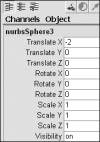
Figure 4.56 Type -2 in the Translate X field of the Channel Box to move the object two units in the negative x direction.
This setting moves the object two units down the negative x axis. - Press
 or click the Move tool icon
  in the toolbar.
 - Press
 on the keyboard to go into pivot point mode.
 - Holding down
 , move the pivot point to the origin
Figure 4.57 Move the pivot point to the origin to send the copy an equal distance away from the origin.
snaps to the grid, which ensures that the pivot point is precisely
at the origin. - Press
to get out of pivot-point edit mode.
-
From the Edit menu, select the box beside Duplicate Special.
The Duplicate Special Options window opens.
- Select Edit > Reset Settings in the Duplicate Special Options window to reset the settings, and then set the Scale X field to –1.
-
Click Duplicate Special.
A mirrored copy is duplicated an equal distance from the pivot point
 or click the Move tool icon
  in the toolbar.
 on the keyboard to go into pivot point mode.
 , move the pivot point to the origin
Add Answer to:
Maya 2016 questions
1. Explain the following in terms of shape and transform nodes: (a) Grouping...
Most questions answered within 3 hours.
-
Where is the error in this code sequence?
String s1 = "Hello";
String s2 = "ello";...
asked 10 months ago -
Financial data for Joel de Paris, Inc., for last year
follow:
Joel de Paris, Inc.
Balance...
asked 10 months ago -
Consider this reaction:
Al2(SO4)3 (aq)+ BaCl3
(aq) Al2Cl6 (aq)- +
3BaSO4(s) . What is the...
asked 10 months ago -
Suppose that Savneet is considering increasing her
recent random sample from 20 car rentals to 40...
asked 10 months ago -
Trucks arrive at an unloading terminal at an average rate of 120
per hour.
Trucks arrive...
asked 10 months ago -
Why are methanol and ethanol completely soluble in water while
octanol is not very little soluble....
asked 10 months ago -
A facilities manager at a university reads in a research report
that the mean amount of...
asked 10 months ago -
When the CuSO4 is rehydrated by adding water to the anhydrous
compound, is this an endothermic...
asked 10 months ago -
A ray of sunlight is passing from diamond into crown glass; the
angle of incidence is...
asked 10 months ago -
A block of mass 0.249 kg is placed on top of a light, vertical
spring of...
asked 10 months ago -
how do the kidneys compensate in the presences of acidosis
a) trigger hyperventilate
b) reserve acid...
asked 10 months ago -
Question 501 pts
The rental rate of capital to the firm increases. Which of the
following...
asked 10 months ago