
Homework Answers
Hey, it's a very good and interesting question for understanding. Let's start:
Let's say you have 2 files. in one file there are:
whereas in the other file you have:

Consider the below example:
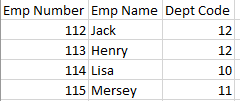
Assuming that EmployeeFile will contain the valid department_id.
EmployeeFile:
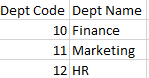
DepartmentFile:
Assuming DepartmentFile contains all the department entries in a consistent manner.
Now our objective is to connect these two files so that we can get the respective employee name and department name at the same time.
Basic information known is both the files are having a common data member filed called department_id. So, our algorithm will use the track of that only. I am going to write the pseudocode.
Assuming, that each record will be in a line on the files.
*************************PSEUDOCODE*****************************
1. Load Both the files in the memory. i.e, open both the files in read mode (e.g. EmployeeFile and DepartmentFile)
2. For each record in the Employee file, find the department_id and repeat step 3 and step 4.
3. Use this department_id and search it in the Departement file.
4. If the department_id obtained from EmployeeFile is found in the DepartmentFile, print the respective department name for that employee along with the employee details.
Else move to the next record(Considering that the department entry is not added in the DepartmentFile)
5. In the end, all the employee name and their respective department name will be printed on the standard output.
*************************PSEUDOCODE*****************************
This objective is achieved by JOIN operations in SQL.
The inner join operation provides this functionality.
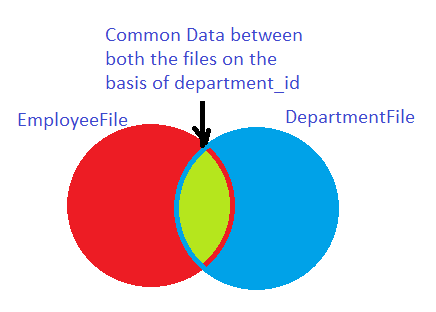
The section in light green will be our data containing the employee details with the respective department name.
I hope it will help.
Thanks and all the best :)
Please don't forget to thumbs up if it helped you.
***************************************COMPLETE************************************
Add Answer to:
Imagine that you have two files that have related information. One file has an Employee_Number, Employee_Name,...
BONUS QUESTION: Suppose you have two tables, EMPLOYEES with primary key employee_ID, and DEPARTMENTS with primary...
BONUS QUESTION: Suppose you have two tables, EMPLOYEES with primary key employee_ID, and DEPARTMENTS with primary key department_ID. Assume each department may have many employees, but each employee is only assigned one department. What would be the correct SQL syntax for retrieving data from both tables? (HINT: You must find out what is the foreign key) A. SELECT employee_ID, employee_name, department_ID, department_location FROM Employees JOIN Departments ON Employees.employee_ID = Departments.employee_ID; B. SELECT employee_ID, employee_name, department_ID, department_location FROM Employees JOIN Departments...
Homework IX-a Write a program that opens a text file, whose name you enter at the keyboard You wi...
 Homework IX-a Write a program that opens a text file, whose name you enter at the keyboard You will be using the file text.txt to test your program. Print out all of the individual, unique words contained in the file, in alphabetical order Print out the number of unique words appearing in text.txt. Call your program: YourName-HwrklXa.py Make sure that your name appears as a comment at the beginning of the program as well as on the output display showing...
Please solve using c++ plus There are two text files with the following information stored in...
Please solve using c++ plus There are two text files with the following information stored in them: The instructor.txt file where each line stores the id, name and affiliated department of an instructor separated by a comma The department.txt file where each line stores the name, location and budget of the department separated by a comma You need to write a C++ program that reads these text files and provides user with the following menu: 1. Enter the instructor ID...
12.8 GPA reports using files Prompt the user by "Enter name of input file: " for...
12.8 GPA reports using files Prompt the user by "Enter name of input file: " for the name of an input file and open that file for reading. The two input files for the tests are already at the zyBooks site.They each have a list of student names with the course they have taken, of the form Jacobs, Anthony ECS10 4 B- ECS20 4 C+ ANS17 3 A ANS49H 2 D Wilson, Elaine ECS10 4 B+ ECS20 4 C+ ANS17...
Please write this in C. Write this code in Visual Studio and upload your Source.cpp file for checking (1) Write a program to prompt the user for an output file name and 2 input file names. The progra...
 Please write this in C.
Write this code in Visual Studio and upload your Source.cpp file for checking (1) Write a program to prompt the user for an output file name and 2 input file names. The program should check for errors in opening the files, and print the name of any file which has an error, and exit if an error occurs opening any of the 3 For example, (user input shown in caps in first line) Enter first...
Please write this in C.
Write this code in Visual Studio and upload your Source.cpp file for checking (1) Write a program to prompt the user for an output file name and 2 input file names. The program should check for errors in opening the files, and print the name of any file which has an error, and exit if an error occurs opening any of the 3 For example, (user input shown in caps in first line) Enter first...
Using listAllFiles as a guide, write a method that has one File argument: if the argument...
Using listAllFiles as a guide, write a method that has one File argument: if the argument is a directory, the method returns the total number of files below it. If the argument represents a file, the method just returns 1. public static int countFiles(File f) import java.io.File; public class FileLister { public static void main(String[] args) { // Choose the directory you want to list. // If running in Eclipse, "." will just be the current project directory. // Use...
Here is an example of how you separate your code into different files add the header...
Here is an example of how you separate your code into different files add the header file and the .cpp file to the project. ------------------------------------------------------------------ //Header file -- saved as ex1.hpp #pragma once class ex1 { public: ...ex1(){} ...void print(); }; ------------------------------------------------------------------ //.cpp file -- saved as ex1.cpp #include "ex1.hpp" #include void ex1::print() { ...std::cout<<"Hello"< } ------------------------------------------------------------------ //main -- saved as main.cpp #include "ex1.hpp" int main(void) { ...ex1 e(); ...e.print(); ...return 0; } ------------------------------------------------------------------ Why do I have the #pragma...
12.8 GPA reports using files This program is to compute and write to a file the...
12.8 GPA reports using files This program is to compute and write to a file the GPA for student scores read from an input file. As in Lab 7.5, the point values of the grades are 4 for A, 3 for B, 2 for C, 1 for D, and 0 for F. Except for the grade A, where + has no effect, a + after the letter increases the point value by 0.3, and except for F, where a -...
Objective: Learn how to -- read string from a file -- write multiple files Problem: Modify...
Objective: Learn how to -- read string from a file -- write multiple files Problem: Modify the Person class in Lab #4. It has four private data members firstNam (char[20]), day, month, year (all int); and two public member functions: setPerson(char *, int, int, int) and printInfo(). The function setPerson sets the first name and birthday in the order of day, month and year. The function printInfo prints first name and birthday. But it should print the date in the...
There is a file called mat2.txt in our files area under the Assignments folder. Download it...
There is a file called mat2.txt in our files area under the Assignments folder. Download it and save it in the same folder where this Matlab file (HW08_02.m) is saved. It may be worth opening that text file to see how it is set out. Note well, however, that the file might have a different number of lines and different number of numbers on each line. Write a Matlab program that does the following: Prompt the user for an input...
 Homework IX-a Write a program that opens a text file, whose name you enter at the keyboard You will be using the file text.txt to test your program. Print out all of the individual, unique words contained in the file, in alphabetical order Print out the number of unique words appearing in text.txt. Call your program: YourName-HwrklXa.py Make sure that your name appears as a comment at the beginning of the program as well as on the output display showing...
 Please write this in C.
Write this code in Visual Studio and upload your Source.cpp file for checking (1) Write a program to prompt the user for an output file name and 2 input file names. The program should check for errors in opening the files, and print the name of any file which has an error, and exit if an error occurs opening any of the 3 For example, (user input shown in caps in first line) Enter first...
Please write this in C.
Write this code in Visual Studio and upload your Source.cpp file for checking (1) Write a program to prompt the user for an output file name and 2 input file names. The program should check for errors in opening the files, and print the name of any file which has an error, and exit if an error occurs opening any of the 3 For example, (user input shown in caps in first line) Enter first...
Most questions answered within 3 hours.
-
Where is the error in this code sequence?
String s1 = "Hello";
String s2 = "ello";...
asked 11 months ago -
Financial data for Joel de Paris, Inc., for last year
follow:
Joel de Paris, Inc.
Balance...
asked 11 months ago -
Consider this reaction:
Al2(SO4)3 (aq)+ BaCl3
(aq) Al2Cl6 (aq)- +
3BaSO4(s) . What is the...
asked 11 months ago -
Suppose that Savneet is considering increasing her
recent random sample from 20 car rentals to 40...
asked 11 months ago -
Trucks arrive at an unloading terminal at an average rate of 120
per hour.
Trucks arrive...
asked 11 months ago -
Why are methanol and ethanol completely soluble in water while
octanol is not very little soluble....
asked 11 months ago -
A facilities manager at a university reads in a research report
that the mean amount of...
asked 11 months ago -
When the CuSO4 is rehydrated by adding water to the anhydrous
compound, is this an endothermic...
asked 11 months ago -
A ray of sunlight is passing from diamond into crown glass; the
angle of incidence is...
asked 11 months ago -
A block of mass 0.249 kg is placed on top of a light, vertical
spring of...
asked 11 months ago -
how do the kidneys compensate in the presences of acidosis
a) trigger hyperventilate
b) reserve acid...
asked 11 months ago -
Question 501 pts
The rental rate of capital to the firm increases. Which of the
following...
asked 11 months ago