Use Java in Eclipse to create an online voting system for Kenya- the country.
Use Java in Eclipse to create an online voting system for Kenya- the country.
Homework Answers
CODE:
import java.lang.*;
import java.util.*;
import java.io.*;
//class Coach
class Vote{
//driver method
public static void main(String args[])throws
Exception{
BufferedReader in = new
BufferedReader(new InputStreamReader(System.in));
//You can edit the names of the
party as per your wish and any number of parties and nowhere else
you have to make any change
String[] partyNames = {"Party
A","Party B","Party C","Party D","Party E","Party F"};
//if you change the number of
parties the number of votes elements should also change
accordingly
int[] votes = {0,0,0,0,0,0};
int choice = 0;
System.out.println("Welcome to the
Online Voting System of Kenya");
System.out.println("-------------------------------------------------------");
//infinite loop for all the users
to vote
while(true) {
//asking the
user to enter the number along side the party name
System.out.println("\nCast your vote,\nEnter the number alongside
your party of choice: ");
for(int
i=0;i<partyNames.length;i++) {
System.out.println((i+1)+" for
"+partyNames[i]);
}
//0 will exit
and show the result
System.out.println("0 to get the Results ");
choice =
Integer.parseInt(in.readLine());
if(choice<0||choice>partyNames.length) {
System.out.println("Invalid Choice! Try
Again");
}else if(choice
== 0){
break;
}else {
//incrementing the vote count in the array
corresponding to the party name
votes[choice-1] += 1;
System.out.println("You Voted For
"+partyNames[choice-1]+". Thank You!");
System.out.println("-----------------------------------------------------");
}
}
System.out.println("-----------------------------------------------------");
//initially setting the first party
as the highest
int max = votes[0];
int maxIndex = 0;
//finding the highest vote
winner
System.out.println("\nVoting
Results:\nParty names alongside their vote counts: ");
for(int
i=0;i<partyNames.length;i++) {
//if the current
element in the array has a vote greater than the previous max this
party is the current winner
if(votes[i]>max) {
max = votes[i];
maxIndex = i;
}
System.out.println(partyNames[i]+"\t\t\t"+votes[i]+" votes");
}
System.out.println("\nThe party
with highest vote is/are: ");
//Checking for any tie
for(int
i=0;i<partyNames.length;i++) {
if(votes[i] ==
max) {
//displaying the winners
System.out.println(partyNames[i]+" with
"+votes[i]+" votes!");
}
}
}
}
_____________________________________________________________________
CODE IMAGES AND OUTPUT:
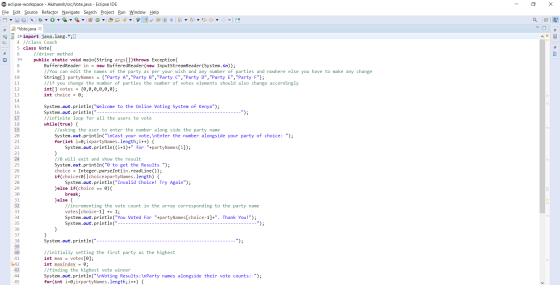
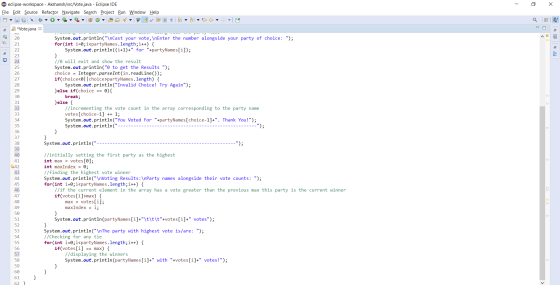
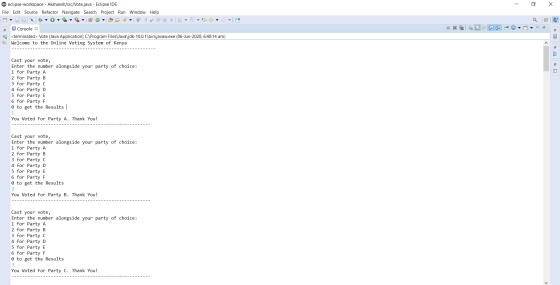
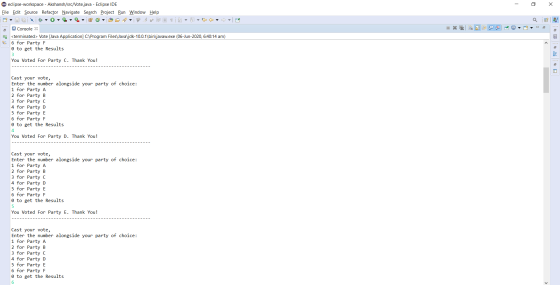
OUTPUT:
I am not showing you the entire output where all the votes are cast because they are the same, you can try it youtself, so I am showing you the main parts of the output:
 __________________________________________________
Feel free to ask any questions in the comments section
Thank You!


Add Answer to:
Use Java in Eclipse to create an online voting system for Kenya-
the country.
Code in Java to be typed in Eclipse. list. Then create another ArrayList L2, with all...
 Code in Java to be typed in
Eclipse.
list. Then create another ArrayList L2, with all the prime numbers in the list L1. Use an enhanced for-loop instead of an ordinary for-loop in your program
Code in Java to be typed in
Eclipse.
list. Then create another ArrayList L2, with all the prime numbers in the list L1. Use an enhanced for-loop instead of an ordinary for-loop in your program
in java Create an Eclipse Java project that utilize "Selection Sort" to sort an unsorted integer...
 in
java
Create an Eclipse Java project that utilize "Selection Sort" to sort an unsorted integer array of size 20 of random numbers in the range 0-500 inclusive. The main method should display the unsorted array and sorted array after Selection Sort.
in
java
Create an Eclipse Java project that utilize "Selection Sort" to sort an unsorted integer array of size 20 of random numbers in the range 0-500 inclusive. The main method should display the unsorted array and sorted array after Selection Sort.
Java(Eclipse). The task will create a server and client and send a message from the client...
Java(Eclipse). The task will create a server and client and send a message from the client to the server. We will have two classes NetworkClient and NetworkServerListener classes. These will each have a main to run from the command line The NetworkServerListener class will listen for a client connection from NetworkClient , receive a message, display the message to the console (stdout) and exit. The NetworkClient class will create a connection to the NetworkServerListener and send a message to the...
is it possible to create a sql file and java file on same platform on eclipse...
is it possible to create a sql file and java file on same platform on eclipse or net beans and connect without using local host and password etc connection
in java eclipse, Create a program “FibonacciFifteen.java” and a method called “double[] getFibonacci()” that creates an...
in java eclipse, Create a program “FibonacciFifteen.java” and a method called “double[] getFibonacci()” that creates an array with a length of 15 that contains the first 15 numbers in the Fibonacci sequence and returns it. Set the first element to 0 and the second element to 1, then use a for loop to fill out the rest of the array by adding the prior two elements.
Create an Eclipse Java project that utilize "Bubble Sort" to sort an unsorted integer array of...
Create an Eclipse Java project that utilize "Bubble Sort" to sort an unsorted integer array of size 10. The main method should display unsorted array and sorted array after Bubble Sort. NEED A WORKING JAVA PROJECT. NEED IT ASAP
2. Create ONE java file in Dr Java according the specifications below: A. Create a Country...
 2. Create ONE java file in Dr Java according the specifications below: A. Create a Country class a. Each Country object of the Country class should know (state) i. its name ii. its area (in square miles) iii. its population b. Each Country object should be able to (behavior) i. set initial population (setter) ii. get density (number of people per square mile) (getter) iii. adjust the set population by some amount (setter) iv. provide its name, area, and population...
We should use “Java” language. Java Eclipse :) Fall 2019 1. Assign each line to a...
 We
should use “Java” language. Java Eclipse :)
Fall 2019 1. Assign each line to a variable and write the passage from Shakespeare's Sonnet #52 to console (Careful about line breaking): Blessed are you whose worthiness gives scope, Being had, to triumph; being lacked, to hope. 2. Create two integer variable, width and height. Write them to console in similar format, i.e. Width of rectangle is 5. 3. Update width and height variable with another value, and write them to...
We
should use “Java” language. Java Eclipse :)
Fall 2019 1. Assign each line to a variable and write the passage from Shakespeare's Sonnet #52 to console (Careful about line breaking): Blessed are you whose worthiness gives scope, Being had, to triumph; being lacked, to hope. 2. Create two integer variable, width and height. Write them to console in similar format, i.e. Width of rectangle is 5. 3. Update width and height variable with another value, and write them to...
Create a Java Project in Eclipse with the following: Include the Rectangle class supplied below. Override...
Create a Java Project in Eclipse with the following: Include the Rectangle class supplied below. Override the toString method for Rectangle. Override the equals method for Rectangle. Implement the comparable Interface for Rectangle (Compare by area) Rectangle class: public class Rectangle { private double length; private double width; public Rectangle(double l, double w) { length = l; width = w; } public double getLength() { ...
Write a simple Java program with the following naming structure: Open Eclipse Create a workspace called...
Write a simple Java program with the following naming structure: Open Eclipse Create a workspace called hw1 Create a project called hw1 (make sure you select the “Use project folder as root for sources and class files”) Create a class called Hw1 in the hw1 package (make sure you check the box that auto creates the main method). Add a comment to the main that includes your name Write code that demonstrates the use of each of the following basic...
 Code in Java to be typed in
Eclipse.
list. Then create another ArrayList L2, with all the prime numbers in the list L1. Use an enhanced for-loop instead of an ordinary for-loop in your program
Code in Java to be typed in
Eclipse.
list. Then create another ArrayList L2, with all the prime numbers in the list L1. Use an enhanced for-loop instead of an ordinary for-loop in your program
 in
java
Create an Eclipse Java project that utilize "Selection Sort" to sort an unsorted integer array of size 20 of random numbers in the range 0-500 inclusive. The main method should display the unsorted array and sorted array after Selection Sort.
in
java
Create an Eclipse Java project that utilize "Selection Sort" to sort an unsorted integer array of size 20 of random numbers in the range 0-500 inclusive. The main method should display the unsorted array and sorted array after Selection Sort.
 2. Create ONE java file in Dr Java according the specifications below: A. Create a Country class a. Each Country object of the Country class should know (state) i. its name ii. its area (in square miles) iii. its population b. Each Country object should be able to (behavior) i. set initial population (setter) ii. get density (number of people per square mile) (getter) iii. adjust the set population by some amount (setter) iv. provide its name, area, and population...
 We
should use “Java” language. Java Eclipse :)
Fall 2019 1. Assign each line to a variable and write the passage from Shakespeare's Sonnet #52 to console (Careful about line breaking): Blessed are you whose worthiness gives scope, Being had, to triumph; being lacked, to hope. 2. Create two integer variable, width and height. Write them to console in similar format, i.e. Width of rectangle is 5. 3. Update width and height variable with another value, and write them to...
We
should use “Java” language. Java Eclipse :)
Fall 2019 1. Assign each line to a variable and write the passage from Shakespeare's Sonnet #52 to console (Careful about line breaking): Blessed are you whose worthiness gives scope, Being had, to triumph; being lacked, to hope. 2. Create two integer variable, width and height. Write them to console in similar format, i.e. Width of rectangle is 5. 3. Update width and height variable with another value, and write them to...
Most questions answered within 3 hours.
-
Where is the error in this code sequence?
String s1 = "Hello";
String s2 = "ello";...
asked 10 months ago -
Financial data for Joel de Paris, Inc., for last year
follow:
Joel de Paris, Inc.
Balance...
asked 10 months ago -
Consider this reaction:
Al2(SO4)3 (aq)+ BaCl3
(aq) Al2Cl6 (aq)- +
3BaSO4(s) . What is the...
asked 10 months ago -
Suppose that Savneet is considering increasing her
recent random sample from 20 car rentals to 40...
asked 10 months ago -
Trucks arrive at an unloading terminal at an average rate of 120
per hour.
Trucks arrive...
asked 10 months ago -
Why are methanol and ethanol completely soluble in water while
octanol is not very little soluble....
asked 10 months ago -
A facilities manager at a university reads in a research report
that the mean amount of...
asked 10 months ago -
When the CuSO4 is rehydrated by adding water to the anhydrous
compound, is this an endothermic...
asked 10 months ago -
A ray of sunlight is passing from diamond into crown glass; the
angle of incidence is...
asked 10 months ago -
A block of mass 0.249 kg is placed on top of a light, vertical
spring of...
asked 10 months ago -
how do the kidneys compensate in the presences of acidosis
a) trigger hyperventilate
b) reserve acid...
asked 10 months ago -
Question 501 pts
The rental rate of capital to the firm increases. Which of the
following...
asked 10 months ago