
Homework Answers
#include <iostream>
#include <iomanip> // std::setprecision
using namespace std;
int main()
{
// Declaring variables
int rows = 7;
int cols = 2;
// Declaring variable
int temps[rows][cols];
/* getting the highest and lowest
* temperatures entered by the user
*/
for (int i = 0; i < rows; i++)
{
cout << "Day#" << i + 1 << endl;
for (int j = 0; j < cols; j++)
{
if (j == 0)
{
cout << "Enter the Highest Temperature :";
cin >> temps[i][j];
}
else if (j == 1)
{
cout << "Enter the Lowest Temperature :";
cin >> temps[i][j];
}
}
}
// Displaying the data in table format
cout << "\nDay\tHighest\tLowest" << endl;
cout << "---\t-------\t------" << endl;
for (int i = 0; i < rows; i++)
{
cout << i + 1 << "\t";
for (int j = 0; j < cols; j++)
{
cout << temps[i][j] << "\t";
}
cout << endl;
}
int sum = 0;
double average = 0.0;
// Setting the precision to one decimal
std::cout << std::setprecision(1) << std::fixed;
cout << "\nAverage\t";
/* This for loop will calculate the average
* of highest and lowest temperatures
*/
for (int j = 0; j < cols; j++)
{
for (int i = 0; i < rows; i++)
{
sum += temps[i][j];
}
cout << ((double)sum / rows) << "\t";
sum = 0;
}
return 0;
}
______________________
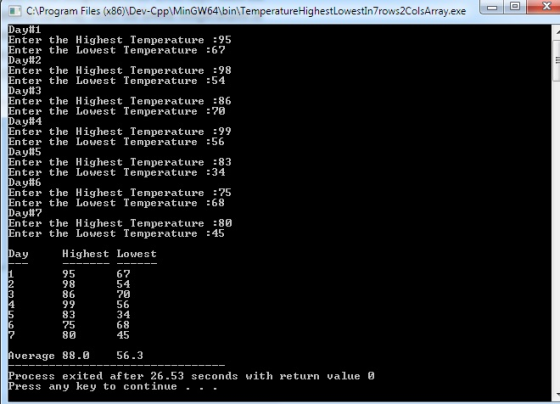
Output:
______________Thank You
Please rate me well.If you area satisfied.
Add Answer to:
If necessary, create a new project named Intermediate23 Project and save it in the Cpp8\Chap12 folder....
If necessary, create a new project named Intermediate24 Project and save it in the Cpp8\Chap14 folder....
If necessary, create a new project named Intermediate24 Project and save it in the Cpp8\Chap14 folder. Also create a new source file named Intermediate24.cpp. If you are using Microsoft Visual C++, copy the Intermediate24.txt file from the Cpp8\Chap14 folder to the Cpp8\Chap14\Intermediate24 Project folder. Use a text editor to open the Intermediate24.txt file, which contains payroll codes and salaries. Close the Intermediate24.txt file. Create a program that allows the user to enter a payroll code. The program should search for...
chapter 7. Create a program that allows the user to enter the ages (in years) of...
chapter 7. Create a program that allows the user to enter the ages (in years) of five people. The program should display the average age. Use the for the statement. Display the average age with one decimal place. If necessary, create a new project named TryThis15 Project, and save it in the Cpp8\Chap07 folder. Enter the C++ instructions into a source file named TryThis15.cpp. Also, enter appropriate comments and any additional instructions required by the compiler. Test the program using...
Follow the instructions for starting C++ and viewing the Intermediate23.cpp file, which is contained in either...
Follow the instructions for starting C++ and viewing the Intermediate23.cpp file, which is contained in either the Cpp8IChap11\Intermediate23 Project folder or the Cpp8\Chap11 folder. (Depending on your C++ development tool, you may need to open the project/solution file first.) The program uses an array to store the amount of money a game show contestant won in each of five days. The program should display the total amount won and the average daily amount won. It should also display the day...
Step 1: Getting Started Create a new .java file named Lab12.java. At the beginning of this...
Step 1: Getting Started Create a new .java file named Lab12.java. At the beginning of this file, include your assignment documentation code block. After the documentation block, you will need several import statements. import java.util.Scanner; import java.io.BufferedReader; import java.io.FileNotFoundException; import java.io.FileReader; import java.io.IOException; Next, declare the Lab12 class and define the main function. public class Lab12 { public static void main (String [] args) { Step 2: Declaring Variables For this section of the lab, you will need to declare...
Can someone help me with a c++ program Create a program that displays a measurement in...
 Can someone help me with a c++ program
Create a program that displays a measurement in either inches or centimeters. If necessary, create a new project named Introductory 18 Project, and save it in the Cpp8\Chap09 folder. The program should allow the user the choice of converting a measurement from inches to centimeters or vice versa. Use two program-defined functions: one for each different conversion type. Enter your C++ instructions into a source file named Introductory 18.cpp Also enter appropriate...
Can someone help me with a c++ program
Create a program that displays a measurement in either inches or centimeters. If necessary, create a new project named Introductory 18 Project, and save it in the Cpp8\Chap09 folder. The program should allow the user the choice of converting a measurement from inches to centimeters or vice versa. Use two program-defined functions: one for each different conversion type. Enter your C++ instructions into a source file named Introductory 18.cpp Also enter appropriate...
C++ The manager of Keystone Tile wants an application that displays the area of a rectangular...
C++ The manager of Keystone Tile wants an application that displays the area of a rectangular floor, given its measurements in feet. It should also display the total cost of tiling the floor, given the price per square foot of tile. 1-Create a new project named Intermediate13 Project, and save it in the Cpp8\Chap04 folder. Enter your C++ instructions into a source file named Intermediate13.cpp. Also enter appropriate comments and any additional instructions required by the compiler. Test the program...
What am I doing wrong here...…. Question is this : In this exercise, you will create...
What am I doing wrong here...…. Question is this : In this exercise, you will create a program that displays a table consisting of four rows and three columns. The first column should contain the numbers 10 through 13. The second and third columns should contain the results of squaring and cubing, respec- tively, the numbers 10 through 13. The table will look similar to the one shown in Figure 9-38. If necessary, create a new project named Introductoryl6 Project,...
- Create a folder called pgm1 - In your folder pgm1, USING A WINDOWS EDITOR, create...
- Create a folder called pgm1 - In your folder pgm1, USING A WINDOWS EDITOR, create a java program named Your lastName, firstLetterOfYourFirstName, pgm1W.java that will do the following: Start here - From your main method call a new method named: processArray - In the processArray method, create one 10x10 two dimensions array named twoDarray - In each index of your twoDarray, load the multiplication of its corresponding xy locations - Using the printf java command display, in a perfect...
Create a program named IntegerFacts whose Main() method declares an array of 10 integers. Call a...
Create a program named IntegerFacts whose Main() method declares an array of 10 integers. Call a method named FillArray to interactively fill the array with any number of values up to 10 or until a sentinel value (999) is entered. If an entry is not an integer, reprompt the user. Call a second method named Statistics that accepts out parameters for the highest value in the array, lowest value in the array, sum of the values in the array, and...
25. In this exercise, you create a program for the sales manager at Computer Haven, a...
 25. In this exercise, you create a program for the sales manager at Computer Haven, a small business that offers motivational seminars to local companies. Figure 7-53 shows the charge for attending a seminar. Notice that the charge per person depends on the number of people the company registers. For example, the cost for four registrants is $400; the cost for two registrants is $300. The program should allow the sales manager to enter the number of registrants for as...
 Can someone help me with a c++ program
Create a program that displays a measurement in either inches or centimeters. If necessary, create a new project named Introductory 18 Project, and save it in the Cpp8\Chap09 folder. The program should allow the user the choice of converting a measurement from inches to centimeters or vice versa. Use two program-defined functions: one for each different conversion type. Enter your C++ instructions into a source file named Introductory 18.cpp Also enter appropriate...
Can someone help me with a c++ program
Create a program that displays a measurement in either inches or centimeters. If necessary, create a new project named Introductory 18 Project, and save it in the Cpp8\Chap09 folder. The program should allow the user the choice of converting a measurement from inches to centimeters or vice versa. Use two program-defined functions: one for each different conversion type. Enter your C++ instructions into a source file named Introductory 18.cpp Also enter appropriate...
 25. In this exercise, you create a program for the sales manager at Computer Haven, a small business that offers motivational seminars to local companies. Figure 7-53 shows the charge for attending a seminar. Notice that the charge per person depends on the number of people the company registers. For example, the cost for four registrants is $400; the cost for two registrants is $300. The program should allow the sales manager to enter the number of registrants for as...
Most questions answered within 3 hours.
-
Where is the error in this code sequence?
String s1 = "Hello";
String s2 = "ello";...
asked 10 months ago -
Financial data for Joel de Paris, Inc., for last year
follow:
Joel de Paris, Inc.
Balance...
asked 10 months ago -
Consider this reaction:
Al2(SO4)3 (aq)+ BaCl3
(aq) Al2Cl6 (aq)- +
3BaSO4(s) . What is the...
asked 10 months ago -
Suppose that Savneet is considering increasing her
recent random sample from 20 car rentals to 40...
asked 10 months ago -
Trucks arrive at an unloading terminal at an average rate of 120
per hour.
Trucks arrive...
asked 10 months ago -
Why are methanol and ethanol completely soluble in water while
octanol is not very little soluble....
asked 10 months ago -
A facilities manager at a university reads in a research report
that the mean amount of...
asked 10 months ago -
When the CuSO4 is rehydrated by adding water to the anhydrous
compound, is this an endothermic...
asked 10 months ago -
A ray of sunlight is passing from diamond into crown glass; the
angle of incidence is...
asked 10 months ago -
A block of mass 0.249 kg is placed on top of a light, vertical
spring of...
asked 10 months ago -
how do the kidneys compensate in the presences of acidosis
a) trigger hyperventilate
b) reserve acid...
asked 10 months ago -
Question 501 pts
The rental rate of capital to the firm increases. Which of the
following...
asked 10 months ago