This questions have 2 parts if anybody can answer this questions will be helpful. Thanks (A)...
This questions have 2 parts if anybody can answer this questions will be helpful. Thanks
(A) 10 minutes PPT (B). Write a 4-page paper documenting your findings. You need to clear, succinct, and to the point / (summary of the PPT).
Topic- Protecting Your Computer
Homework Answers
Protecting Your Computer-->
Protecting Your Computer / Things You Can do to Secure Your PC Things You Can do to Secure Your PC
----------------------------------------------------------------------------------------------------------------------------------------------------------------------
What can do
1.Turn off File Sharing
2.Install Firewall
3.Scan for Spy ware
4.Anti-Virus
5.Update Your OS
6.Upgrade IE 6 to IE 7
7.Secure your Wireless Network
8.Encrypt your Data
9.Safe Passwords
10.Manage your accounts
----------------------------------------------------------------------------------------------------------------------------------------------------------------------
1.Turn off File Sharing
--Many attacks will allow a malicious hacker to have complete read/write access to the contents of your hard-drive.
--Be careful when using WiFi Hotspots
----------------------------------------------------------------------------------------------------------------------------------------------------------------------
2.Install Firewall
--A firewall can block malware that could otherwise scan your computer for vulnerabilities and then try to break in at a weak point.
--Use a wired or wireless router with firewall features to provide additional protection
----------------------------------------------------------------------------------------------------------------------------------------------------------------------
3.Scan for Spy ware
--Dell claims that 12% of their calls now involve questions about spy ware.
--Best defense is to use multiple anti-spy ware tools.
--Select an anti-spy ware tool that provides:
a)Automatic updates
b)Real-time scans
----------------------------------------------------------------------------------------------------------------------------------------------------------------------
4.Anti-Virus
--Scan your machine regularly
--Use AV program with:
--Real-time scanning
--Automatic Updates
--Email Scanning
--Many AV programs require an annual subscription.
----------------------------------------------------------------------------------------------------------------------------------------------------------------------
5.Update Your OS
--Turn on auto-updates in Windows
--Configure Auto-updates to patch the OS daily.
--Ensure that the machine is on at the scheduled update time
----------------------------------------------------------------------------------------------------------------------------------------------------------------------
6.Upgrade IE 6 to IE 7
--Features include:
--Phishing filter
--Cross Domain barriers
--Color coded address bar
--Extended Validation SSL Certificates
----------------------------------------------------------------------------------------------------------------------------------------------------------------------
7.Secure your Wireless Network
---Ensure your home network has the appropriate Encryption enabled.
--Some wireless routers allow you to restrict access to your wireless network by listing all your wireless devices MAC addresses.
--This will keep unwanted neighbors off your network.
----------------------------------------------------------------------------------------------------------------------------------------------------------------------
8.Encrypt your Data
--Protects the data if your laptop is stolen.
--You can encrypt select files or the entire hard drive.
--Requires a separate password to un-encrypt the data before it can be accessed.
----------------------------------------------------------------------------------------------------------------------------------------------------------------------
9.Safe Passwords
--Do not use personal information
--Use mixed case passwords with numbers and special characters.
--Change passwords often
--Use pass phrases rather than passwords
----------------------------------------------------------------------------------------------------------------------------------------------------------------------
10.Manage your accounts
--Logon as Administrator only when necessary.
--Disable the Guest Account
--Rename the Administrator Account
----------------------------------------------------------------------------------------------------------------------------------------------------------------------
The two major computer operating systems have built-in firewalls, software designed to create a barrier between your information and the outside world. Firewalls prevent unauthorized access to your business network and alert you of any intrusion attempts. The first thing to do with a new computer (or the computer you now use) is to make sure the firewall is enabled before you go online. However, you can also purchase a hardware firewall from companies like Cisco depending on your broadband router, which also has a built-in firewall that protects your network. If you have a larger business, you can purchase an additional business networking firewall.
Computer viruses, key loggers and Trojans are everywhere. Antivirus programs such as Bit defender, Panda Cloud Antivirus, Malware bytes and Avast immunize your computer against unauthorized code or software that threatens your operating system. Viruses have various effects that may be easy to spot: They might slow your computer to a halt or delete key files. Antivirus software plays a major role in protecting your system by detecting real-time threats to ensure your data is safe. Some advanced antivirus programs provide automatic updates, further protecting your machine from the new viruses that generate every day. After you install an antivirus program, don't forget to use it. Run or schedule regular virus scans to keep your computer virus-free.
Spyware is a special kind of software that secretly monitors and collects personal or organizational information. It is designed to be hard to detect and difficult to remove, and tends to serve up unwanted ads or search results to direct you to certain websites.Some spyware records every keystroke to gain access to passwords and other financial information. Anti-spyware concentrates exclusively on this part of the nuisance spectrum but is often included in major antivirus packages like Webroot, McAfee and Norton. Anti-spyware packages provide real-time protection by scanning all incoming information and blocking threats.
Using secure passwords is the most important way to prevent illegal intrusions onto your computer network. The more secure your passwords, the harder it is for a hacker to invade your system. More secure often means longer and more complex: Use a password that has at least eight characters and a combination of numbers, upper- and lowercase letters, and computer symbols. Hackers have an arsenal of tools to break short, easy passwords in minutes. Don't use recognizable words or combinations that represent birthdays or other information that can be connected to you. Don't reuse passwords either; if you have too many passwords to remember, consider using a password manager like Dash lane, Sticky Password, Last Pass or Password Boss.
Always install new updates to your operating systems. Most updates include security fixes that prevent hackers from accessing and exploiting your data. The same goes for your favorite apps. Today's web browsers are increasingly sophisticated, especially in privacy and security. Be sure to review your browser security settings in addition to installing all new updates. For example, you can use your browser to prevent websites from tracking your movements, which increases your online privacy.
Beware of email messages from unknown parties, and never click on links or open attachments that accompany them. Spam-catchers have upped their game in recent years and become pretty good at catching the most egregious spam. .
If you've got a new router, chances are it comes with no set security. Always log in to the router and set a password using a secure, encrypted setup. This prevents intruders from infiltrating your network and messing with your settings.
If your business is not already backing up your hard drive, then you need to go back to B-school. Backing up your information is critical in case disaster strikes and hackers do get through and trash your system.
Even if someone is able to steal your data or monitor your internet connection, encryption can prevent hackers from accessing any of that information. You can encrypt your Windows or mac OS hard drive with Bit Locker or File Vault, encrypt any USB flash drive that contains sensitive information, and use a VPN to encrypt your web traffic. Only shop at encrypted websites – you can spot them immediately by the "https" in the address bar accompanied by a closed padlock icon.
Points may be flip but its all related in given ppt
Add Answer to:
This questions have 2 parts if anybody can answer this questions
will be helpful. Thanks
(A)...
can anybody help? Question 10 (1 point) In a pickle - There is a beautiful hill...
 can
anybody help?
Question 10 (1 point) In a pickle - There is a beautiful hill station in India called 'Kurseong'. Besides breathtaking views, this town is also famous for its locally made spicy pickle called Tittira. A random group of tourists from different parts of the world were asked to taste Tittira and 10.83% of tourists said they liked it. The estimated standard error of the sample proportion is 0.0499. e 3: A normal distribution can be used to...
can
anybody help?
Question 10 (1 point) In a pickle - There is a beautiful hill station in India called 'Kurseong'. Besides breathtaking views, this town is also famous for its locally made spicy pickle called Tittira. A random group of tourists from different parts of the world were asked to taste Tittira and 10.83% of tourists said they liked it. The estimated standard error of the sample proportion is 0.0499. e 3: A normal distribution can be used to...
Please, answer this. This is actually an essay type which have two parts. You can answer...
 Please, answer this. This is actually an essay type which have
two parts. You can answer either of them or both.
Brainstorm (using any of the methods learnt in class) the following topics and write a paragraph on each topic of about 100 to 120 words. Underline topic sentences in each paragraph. Online leaning Impact of technology on today's Youth Revise the following vague or general thesis statements so that each makes a point that could be developed in a...
Please, answer this. This is actually an essay type which have
two parts. You can answer either of them or both.
Brainstorm (using any of the methods learnt in class) the following topics and write a paragraph on each topic of about 100 to 120 words. Underline topic sentences in each paragraph. Online leaning Impact of technology on today's Youth Revise the following vague or general thesis statements so that each makes a point that could be developed in a...
hey, can anybody help me with this. please answer all of the questions. Thank you so...
 hey, can anybody help me with this. please answer all of the
questions. Thank you so much.
- Lab Report Form - Question (1 point): 30 total points possible Hypothesis (2 points): Variables Why did you choose this as the variable? (1 point) (2 points) Dependent Variable (2 points) (1 point) Independent Variable (1 point each for a total of 3 points) (1 point) Controlled Variables - a mi Control Group: (2 points) Experimental Group: (2 points) Conclusion: (1 point)...
hey, can anybody help me with this. please answer all of the
questions. Thank you so much.
- Lab Report Form - Question (1 point): 30 total points possible Hypothesis (2 points): Variables Why did you choose this as the variable? (1 point) (2 points) Dependent Variable (2 points) (1 point) Independent Variable (1 point each for a total of 3 points) (1 point) Controlled Variables - a mi Control Group: (2 points) Experimental Group: (2 points) Conclusion: (1 point)...
Extended Answer Section There are three questions in this section, each with a number of parts. Write your answers...
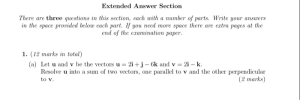 Extended Answer Section There are three questions in this section, each with a number of parts. Write your answers in the space provided below each part. If you need more space there are extra pages at the end of the examination paper. 1. (12 marks in total) (a) Let u and v be the vectors u 2i +j - 6k and v = 2i - k. Resolve u into a sum of two vectors, one parallel to v and the...
Hi can you please answer these two questions!! ASAP, Thanks a lot!! :) 1) A rectangular...
Hi can you please answer these two questions!! ASAP, Thanks a lot!! :) 1) A rectangular box is to have a square base and a volume of 24 ft. 3. If the material for the base costs 20 cent/square foot, the material for the sides costs 10 cent/square foot, and the material for the top costs 40 cent/square foot, determine the dimensions of the box that can be constructed at minimum cost. 2) A book designer has decided...
I need the answer for this questions step by step on a document or a paper....
 I need the answer for this questions step by step on a
document or a paper. It have to be clear so I can understand.
Please explain each answer. I will give thumbs up (like) to the
person that answer it correctly. Thank you.
This is organic chemistry, chapter 12 (edition
8)
The following mass spectrometry (MS) corresponds to trans-2-pentene: Write the structure of the "peak base" (m/z = 55). 100 Relative Intensity 10 20 60 70 DO 50 m/...
I need the answer for this questions step by step on a
document or a paper. It have to be clear so I can understand.
Please explain each answer. I will give thumbs up (like) to the
person that answer it correctly. Thank you.
This is organic chemistry, chapter 12 (edition
8)
The following mass spectrometry (MS) corresponds to trans-2-pentene: Write the structure of the "peak base" (m/z = 55). 100 Relative Intensity 10 20 60 70 DO 50 m/...
Please answer both questions on an excel sheet with the steps! Thanks You have $100,000 to...
 Please answer both questions on an excel sheet with the steps!
Thanks
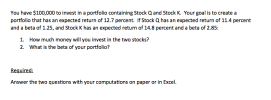
You have $100,000 to invest in a portfolio containing Stock Q and Stock K. Your goal is to create a portfolio that has an expected return of 12.7 percent. If Stock Q has an expected return of 11.4 percent and a beta of 1.25, and Stock K has an expected return of 14.8 percent and a beta of 2.85: 1. How much money will you invest in the...
Please answer both questions on an excel sheet with the steps!
Thanks
You have $100,000 to invest in a portfolio containing Stock Q and Stock K. Your goal is to create a portfolio that has an expected return of 12.7 percent. If Stock Q has an expected return of 11.4 percent and a beta of 1.25, and Stock K has an expected return of 14.8 percent and a beta of 2.85: 1. How much money will you invest in the...
Now that you have a better understanding of The Cloud, Cloud Computing, and Big Data, you...
Now that you have a better understanding of The Cloud, Cloud Computing, and Big Data, you will be asked in this Topic Paper to write a brief paper (no more than 3 pages double spaced, 12 point font) on Big Data and Big Data Analytics. Use what you already know about data, and supplement that knowledge with other materials that you can find to write a brief paper that answers the following questions. Be sure to use your own words...
Assignment Overview This writing assignment requires you to have a general idea of a researchable topic...
Assignment Overview This writing assignment requires you to have a general idea of a researchable topic related to the field of business. You will create a knowledge list, an expansive compilation of questions, an inquiry question, and a research proposal that you will likely address later through your final research paper. Deliverables 2- page paper (12 point font) written in a word processing program (such as MS Word). Activity Details Perform the following tasks: Step 1: Create a knowledge list...
Can you please help with this question, it has three parts! Thanks 1. Questions 1 through...
 Can you please help with this
question, it has three parts! Thanks
1. Questions 1 through 7: Four charges are placed at the corners of a square 5 cm on a side. Two of the charges - one at the origin (x,y) = (0,0) cm and the one on the y-axis at (0,5) cm have positive charges of 10-9 Coulombs. The other two charges one on the x-axis at (5,0) cm and the other at (x,y)= (5,5) cm have negative...
Can you please help with this
question, it has three parts! Thanks
1. Questions 1 through 7: Four charges are placed at the corners of a square 5 cm on a side. Two of the charges - one at the origin (x,y) = (0,0) cm and the one on the y-axis at (0,5) cm have positive charges of 10-9 Coulombs. The other two charges one on the x-axis at (5,0) cm and the other at (x,y)= (5,5) cm have negative...
 can
anybody help?
Question 10 (1 point) In a pickle - There is a beautiful hill station in India called 'Kurseong'. Besides breathtaking views, this town is also famous for its locally made spicy pickle called Tittira. A random group of tourists from different parts of the world were asked to taste Tittira and 10.83% of tourists said they liked it. The estimated standard error of the sample proportion is 0.0499. e 3: A normal distribution can be used to...
can
anybody help?
Question 10 (1 point) In a pickle - There is a beautiful hill station in India called 'Kurseong'. Besides breathtaking views, this town is also famous for its locally made spicy pickle called Tittira. A random group of tourists from different parts of the world were asked to taste Tittira and 10.83% of tourists said they liked it. The estimated standard error of the sample proportion is 0.0499. e 3: A normal distribution can be used to...
 Please, answer this. This is actually an essay type which have
two parts. You can answer either of them or both.
Brainstorm (using any of the methods learnt in class) the following topics and write a paragraph on each topic of about 100 to 120 words. Underline topic sentences in each paragraph. Online leaning Impact of technology on today's Youth Revise the following vague or general thesis statements so that each makes a point that could be developed in a...
Please, answer this. This is actually an essay type which have
two parts. You can answer either of them or both.
Brainstorm (using any of the methods learnt in class) the following topics and write a paragraph on each topic of about 100 to 120 words. Underline topic sentences in each paragraph. Online leaning Impact of technology on today's Youth Revise the following vague or general thesis statements so that each makes a point that could be developed in a...
 hey, can anybody help me with this. please answer all of the
questions. Thank you so much.
- Lab Report Form - Question (1 point): 30 total points possible Hypothesis (2 points): Variables Why did you choose this as the variable? (1 point) (2 points) Dependent Variable (2 points) (1 point) Independent Variable (1 point each for a total of 3 points) (1 point) Controlled Variables - a mi Control Group: (2 points) Experimental Group: (2 points) Conclusion: (1 point)...
hey, can anybody help me with this. please answer all of the
questions. Thank you so much.
- Lab Report Form - Question (1 point): 30 total points possible Hypothesis (2 points): Variables Why did you choose this as the variable? (1 point) (2 points) Dependent Variable (2 points) (1 point) Independent Variable (1 point each for a total of 3 points) (1 point) Controlled Variables - a mi Control Group: (2 points) Experimental Group: (2 points) Conclusion: (1 point)...
 Extended Answer Section There are three questions in this section, each with a number of parts. Write your answers in the space provided below each part. If you need more space there are extra pages at the end of the examination paper. 1. (12 marks in total) (a) Let u and v be the vectors u 2i +j - 6k and v = 2i - k. Resolve u into a sum of two vectors, one parallel to v and the...
 I need the answer for this questions step by step on a
document or a paper. It have to be clear so I can understand.
Please explain each answer. I will give thumbs up (like) to the
person that answer it correctly. Thank you.
This is organic chemistry, chapter 12 (edition
8)
The following mass spectrometry (MS) corresponds to trans-2-pentene: Write the structure of the "peak base" (m/z = 55). 100 Relative Intensity 10 20 60 70 DO 50 m/...
I need the answer for this questions step by step on a
document or a paper. It have to be clear so I can understand.
Please explain each answer. I will give thumbs up (like) to the
person that answer it correctly. Thank you.
This is organic chemistry, chapter 12 (edition
8)
The following mass spectrometry (MS) corresponds to trans-2-pentene: Write the structure of the "peak base" (m/z = 55). 100 Relative Intensity 10 20 60 70 DO 50 m/...
 Please answer both questions on an excel sheet with the steps!
Thanks
You have $100,000 to invest in a portfolio containing Stock Q and Stock K. Your goal is to create a portfolio that has an expected return of 12.7 percent. If Stock Q has an expected return of 11.4 percent and a beta of 1.25, and Stock K has an expected return of 14.8 percent and a beta of 2.85: 1. How much money will you invest in the...
Please answer both questions on an excel sheet with the steps!
Thanks
You have $100,000 to invest in a portfolio containing Stock Q and Stock K. Your goal is to create a portfolio that has an expected return of 12.7 percent. If Stock Q has an expected return of 11.4 percent and a beta of 1.25, and Stock K has an expected return of 14.8 percent and a beta of 2.85: 1. How much money will you invest in the...
 Can you please help with this
question, it has three parts! Thanks
1. Questions 1 through 7: Four charges are placed at the corners of a square 5 cm on a side. Two of the charges - one at the origin (x,y) = (0,0) cm and the one on the y-axis at (0,5) cm have positive charges of 10-9 Coulombs. The other two charges one on the x-axis at (5,0) cm and the other at (x,y)= (5,5) cm have negative...
Can you please help with this
question, it has three parts! Thanks
1. Questions 1 through 7: Four charges are placed at the corners of a square 5 cm on a side. Two of the charges - one at the origin (x,y) = (0,0) cm and the one on the y-axis at (0,5) cm have positive charges of 10-9 Coulombs. The other two charges one on the x-axis at (5,0) cm and the other at (x,y)= (5,5) cm have negative...
Most questions answered within 3 hours.
-
Where is the error in this code sequence?
String s1 = "Hello";
String s2 = "ello";...
asked 10 months ago -
Financial data for Joel de Paris, Inc., for last year
follow:
Joel de Paris, Inc.
Balance...
asked 10 months ago -
Consider this reaction:
Al2(SO4)3 (aq)+ BaCl3
(aq) Al2Cl6 (aq)- +
3BaSO4(s) . What is the...
asked 10 months ago -
Suppose that Savneet is considering increasing her
recent random sample from 20 car rentals to 40...
asked 10 months ago -
Trucks arrive at an unloading terminal at an average rate of 120
per hour.
Trucks arrive...
asked 10 months ago -
Why are methanol and ethanol completely soluble in water while
octanol is not very little soluble....
asked 10 months ago -
A facilities manager at a university reads in a research report
that the mean amount of...
asked 10 months ago -
When the CuSO4 is rehydrated by adding water to the anhydrous
compound, is this an endothermic...
asked 10 months ago -
A ray of sunlight is passing from diamond into crown glass; the
angle of incidence is...
asked 10 months ago -
A block of mass 0.249 kg is placed on top of a light, vertical
spring of...
asked 10 months ago -
how do the kidneys compensate in the presences of acidosis
a) trigger hyperventilate
b) reserve acid...
asked 10 months ago -
Question 501 pts
The rental rate of capital to the firm increases. Which of the
following...
asked 10 months ago