The ", delimiter" should now be changed to use the "^ delimiter". There needs to be...
The ", delimiter" should now be changed to use the "^ delimiter". There needs to be an 2nd address field added to the original code, as well as, a "plus 4" on the zip code (example: 47408-6606). Then the additional prompts must be added. Thank you!
Last Real-World problem (in module 04 - 05), you added functionality to allow the user to enter multiple patients until the user indicated done. You are to enhance this functionality. Add the following functionality to your report app:
Your app should read this text file via your report app:
XYZHospitalData.txt
12345^Jones^John^1234 Test Drive^PO box 123^Test City^IN^11234^1234^12/05/2015^250.00^25000.00
12346^Jones^Sara^1234 Test Drive^PO box 123^Test City^IN^11234^1234^12/20/2017^50.00^50000.00
12347^Doe^John^1235 XYZ Drive^^Test City^IN^11234^^01/05/2016^350.00^56799.00
12348^Doe^Sara^1235 XYZ Drive^^Test City^IN^11234^^11/09/2017^100.00^5020.52
12349^Lawson^Lonnie^12 South Drive^^Test City^IN^11236^^03/15/2013^253.51^25065.52
12349^Anderson^Sara^156 North Avenue^^Test City^IN^11246^^05/05/2013^21.33^251.56
12350^Smith^Andy^2455 East Street^^Test City^IN^11246^^12/05/2017^365.21^2543.33
If the data within the file (using the exact same format) is changed, the report should read the new data and format the report correctly. As long as the file is in the same format as outlined here:
Each field in this file is delimited by a carat (^)
The fields included in this file are ID^Last Name^First Name^Address Line 1^Address Line 2(optional)^City^State^Zip^ZipPlus4(Optional)^Payment Date^Payment Amount^Amount Owed
The fields marked as optional may not contain data. For example, the format might appear like this:
ID^Last Name^First Name^Address Line 1^^City^State^Zip^^Payment Date^Payment Amount^Amount Owed
When producing the report
Skip those fields that are not part of the report format
Rearrange those fields that are in a different order, so they correspond to the report format
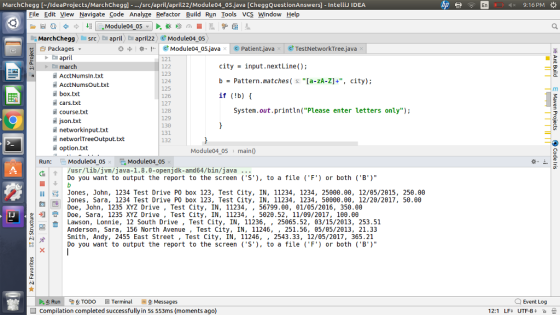
Add a prompt to the user "Do you want to output the report to the screen ('S'), to a file ('F') or both ('B')".
If the user enters 'S' your code should display the report to the screen as it currently does.
Whether the user enters an uppercase or lowercase letter should not matter. For example, 'S' or 's' should not matter. In both cases, the user should display the data as described above.
If the user enters "F" (or "f"), then the app should
Prompt the user for the desired file name (including the file path)
Output the report to a file using the file name / path the user entered. This output should be in the exact same format as the report is-if sent to the screen except that it outputs the report to a file.
If the user enters "B" (or "b"), then the app should output the report to both the screen and output it to a file.
This was my original code from the previous Module 04-05:
import java.util.Scanner;
import java.util.ArrayList;
import java.util.regex.Pattern;
class Patient {
public String getLast() {
return last;
}
public String getFirst() {
return first;
}
public String getAddress() {
return address;
}
public String getCity() {
return city;
}
public String getState() {
return state;
}
public String getZip() {
return zip;
}
public String getAmount() {
return amount;
}
public String getPayment() {
return payment;
}
public String getDate() {
return date;
}
private String last, first, address, city, state, zip, amount, payment, date;
public Patient (String s1, String s2, String address, String city, String state, String zip, String amount, String payment, String date) {
this.last = s1;
this.first = s2;
this.address = address;
this.city = city;
this.state = state;
this.zip = zip;
this.amount = amount;
this.payment = payment;
this.date = date;
}
}
public class Module04_05 {
public static void main(String[] args) {
Scanner input = new Scanner(System.in);
char ch;
boolean b;
String s1, s2, address, city, state, zip, amount, payment, date;
ArrayList<Patient> arr = new ArrayList<>();
do {
do {
System.out.print("Enter last name ");
s1 = input.nextLine();
b = Pattern.matches("[a-zA-Z]+", s1);
if (!b) {
System.out.println("Please enter letters only");
}
}
while (b==false);
do {
System.out.print("Enter first name ");
s2 = input.nextLine();
b = Pattern.matches("[a-zA-Z]+", s2);
if (!b) {
System.out.println("Please enter letters only");
}
}
while (b==false);
System.out.print("Enter address ");
address = input.nextLine();
do {
System.out.print("Enter city ");
city = input.nextLine();
b = Pattern.matches("[a-zA-Z]+", city);
if (!b) {
System.out.println("Please enter letters only");
}
}
while (b==false);
do {
System.out.print("Enter state ");
state = input.nextLine();
b = Pattern.matches("[a-zA-Z]+", state);
if (!b) {
System.out.println("Please enter letters only");
}
}
while (b==false);
do {
System.out.print("Enter zip ");
zip = input.nextLine();
if (zip.length()==5 && Pattern.matches("[0-9]+", zip)) {
b = true;
}
else {
System.out.println("Must be 5 digits long and must be digits only");
b=false;
}
}
while (b==false);
do {
System.out.print("Enter amount owed ");
amount = input.nextLine();
if (Pattern.matches("[0-9]+", amount))
b = true;
else {
System.out.println("Please enter digits only");
b = false;
}
}
while (b==false);
do {
System.out.print("Enter payment amount ");
payment = input.nextLine();
if (Pattern.matches("[0-9]+", payment))
b = true;
else {
System.out.println("Please enter digits only");
b = false;
}
}
while (b==false);
System.out.print("Enter payment date in the format 'dd/mm/yyyy'");
date = input.nextLine();
Patient p = new Patient (s1,s2,address,city,state,zip,amount,payment,date);
arr.add(p);
System.out.println("Any more entries? Click y for Yes or n for No");
ch = input.nextLine().charAt(0);
}
while (ch=='y');
System.out.printf("%80s\n", "XYZ Community Hospital");
System.out.printf(String.format("%150s\n", "").replace(' ', '='));
System.out.printf("%10s%30s%80s\n", "Name", "Address", "Payment Information");
System.out.printf("%-12s %-12s %-30s %-15s %-5s %-10s %-15s %-15s %-15s \n", "Last", "First", "Address Line 1", "City", "State", "Zip", "Amount Owed", "Payment Amt.", "Payment Date");
System.out.printf(String.format("%150s\n", "").replace(' ', '='));
for (int i = 0; i < arr.size(); i++) {
Patient p = arr.get(i);
System.out.printf("%-12s %-12s %-30s %-15s %-5s %-10s %-15s %-15s %-15s \n", p.getLast(), p.getFirst(), p.getAddress(), p.getCity(), p.getState(), p.getZip(), p.getAmount(), p.getPayment(), p.getDate());
}
input.close();
}
}
Homework Answers
package april.april22;

import java.io.FileNotFoundException;
import java.io.FileOutputStream;
import java.io.PrintWriter;
import java.nio.file.Files;
import java.nio.file.Paths;
import java.util.ArrayList;
import java.util.List;
import java.util.Scanner;
import java.util.regex.Pattern;

public class Module04_05 {

    public static void main(String[] args) {
        List<String> readFile = null;
        try {
            readFile = Files.readAllLines(Paths.get("src/XYZHospitalData.txt"));
        } catch (Exception e) {

        }


        ArrayList<Patient> arr = new ArrayList<>();
        ////read from file
        if (readFile != null) {
            for (int i = 0; i < readFile.size(); i++) {


                String[] strings = readFile.get(i).split("\\^");
                /*ID^
                Last Name^First Name^Address Line 1^Address Line 2(optional)
                ^City^State^Zip^ZipPlus4(Optional)
                ^Payment Date^Payment Amount^Amount Owed*/
                arr.add(new Patient(
                        strings[1], strings[2], strings[3] + " " + strings[4],
                        strings[5], strings[6], strings[7] + ", " + strings[8],
                        strings[11], strings[9], strings[10]));
            }


        }


        Scanner input = new Scanner(System.in);

        boolean isContinue = true;
        while (isContinue) {
            System.out.println("Do you want to output the report to the screen ('S'), to a file ('F') or both ('B')\"");

            String stringInput = input.next().toUpperCase();
            switch (stringInput) {
                case "S":
                    showInputOnDisplay(arr);
                    break;
                case "F":
                    printIntoFile(arr, false);
                    break;
                case "B":
                    printIntoFile(arr, true);
                    break;
            }
        }


        char ch;

        boolean b;

        String s1, s2, address, city, state, zip, amount, payment, date;


        do {

            do {

                System.out.print("Enter last name ");

                s1 = input.nextLine();

                b = Pattern.matches("[a-zA-Z]+", s1);

                if (!b) {

                    System.out.println("Please enter letters only");

                }

            }

            while (b == false);

            do {

                System.out.print("Enter first name ");

                s2 = input.nextLine();

                b = Pattern.matches("[a-zA-Z]+", s2);

                if (!b) {

                    System.out.println("Please enter letters only");

                }

            }

            while (b == false);

            System.out.print("Enter address ");

            address = input.nextLine();


            do {

                System.out.print("Enter city ");

                city = input.nextLine();

                b = Pattern.matches("[a-zA-Z]+", city);

                if (!b) {

                    System.out.println("Please enter letters only");

                }

            }

            while (b == false);

            do {

                System.out.print("Enter state ");

                state = input.nextLine();

                b = Pattern.matches("[a-zA-Z]+", state);

                if (!b) {

                    System.out.println("Please enter letters only");

                }

            }

            while (b == false);

            do {


                System.out.print("Enter zip ");

                zip = input.nextLine();

                if (zip.length() == 5 && Pattern.matches("[0-9]+", zip)) {

                    b = true;

                } else {

                    System.out.println("Must be 5 digits long and must be digits only");

                    b = false;

                }

            }

            while (b == false);

            do {

                System.out.print("Enter amount owed ");

                amount = input.nextLine();

                if (Pattern.matches("[0-9]+", amount))

                    b = true;

                else {

                    System.out.println("Please enter digits only");

                    b = false;

                }

            }

            while (b == false);

            do {

                System.out.print("Enter payment amount ");

                payment = input.nextLine();

                if (Pattern.matches("[0-9]+", payment))

                    b = true;

                else {

                    System.out.println("Please enter digits only");

                    b = false;

                }

            }

            while (b == false);

            System.out.print("Enter payment date in the format 'dd/mm/yyyy'");

            date = input.nextLine();

            Patient p = new Patient(s1, s2, address, city, state, zip, amount, payment, date);

            arr.add(p);

            System.out.println("Any more entries? Click y for Yes or n for No");

            ch = input.nextLine().charAt(0);

        }

        while (ch == 'y');


        System.out.printf("%80s\n", "XYZ Community Hospital");

        System.out.printf(String.format("%150s\n", "").replace(' ', '='));

        System.out.printf("%10s%30s%80s\n", "Name", "Address", "Payment Information");

        System.out.printf("%-12s %-12s %-30s %-15s %-5s %-10s %-15s %-15s %-15s \n", "Last", "First", "Address Line 1", "City", "State", "Zip", "Amount Owed", "Payment Amt.", "Payment Date");

        System.out.printf(String.format("%150s\n", "").replace(' ', '='));

        for (int i = 0; i < arr.size(); i++) {

            Patient p = arr.get(i);

            System.out.printf("%-12s %-12s %-30s %-15s %-5s %-10s %-15s %-15s %-15s \n", p.getLast(), p.getFirst(), p.getAddress(), p.getCity(), p.getState(), p.getZip(), p.getAmount(), p.getPayment(), p.getDate());

        }

        input.close();

    }

    private static void printIntoFile(ArrayList<Patient> arr, boolean isPrint) {
        try {
            FileOutputStream fos = new FileOutputStream("src/XYZHospitalDataOutput.txt", false);
            PrintWriter pw = new PrintWriter(fos);
            for (int i = 0; i < arr.size(); i++) {
                pw.println(arr.get(i));
                if (isPrint){
                    System.out.println(arr.get(i));
                }
            }
            pw.close();
        } catch (FileNotFoundException fnfe) {
            System.out.println("output.txt not found.");
        }
    }

    private static void showInputOnDisplay(ArrayList<Patient> arr) {
        for (int i = 0; i <arr.size(); i++) {
            System.out.println(arr.get(i));
        }
    }

}
///////////////////
package april.april22;

import java.util.Scanner;

import java.util.ArrayList;

import java.util.regex.Pattern;

class Patient {

    public String getLast() {

        return last;

    }

    public String getFirst() {

        return first;

    }

    public String getAddress() {

        return address;

    }

    public String getCity() {

        return city;

    }

    public String getState() {

        return state;

    }

    public String getZip() {

        return zip;

    }

    public String getAmount() {

        return amount;

    }

    public String getPayment() {

        return payment;

    }

    public String getDate() {

        return date;

    }

    private String last, first, address, city, state, zip, amount, payment, date;

    public Patient(String last, String first, String address, String city, String state, String zip, String amount, String payment, String date) {

        this.last = last;

        this.first = first;

        this.address = address;

        this.city = city;

        this.state = state;

        this.zip = zip;

        this.amount = amount;

        this.payment = payment;

        this.date = date;

    }


    @Override
    public String toString() {
        return last+", "+first+", "+address+", "+city+", "+state+", "+zip+", "+amount+", "+payment+", "+date;
    }
}
//////////Output////////////
Add Answer to:
The ", delimiter" should now be changed to use the "^
delimiter". There needs to be...
Hello Can you help to fix the program. When running, it still show Exception in thread...
Hello Can you help to fix the program. When running, it still show Exception in thread "main" java.lang.RuntimeException: Uncompilable source code - cannot find symbol symbol: class Contact location: class ContactMap at ContactMap.main(ContactMap.java:40) C:\Users\user\AppData\Local\NetBeans\Cache\8.1\executor-snippets\run.xml:53: Java returned: 1 BUILD FAILED (total time: 1 second) ************************ import java.io.BufferedReader; import java.io.FileNotFoundException; import java.io.FileReader; import java.io.IOException; import java.util.HashMap; import java.util.Map; import java.util.Scanner; import java.util.TreeMap; public class ContactMap { public static void main(String args[]) throws IOException { Scanner input=new Scanner(System.in); //Create a TreeMap ,...
Java // Topic 2c // Program reserves airline seats. import java.util.Scanner public class Plane { //...
Java // Topic 2c // Program reserves airline seats. import java.util.Scanner public class Plane { // checks customers in and assigns them a boarding pass // To the human user, Seats 1 to 2 are for First Class passengers and Seats 3 to 5 are for Economy Class passengers // public void reserveSeats() { int counter = 0; int section = 0; int choice = 0; String eatRest = ""; //to hold junk in input buffer String inName = ""; ...
Hi, So I have a finished class for the most part aside of the toFile method...
 Hi,
So I have a finished class for the most part aside of the toFile
method that takes a file absolute path +file name and writes to
that file. I'd like to write everything that is in my run method
also the toFile method. (They are the last two methods in the
class). When I write to the file this is what I get.
Instead of the desired
That I get to my counsel. I am
having trouble writing my...
Hi,
So I have a finished class for the most part aside of the toFile
method that takes a file absolute path +file name and writes to
that file. I'd like to write everything that is in my run method
also the toFile method. (They are the last two methods in the
class). When I write to the file this is what I get.
Instead of the desired
That I get to my counsel. I am
having trouble writing my...
this needs to be in Java: use a comparator class which is passed into the sort...
 this needs to be in Java:
use a comparator class which
is passed into the sort method that is available on the
ArrayList.
import java.util.Scanner;
public class Assign1{
public static
void main(String[] args){
Scanner reader = new Scanner (System.in);
MyDate todayDate = new MyDate();
int choice = 0;
Library library = new Library();
while (choice != 6){
displayMainMenu();
if (reader.hasNextInt()){
choice = reader.nextInt();
switch(choice){
case 1:
library.inputResource(reader, todayDate);
break;
case 2:
System.out.println(library.resourcesOverDue(todayDate));
break;
case 3:
System.out.println(library.toString());
break;
case 4:
library.deleteResource(reader,...
this needs to be in Java:
use a comparator class which
is passed into the sort method that is available on the
ArrayList.
import java.util.Scanner;
public class Assign1{
public static
void main(String[] args){
Scanner reader = new Scanner (System.in);
MyDate todayDate = new MyDate();
int choice = 0;
Library library = new Library();
while (choice != 6){
displayMainMenu();
if (reader.hasNextInt()){
choice = reader.nextInt();
switch(choice){
case 1:
library.inputResource(reader, todayDate);
break;
case 2:
System.out.println(library.resourcesOverDue(todayDate));
break;
case 3:
System.out.println(library.toString());
break;
case 4:
library.deleteResource(reader,...
By editing the code below to include composition, enums, toString; must do the following: Prompt the...
By editing the code below to include composition, enums, toString; must do the following: Prompt the user to enter their birth date and hire date (see Fig. 8.7, 8.8 and 8.9 examples) in addition to the previous user input Create a new class that validates the dates that are input (can copy date class from the book) Incorporate composition into your class with these dates Use enums to identify the employee status as fulltime (40 or more hours worked for...
Java need help with searching for a contact Question:Write a program that uses an ArrayList of...
Java need help with searching for a contact Question:Write a program that uses an ArrayList of parameter type Contact to store a database of contacts. The Contact class should store the contact’s first and last name, phone number, and email address. Add appropriate accessor and mutator methods. Your database program should present a menu that allows the user to add a contact, display all contacts, search for a specific contact and display it, or search for a specific contact and...
Can you help me rearrange my code by incorporating switch I'm not really sure how to...
Can you help me rearrange my code by incorporating switch I'm not really sure how to do it and it makes the code look cleaner. Can you help me do it but still give the same output? Also kindly add an in-line comment on what changes and rearrangement you've done so I can understand what's going on. import java.util.ArrayList; import java.util.Scanner; public class Bank { /** * Add and read bank information to the user. * @param arg A string,...
Can you help me rearrange my code to make it look cleaner but still give the...
Can you help me rearrange my code to make it look cleaner but still give the same output? Also kindly add an in-line comment on what changes and rearrangement you've done so I can understand what's going on. import java.util.ArrayList; import java.util.Scanner; public class Bank { /** * Add and read bank information to the user. * @param arg A string, double and int array containing * the command line arguments. * @exception Any exception * @return an arraylsit of...
8-7. Modify exercise 7-2 on comparing strings so it is now done in an applet instead...
8-7. Modify exercise 7-2 on comparing strings so it is now done in an applet instead of an application. The prompts will now be in labels and the input will now be textfields. The user will hit enter in the secondtextfield to get the results in two other answer labels. The results (which is greater and the difference amount) will be in these two other answer labels. Declare everything at the top, use the init to add the components to...
My Java code from last assignment: Previous Java code: public static void main(String args[]) { //...
 My Java code from last assignment:
Previous Java code:
public static
void main(String args[]) {
// While loop set-up
boolean flag = true;
while (flag) {
Scanner sc = new
Scanner(System.in);
// Ask user to enter employee number
System.out.print("Enter employee
number: ");
int employee_number = sc.nextInt();
// Ask user to enter last name
System.out.print("Enter employee last
name: ");
String last_name = sc.next();
// Ask user to enter number of hours worked
System.out.print("Enter number of
hours worked: ");
int hours_worked =...
My Java code from last assignment:
Previous Java code:
public static
void main(String args[]) {
// While loop set-up
boolean flag = true;
while (flag) {
Scanner sc = new
Scanner(System.in);
// Ask user to enter employee number
System.out.print("Enter employee
number: ");
int employee_number = sc.nextInt();
// Ask user to enter last name
System.out.print("Enter employee last
name: ");
String last_name = sc.next();
// Ask user to enter number of hours worked
System.out.print("Enter number of
hours worked: ");
int hours_worked =...
 Hi,
So I have a finished class for the most part aside of the toFile
method that takes a file absolute path +file name and writes to
that file. I'd like to write everything that is in my run method
also the toFile method. (They are the last two methods in the
class). When I write to the file this is what I get.
Instead of the desired
That I get to my counsel. I am
having trouble writing my...
Hi,
So I have a finished class for the most part aside of the toFile
method that takes a file absolute path +file name and writes to
that file. I'd like to write everything that is in my run method
also the toFile method. (They are the last two methods in the
class). When I write to the file this is what I get.
Instead of the desired
That I get to my counsel. I am
having trouble writing my...
 this needs to be in Java:
use a comparator class which
is passed into the sort method that is available on the
ArrayList.
import java.util.Scanner;
public class Assign1{
public static
void main(String[] args){
Scanner reader = new Scanner (System.in);
MyDate todayDate = new MyDate();
int choice = 0;
Library library = new Library();
while (choice != 6){
displayMainMenu();
if (reader.hasNextInt()){
choice = reader.nextInt();
switch(choice){
case 1:
library.inputResource(reader, todayDate);
break;
case 2:
System.out.println(library.resourcesOverDue(todayDate));
break;
case 3:
System.out.println(library.toString());
break;
case 4:
library.deleteResource(reader,...
this needs to be in Java:
use a comparator class which
is passed into the sort method that is available on the
ArrayList.
import java.util.Scanner;
public class Assign1{
public static
void main(String[] args){
Scanner reader = new Scanner (System.in);
MyDate todayDate = new MyDate();
int choice = 0;
Library library = new Library();
while (choice != 6){
displayMainMenu();
if (reader.hasNextInt()){
choice = reader.nextInt();
switch(choice){
case 1:
library.inputResource(reader, todayDate);
break;
case 2:
System.out.println(library.resourcesOverDue(todayDate));
break;
case 3:
System.out.println(library.toString());
break;
case 4:
library.deleteResource(reader,...
 My Java code from last assignment:
Previous Java code:
public static
void main(String args[]) {
// While loop set-up
boolean flag = true;
while (flag) {
Scanner sc = new
Scanner(System.in);
// Ask user to enter employee number
System.out.print("Enter employee
number: ");
int employee_number = sc.nextInt();
// Ask user to enter last name
System.out.print("Enter employee last
name: ");
String last_name = sc.next();
// Ask user to enter number of hours worked
System.out.print("Enter number of
hours worked: ");
int hours_worked =...
My Java code from last assignment:
Previous Java code:
public static
void main(String args[]) {
// While loop set-up
boolean flag = true;
while (flag) {
Scanner sc = new
Scanner(System.in);
// Ask user to enter employee number
System.out.print("Enter employee
number: ");
int employee_number = sc.nextInt();
// Ask user to enter last name
System.out.print("Enter employee last
name: ");
String last_name = sc.next();
// Ask user to enter number of hours worked
System.out.print("Enter number of
hours worked: ");
int hours_worked =...
Most questions answered within 3 hours.
-
Where is the error in this code sequence?
String s1 = "Hello";
String s2 = "ello";...
asked 10 months ago -
Financial data for Joel de Paris, Inc., for last year
follow:
Joel de Paris, Inc.
Balance...
asked 10 months ago -
Consider this reaction:
Al2(SO4)3 (aq)+ BaCl3
(aq) Al2Cl6 (aq)- +
3BaSO4(s) . What is the...
asked 10 months ago -
Suppose that Savneet is considering increasing her
recent random sample from 20 car rentals to 40...
asked 10 months ago -
Trucks arrive at an unloading terminal at an average rate of 120
per hour.
Trucks arrive...
asked 10 months ago -
Why are methanol and ethanol completely soluble in water while
octanol is not very little soluble....
asked 10 months ago -
A facilities manager at a university reads in a research report
that the mean amount of...
asked 10 months ago -
When the CuSO4 is rehydrated by adding water to the anhydrous
compound, is this an endothermic...
asked 10 months ago -
A ray of sunlight is passing from diamond into crown glass; the
angle of incidence is...
asked 10 months ago -
A block of mass 0.249 kg is placed on top of a light, vertical
spring of...
asked 10 months ago -
how do the kidneys compensate in the presences of acidosis
a) trigger hyperventilate
b) reserve acid...
asked 10 months ago -
Question 501 pts
The rental rate of capital to the firm increases. Which of the
following...
asked 10 months ago