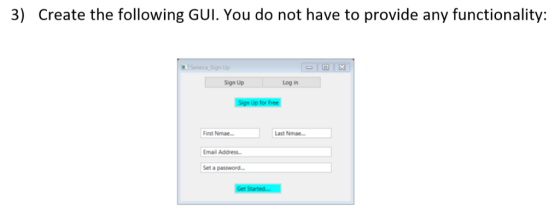
Use of swing or javaFX is optional in any of the questions...
Homework Answers
check out the solution and let me know if any queries through COMMENTS.
-------------------------------------------------------------------
// import required packages
import java.awt.*;
import javax.swing.*;
public class MyGui {
public static void main(String[] args) {
// declare required GUI components
JTextField fn, ln, email, pwd;
JButton signup, login, sfree, start;
Color myColor = new Color(51,204,255);
// create a frame object
JFrame frame = new JFrame("Seneca_Sign Up");
// initialise the gui components with the preferred
text as "Sign Up"
signup = new JButton("Sign Up");
login = new JButton("Log In");
sfree = new JButton("Sign Up for Free");
// sets background color as blue
sfree.setBackground(myColor);
start = new JButton("Get Started...");
// sets background color as blue
start.setBackground(myColor);
fn = new JTextField("First Name...");
// sets the font color as gray - these just displays
text and doesn't have actions.
fn.setForeground(Color.gray);
ln = new JTextField("Last Name...");
ln.setForeground(Color.gray);
email = new JTextField("Email Address...");
email.setForeground(Color.gray);
pwd = new JTextField("Set a password...");
pwd.setForeground(Color.gray);
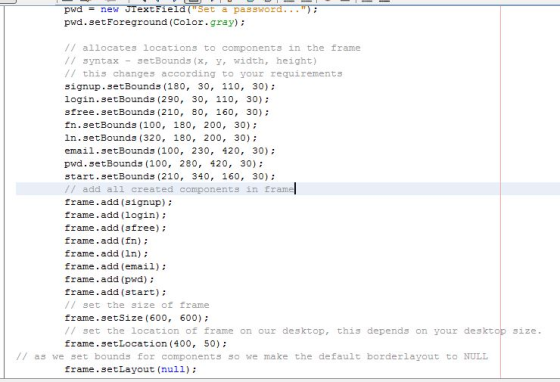
// allocates locations to components in the
frame
// syntax - setBounds(x, y, width, height)
// this changes according to your requirements
signup.setBounds(180, 30, 110, 30);
login.setBounds(290, 30, 110, 30);
sfree.setBounds(210, 80, 160, 30);
fn.setBounds(100, 180, 200, 30);
ln.setBounds(320, 180, 200, 30);
email.setBounds(100, 230, 420, 30);
pwd.setBounds(100, 280, 420, 30);
start.setBounds(210, 340, 160, 30);
// add all created components in frame
frame.add(signup);
frame.add(login);
frame.add(sfree);
frame.add(fn);
frame.add(ln);
frame.add(email);
frame.add(pwd);
frame.add(start);
// set the size of frame
frame.setSize(600, 600);
// set the location of frame on our desktop, this
depends on your desktop size.
frame.setLocation(400, 50);
// as we set bounds for components so we make the default
borderlayout to NULL
frame.setLayout(null);
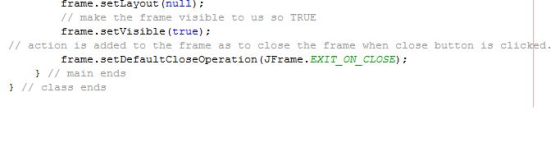
// make the frame visible to us so TRUE
frame.setVisible(true);
// action is added to the frame as to close the frame when close
button is clicked.
frame.setDefaultCloseOperation(JFrame.EXIT_ON_CLOSE);
} // main ends
} // class ends
---------------------------------
![mport required packages import java.awt. *, import javax.swing. public class MyGuǐ { public static void main (String [] args)](http://img.homeworklib.com/questions/a716c520-8664-11eb-95e3-cd93c86c08fc.png?x-oss-process=image/resize,w_560)
-------------------------------------------
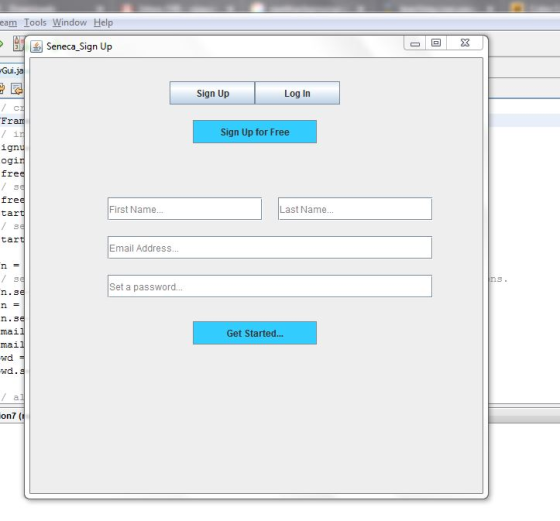
OUTPUT ::
Add Answer to:
Use of swing or javaFX is optional in any of the
questions...
3) Create the following...
You will be designing and creating a Java GUI-based course application. Create a “Student” class. You...
You will be designing and creating a Java GUI-based course application. Create a “Student” class. You need to have at least 3 instance variables (student characteristics like name,…), at least 2 constructors (1 should be a no-arg constructor), set and get methods. Create a “Course” class that consists of 2 instance variables: the course name and an array of Students (using your Student class). Design and create a JavaFX-based GUI interface that allows you to : INPUT information for Course...
please use Python You are to create a program that generates an email addresses. The format...
please use Python You are to create a program that generates an email addresses. The format is as follows: firstname.lastname@domain.topleveldomain (maximum 60 characters) example (aaa.bbb@ccc.ddd) please use any number of variables and types that you wish. The only requirement is that you ask the user one at a time for first name, last name, domain and TLD (top level domain), use that to generate the email address string. The maximum size of the created email address string is 60. If...
Write a JavaFX program to display 5 labels and 3 buttons. You can use any kind...
Write a JavaFX program to display 5 labels and 3 buttons. You can use any kind of Pane you like to use. Display 3 red circles and 2 blue rectangles (pick your own size). Use the Image and ImageView classes (explained in section 14.9 of your textbook) to show 2 images of your choice. Include your first and last name somewhere on the frame, label, button, etc. We won’t discuss handing events where one would be able to click buttons...
Java Help References Mailings Review View No Spacing Heading 1 Heading 2 Normal For following questions, please provided your solutions for each of the questions in a separate Word document to...
 Java Help
References Mailings Review View No Spacing Heading 1 Heading 2 Normal For following questions, please provided your solutions for each of the questions in a separate Word document to include screenshots of execution of the code. Using IntellJ IDE, which can be downloaded at the following address https://www.jetbrains.com/idea/downloadf#eection windows. Be sure to select the Community version. Create a project using the proper naming convention a. b. Create the code to build a GUI and should have the following...
Java Help
References Mailings Review View No Spacing Heading 1 Heading 2 Normal For following questions, please provided your solutions for each of the questions in a separate Word document to include screenshots of execution of the code. Using IntellJ IDE, which can be downloaded at the following address https://www.jetbrains.com/idea/downloadf#eection windows. Be sure to select the Community version. Create a project using the proper naming convention a. b. Create the code to build a GUI and should have the following...
Create an online order form and calculator for Joe’s Coffee House. Joe sells regular and decaff...
Create an online order form and calculator for Joe’s Coffee House. Joe sells regular and decaff coffee. Customers have the option of adding cream, sugar, artificial sweetener, cinnamon and caramel to their coffee. They can have any number of the options available or none at all. Customers can add one or more muffins to their order. Possible muffins are blueberry, chocolate chip, banana nut and bran. Coffee is $3.00 Coffee Add-Ins are $0.25 a piece Muffins are $2.25 apiece. Your...
with java programming language Create a swing application to get following gui screen. All gui elements...
 with java programming language
Create a swing application to get following gui screen. All gui elements in the JFrame are JButton. You are expected to write proper event handler so that: • When the JButton with text "O" is pressed value of the button increased by 1. • When the JButton with text "a" is pressed the text will be replaced with the next ascii character. i.e it will be 'b' on first press, than 'c'on next press, so on....
with java programming language
Create a swing application to get following gui screen. All gui elements in the JFrame are JButton. You are expected to write proper event handler so that: • When the JButton with text "O" is pressed value of the button increased by 1. • When the JButton with text "a" is pressed the text will be replaced with the next ascii character. i.e it will be 'b' on first press, than 'c'on next press, so on....
in JAVA please and please show output!! Create a JavaFX application that simulates the rolling of...
 in JAVA please and please show output!!
Create a JavaFX application that simulates the rolling of a pair of
dice. When the user clicks a button, the application should
generate two random numbers, each in the range of 1 through 6, to
represent the value of the dice. Use ImageView component to display
the dice. Six images are included in the project folder for you to
use. For example, the first picture below is the initial window,
after clicking the...
in JAVA please and please show output!!
Create a JavaFX application that simulates the rolling of a pair of
dice. When the user clicks a button, the application should
generate two random numbers, each in the range of 1 through 6, to
represent the value of the dice. Use ImageView component to display
the dice. Six images are included in the project folder for you to
use. For example, the first picture below is the initial window,
after clicking the...
I tried to complete a Java application that must include at a minimum: Three classes minimum...
I tried to complete a Java application that must include at a minimum: Three classes minimum At least one class must use inheritance At least one class must be abstract JavaFX front end – as you will see, JavaFX will allow you to create a GUI user interface. The User Interface must respond to events. If your application requires a data backend, you can choose to use a database or to use text files. Error handling - The application should...
Answer questions 1-20 about creating GUI applications with JavaFX 1. A tree-like data structure that contains...
Answer questions 1-20 about creating GUI applications with JavaFX 1. A tree-like data structure that contains the components of a JavaFX GUI is called a: a. directory tree b. node tree c.node graph d. scene graph 2. A node in a scene graph that contains other nodes is called a: a. root node b. branch node c. leaf node d. terminal node 3. A node in a scene graph that has no children is called a: a. root node b....
Hi guys! I need some help with this Web Design mini project. Any help will be appreciated a rated...
 Hi guys! I need some help with this Web Design mini project. Any
help will be appreciated a rated. Thanks in advance!
Here is the project: (It must be implemented using JSP and
MySQL) not PHP
I
need help with the code implementation!
Mini Facebook A. Description You are asked to implement a social network B. Requirements You are to implement a computer system with the following capabilities 1. User accounts including: sign up, login, and logout. 2. Each user...
Hi guys! I need some help with this Web Design mini project. Any
help will be appreciated a rated. Thanks in advance!
Here is the project: (It must be implemented using JSP and
MySQL) not PHP
I
need help with the code implementation!
Mini Facebook A. Description You are asked to implement a social network B. Requirements You are to implement a computer system with the following capabilities 1. User accounts including: sign up, login, and logout. 2. Each user...
 Java Help
References Mailings Review View No Spacing Heading 1 Heading 2 Normal For following questions, please provided your solutions for each of the questions in a separate Word document to include screenshots of execution of the code. Using IntellJ IDE, which can be downloaded at the following address https://www.jetbrains.com/idea/downloadf#eection windows. Be sure to select the Community version. Create a project using the proper naming convention a. b. Create the code to build a GUI and should have the following...
Java Help
References Mailings Review View No Spacing Heading 1 Heading 2 Normal For following questions, please provided your solutions for each of the questions in a separate Word document to include screenshots of execution of the code. Using IntellJ IDE, which can be downloaded at the following address https://www.jetbrains.com/idea/downloadf#eection windows. Be sure to select the Community version. Create a project using the proper naming convention a. b. Create the code to build a GUI and should have the following...
 with java programming language
Create a swing application to get following gui screen. All gui elements in the JFrame are JButton. You are expected to write proper event handler so that: • When the JButton with text "O" is pressed value of the button increased by 1. • When the JButton with text "a" is pressed the text will be replaced with the next ascii character. i.e it will be 'b' on first press, than 'c'on next press, so on....
with java programming language
Create a swing application to get following gui screen. All gui elements in the JFrame are JButton. You are expected to write proper event handler so that: • When the JButton with text "O" is pressed value of the button increased by 1. • When the JButton with text "a" is pressed the text will be replaced with the next ascii character. i.e it will be 'b' on first press, than 'c'on next press, so on....
 in JAVA please and please show output!!
Create a JavaFX application that simulates the rolling of a pair of
dice. When the user clicks a button, the application should
generate two random numbers, each in the range of 1 through 6, to
represent the value of the dice. Use ImageView component to display
the dice. Six images are included in the project folder for you to
use. For example, the first picture below is the initial window,
after clicking the...
in JAVA please and please show output!!
Create a JavaFX application that simulates the rolling of a pair of
dice. When the user clicks a button, the application should
generate two random numbers, each in the range of 1 through 6, to
represent the value of the dice. Use ImageView component to display
the dice. Six images are included in the project folder for you to
use. For example, the first picture below is the initial window,
after clicking the...
 Hi guys! I need some help with this Web Design mini project. Any
help will be appreciated a rated. Thanks in advance!
Here is the project: (It must be implemented using JSP and
MySQL) not PHP
I
need help with the code implementation!
Mini Facebook A. Description You are asked to implement a social network B. Requirements You are to implement a computer system with the following capabilities 1. User accounts including: sign up, login, and logout. 2. Each user...
Hi guys! I need some help with this Web Design mini project. Any
help will be appreciated a rated. Thanks in advance!
Here is the project: (It must be implemented using JSP and
MySQL) not PHP
I
need help with the code implementation!
Mini Facebook A. Description You are asked to implement a social network B. Requirements You are to implement a computer system with the following capabilities 1. User accounts including: sign up, login, and logout. 2. Each user...
Most questions answered within 3 hours.
-
Where is the error in this code sequence?
String s1 = "Hello";
String s2 = "ello";...
asked 11 months ago -
Financial data for Joel de Paris, Inc., for last year
follow:
Joel de Paris, Inc.
Balance...
asked 11 months ago -
Consider this reaction:
Al2(SO4)3 (aq)+ BaCl3
(aq) Al2Cl6 (aq)- +
3BaSO4(s) . What is the...
asked 11 months ago -
Suppose that Savneet is considering increasing her
recent random sample from 20 car rentals to 40...
asked 11 months ago -
Trucks arrive at an unloading terminal at an average rate of 120
per hour.
Trucks arrive...
asked 11 months ago -
Why are methanol and ethanol completely soluble in water while
octanol is not very little soluble....
asked 11 months ago -
A facilities manager at a university reads in a research report
that the mean amount of...
asked 11 months ago -
When the CuSO4 is rehydrated by adding water to the anhydrous
compound, is this an endothermic...
asked 11 months ago -
A ray of sunlight is passing from diamond into crown glass; the
angle of incidence is...
asked 11 months ago -
A block of mass 0.249 kg is placed on top of a light, vertical
spring of...
asked 11 months ago -
how do the kidneys compensate in the presences of acidosis
a) trigger hyperventilate
b) reserve acid...
asked 11 months ago -
Question 501 pts
The rental rate of capital to the firm increases. Which of the
following...
asked 11 months ago