
Homework Answers
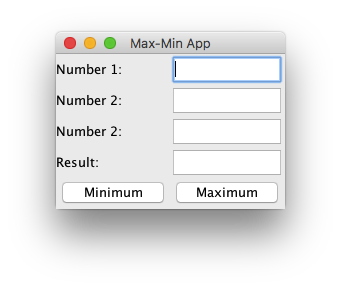
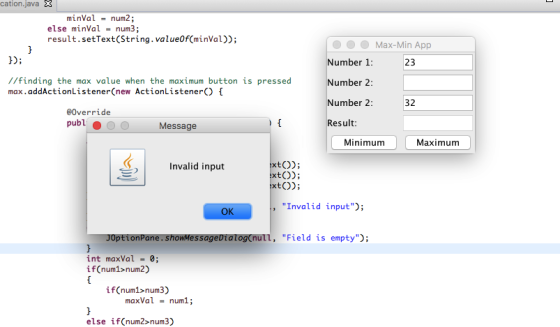
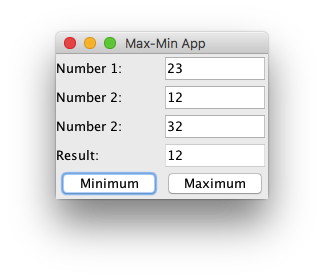
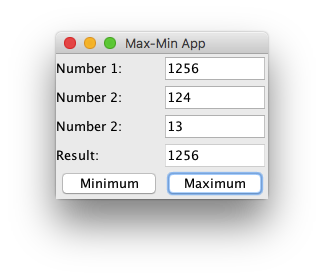
PROGRAM CODE:
package GUI;
import java.awt.Container;
import java.awt.GridLayout;
import java.awt.event.ActionEvent;
import java.awt.event.ActionListener;
import javax.swing.JButton;
import javax.swing.JFrame;
import javax.swing.JLabel;
import javax.swing.JOptionPane;
import javax.swing.JTextField;
public class MaxMinApplication {
public static void main(String[] args) {
//creating frame and adding components
JFrame frame = new JFrame("Max-Min App");
Container c = frame.getContentPane();
c.setLayout(new GridLayout(5, 2));
JTextField number1 = new JTextField();
JTextField number2 = new JTextField();
JTextField number3 = new JTextField();
JTextField result = new JTextField();
JButton min = new JButton("Minimum");
JButton max = new JButton("Maximum");
result.setEditable(false);
c.add(new JLabel("Number 1: "));
c.add(number1);
c.add(new JLabel("Number 2: "));
c.add(number2);
c.add(new JLabel("Number 2: "));
c.add(number3);
c.add(new JLabel("Result: "));
c.add(result);
c.add(min);
c.add(max);
//finding the minimum value when the min button is pressed
min.addActionListener(new ActionListener() {
@Override
public void actionPerformed(ActionEvent e) {
int num1 = 0, num2 = 0, num3 = 0;
try
{
num1 = Integer.parseInt(number1.getText());
num2 = Integer.parseInt(number2.getText());
num3 = Integer.parseInt(number3.getText());
}catch (NumberFormatException e1) {
JOptionPane.showMessageDialog(null, "Invalid input");
}
catch (NullPointerException e2) {
JOptionPane.showMessageDialog(null, "Field is empty");
}
int minVal = 0;
if(num1<num2)
{
if(num1<num3)
minVal = num1;
else
minVal = num3;
}
else if(num2<num3)
minVal = num2;
else minVal = num3;
result.setText(String.valueOf(minVal));
}
});
//finding the max value when the maximum button is pressed
max.addActionListener(new ActionListener() {
@Override
public void actionPerformed(ActionEvent e) {
int num1 = 0, num2 = 0, num3 = 0;
try
{
num1 = Integer.parseInt(number1.getText());
num2 = Integer.parseInt(number2.getText());
num3 = Integer.parseInt(number3.getText());
}catch (NumberFormatException e1) {
JOptionPane.showMessageDialog(null, "Invalid input");
}
catch (NullPointerException e2) {
JOptionPane.showMessageDialog(null, "Field is empty");
}
int maxVal = 0;
if(num1>num2)
{
if(num1>num3)
maxVal = num1;
else if(num3>num2)
maxVal = num3;
}
else if(num2>num3)
maxVal = num2;
else maxVal = num3;
result.setText(String.valueOf(maxVal));
}
});
//settings for the frame
frame.setDefaultCloseOperation(JFrame.EXIT_ON_CLOSE);
frame.setVisible(true);
frame.setSize(400, 600);
frame.pack();
}
}
Add Answer to:
Need helping developing code for this application
You are developing an application that needs to And...
I tried to complete a Java application that must include at a minimum: Three classes minimum...
I tried to complete a Java application that must include at a minimum: Three classes minimum At least one class must use inheritance At least one class must be abstract JavaFX front end – as you will see, JavaFX will allow you to create a GUI user interface. The User Interface must respond to events. If your application requires a data backend, you can choose to use a database or to use text files. Error handling - The application should...
If you could please assist me with this C# assignment. Screenshots would be greatly appreciated! Create...
If you could please assist me with this C# assignment. Screenshots would be greatly appreciated! Create a Windows application using C# visual studio that functions like a banking account register. The graphical user interface should initially allow the user to input the account name, number, and initial balance. Ensure that the full name is entered for the customer and that only numeric values are entered for number fields when the Create Account button is selected. Separate the business logic from...
For this question you will need to complete the methods to create a JavaFX GUI application...
 For this question you will need to complete the methods to create a JavaFX GUI application that implements two String analysis algorithms. Each algorithm is activated when its associated button is pressed. They both take their input from the text typed by the user in a TextField and they both display their output via a Text component at the bottom of the GUI, which is initialized to “Choose a string methods as indicated in the partially completed class shown after...
JAVA Developing a graphical user interface in programming is paramount to being successful in the business...
JAVA Developing a graphical user interface in programming is paramount to being successful in the business industry. This project incorporates GUI techniques with other tools that you have learned about in this class. Here is your assignment: You work for a flooring company. They have asked you to be a part of their team because they need a computer programmer, analyst, and designer to aid them in tracking customer orders. Your skills will be needed in creating a GUI program...
I. User Interface Create a JavaFX application with a graphical user interface (GUI) based on the...
I. User Interface Create a JavaFX application with a graphical user interface (GUI) based on the attached “GUI Mock-Up”. Write code to display each of the following screens in the GUI: A. A main screen, showing the following controls: • buttons for “Add”, “Modify”, “Delete”, “Search” for parts and products, and “Exit” • lists for parts and products • text boxes for searching for parts and products • title labels for parts, products, and the application title B. An add...
INSTRUCTIONS #6. Your science teacher has asked you to create an application that displays how much...
 INSTRUCTIONS #6. Your science teacher has asked you to create an application that displays how much a person would weigh on the following planets: Venus, Mars, and Jupiter. The application's interface should allow the user to enter the person's weight on Earth. Perform the steps involved in creating an OO application. (See the Note at the beginning of the Exercises section.) Include a button for clearing the screen. . Create an application, using the following names for the solution and...
use java to design the application, the GUI should appear as in the picture shown ....
 use java to design the application,
the GUI should appear as in the picture shown .
Use java language: Requirements Document A local bank intends to install a new automated teller machine (ATM) to allow users (i.e., bank customers) to perform basic financial transactions. Each user can have only one account at the bank. ATM users should be able to view their account balance, withdraw cash (i.e., take money out of an account) and deposit funds (i.e., place money into...
use java to design the application,
the GUI should appear as in the picture shown .
Use java language: Requirements Document A local bank intends to install a new automated teller machine (ATM) to allow users (i.e., bank customers) to perform basic financial transactions. Each user can have only one account at the bank. ATM users should be able to view their account balance, withdraw cash (i.e., take money out of an account) and deposit funds (i.e., place money into...
Convert Project #1 into a GUI program, following the following requirements: Provide two text fields: one...
Convert Project #1 into a GUI program, following the following requirements: Provide two text fields: one receives the length of the sequence, and the second receive the sequence (each number separated by a comma). There may, or may not, be space in between the comma and the number element. Provide a clear button that has an event listener attached to it. When pressed, the two text fields are emptied. The event listener should be defined and implemented as an anonymous...
Question 1 (Marks: 50 Develop a Java GUI application that will produce an investment report based...
 Question 1 (Marks: 50 Develop a Java GUI application that will produce an investment report based on various criteria, such as investment amount, investment type and term. On the form create two text fields, one to capture the customer name and (10) Q.1.1 another to capture the amount to invest. Also create a combo box for the user to select the investment type which will be moderate or aggressive. Finally add three radio buttons for the user to select the...
Java: student directory GUI You need to implement three classes: Person Student StudentDirectory StudentMain Start by...
Java: student directory GUI You need to implement three classes: Person Student StudentDirectory StudentMain Start by implementing Person and Student classes. Once you are sure you can serialize and deserialize and ArrayList of Students to and from a file, move on to building the GUI application. Person: The Person class should implement serializable interface. It contains the following: Person's first name (String) Person's last name (String) Person's id number Person's date of birth (Date) public String toString(): This method method...
 For this question you will need to complete the methods to create a JavaFX GUI application that implements two String analysis algorithms. Each algorithm is activated when its associated button is pressed. They both take their input from the text typed by the user in a TextField and they both display their output via a Text component at the bottom of the GUI, which is initialized to “Choose a string methods as indicated in the partially completed class shown after...
 INSTRUCTIONS #6. Your science teacher has asked you to create an application that displays how much a person would weigh on the following planets: Venus, Mars, and Jupiter. The application's interface should allow the user to enter the person's weight on Earth. Perform the steps involved in creating an OO application. (See the Note at the beginning of the Exercises section.) Include a button for clearing the screen. . Create an application, using the following names for the solution and...
 use java to design the application,
the GUI should appear as in the picture shown .
Use java language: Requirements Document A local bank intends to install a new automated teller machine (ATM) to allow users (i.e., bank customers) to perform basic financial transactions. Each user can have only one account at the bank. ATM users should be able to view their account balance, withdraw cash (i.e., take money out of an account) and deposit funds (i.e., place money into...
use java to design the application,
the GUI should appear as in the picture shown .
Use java language: Requirements Document A local bank intends to install a new automated teller machine (ATM) to allow users (i.e., bank customers) to perform basic financial transactions. Each user can have only one account at the bank. ATM users should be able to view their account balance, withdraw cash (i.e., take money out of an account) and deposit funds (i.e., place money into...
 Question 1 (Marks: 50 Develop a Java GUI application that will produce an investment report based on various criteria, such as investment amount, investment type and term. On the form create two text fields, one to capture the customer name and (10) Q.1.1 another to capture the amount to invest. Also create a combo box for the user to select the investment type which will be moderate or aggressive. Finally add three radio buttons for the user to select the...
Most questions answered within 3 hours.
-
Where is the error in this code sequence?
String s1 = "Hello";
String s2 = "ello";...
asked 11 months ago -
Financial data for Joel de Paris, Inc., for last year
follow:
Joel de Paris, Inc.
Balance...
asked 11 months ago -
Consider this reaction:
Al2(SO4)3 (aq)+ BaCl3
(aq) Al2Cl6 (aq)- +
3BaSO4(s) . What is the...
asked 11 months ago -
Suppose that Savneet is considering increasing her
recent random sample from 20 car rentals to 40...
asked 11 months ago -
Trucks arrive at an unloading terminal at an average rate of 120
per hour.
Trucks arrive...
asked 11 months ago -
Why are methanol and ethanol completely soluble in water while
octanol is not very little soluble....
asked 11 months ago -
A facilities manager at a university reads in a research report
that the mean amount of...
asked 11 months ago -
When the CuSO4 is rehydrated by adding water to the anhydrous
compound, is this an endothermic...
asked 11 months ago -
A ray of sunlight is passing from diamond into crown glass; the
angle of incidence is...
asked 11 months ago -
A block of mass 0.249 kg is placed on top of a light, vertical
spring of...
asked 11 months ago -
how do the kidneys compensate in the presences of acidosis
a) trigger hyperventilate
b) reserve acid...
asked 11 months ago -
Question 501 pts
The rental rate of capital to the firm increases. Which of the
following...
asked 11 months ago