Show the contents of the label, lblOut, after the following Procedure is called: Sub PrintStuff() ...
- Show the contents of the label, lblOut, after the following Procedure is called:
Sub PrintStuff()
Dim intVal As Integer = 0
Dim strOut As String = String.Empty
Do While intVal < 13
If intVal = 8 Then
strOut = strOut & "k."
ElseIf intVal = 9 Then
strOut = strOut & " St"
ElseIf intVal = 6 Then
strOut = strOut & "Br"
ElseIf intVal = 1 Then
strOut = strOut & " gr"
ElseIf intVal = 10 Then
strOut = strOut & "ay H"
ElseIf intVal = 3 Then
strOut = strOut & "t "
ElseIf intVal = 4 Then
strOut = strOut & "Spr"
ElseIf intVal = 0 Then
strOut = strOut & "Have a"
ElseIf intVal = 5 Then
strOut = strOut & "ing "
ElseIf intVal = 12 Then
strOut = strOut & "lthy!!"
Else
strOut = strOut & "ea"
End If
intVal = intVal + 1
Loop
lblOut.Text = strOut
End Sub
Homework Answers
Dear Student ,
As per requirement submitted above kindly find below solution.
Question :
Output:Have a great Spring Break.Stay Healthy!!
Demonstration :
Here new windows forms application in VB is created using visual studio 2019 with name "WindowsApp8". This application contains a form with name "Form1.vb".Below is the details of this form.
Form1.vb[Design] :
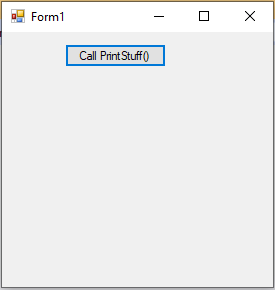
*********************
Form1.vb :
Public Class Form1 'VB class
'Button Call PrintStuff() click event
Private Sub btnCall_Click(sender As Object, e As EventArgs) Handles
btnCall.Click
PrintStuff()
End Sub
'procedure PrintStuff()
Sub PrintStuff()
'declaring variable of Integer type
Dim intVal As Integer = 0
'declaring variable to store output string of string type
Dim strOut As String = String.Empty
'using Do While loop
'Do While will execute till intVal less than 13
Do While intVal < 13
'checking value of intVal
If intVal = 8 Then
strOut = strOut & "k."
ElseIf intVal = 9 Then
strOut = strOut & " St"
ElseIf intVal = 6 Then
strOut = strOut & "Br"
ElseIf intVal = 1 Then
strOut = strOut & " gr"
ElseIf intVal = 10 Then
strOut = strOut & "ay H"
ElseIf intVal = 3 Then
strOut = strOut & "t "
ElseIf intVal = 4 Then
strOut = strOut & "Spr"
ElseIf intVal = 0 Then
strOut = strOut & "Have a"
ElseIf intVal = 5 Then
strOut = strOut & "ing "
ElseIf intVal = 12 Then
strOut = strOut & "lthy!!"
Else
strOut = strOut & "ea"
End If
intVal = intVal + 1 'increment value of intVal
Loop
lblOut.Text = strOut 'display output on the label
End Sub
End Class
==================================
Output :Run application using F5 and will get the screen as shown below
Screen 1:Screen when button Call PrintStuff() is clicked.
NOTE :PLEASE FEEL FREE TO PROVIDE FEEDBACK ABOUT THE SOLUTION.
Add Answer to:
Show the contents of the label, lblOut, after
the following Procedure is called:
Sub PrintStuff()
...
What will be displayed when the sub procedure that follows is run, true or false? Show...
What will be displayed when the sub procedure that follows is run, true or false? Show all the steps. Option Explicit Sub test() Dim x As Double, z As Double, a As String, b As String x = 7 z = 6 a = "b" b = "a" If Not z > 4 * Atn(1) Or rrr(x) < z Or x > 7 And a > b Then MsgBox "true" Else MsgBox "false" End If End Sub Function...
Project 2 – Memory Match Game Purpose This Windows Classic Desktop application plays a simple matching game. The game si...
Project 2 – Memory Match Game Purpose This Windows Classic Desktop application plays a simple matching game. The game simulates a card game where the cards a placed face down and the player flips over pairs of cards in an attempt to find matching cards. Program Procedure Display a 4x4 grid of “face down” cards. Assign the letters A through H randomly to the cards in pairs. Allow the user to click on a card to “flip” it over and...
Zander Inc. stores employee IDs and salaries in a sequential access file named Employees.txt. Open the...
 Zander Inc. stores employee IDs and salaries in a sequential
access file named Employees.txt. Open the VB2015\Chap10\Zander
Solution\Zander Solution (Zander Solution.sln) file. Open the
Employees.txt file, which is contained in the project’s bin\Debug
folder. The ID and salary information appear on separate lines in
the file. Close the Employees.txt window. a. Define a structure
named Employee. The structure should contain two member
variables:
a String variable to store the ID and a Double variable to store
the salary.
b. Declare...
Zander Inc. stores employee IDs and salaries in a sequential
access file named Employees.txt. Open the VB2015\Chap10\Zander
Solution\Zander Solution (Zander Solution.sln) file. Open the
Employees.txt file, which is contained in the project’s bin\Debug
folder. The ID and salary information appear on separate lines in
the file. Close the Employees.txt window. a. Define a structure
named Employee. The structure should contain two member
variables:
a String variable to store the ID and a Double variable to store
the salary.
b. Declare...
Visual Basic 2015: Extra 18-1 Use inheritance with the Inventory Maintenance Application Source Code: 1. frmNewItem.vb...
 Visual Basic 2015: Extra 18-1 Use inheritance with the Inventory
Maintenance Application
Source Code:
1. frmNewItem.vb
Public Class frmNewItem
Public InvItem As InvItem
Private Sub frmNewItem_Load(sender As Object, e As EventArgs)
Handles MyBase.Load
Me.LoadComboBox()
End Sub
Private Sub LoadComboBox()
cboSizeOrManufacturer.Items.Clear()
If rdoPlant.Checked Then
cboSizeOrManufacturer.Items.Add("1 gallon")
cboSizeOrManufacturer.Items.Add("5 gallon")
cboSizeOrManufacturer.Items.Add("15 gallon")
cboSizeOrManufacturer.Items.Add("24-inch box")
cboSizeOrManufacturer.Items.Add("36-inch box")
Else
cboSizeOrManufacturer.Items.Add("Bayer")
cboSizeOrManufacturer.Items.Add("Jobe's")
cboSizeOrManufacturer.Items.Add("Ortho")
cboSizeOrManufacturer.Items.Add("Roundup")
cboSizeOrManufacturer.Items.Add("Scotts")
End If
End Sub
Private Sub btnSave_Click(sender As Object, e As EventArgs)
Handles btnSave.Click
If IsValidData() Then
InvItem = New InvItem(CInt(txtItemNo.Text),...
Visual Basic 2015: Extra 18-1 Use inheritance with the Inventory
Maintenance Application
Source Code:
1. frmNewItem.vb
Public Class frmNewItem
Public InvItem As InvItem
Private Sub frmNewItem_Load(sender As Object, e As EventArgs)
Handles MyBase.Load
Me.LoadComboBox()
End Sub
Private Sub LoadComboBox()
cboSizeOrManufacturer.Items.Clear()
If rdoPlant.Checked Then
cboSizeOrManufacturer.Items.Add("1 gallon")
cboSizeOrManufacturer.Items.Add("5 gallon")
cboSizeOrManufacturer.Items.Add("15 gallon")
cboSizeOrManufacturer.Items.Add("24-inch box")
cboSizeOrManufacturer.Items.Add("36-inch box")
Else
cboSizeOrManufacturer.Items.Add("Bayer")
cboSizeOrManufacturer.Items.Add("Jobe's")
cboSizeOrManufacturer.Items.Add("Ortho")
cboSizeOrManufacturer.Items.Add("Roundup")
cboSizeOrManufacturer.Items.Add("Scotts")
End If
End Sub
Private Sub btnSave_Click(sender As Object, e As EventArgs)
Handles btnSave.Click
If IsValidData() Then
InvItem = New InvItem(CInt(txtItemNo.Text),...
Write in Java please. The purpose of this program is to read a file, called WaterData.csv....
Write in Java please. The purpose of this program is to read a file, called WaterData.csv. It will output date and gallons. So it would look something like "2/04/15 40 Gallons". The pseudo code is as follows. prompt the user for a file name open the file if that file cannot be opened display an error message and quit endif create a String variable 'currentDate' and initialize it to the empty string. create a variable gallonsUsed and initialize it to...
computer Programming visual Basic 1-10 QUESTION 1 Which of the following is not a logical operator...
 computer Programming
visual Basic
1-10
QUESTION 1 Which of the following is not a logical operator in Visual Basic? Not • or And Then QUESTION 2 Which of the following is a valid Visual Basic conditional statement? 2<n<5 2 <n or <5 0 2 <n<5 (2 <n) or (n <5) QUESTION 3 When Visual Basic stops evaluating a compound condition with the logical And operator because the first condition evaluates to False. It is called evaluation. short-circuit Pre- compound first...
computer Programming
visual Basic
1-10
QUESTION 1 Which of the following is not a logical operator in Visual Basic? Not • or And Then QUESTION 2 Which of the following is a valid Visual Basic conditional statement? 2<n<5 2 <n or <5 0 2 <n<5 (2 <n) or (n <5) QUESTION 3 When Visual Basic stops evaluating a compound condition with the logical And operator because the first condition evaluates to False. It is called evaluation. short-circuit Pre- compound first...
please help!!!! JAVA I done the project expect one part but I still give you all...
 please help!!!! JAVA
I done the project expect one part but I still give you all the
detail that you needed...
and I will post my code please help me fix the
CreateGrid() part in main and make GUI works
List Type Data Structures
Overview :
You will be implementing my version of a linked list. This is a
linked list which has possible sublists descending from each node.
These sublists are used to group together all nodes which...
please help!!!! JAVA
I done the project expect one part but I still give you all the
detail that you needed...
and I will post my code please help me fix the
CreateGrid() part in main and make GUI works
List Type Data Structures
Overview :
You will be implementing my version of a linked list. This is a
linked list which has possible sublists descending from each node.
These sublists are used to group together all nodes which...
use MatLab to answer these questions 1. (10 points) Create an m-file called addup.m Use a...
 use MatLab to answer these questions
1. (10 points) Create an m-file called addup.m Use a for loop with k = 1 to 8 to sum the terms in this sequence: x(k) = 1/3 Before the loop set sumx = 0 Then add each term to sumx inside the loop. (You do not need to store the individual values of the sequence; it is sufficient to add each term to the sum.) After the loop, display sumx with either disp()...
use MatLab to answer these questions
1. (10 points) Create an m-file called addup.m Use a for loop with k = 1 to 8 to sum the terms in this sequence: x(k) = 1/3 Before the loop set sumx = 0 Then add each term to sumx inside the loop. (You do not need to store the individual values of the sequence; it is sufficient to add each term to the sum.) After the loop, display sumx with either disp()...
Been working on this program for hours and keep getting error. PLEASE help and show a...
Been working on this program for hours and keep getting error. PLEASE help and show a working output, Thank you Step 2: Declaring variables Examining the problem we need to have 2 variable to store integer input given by the user. int x,y; Step 3: setting up Scanner object and scanning the inputs import java.util.Scanner; Create Scanner class object by using following syntax Scanner=new Scanner(System.in); /* give some name to the object which ever you want */ Ask the...
I am having trouble understanding how this code is able to use the contents of the...
I am having trouble understanding how this code is able to use the contents of the header file. Can someone please provide comments in the main code to describe what is happening? (especially on the bool isNumber) THE MAIN CODE: #include<bits/stdc++.h> #include "MyCartesianPoint.h" #include <math.h> #include <iostream> using namespace std; bool isNumber(string s) { if(!isdigit (s[0])) { if(s[0] != '-') return false; else if(s.length() == 1) return false;...
 Zander Inc. stores employee IDs and salaries in a sequential
access file named Employees.txt. Open the VB2015\Chap10\Zander
Solution\Zander Solution (Zander Solution.sln) file. Open the
Employees.txt file, which is contained in the project’s bin\Debug
folder. The ID and salary information appear on separate lines in
the file. Close the Employees.txt window. a. Define a structure
named Employee. The structure should contain two member
variables:
a String variable to store the ID and a Double variable to store
the salary.
b. Declare...
Zander Inc. stores employee IDs and salaries in a sequential
access file named Employees.txt. Open the VB2015\Chap10\Zander
Solution\Zander Solution (Zander Solution.sln) file. Open the
Employees.txt file, which is contained in the project’s bin\Debug
folder. The ID and salary information appear on separate lines in
the file. Close the Employees.txt window. a. Define a structure
named Employee. The structure should contain two member
variables:
a String variable to store the ID and a Double variable to store
the salary.
b. Declare...
 Visual Basic 2015: Extra 18-1 Use inheritance with the Inventory
Maintenance Application
Source Code:
1. frmNewItem.vb
Public Class frmNewItem
Public InvItem As InvItem
Private Sub frmNewItem_Load(sender As Object, e As EventArgs)
Handles MyBase.Load
Me.LoadComboBox()
End Sub
Private Sub LoadComboBox()
cboSizeOrManufacturer.Items.Clear()
If rdoPlant.Checked Then
cboSizeOrManufacturer.Items.Add("1 gallon")
cboSizeOrManufacturer.Items.Add("5 gallon")
cboSizeOrManufacturer.Items.Add("15 gallon")
cboSizeOrManufacturer.Items.Add("24-inch box")
cboSizeOrManufacturer.Items.Add("36-inch box")
Else
cboSizeOrManufacturer.Items.Add("Bayer")
cboSizeOrManufacturer.Items.Add("Jobe's")
cboSizeOrManufacturer.Items.Add("Ortho")
cboSizeOrManufacturer.Items.Add("Roundup")
cboSizeOrManufacturer.Items.Add("Scotts")
End If
End Sub
Private Sub btnSave_Click(sender As Object, e As EventArgs)
Handles btnSave.Click
If IsValidData() Then
InvItem = New InvItem(CInt(txtItemNo.Text),...
Visual Basic 2015: Extra 18-1 Use inheritance with the Inventory
Maintenance Application
Source Code:
1. frmNewItem.vb
Public Class frmNewItem
Public InvItem As InvItem
Private Sub frmNewItem_Load(sender As Object, e As EventArgs)
Handles MyBase.Load
Me.LoadComboBox()
End Sub
Private Sub LoadComboBox()
cboSizeOrManufacturer.Items.Clear()
If rdoPlant.Checked Then
cboSizeOrManufacturer.Items.Add("1 gallon")
cboSizeOrManufacturer.Items.Add("5 gallon")
cboSizeOrManufacturer.Items.Add("15 gallon")
cboSizeOrManufacturer.Items.Add("24-inch box")
cboSizeOrManufacturer.Items.Add("36-inch box")
Else
cboSizeOrManufacturer.Items.Add("Bayer")
cboSizeOrManufacturer.Items.Add("Jobe's")
cboSizeOrManufacturer.Items.Add("Ortho")
cboSizeOrManufacturer.Items.Add("Roundup")
cboSizeOrManufacturer.Items.Add("Scotts")
End If
End Sub
Private Sub btnSave_Click(sender As Object, e As EventArgs)
Handles btnSave.Click
If IsValidData() Then
InvItem = New InvItem(CInt(txtItemNo.Text),...
 computer Programming
visual Basic
1-10
QUESTION 1 Which of the following is not a logical operator in Visual Basic? Not • or And Then QUESTION 2 Which of the following is a valid Visual Basic conditional statement? 2<n<5 2 <n or <5 0 2 <n<5 (2 <n) or (n <5) QUESTION 3 When Visual Basic stops evaluating a compound condition with the logical And operator because the first condition evaluates to False. It is called evaluation. short-circuit Pre- compound first...
computer Programming
visual Basic
1-10
QUESTION 1 Which of the following is not a logical operator in Visual Basic? Not • or And Then QUESTION 2 Which of the following is a valid Visual Basic conditional statement? 2<n<5 2 <n or <5 0 2 <n<5 (2 <n) or (n <5) QUESTION 3 When Visual Basic stops evaluating a compound condition with the logical And operator because the first condition evaluates to False. It is called evaluation. short-circuit Pre- compound first...
 please help!!!! JAVA
I done the project expect one part but I still give you all the
detail that you needed...
and I will post my code please help me fix the
CreateGrid() part in main and make GUI works
List Type Data Structures
Overview :
You will be implementing my version of a linked list. This is a
linked list which has possible sublists descending from each node.
These sublists are used to group together all nodes which...
please help!!!! JAVA
I done the project expect one part but I still give you all the
detail that you needed...
and I will post my code please help me fix the
CreateGrid() part in main and make GUI works
List Type Data Structures
Overview :
You will be implementing my version of a linked list. This is a
linked list which has possible sublists descending from each node.
These sublists are used to group together all nodes which...
 use MatLab to answer these questions
1. (10 points) Create an m-file called addup.m Use a for loop with k = 1 to 8 to sum the terms in this sequence: x(k) = 1/3 Before the loop set sumx = 0 Then add each term to sumx inside the loop. (You do not need to store the individual values of the sequence; it is sufficient to add each term to the sum.) After the loop, display sumx with either disp()...
use MatLab to answer these questions
1. (10 points) Create an m-file called addup.m Use a for loop with k = 1 to 8 to sum the terms in this sequence: x(k) = 1/3 Before the loop set sumx = 0 Then add each term to sumx inside the loop. (You do not need to store the individual values of the sequence; it is sufficient to add each term to the sum.) After the loop, display sumx with either disp()...
Most questions answered within 3 hours.
-
Where is the error in this code sequence?
String s1 = "Hello";
String s2 = "ello";...
asked 11 months ago -
Financial data for Joel de Paris, Inc., for last year
follow:
Joel de Paris, Inc.
Balance...
asked 11 months ago -
Consider this reaction:
Al2(SO4)3 (aq)+ BaCl3
(aq) Al2Cl6 (aq)- +
3BaSO4(s) . What is the...
asked 11 months ago -
Suppose that Savneet is considering increasing her
recent random sample from 20 car rentals to 40...
asked 11 months ago -
Trucks arrive at an unloading terminal at an average rate of 120
per hour.
Trucks arrive...
asked 11 months ago -
Why are methanol and ethanol completely soluble in water while
octanol is not very little soluble....
asked 11 months ago -
A facilities manager at a university reads in a research report
that the mean amount of...
asked 11 months ago -
When the CuSO4 is rehydrated by adding water to the anhydrous
compound, is this an endothermic...
asked 11 months ago -
A ray of sunlight is passing from diamond into crown glass; the
angle of incidence is...
asked 11 months ago -
A block of mass 0.249 kg is placed on top of a light, vertical
spring of...
asked 11 months ago -
how do the kidneys compensate in the presences of acidosis
a) trigger hyperventilate
b) reserve acid...
asked 11 months ago -
Question 501 pts
The rental rate of capital to the firm increases. Which of the
following...
asked 11 months ago