
Must be car Themed
My first JS-DOM
color:red;
text node!'); //creates 'This is a text node!'
color:blue; font-family: arial;
Clicker Counter: 0
Interface should look something like this, but does not have to be one for one like this picture
Homework Answers
Note that the image you are referring to is not visible.But from the Notes you have given. I have inferred the following:
Save the file with extension.html and run it on browser.
Source Code:
<html>
<head>
<title>My first JS-DOM</title>
<style>
#finished{
color:blue;
float:right;
}
#myUL{
color:red;
}
h1{
text-align:
center;
}
</style>
</head>
<body>
<h1>My First JS DOM TODO List</h1>
<p id="finished">Finished Tasks : <span
id="count">0</span></p>
<button class = "add" onclick="addTask()">Add a
task</button>
<ul id="myUL">
</ul>
</body>
<script>
function addTask(){
var txt = window.prompt("What to
add to the list?","");
//creating the checkbox
var x =
document.createElement("INPUT");
x.setAttribute("type",
"checkbox");
x.addEventListener( 'change',
function() {
if(this.checked) {
var c =
document.getElementById("count").innerHTML;
var incr = parseInt(c)+1;
document.getElementById("count").innerHTML=incr;
} else {
var c =
document.getElementById("count").innerHTML;
var incr = parseInt(c)-1;
document.getElementById("count").innerHTML=incr;
}
});
//creating the list
var li =
document.createElement("li");
var t =
document.createTextNode(txt);
li.appendChild(x);
li.appendChild(t);
if (txt === '') {
alert("You must write
something!");
} else {
document.getElementById("myUL").appendChild(li);
}
}
</script>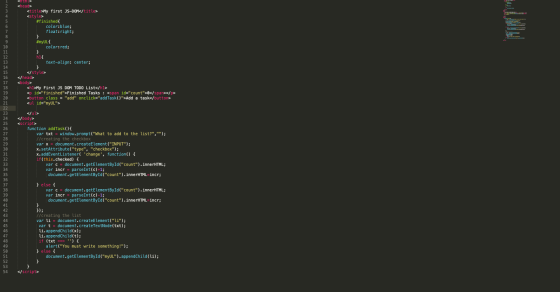
OUTPUT:
Add Answer to:
Must be car Themed
My first JS-DOM
color:red;
text node!'); //creates 'This is a text node!'...
Javascript to edit a HTML file. Where to begin? <!doctype html> <html> <head> <meta charset="utf-8"> <title>TODO:...
Javascript to edit a HTML file. Where to begin? <!doctype html> <html> <head> <meta charset="utf-8"> <title>TODO: Change The Title</title> </head> <body> <h1></h1> <p>First paragraph.</p> <p class="intro">Second <span>paragraph</span>.</p> <button id="start">Start</button> <main> </main> <!-- Test 6: DOM Programming You MAY consult the notes for week 7, but you MAY NOT discuss this test or your code with any other students. All work must be your own. Instructions: 1. Put all solution code in a file named solution.js. When you upload your solution to...
WEB230 - JavaScript 1 Assignment 6a Use Events and DOM manipulation to create a playable Tic...
 WEB230 - JavaScript 1 Assignment 6a Use Events and DOM manipulation to create a playable Tic Tac Toe game. Do the following using JavaScript. Do not modify the HTML file. When you see this symbol: save and refresh the browser (this should happen automatically if you are using Brackets with Live Preview), then check your code to make sure it is working before you proceed. 1. Create two variables called "playerX" and "playero". Set them to the DOM element with...
In this problem, you will create a selectable “To Do” List. To add a task to...
 In this problem, you will create a selectable “To Do” List. To
add a task to this list, the user clicks the Add Task button and
enters a description of the task. To delete a task from the list,
the user selects the task and then clicks the Delete Task
button.
Open the HTML and JavaScript files provided as start-up files
(index.html from within todo_list_Q.zip file). Then,
review the HTML in this file. Note, within the div element, there
is...
In this problem, you will create a selectable “To Do” List. To
add a task to this list, the user clicks the Add Task button and
enters a description of the task. To delete a task from the list,
the user selects the task and then clicks the Delete Task
button.
Open the HTML and JavaScript files provided as start-up files
(index.html from within todo_list_Q.zip file). Then,
review the HTML in this file. Note, within the div element, there
is...
NEED HELP DIRECTIONS: Notice that there is one input area and two buttons There is a...
NEED HELP DIRECTIONS: Notice that there is one input area and two buttons There is a place in the HTML reserved for < li > elements under the heading “Shopping List” Write a javascript program that will cause whatever the user inputs to be placed in a newly -created < li > tag and the tag placed inside the < ul > element whenever the user clicks the button Your program must not create any < li > tag is...
can you do this js and html question. ill give you the html and js and...
 can you do this js and html question. ill give you the html and
js and css files just fix my error use if and else like what i did
dont use switch just fix my erorr.
<!DOCTYPE html>
<!-- Webpage HTML document for Lab 4.
Authors: Amirhossein Chinaei, Andriy Pavlovych
For: EECS 1012, York University, Lassonde School of Engineering
-->
<html lang="En">
<head>
<meta charset="UTF-8">
<!-- title for web page -->
<title> EECS1012: Lab 4 - Computational Thinking
</title>...
can you do this js and html question. ill give you the html and
js and css files just fix my error use if and else like what i did
dont use switch just fix my erorr.
<!DOCTYPE html>
<!-- Webpage HTML document for Lab 4.
Authors: Amirhossein Chinaei, Andriy Pavlovych
For: EECS 1012, York University, Lassonde School of Engineering
-->
<html lang="En">
<head>
<meta charset="UTF-8">
<!-- title for web page -->
<title> EECS1012: Lab 4 - Computational Thinking
</title>...
Modify an application that lets users add tasks to a list so the tasks can also...
Modify an application that lets users add tasks to a list so the tasks can also be deleted when they’re completed. 1. In the HTML file, enclose the text for each of the three existing list items in a <p> element. Then, Add buttons like the ones shown above preceding the <p> elements. No ids or names are required for these buttons, but they should be assigned to the class named “delete”. 2. In the JavaScript file, modify the event...
<!DOCTYPE html> <html> <head> <!-- JavaScript 6th Edition Chapter 4 Hands-on Project 4-3 Author: Da...
<!DOCTYPE html> <html> <head> <!-- JavaScript 6th Edition Chapter 4 Hands-on Project 4-3 Author: Date: Filename: index.htm --> <meta charset="utf-8" /> <meta name="viewport" content="width=device-width, initial-scale=1.0" /> <title>Hands-on Project 4-3</title> <link rel="stylesheet" href="styles.css" /> <script src="modernizr.custom.05819.js"></script> </head> <body> <header> <h1> Hands-on Project 4-3 </h1> </header> <article> <div id="results"> <p id="resultsExpl"></p> <ul> <li id="item1"></li> <li id="item2"></li> <li id="item3"></li> <li id="item4"></li> <li id="item5"></li> </ul> </div> <form> <fieldset> <label for="placeBox" id="placeLabel"> Type the name of a place, then click Submit: </label> <input type="text" id="placeBox"...
Need help with creating this JavaScript file. I'm not sure where or how to begin. 1. You are working solely with the DOM object. Thus, you should be coding primarily in the js file. You must use...
 Need help with creating this JavaScript file. I'm not sure where
or how to begin.
1. You are working solely with the DOM object. Thus, you should be
coding primarily in the js file. You must use the addEventListener,
in addition you may need to use id and class attributes as needed.
The .html and .css files have been provided to you. See the .png
files for an example of what is expected.
2. Place the javaScript file in its...
Need help with creating this JavaScript file. I'm not sure where
or how to begin.
1. You are working solely with the DOM object. Thus, you should be
coding primarily in the js file. You must use the addEventListener,
in addition you may need to use id and class attributes as needed.
The .html and .css files have been provided to you. See the .png
files for an example of what is expected.
2. Place the javaScript file in its...
This is my code so far: <!DOCTYPE html> <html> <head> <title>JavaScript is fun</title> <meta charset="utf-8" />...
This is my code so far: <!DOCTYPE html> <html> <head> <title>JavaScript is fun</title> <meta charset="utf-8" /> </head> <body> <script type ="text/javascript"> //declare a variable and store text in it var x = "JavaScript is fun"; //write the variable 5 times document.write(x + x + x + x + x); //store 5 as string in variable x x = "5"; //store 3 as string in variable y var y = "3"; //write the value x + y to the document document.write("<br>");...
(Below I have posted my full assignment so my question makes sense with context. The part...
(Below I have posted my full assignment so my question makes sense with context. The part I am struggling with is section e. I am not sure how to create the said class. If you could help it would be appreciated. Also, this is all HTML code.) In this assignment you will create a web page about your favorite TV show of all-time and link it to an external style sheet to apply a few CSS rules to it. Follow...
 WEB230 - JavaScript 1 Assignment 6a Use Events and DOM manipulation to create a playable Tic Tac Toe game. Do the following using JavaScript. Do not modify the HTML file. When you see this symbol: save and refresh the browser (this should happen automatically if you are using Brackets with Live Preview), then check your code to make sure it is working before you proceed. 1. Create two variables called "playerX" and "playero". Set them to the DOM element with...
 In this problem, you will create a selectable “To Do” List. To
add a task to this list, the user clicks the Add Task button and
enters a description of the task. To delete a task from the list,
the user selects the task and then clicks the Delete Task
button.
Open the HTML and JavaScript files provided as start-up files
(index.html from within todo_list_Q.zip file). Then,
review the HTML in this file. Note, within the div element, there
is...
In this problem, you will create a selectable “To Do” List. To
add a task to this list, the user clicks the Add Task button and
enters a description of the task. To delete a task from the list,
the user selects the task and then clicks the Delete Task
button.
Open the HTML and JavaScript files provided as start-up files
(index.html from within todo_list_Q.zip file). Then,
review the HTML in this file. Note, within the div element, there
is...
 can you do this js and html question. ill give you the html and
js and css files just fix my error use if and else like what i did
dont use switch just fix my erorr.
<!DOCTYPE html>
<!-- Webpage HTML document for Lab 4.
Authors: Amirhossein Chinaei, Andriy Pavlovych
For: EECS 1012, York University, Lassonde School of Engineering
-->
<html lang="En">
<head>
<meta charset="UTF-8">
<!-- title for web page -->
<title> EECS1012: Lab 4 - Computational Thinking
</title>...
can you do this js and html question. ill give you the html and
js and css files just fix my error use if and else like what i did
dont use switch just fix my erorr.
<!DOCTYPE html>
<!-- Webpage HTML document for Lab 4.
Authors: Amirhossein Chinaei, Andriy Pavlovych
For: EECS 1012, York University, Lassonde School of Engineering
-->
<html lang="En">
<head>
<meta charset="UTF-8">
<!-- title for web page -->
<title> EECS1012: Lab 4 - Computational Thinking
</title>...
 Need help with creating this JavaScript file. I'm not sure where
or how to begin.
1. You are working solely with the DOM object. Thus, you should be
coding primarily in the js file. You must use the addEventListener,
in addition you may need to use id and class attributes as needed.
The .html and .css files have been provided to you. See the .png
files for an example of what is expected.
2. Place the javaScript file in its...
Need help with creating this JavaScript file. I'm not sure where
or how to begin.
1. You are working solely with the DOM object. Thus, you should be
coding primarily in the js file. You must use the addEventListener,
in addition you may need to use id and class attributes as needed.
The .html and .css files have been provided to you. See the .png
files for an example of what is expected.
2. Place the javaScript file in its...
Most questions answered within 3 hours.
-
Where is the error in this code sequence?
String s1 = "Hello";
String s2 = "ello";...
asked 11 months ago -
Financial data for Joel de Paris, Inc., for last year
follow:
Joel de Paris, Inc.
Balance...
asked 11 months ago -
Consider this reaction:
Al2(SO4)3 (aq)+ BaCl3
(aq) Al2Cl6 (aq)- +
3BaSO4(s) . What is the...
asked 11 months ago -
Suppose that Savneet is considering increasing her
recent random sample from 20 car rentals to 40...
asked 11 months ago -
Trucks arrive at an unloading terminal at an average rate of 120
per hour.
Trucks arrive...
asked 11 months ago -
Why are methanol and ethanol completely soluble in water while
octanol is not very little soluble....
asked 11 months ago -
A facilities manager at a university reads in a research report
that the mean amount of...
asked 11 months ago -
When the CuSO4 is rehydrated by adding water to the anhydrous
compound, is this an endothermic...
asked 11 months ago -
A ray of sunlight is passing from diamond into crown glass; the
angle of incidence is...
asked 11 months ago -
A block of mass 0.249 kg is placed on top of a light, vertical
spring of...
asked 11 months ago -
how do the kidneys compensate in the presences of acidosis
a) trigger hyperventilate
b) reserve acid...
asked 11 months ago -
Question 501 pts
The rental rate of capital to the firm increases. Which of the
following...
asked 11 months ago