HTML/HTML5 script: Create a form as shown below:
Present it as close as you see it on here.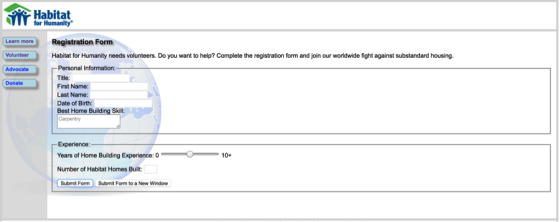
Use the HTML5 attributes such as autocomplete, autofocus, required, patter, email, url, text, input, formtarget and add more as needed for this web form.
Aapply the proper attributes to validate the form on your page.
Homework Answers
<html>
<head>
<style>
.form fieldset{border:0px; padding:0px; margin:0px;}
.form p.contact { font-size: 12px; margin:0px 0px 10px 0;line-height: 14px; font-family:Arial, Helvetica;}
.form input[type="text"] { width: 400px; }
.form input[type="email"] { width: 400px; }
.forminput[type="password"] { width: 400px; }
.form input.birthday{width:60px;}
.form input.birthyear{width:120px;}
.form label { color: #000; font-weight:bold;font-size: 12px;font-family:Arial, Helvetica; }
.form label.month {width: 135px;}
.form input, textarea { background-color: rgba(255, 255, 255, 0.4); border: 1px solid rgba(122, 192, 0, 0.15); padding: 7px; font-family: Keffeesatz, Arial; color: #4b4b4b; font-size: 14px; -webkit-border-radius: 5px; margin-bottom: 15px; margin-top: -10px; }
.form input:focus, textarea:focus { border: 1px solid #ff5400; background-color: rgba(255, 255, 255, 1); }
.form .select-style {
-webkit-appearance: button;
-webkit-border-radius: 2px;
-webkit-box-shadow: 0px 1px 3px rgba(0, 0, 0, 0.1);
-webkit-padding-end: 20px;
-webkit-padding-start: 2px;
-webkit-user-select: none;
background-image: url(images/select-arrow.png),
-webkit-linear-gradient(#FAFAFA, #F4F4F4 40%, #E5E5E5);
background-position: center right;
background-repeat: no-repeat;
border: 0px solid #FFF;
color: #555;
font-size: inherit;
margin: 0;
overflow: hidden;
padding-top: 5px;
padding-bottom: 5px;
text-overflow: ellipsis;
white-space: nowrap;}
.form .gender {
width:410px;
}
#maincontent {
background-color: #F0F0F0;
}
#menuleftcontent{
float: left;
width: 200px;
margin-left: -8px;
background-color: #CCCCCC;
}
</style>
</head>
<body>
<div class="form">
<div class="container">
<img src="habitat.jpg" class="img-rounded" alt="Cinque Terre"
width="120" height="120">
</div>
<hr/>
<table>
<tr>
<td>
<div style="border:1px solid black;height: 694px;"
id="menuleftcontent" >
<button type="button">Learn More!</button>
<br/>
<br/>
<br/>
<button type="button">Volunteer!</button>
<br/>
<br/>
<br/>
<button type="button">Advocate!</button>
<br/>
<br/>
<br/>
<button type="button">Donate!</button>
</div>
</td>
<td >
<form id="contactform">
<div style="border:1px solid black" id="maincontent">
<h4>Registartion Form</label></h4>
<p class="contact"><label>Habitat for humanity needs
volunteers. Do you want to help? Complete the registration form and
join our worldwide fight against substained
housing</label></p>
<p class="contact"><label for="Title ">Title
</label></p>
<input id="Title " name="Title " placeholder="Title" required="" tabindex="1" type="text" required>
<p class="contact"><label for=" First Name "> First Name</label></p>
<input id=" First Name " name=" First Name " placeholder="First name" required="" tabindex="1" type="text" required>
<p class="contact"><label for=" Last Name "> Last Name</label></p>
<input id=" Last Name " name=" Last Name " placeholder="Last name" required="" tabindex="1" type="text" required>
<p class="contact"><label for="dob "> Date Of Birth</label></p>
<input id="dob " name="dob " placeholder="Date Of birth " required="" tabindex="1" type="text" required>
<p class="contact"><label for="email">Email</label></p>
<input id="email" name="email" placeholder="example@domain.com" required="" type="email" required>
<p class="contact"><label for="email">Best Home Building Skills </label></p>
<textarea rows="3" cols="20">
Carpertry
</textarea>
</div>
<br/>
<div style="border:1px solid black"
id="maincontent">
<p class="contact"><label for="Exper ">Years of Home
building experience:</label></p>
0: <input type = "range" min = "0" max = "10" step "1"
value = "5" name = "newinput" /> 10+
<p class="contact"><label for="Habitates">Number of
habitat built </label></p>
<input id="Title " name="Title " placeholder="Title" required="" tabindex="1" type="text" required>
<p>
<button type="submit">Submit
Form</button> <button
type="submit">Submit Form to a new window</button>
</p>
<div>
</td>
</form>
</tr>
</table>
</div>
</body>
</html>
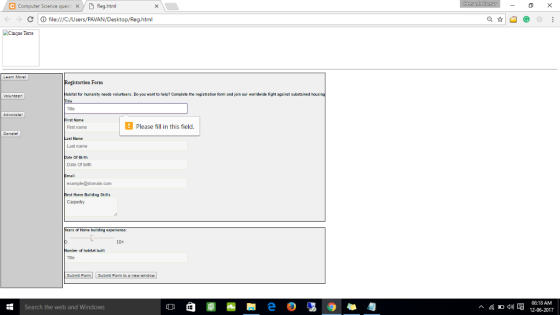
Output:
Add Answer to:
HTML/HTML5 script: Create a form as shown below:
Present it as close as you see it...
Most questions answered within 3 hours.
-
Where is the error in this code sequence?
String s1 = "Hello";
String s2 = "ello";...
asked 11 months ago -
Financial data for Joel de Paris, Inc., for last year
follow:
Joel de Paris, Inc.
Balance...
asked 11 months ago -
Consider this reaction:
Al2(SO4)3 (aq)+ BaCl3
(aq) Al2Cl6 (aq)- +
3BaSO4(s) . What is the...
asked 11 months ago -
Suppose that Savneet is considering increasing her
recent random sample from 20 car rentals to 40...
asked 11 months ago -
Trucks arrive at an unloading terminal at an average rate of 120
per hour.
Trucks arrive...
asked 11 months ago -
Why are methanol and ethanol completely soluble in water while
octanol is not very little soluble....
asked 11 months ago -
A facilities manager at a university reads in a research report
that the mean amount of...
asked 11 months ago -
When the CuSO4 is rehydrated by adding water to the anhydrous
compound, is this an endothermic...
asked 11 months ago -
A ray of sunlight is passing from diamond into crown glass; the
angle of incidence is...
asked 11 months ago -
A block of mass 0.249 kg is placed on top of a light, vertical
spring of...
asked 11 months ago -
how do the kidneys compensate in the presences of acidosis
a) trigger hyperventilate
b) reserve acid...
asked 11 months ago -
Question 501 pts
The rental rate of capital to the firm increases. Which of the
following...
asked 11 months ago