Write a program that will define a runnable frame to have a ball move across the...
Write a program that will define a runnable frame to have a ball move across the frame left to right.
While that is happening, have another frame that will let the user do something like click a button or input
into a textfield, but keep the ball moving in the other frame.  When the ball reaches the right edge of the
frame or when the user takes action - enters in textfield or clicks the button, end the thread.  The frame
application will be running while the ball runnable thread is running.


The one frame class is shown below and the second ball frame class is partially done.  Finish the ball frame class, filling in the missing methods shown with comments below.

First, here is the Frame class with the ball thread instantiated:

package threads14;
/*
 * This program will let the user click a button while a ball is moving
 */
import java.awt.*;
import java.awt.event.*;
import javax.swing.*;

public class ex144 extends JFrame implements ActionListener
{
    ball144 b = new ball144();
         // create ball frame runnable thread object
    JButton jb = new JButton("Click");
    JLabel jl = new JLabel("          ");

    public ex144(String s)
    {
        super(s);
        setSize(100, 100);
        setLayout(new FlowLayout());
        add(jb);
        add(jl);
        jb.addActionListener(this);
        setVisible(true);

        b = new ball144();  // run constructor
        b.setSize(500, 300); // set size of frame
        b.setVisible(true);
        new Thread(b).start();
          /* start the runnable ball b by converting to subclass
             Thread and call Thread start() method */
        setVisible(true);
    }

    public void actionPerformed(ActionEvent e)
    {
        jl.setText("You clicked");
        b.end();  // end the runnable ball b
    }

    public static void main(String[] args)
    {
        ex144 jf = new ex144("Click");
    }
}Next, here is the ball runnable thread:

package threads14;
/*
 * This class will define a moving ball
 */
import java.awt.*;
import javax.swing.*;

public class ball144 extends JFrame implements Runnable
        /* since extends JFrame, must implements Runnable
           since can only extends one class */
{
    boolean stopflag;
    int x, y;
    Container c;

    public ball144()
    {
        c = getContentPane();
        c.setBackground(Color.cyan);
        stopflag = false;
        x = 0;
        y = 50;
        setTitle("Ball");
        setForeground(Color.blue);
    }

 /* write run() method that will switch stopflag and loop and keep
   calling repaint() while the ball is not stopped and the ball is
     on the frame (the ball width less than the right side).
    When done, end the ball thread. */


        // write update method to not clear frame and call paint()


        /* write paint() method to cover old ball, move x across the
           screen and draw new ball */


       /* write end() method that will switch stopflag and
          draw final ball */
Homework Answers
import javax.swing.*;
import java.awt.*;
import static java.awt.Color.*;
import static java.lang.System.*;
public class Exercise4
{
private static class BallFrame extends JFrame
implements Runnable
{
boolean initial =
true;
int pos = 0;
@Override
public void run()
{
setSize(600, 100);
setLocation(500, 200);
setDefaultCloseOperation(EXIT_ON_CLOSE);
setVisible(true);
while (pos < 580)
{
try
{
repaint();
Thread.sleep(5);
}
catch (InterruptedException e)
{
break;
}
}
exit(0);
}
@Override
public void
paint(Graphics g)
{
if (initial)
{
initial = false;
g.setColor(red);
g.fillOval(pos, 50, 20,20);
}
else
{
g.setColor(white);
g.fillOval(pos++, 50, 20,20);
g.setColor(red);
g.fillOval(pos, 50, 20,20);
}
}
}
private static class ClickFrame extends
JFrame implements Runnable
{
@Override
public void run()
{
setSize(120, 80);
setLocation(500, 500);
setDefaultCloseOperation(EXIT_ON_CLOSE);
JButton button = new JButton("End me!");
button.addActionListener(e -> exit(0));
getContentPane().add(new JPanel().add(button).getParent());
setVisible(true);
}
}
public static void main(String[] args)
{
new Thread(new
BallFrame()).start();
new Thread(new
ClickFrame()).start();
}
}

Add Answer to:
Write a program that will define a runnable frame to have a ball move across the...
Basic button tracking Deliverables Updated files for app6.java myJFrame6.java myJPanel6.java student.java Contents You can start with...
 Basic button tracking
Deliverables
Updated files for
app6.java
myJFrame6.java
myJPanel6.java
student.java
Contents
You can start with the files available here.
public class app6
{
public static void main(String args[])
{
myJFrame6 mjf = new myJFrame6();
}
}
import java.awt.*;
import javax.swing.*;
import java.awt.event.*;
public class myJFrame6 extends JFrame
{
myJPanel6 p6;
public myJFrame6 ()
{
super ("My First Frame");
//------------------------------------------------------
// Create components: Jpanel, JLabel and JTextField
p6 = new myJPanel6();
//------------------------------------------------------...
Basic button tracking
Deliverables
Updated files for
app6.java
myJFrame6.java
myJPanel6.java
student.java
Contents
You can start with the files available here.
public class app6
{
public static void main(String args[])
{
myJFrame6 mjf = new myJFrame6();
}
}
import java.awt.*;
import javax.swing.*;
import java.awt.event.*;
public class myJFrame6 extends JFrame
{
myJPanel6 p6;
public myJFrame6 ()
{
super ("My First Frame");
//------------------------------------------------------
// Create components: Jpanel, JLabel and JTextField
p6 = new myJPanel6();
//------------------------------------------------------...
Write a Java application that displays the following ClickMe When the user clicks on "Click Me"...
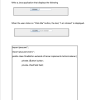 Write a Java application that displays the following ClickMe When the user clicks on "Click Me" button, the text, "l am clicked" is displayed. ClickMe am clicked import java.awt.*; import java.awt.event.*; public class OneButton extends JFrame implements ActionListener private JButton button; private JTextField field; public static void main(String args)( OneButton myCoolButton new OneButton0;
Add a timer to the lightbulb ON/OFF program such that the bulb stays on for 10...
 Add a timer to the lightbulb ON/OFF program such that the bulb
stays on for 10 seconds after the ON button is pushed and then goes
off. Put a new label on the lightbulb panel that counts
the number of seconds the bulb is on and displays the number of
seconds as it counts up from 0 to 10. THIS IS A JAVA PROGRAM. The
image above is what it should look like.
// Demonstrates mnemonics and tool tips.
//********************************************************************...
Add a timer to the lightbulb ON/OFF program such that the bulb
stays on for 10 seconds after the ON button is pushed and then goes
off. Put a new label on the lightbulb panel that counts
the number of seconds the bulb is on and displays the number of
seconds as it counts up from 0 to 10. THIS IS A JAVA PROGRAM. The
image above is what it should look like.
// Demonstrates mnemonics and tool tips.
//********************************************************************...
Why when executed my frame does not contain what i have added to it? Here is...
Why when executed my frame does not contain what i have added to it? Here is my code import java.awt.Panel; import java.awt.event.ActionEvent; import java.awt.event.ActionListener; import javax.swing.JButton; import javax.swing.JFrame; import javax.swing.JLabel; import javax.swing.JTextArea; import javax.swing.JTextField; import javax.swing.JPanel; @SuppressWarnings("serial") public class AddressBook1 extends JFrame implements ActionListener { /** * */ JLabel name = new JLabel("Name: "); JLabel address = new JLabel("Address: "); JLabel phone = new JLabel("Phone: "); JLabel email = new JLabel("Email: ");...
Program #2 Write a program to simulate showing an NBA Team on a Basketball court Here...
 Program #2 Write a program to simulate showing an NBA Team on a Basketball court Here is an example of the screenshot when running the program: Tony Parker T. Splitter T. Duncan M. Gineb Player Kame: M Ginobil Player Age 2 Add A Player Ce An example of the JFrame subclass with main method is as follows import java.awt. import java.awt.event." import javax.swing. public class NBA Playoff extends JFrame private JTextField txtName: private JTextField txtAge: private NBATeam spurs private NBAcourtPanel...
Java please answer A and B a. Describe the purpose of action listener in push button...
Java please answer A and B a. Describe the purpose of action listener in push button jbtnCompare.(from the code below) b. Explain why there are not action listeners added to text fields of this program.(from the code below) code import java.awt.*; import java.awt.event.*; import javax.swing.*; import java.io.*; class SwingFC implements ActionListener { JTextField jtfFirst; // holds the first file name JTextField jtfSecond; // holds the second file name JButton jbtnComp; // button to compare the files JLabel jlabFirst, jlabSecond; //...
Can you please fix the error. package com.IST240Apps; import java.awt.*; import java.awt.event.*; import java.io.*; import javax.swing.*;...
Can you please fix the error. package com.IST240Apps; import java.awt.*; import java.awt.event.*; import java.io.*; import javax.swing.*; import java.net.*; public class LinkRotator extends JFrame implements Runnable, ActionListener { String[] pageTitle = new String[5]; URI[] pageLink = new URI[5]; int current = 0; Thread runner; JLabel siteLabel = new Jlabel(); public LinkRotator() { setDefaultCloseOperation(Jframe.EXIT_ON_CLOSE); setSize(300, 100); FlowLayout flo = new Flowlayout(); setLayout(flo); add(siteLabel); pageTitle = new String[] { "Oracle Java Site", "Server Side", "JavaWorld", "Google", "Yahoo", "Penn State" }; pageLink[0] = getUR1("http://www.oracle.com/technetwork/java");...
There 2 parts to complete: import javax.swing.*; import java.awt.event.*; import java.awt.*; public class Q4 extends JFrame...
There 2 parts to complete: import javax.swing.*; import java.awt.event.*; import java.awt.*; public class Q4 extends JFrame { private int xPos, yPos; public Q4() { JPanel drawPanel = new JPanel() { @Override public void paintComponent(Graphics g) { super.paintComponent(g); // paint parent's background //complete this: } }; drawPanel.addMouseListener(new MouseAdapter() { public void mouseClicked(MouseEvent evt) { //complete this :- set the xPos, yPos } }); setContentPane(drawPanel); setDefaultCloseOperation(JFrame.EXIT_ON_CLOSE); setTitle("Mouse-Click Demo"); setSize(400, 250); setVisible(true); } public static void main(String[] args) { SwingUtilities.invokeLater(new Runnable() {...
Modify the code to turn the text area background to the color YELLOW if you click...
 Modify the code to turn the text area background to the color
YELLOW if you click an "x" (lower or uppercase)?
package com.java24hours; import javax.swing.*; import java.awt.event.*; import java.awt.*; public class KeyViewer extends JFrame implements KeyListener { JTextField keyText = new JTextField(80); JLabel keyLabel = new JLabel("Press any key in the text field."); public KeyViewer() { super("KeyViewer"); set LookAndFeel(); setSize(350, 100); setDefaultCloseOperation (JFrame.EXIT_ON_CLOSE) ; keyText.addKeyListener(this); BorderLayout bord = new BorderLayout(); set Layout (bord); add (keyLabel, BorderLayout. NORTH); add (keyText, BorderLayout....
Modify the code to turn the text area background to the color
YELLOW if you click an "x" (lower or uppercase)?
package com.java24hours; import javax.swing.*; import java.awt.event.*; import java.awt.*; public class KeyViewer extends JFrame implements KeyListener { JTextField keyText = new JTextField(80); JLabel keyLabel = new JLabel("Press any key in the text field."); public KeyViewer() { super("KeyViewer"); set LookAndFeel(); setSize(350, 100); setDefaultCloseOperation (JFrame.EXIT_ON_CLOSE) ; keyText.addKeyListener(this); BorderLayout bord = new BorderLayout(); set Layout (bord); add (keyLabel, BorderLayout. NORTH); add (keyText, BorderLayout....
Modify Java Code below: - Remove Button Try the Number -Instead of Try the Number button...
Modify Java Code below: - Remove Button Try the Number -Instead of Try the Number button just hit enter on keyboard to try number -Remove Button Quit import javax.swing.*; import java.awt.*; import java.awt.event.ActionEvent; import java.awt.event.ActionListener; import java.util.Random; // Main Class public class GuessGame extends JFrame { // Declare class variables private static final long serialVersionUID = 1L; public static Object prompt1; private JTextField userInput; private JLabel comment = new JLabel(" "); private JLabel comment2 = new JLabel(" "); private int...
 Basic button tracking
Deliverables
Updated files for
app6.java
myJFrame6.java
myJPanel6.java
student.java
Contents
You can start with the files available here.
public class app6
{
public static void main(String args[])
{
myJFrame6 mjf = new myJFrame6();
}
}
import java.awt.*;
import javax.swing.*;
import java.awt.event.*;
public class myJFrame6 extends JFrame
{
myJPanel6 p6;
public myJFrame6 ()
{
super ("My First Frame");
//------------------------------------------------------
// Create components: Jpanel, JLabel and JTextField
p6 = new myJPanel6();
//------------------------------------------------------...
Basic button tracking
Deliverables
Updated files for
app6.java
myJFrame6.java
myJPanel6.java
student.java
Contents
You can start with the files available here.
public class app6
{
public static void main(String args[])
{
myJFrame6 mjf = new myJFrame6();
}
}
import java.awt.*;
import javax.swing.*;
import java.awt.event.*;
public class myJFrame6 extends JFrame
{
myJPanel6 p6;
public myJFrame6 ()
{
super ("My First Frame");
//------------------------------------------------------
// Create components: Jpanel, JLabel and JTextField
p6 = new myJPanel6();
//------------------------------------------------------...
 Write a Java application that displays the following ClickMe When the user clicks on "Click Me" button, the text, "l am clicked" is displayed. ClickMe am clicked import java.awt.*; import java.awt.event.*; public class OneButton extends JFrame implements ActionListener private JButton button; private JTextField field; public static void main(String args)( OneButton myCoolButton new OneButton0;
 Add a timer to the lightbulb ON/OFF program such that the bulb
stays on for 10 seconds after the ON button is pushed and then goes
off. Put a new label on the lightbulb panel that counts
the number of seconds the bulb is on and displays the number of
seconds as it counts up from 0 to 10. THIS IS A JAVA PROGRAM. The
image above is what it should look like.
// Demonstrates mnemonics and tool tips.
//********************************************************************...
Add a timer to the lightbulb ON/OFF program such that the bulb
stays on for 10 seconds after the ON button is pushed and then goes
off. Put a new label on the lightbulb panel that counts
the number of seconds the bulb is on and displays the number of
seconds as it counts up from 0 to 10. THIS IS A JAVA PROGRAM. The
image above is what it should look like.
// Demonstrates mnemonics and tool tips.
//********************************************************************...
 Program #2 Write a program to simulate showing an NBA Team on a Basketball court Here is an example of the screenshot when running the program: Tony Parker T. Splitter T. Duncan M. Gineb Player Kame: M Ginobil Player Age 2 Add A Player Ce An example of the JFrame subclass with main method is as follows import java.awt. import java.awt.event." import javax.swing. public class NBA Playoff extends JFrame private JTextField txtName: private JTextField txtAge: private NBATeam spurs private NBAcourtPanel...
 Modify the code to turn the text area background to the color
YELLOW if you click an "x" (lower or uppercase)?
package com.java24hours; import javax.swing.*; import java.awt.event.*; import java.awt.*; public class KeyViewer extends JFrame implements KeyListener { JTextField keyText = new JTextField(80); JLabel keyLabel = new JLabel("Press any key in the text field."); public KeyViewer() { super("KeyViewer"); set LookAndFeel(); setSize(350, 100); setDefaultCloseOperation (JFrame.EXIT_ON_CLOSE) ; keyText.addKeyListener(this); BorderLayout bord = new BorderLayout(); set Layout (bord); add (keyLabel, BorderLayout. NORTH); add (keyText, BorderLayout....
Modify the code to turn the text area background to the color
YELLOW if you click an "x" (lower or uppercase)?
package com.java24hours; import javax.swing.*; import java.awt.event.*; import java.awt.*; public class KeyViewer extends JFrame implements KeyListener { JTextField keyText = new JTextField(80); JLabel keyLabel = new JLabel("Press any key in the text field."); public KeyViewer() { super("KeyViewer"); set LookAndFeel(); setSize(350, 100); setDefaultCloseOperation (JFrame.EXIT_ON_CLOSE) ; keyText.addKeyListener(this); BorderLayout bord = new BorderLayout(); set Layout (bord); add (keyLabel, BorderLayout. NORTH); add (keyText, BorderLayout....
Most questions answered within 3 hours.
-
Where is the error in this code sequence?
String s1 = "Hello";
String s2 = "ello";...
asked 11 months ago -
Financial data for Joel de Paris, Inc., for last year
follow:
Joel de Paris, Inc.
Balance...
asked 11 months ago -
Consider this reaction:
Al2(SO4)3 (aq)+ BaCl3
(aq) Al2Cl6 (aq)- +
3BaSO4(s) . What is the...
asked 11 months ago -
Suppose that Savneet is considering increasing her
recent random sample from 20 car rentals to 40...
asked 11 months ago -
Trucks arrive at an unloading terminal at an average rate of 120
per hour.
Trucks arrive...
asked 11 months ago -
Why are methanol and ethanol completely soluble in water while
octanol is not very little soluble....
asked 11 months ago -
A facilities manager at a university reads in a research report
that the mean amount of...
asked 11 months ago -
When the CuSO4 is rehydrated by adding water to the anhydrous
compound, is this an endothermic...
asked 11 months ago -
A ray of sunlight is passing from diamond into crown glass; the
angle of incidence is...
asked 11 months ago -
A block of mass 0.249 kg is placed on top of a light, vertical
spring of...
asked 11 months ago -
how do the kidneys compensate in the presences of acidosis
a) trigger hyperventilate
b) reserve acid...
asked 11 months ago -
Question 501 pts
The rental rate of capital to the firm increases. Which of the
following...
asked 11 months ago