
Homework Answers
package com.mize.ext.jpa.repositories.batch;
import java.awt.Button;
import java.awt.FlowLayout;
import java.awt.Frame;
import java.awt.Label;
import java.awt.TextField;
import java.awt.event.ActionEvent;
import java.awt.event.ActionListener;
import java.io.BufferedWriter;
import java.io.File;
import java.io.FileWriter;
import java.io.IOException;
public class PlayerData {
public static void main(String args[]){
PopUpWindow popUpWindow = new PopUpWindow();
}
}
class PopUpWindow extends Frame{
/**
*
*/
private static final long serialVersionUID = 1L;
Label l1,l2,l3;
TextField tf1,tf2,tf3;
Button b1,b2,b3,b4;
PopUpWindow(){
/* public void setSize(int, int) method is used for setting the size of the window in terms of pixels, and it is present in java.awt.Window */
setSize(300, 300);
/* public void setTitle(String) mehtod is used for setting the title of the window and this methos is present in java.awt.Window*/
setTitle("Player Data");
/* FlowLayout is one of the pre-defined Layout manager which organizes the components in the container in the for of row(row wise)*/
FlowLayout fl = new FlowLayout();
setLayout(fl);
/* Label creation*/
l1=new Label("PalyerName:");
l2=new Label("Average:");
l3=new Label("Slugging:");
/* TextField creating with*/
tf1=new TextField(20);
tf2=new TextField(20);
tf3=new TextField(20);
/* Button creation*/
b1=new Button("Input:");
b2=new Button("Input another record:");
b3=new Button("Exit:");
/*Adding lables, textfields and buttons to container*/
add(l1);add(tf1);
add(l2);add(tf2);
add(l3);add(tf3);
add(b1);add(b2);add(b3);
/*Registering buttons with action listener*/
b1.addActionListener(new InnerActionListener());
b2.addActionListener(new InnerActionListener());
b3.addActionListener(new InnerActionListener());
/* public void setVisible(boolean) used for making the created components to visible by passing true value and this method is present in java.awt.Component*/
setVisible(true);
}
class InnerActionListener implements ActionListener{
@Override
public void actionPerformed(ActionEvent ae) {
/*Button "Input" action*/
if(ae.getSource() == b1){
String playerData = preparePlayerData();
uploadPlayerDataToFile(playerData);
}else if(ae.getSource() == b2){ /*Button "Input another record" action*/
tf1.setText("");
tf2.setText("");
tf3.setText("");
}else if(ae.getSource() == b3){/*Button "Exit" action*/
System.exit(1);
}
}
/*Preparing player data concatinating with playerName,average and slugging*/
private String preparePlayerData() {
String palyerName = tf1.getText();
String average = tf2.getText();
String slugging = tf3.getText();
String playerData = palyerName+", Average: ."+average+", Slugging ."+slugging;
return playerData;
}
/*Uploading player data in java.io.File*/
private void uploadPlayerDataToFile(String playerData) {
File file = new File("D://PlayerData.txt");
BufferedWriter writer;
try {
if(file.exists()){
writer = new BufferedWriter(new FileWriter(file, true));/*Opening an existing file with append mode (new FileWriter(file, true)) */
writer.write("\n"+playerData);
}else{
writer = new BufferedWriter(new FileWriter(file));/*Opening a new file*/
writer.write(playerData);
}
writer.close();
} catch (IOException e) {
// TODO Auto-generated catch block
e.printStackTrace();
}
}
}
}
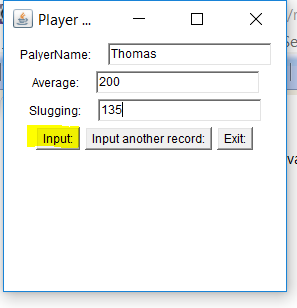
1. When run the above program, below window will appear. Fill player details and click on "Input" button, that will open a new file/existing file and write player data.
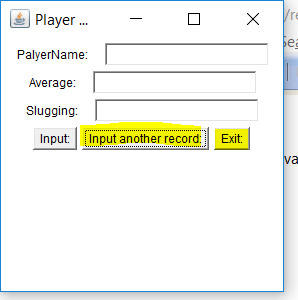
2. "Input another record" button is used to clear the existing player details in the window.
3. "Exit" button is used to exit from/close the window.
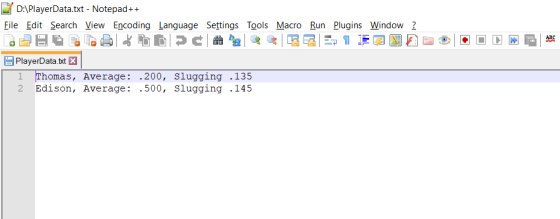
4. Below is the sample player data file.
Add Answer to:
; Read from file mov eax, fileHandle mov edx, OFFSET buffer mov ecx, lengthof buffer call...
X86 Assembly Language Help to implement the CipherChar Procedure at the end of the given code...
X86 Assembly Language Help to implement the CipherChar Procedure at the end of the given code INCLUDE Irvine32.inc .data KeyPrompt BYTE "Enter the passphrase: ",0 TextPrompt BYTE "Enter the plaintest: ",0 str1 BYTE "The passphrase has length:",0 str2 BYTE "The plaintest has length:",0 KeyIs BYTE "The passphrase: ",0 PlainTextIs BYTE "The plaintext: ",0 CipherTextIs BYTE "The ciphertext: ",0 KMAX = 64 ; passphrase buffer maximum size BMAX = 128 ; test...
Assembly MASM x86 Write a complete program that sorts dword unsigned integer array in descending order....
Assembly MASM x86 Write a complete program that sorts dword unsigned integer array in descending order. Assume that the user doesn’t enter more than 40 integers. You MUST use the template and follow all the directions there. You can’t add any more procedures to the template. The procedures can’t use any global variables (variables that are inside .data segment). The caller of any procedures sends its argument through the stack. Inside any procedures, if you need to use a register,...
In Nasm: In the following code what it's needed to sort the array in ascending order:...
In Nasm: In the following code what it's needed to sort the array in ascending order: ;;;;;;;;;;;;;;;;;;;; MACRO DEFINITIONS ;;;;;;;;;;;;;;;;;;;; ; A macro with two parameters ; Implements the write system call %macro writestring 2 mov eax, 4 ;sys_write system call number mov ebx, 1 ;file descriptor std_out mov ecx, %1 ;message to write from parameter 1 mov edx, %2 ;message length from parameter 2 int 0x80 %endmacro...
NOTE: explain the lines in comments for better understanding Write an assembly program (for x86 processors...
NOTE: explain the lines in comments for better understanding Write an assembly program (for x86 processors - Irvine) that has two procedures, a main procedure and a procedure called Fib. The fib procedure is to uses a loop to calculate and printout the first N Fibonacci numbers. Fibonacci sequence is described by the following formula: Fib(1) = 1, Fib(2) = 1, Fib(n) = Fib(n – 1) + Fib(n – 2). The value of N is to be communicated to this...
Write a program that turns a 32-bit numeric value (e.g., 0xFFFFh) and converts it to a...
Write a program that turns a 32-bit numeric value (e.g., 0xFFFFh) and converts it to a byte array such that it can be printed to the screen using a system call method. A loop is necessary for converting the numeric value to ASCII for output. Again, use a system call (e.g., int 80h) to print the value to the console. Calling external functions (e.g. printf) is not allowed. You may use the starter file attached to this assignment. PLEASE WRITE...
IN MIPS PLEASE. Need help writing a MIPS program that reads from a text file named...
IN MIPS PLEASE. Need help writing a MIPS program that reads from a text file named "input.txt" and places it in a buffer. A buffer of 80 bytes is more than enough. Before you call your function, set $a0 equal to the address of the filename and $a1 to the address of the buffer where data is stored. The function should return the number of bytes read in $v0. In the main program, print an error message and terminate the...
Most questions answered within 3 hours.
-
Where is the error in this code sequence?
String s1 = "Hello";
String s2 = "ello";...
asked 10 months ago -
Financial data for Joel de Paris, Inc., for last year
follow:
Joel de Paris, Inc.
Balance...
asked 10 months ago -
Consider this reaction:
Al2(SO4)3 (aq)+ BaCl3
(aq) Al2Cl6 (aq)- +
3BaSO4(s) . What is the...
asked 10 months ago -
Suppose that Savneet is considering increasing her
recent random sample from 20 car rentals to 40...
asked 10 months ago -
Trucks arrive at an unloading terminal at an average rate of 120
per hour.
Trucks arrive...
asked 10 months ago -
Why are methanol and ethanol completely soluble in water while
octanol is not very little soluble....
asked 10 months ago -
A facilities manager at a university reads in a research report
that the mean amount of...
asked 10 months ago -
When the CuSO4 is rehydrated by adding water to the anhydrous
compound, is this an endothermic...
asked 10 months ago -
A ray of sunlight is passing from diamond into crown glass; the
angle of incidence is...
asked 10 months ago -
A block of mass 0.249 kg is placed on top of a light, vertical
spring of...
asked 10 months ago -
how do the kidneys compensate in the presences of acidosis
a) trigger hyperventilate
b) reserve acid...
asked 10 months ago -
Question 501 pts
The rental rate of capital to the firm increases. Which of the
following...
asked 10 months ago