Write a Matlab script for a 2-dimentional Cellular automata. Plot your result.
Write a Matlab script for a 2-dimentional Cellular automata. Plot your result.
Homework Answers
%Main Script
for rule = 0:1
pattern = cellularAutomata(rule, 50);
end
%cellularAutomata.m
function pattern = cellularAutomata(rule, n, width,
randfrac)
%elementaryCellularAutomata Elementary 1D cellular automaton
patterns
%
% PATTERN = elementaryCellularAutomata(RULE, NITER), where NITER is
a
% scalar, returns an NITER x 2*NITER+1 matrix whose entries are all
0 or
% 1. The I'th row of the matrix contains the state of the
elementary 1D
% cellular automaton at iteration I-1, counting the initial state
as
% iteration 0. The integer RULE specifies the rule to use as set
out at
%
http://mathworld.wolfram.com/ElementaryCellularAutomaton.html.
%
% The initial state is all zeros except for a 1 at element NITER+1
(the
% central element) of the CA.
%
% PATTERN = elementaryCellularAutomata(RULE, NITER, WID), where WID
is a
% scalar, returns an NITER x WID matrix. The array of cells is
taken to
% be circular, so that PATTERN(I+1,I) depends on PATTERN{(I,WID),
(I,1)
% and (I,2)}. Similarly, PATTERN(I+1,WID) depends on
PATTERN{(I,WID-1),
% (I,WID) and (I,1)}. This only matters if WID < 2*NITER+1 and
RULE is
% such that the pattern propagates outwards, so reaching the
boundaries
% of the array.
%
% This wraparound allows long, thin patterns to be generated if
an
% appropriate rule is chosen. All patterns with a fixed width will
be
% periodic, unless some random noise is added.
%
% The state on the first iteration is all zeros except for a 1 at
element
% floor((WID+1)/2) of the CA.
%
% PATTERN = elementaryCellularAutomata(RULE, NITER, START) where
START is
% a 1 x WID row vector containing only the values 0 and 1, is as
above
% except that the initial state is given by the entries in START.
Thus on
% exit, PATTERN(1,:) is equal to START.
%
% PATTERN = elementaryCellularAutomata(RULE, NITER, WIDSTART,
FNOISE) is
% as above except that noise is added to the process. WIDSTART can
be
% either a scalar giving the width or a vector giving the start
state; an
% empty matrix is equivalent to 2*NITER+1. FNOISE is a number from
0 to 1
% giving the probability that any given cell will be set to the
wrong
% state (the complement of the state given by the rule) on any
one
% iteration.
%
% Example
% -------
% % show 50 rows of each pattern
% for rule = 0:255
% pattern = elementaryCellularAutomata(rule, 50);
% imshow(pattern); pause;
% end
% Copyright 2010 David Young
% check arguments and supply defaults
error(nargchk(2, 4, nargin));
validateattributes(rule, {'numeric'}, {'scalar' 'integer'
'nonnegative' '<=' 255}, ...
'elementaryCellularAutomata', 'RULE');
validateattributes(n, {'numeric'}, {'scalar' 'integer' 'positive'},
...
'elementaryCellularAutomata', 'N');
if nargin < 3 || isempty(width)
width = 2*n-1;
elseif isscalar(width)
validateattributes(width, {'numeric'}, {'integer' 'positive'},
...
'elementaryCellularAutomata', 'WIDTH');
else
validateattributes(width, {'numeric' 'logical'}, {'binary' 'row'},
...
'elementaryCellularAutomata', 'START');
end
if nargin < 4 || isempty(randfrac)
dorand = false;
else
validateattributes(randfrac, {'double' 'single'}, {'scalar'
'nonnegative' '<=' 1}, ...
'elementaryCellularAutomata', 'FNOISE');
dorand = true;
end
% set up machine
if isscalar(width)
patt = ones(1, width);
patt(floor((width+1)/2)) = 2;
else
patt = width + 1; % change 0,1 to 1,2 so can use sub2ind
width = length(patt);
end
% unpack rule
rulearr = (bitget(rule, 1:8) + 1);
% initialise output array
pattern = zeros(n, width);
% iterate to generate rest of pattern
for i = 1:n
pattern(i, :) = patt; % record current state in output array
% core step: apply CA rules to propagate to next 1D pattern
ind = sub2ind([2 2 2], ...
[patt(2:end) patt(1)], patt, [patt(end) patt(1:end-1)]);
patt = rulearr(ind);
%optional randomisation
if dorand
flip = rand(1, width) < randfrac;
patt(flip) = 3 - patt(flip);
end
end
% change symbols from 1 and 2 to 0 and 1
pattern = pattern-1;
plot(pattern);
hold on;
end
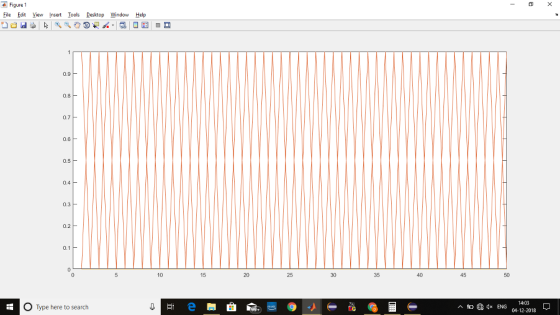
Screenshot of Plot:
Add Answer to:
Write a Matlab script for a 2-dimentional Cellular automata.
Plot your result.
Write a MATLAB script to plot the function of f(x) given by: Write a MATLAB script...
 Write a MATLAB script to plot the function of f(x) given by:
 f(x) = integral x^2 - pi^2/4 x > pi/2 8 * cos x -pi/2 lessthanorequalto x lessthanorequalto pi/2 pi^2/4 - x^2 x < -pi/2
Write a MATLAB script to plot the function of f(x) given by:
Write a MATLAB script to plot the function of f(x) given by: f(x) = integral x^2 - pi^2/4 x > pi/2 8 * cos x -pi/2 lessthanorequalto x lessthanorequalto pi/2 pi^2/4 - x^2 x < -pi/2
1) Explain the IDFT function in Matlab 2) Re-write a SCILAB script that performs the IDFT....
 1) Explain the IDFT function in Matlab 2) Re-write a SCILAB script that performs the IDFT. 3) Test your program using the following input xk (6-1-40-1)); 4) Plot x 5) Compare the output of Matlab with the output of SCILAB
In Matlab Prepare a script to plot the surface plot of the function Plot over the...
 In Matlab
Prepare a script to plot the surface plot of the function Plot over the ranges -10 s x 3 10 and-20 sy 20. Note: The function, meshgrid) will need to be used to get the required matrices needed for x and y
In Matlab
Prepare a script to plot the surface plot of the function Plot over the ranges -10 s x 3 10 and-20 sy 20. Note: The function, meshgrid) will need to be used to get the required matrices needed for x and y
matlab script QUESTION 1 (1) Write a MATLAB script to find the standard deviation of integer...
 matlab script
QUESTION 1 (1) Write a MATLAB script to find the standard deviation of integer numbers located in the vector a. Note that the vector contains both integer and floating- point numbers. The standard deviation formula is: 1 S = VN-12(%; – T)? use a-[6.6, 3, 8, 5, 8.8, 54, 78, 90, 5.5] the result should be
matlab script
QUESTION 1 (1) Write a MATLAB script to find the standard deviation of integer numbers located in the vector a. Note that the vector contains both integer and floating- point numbers. The standard deviation formula is: 1 S = VN-12(%; – T)? use a-[6.6, 3, 8, 5, 8.8, 54, 78, 90, 5.5] the result should be
Problem 2: A periodic signalxit) is shown below A =10, T-4 sec. -T Write a MATLAB script to plot ...
 Problem 2: A periodic signalxit) is shown below A =10, T-4 sec. -T Write a MATLAB script to plot the signal, using enough points to get a smooth curve. Compute the Fourier series coefficients for the signal (if you can find them in the text, that is ok). Plot the single-sided or double-sided spectra for each signal. Include enough frequencies in the plots to adequately represent the frequency content of the signals. Plot partial sums of the Fourier series for...
Write a matlab script(using only matlab) for this. Write a script to solve the following problem:...
 Write a matlab script(using only matlab) for this.
Write a script to solve the following problem: Ask the user for the length and the width of a rectangle. These need to be passed to a function. The function is to calculate and return the area and the perimeter of the rectangle. The area is the length times the width and the perimeter is 2 times the length and 2 times the width. Make sure to suppress all output from the...
Write a matlab script(using only matlab) for this.
Write a script to solve the following problem: Ask the user for the length and the width of a rectangle. These need to be passed to a function. The function is to calculate and return the area and the perimeter of the rectangle. The area is the length times the width and the perimeter is 2 times the length and 2 times the width. Make sure to suppress all output from the...
In matlab script, thank you! Write a MATLAB script that will generate random integers in the...
 In matlab script, thank you!
Write a MATLAB script that will generate random integers in the range from 1 to 100, and print them, until one is finally generated that is greater than 50. The script should print how many attempts it took
In matlab script, thank you!
Write a MATLAB script that will generate random integers in the range from 1 to 100, and print them, until one is finally generated that is greater than 50. The script should print how many attempts it took
Question 2 Problem Definition Write a MATLAB script that uses nested loops to create a 100 by 100...
 Question 2 Problem Definition Write a MATLAB script that uses nested loops to create a 100 by 100 element 2D array representing an image that shades from white at the top to black at the bottom. Your script should save the image in a file called test2.png. Testing The image file produced should be shaded from white at the top of the image to black at the bottom of the image like SO: Coding Write your code in a MATLAB...
Write a Matlab script to complete the following: 1. Write a script file that allows a...
 Write a Matlab script to complete the following:
1. Write a script file that allows a user to: a. Plot a function from a list b. Change the function coefficients c. Choose function range and number of points d. Replot a new function on the same graph keeping the original function e. Replot a new function on the same graph overwriting the original function f. Save the graph (as a png file) Functions to choose from: y A sin(Bx +...
Write a Matlab script to complete the following:
1. Write a script file that allows a user to: a. Plot a function from a list b. Change the function coefficients c. Choose function range and number of points d. Replot a new function on the same graph keeping the original function e. Replot a new function on the same graph overwriting the original function f. Save the graph (as a png file) Functions to choose from: y A sin(Bx +...
PROBLEM 2 Write a Matlab code* (script) or use Excel to determine the damping coefficient of...
 PROBLEM 2 Write a Matlab code* (script) or use Excel to determine the damping coefficient of a spring - mass - damper system with a mass of 165 kg and stiffness of 2400 N/m such that its response will die out (decay) after about 1.5 s, given a zero initial position and an initial velocity of 8 mm/s. 1. Display the numerical value of the damping coefficient. 2. Plot the response of the system. *Turn in your Matlab code with...
 Write a MATLAB script to plot the function of f(x) given by:
 f(x) = integral x^2 - pi^2/4 x > pi/2 8 * cos x -pi/2 lessthanorequalto x lessthanorequalto pi/2 pi^2/4 - x^2 x < -pi/2
Write a MATLAB script to plot the function of f(x) given by:
Write a MATLAB script to plot the function of f(x) given by: f(x) = integral x^2 - pi^2/4 x > pi/2 8 * cos x -pi/2 lessthanorequalto x lessthanorequalto pi/2 pi^2/4 - x^2 x < -pi/2
 1) Explain the IDFT function in Matlab 2) Re-write a SCILAB script that performs the IDFT. 3) Test your program using the following input xk (6-1-40-1)); 4) Plot x 5) Compare the output of Matlab with the output of SCILAB
 In Matlab
Prepare a script to plot the surface plot of the function Plot over the ranges -10 s x 3 10 and-20 sy 20. Note: The function, meshgrid) will need to be used to get the required matrices needed for x and y
In Matlab
Prepare a script to plot the surface plot of the function Plot over the ranges -10 s x 3 10 and-20 sy 20. Note: The function, meshgrid) will need to be used to get the required matrices needed for x and y
 matlab script
QUESTION 1 (1) Write a MATLAB script to find the standard deviation of integer numbers located in the vector a. Note that the vector contains both integer and floating- point numbers. The standard deviation formula is: 1 S = VN-12(%; – T)? use a-[6.6, 3, 8, 5, 8.8, 54, 78, 90, 5.5] the result should be
matlab script
QUESTION 1 (1) Write a MATLAB script to find the standard deviation of integer numbers located in the vector a. Note that the vector contains both integer and floating- point numbers. The standard deviation formula is: 1 S = VN-12(%; – T)? use a-[6.6, 3, 8, 5, 8.8, 54, 78, 90, 5.5] the result should be
 Problem 2: A periodic signalxit) is shown below A =10, T-4 sec. -T Write a MATLAB script to plot the signal, using enough points to get a smooth curve. Compute the Fourier series coefficients for the signal (if you can find them in the text, that is ok). Plot the single-sided or double-sided spectra for each signal. Include enough frequencies in the plots to adequately represent the frequency content of the signals. Plot partial sums of the Fourier series for...
 Write a matlab script(using only matlab) for this.
Write a script to solve the following problem: Ask the user for the length and the width of a rectangle. These need to be passed to a function. The function is to calculate and return the area and the perimeter of the rectangle. The area is the length times the width and the perimeter is 2 times the length and 2 times the width. Make sure to suppress all output from the...
Write a matlab script(using only matlab) for this.
Write a script to solve the following problem: Ask the user for the length and the width of a rectangle. These need to be passed to a function. The function is to calculate and return the area and the perimeter of the rectangle. The area is the length times the width and the perimeter is 2 times the length and 2 times the width. Make sure to suppress all output from the...
 In matlab script, thank you!
Write a MATLAB script that will generate random integers in the range from 1 to 100, and print them, until one is finally generated that is greater than 50. The script should print how many attempts it took
In matlab script, thank you!
Write a MATLAB script that will generate random integers in the range from 1 to 100, and print them, until one is finally generated that is greater than 50. The script should print how many attempts it took
 Question 2 Problem Definition Write a MATLAB script that uses nested loops to create a 100 by 100 element 2D array representing an image that shades from white at the top to black at the bottom. Your script should save the image in a file called test2.png. Testing The image file produced should be shaded from white at the top of the image to black at the bottom of the image like SO: Coding Write your code in a MATLAB...
 Write a Matlab script to complete the following:
1. Write a script file that allows a user to: a. Plot a function from a list b. Change the function coefficients c. Choose function range and number of points d. Replot a new function on the same graph keeping the original function e. Replot a new function on the same graph overwriting the original function f. Save the graph (as a png file) Functions to choose from: y A sin(Bx +...
Write a Matlab script to complete the following:
1. Write a script file that allows a user to: a. Plot a function from a list b. Change the function coefficients c. Choose function range and number of points d. Replot a new function on the same graph keeping the original function e. Replot a new function on the same graph overwriting the original function f. Save the graph (as a png file) Functions to choose from: y A sin(Bx +...
 PROBLEM 2 Write a Matlab code* (script) or use Excel to determine the damping coefficient of a spring - mass - damper system with a mass of 165 kg and stiffness of 2400 N/m such that its response will die out (decay) after about 1.5 s, given a zero initial position and an initial velocity of 8 mm/s. 1. Display the numerical value of the damping coefficient. 2. Plot the response of the system. *Turn in your Matlab code with...
Most questions answered within 3 hours.
-
Where is the error in this code sequence?
String s1 = "Hello";
String s2 = "ello";...
asked 10 months ago -
Financial data for Joel de Paris, Inc., for last year
follow:
Joel de Paris, Inc.
Balance...
asked 10 months ago -
Consider this reaction:
Al2(SO4)3 (aq)+ BaCl3
(aq) Al2Cl6 (aq)- +
3BaSO4(s) . What is the...
asked 10 months ago -
Suppose that Savneet is considering increasing her
recent random sample from 20 car rentals to 40...
asked 10 months ago -
Trucks arrive at an unloading terminal at an average rate of 120
per hour.
Trucks arrive...
asked 10 months ago -
Why are methanol and ethanol completely soluble in water while
octanol is not very little soluble....
asked 10 months ago -
A facilities manager at a university reads in a research report
that the mean amount of...
asked 10 months ago -
When the CuSO4 is rehydrated by adding water to the anhydrous
compound, is this an endothermic...
asked 10 months ago -
A ray of sunlight is passing from diamond into crown glass; the
angle of incidence is...
asked 10 months ago -
A block of mass 0.249 kg is placed on top of a light, vertical
spring of...
asked 10 months ago -
how do the kidneys compensate in the presences of acidosis
a) trigger hyperventilate
b) reserve acid...
asked 10 months ago -
Question 501 pts
The rental rate of capital to the firm increases. Which of the
following...
asked 10 months ago