Pacman
 For this project, you will be working in on the Pacman game you created for Lab 6. See the solution to Lab 6 for starting files to this project.
You should be working in a group of 3 or fewer students.
Part 1: Inheritance
Create a new class called GameCharacter.
Make GameCharacter a parent class of Pacman and Ghost.
Make sure to move all common fields and methods from Pacman and Ghost to GameCharacter.
Part 2: Gameplay
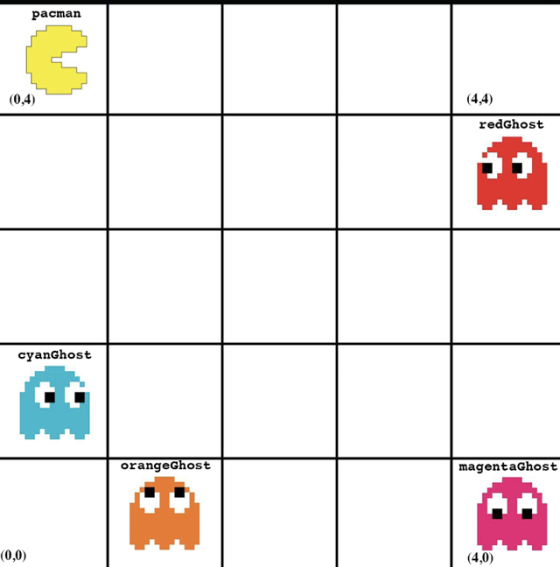
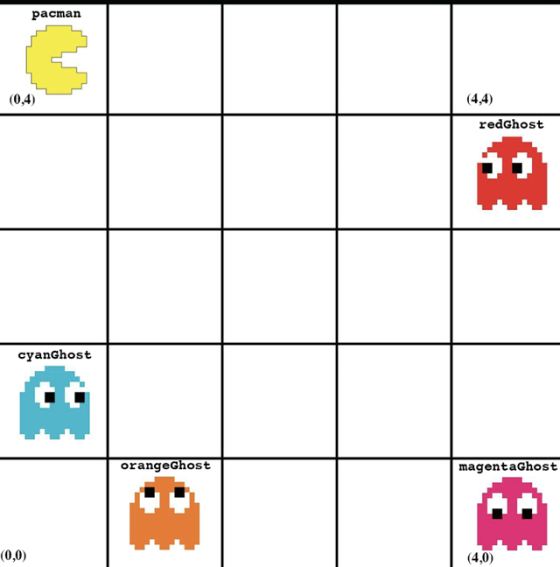
Begin the game with the following configuration of character placement. (How Lab #4 begins)
Allow the player to move Pacman on the board by entering the following letters to move:
W | Up |
A | Left |
S | Down |
D | Right |
You can add additional letters/keys if you would like.
When the player moves the character, you should do the following:
1. Make sure the position they are trying to move Pacman to is valid (i.e. within the board)
· If an invalid position is selected, ask the player to re-enter
2. Update Pacman’s position.
3. Randomly move the ghosts to new positions.
· Cannot be off board
· Cannot be where another ghost is, but can be where Pacman is
4. Check to see if a ghost is now where Pacman is. If the ghost is where Pacman is, the game is over.
5. Keep track of how many times the player has moved. This will be the player’s score.
The game should continue until the ghosts catch Pacman.
Part 3: Displaying Info to the Player
Your game should convey the following info to the player at appropriate times:
· How to move Pacman
· When they have selected an invalid move
· The position of each GameCharacter after each movement.
· When the game is over because a ghost caught Pacman
· The player’s score (based on their moves)
You DO NOT have to display images to the player. However, if you display images to the player with a grid and the character’s in their correct position, you will get EXTREME extra credit.
//Code for Lab 6 to work with
public class Ghost {
// instance variables
private Color color;
private int xPosition;
private int yPosition;
public Ghost(int xPosition, int yPosition, Color color){
this.xPosition = xPosition;
this.yPosition = yPosition;
this.color = color;
}
// getters and setters
public Color getColor() {
return color;
}
public void setColor(Color color) {
this.color = color;
}
public int getXPosition() {
return xPosition;
}
public void setXPosition(int xPosition) {
this.xPosition = xPosition;
}
public int getYPosition() {
return yPosition;
}
public void setYPosition(int yPosition) {
this.yPosition = yPosition;
}
// other methods
public void moveLeft(){
xPosition = xPosition - 1;
}
public void moveRight(){
xPosition = xPosition + 1;
}
public void moveUp(){
yPosition = yPosition + 1;
}
public void moveDown(){
yPosition = yPosition - 1;
}
public void becomeEdible(){
System.out.println("Get those ghosts!!!");
}
}
import java.awt.Color;
public class Main {
public static void main(String[] args){
// make all the game characters
Pacman pacman = new Pacman(0, 4);
Ghost redGhost = new Ghost(4, 3, Color.RED);
Ghost cyanGhost = new Ghost(0, 1, Color.CYAN);
Ghost orangeGhost = new Ghost(1, 0, Color.ORANGE);
Ghost magentaGhost = new Ghost(4, 0, Color.MAGENTA);
System.out.println("The game BEGINS!!");
System.out.println("Pacman: (" + pacman.getXPosition() + "," + pacman.getXPosition() +")");
System.out.println("Red Ghost: (" + redGhost.getXPosition() + "," + redGhost.getXPosition() +")");
System.out.println("Cyan Ghost: (" + cyanGhost.getXPosition() + "," + cyanGhost.getXPosition() +")");
System.out.println("Orange Ghost: (" + orangeGhost.getXPosition() + "," + orangeGhost.getXPosition() +")");
System.out.println("Magenta Ghost: (" + magentaGhost.getXPosition() + "," + magentaGhost.getXPosition() +")");
System.out.println();
// move pacman
pacman.moveDown();
pacman.moveRight();
// move the red ghost
redGhost.becomeEdible();
redGhost.moveLeft();
redGhost.moveDown();
// move the cyan ghost
redGhost.becomeEdible();
cyanGhost.moveUp();
// move the orange ghost
redGhost.becomeEdible();
orangeGhost.moveUp();
// move the magenta ghost
redGhost.becomeEdible();
magentaGhost.moveUp();
System.out.println();
System.out.println("The game ENDS!!");
System.out.println("Pacman: (" + pacman.getXPosition() + "," + pacman.getXPosition() +")");
System.out.println("Red Ghost: (" + redGhost.getXPosition() + "," + redGhost.getXPosition() +")");
System.out.println("Cyan Ghost: (" + cyanGhost.getXPosition() + "," + cyanGhost.getXPosition() +")");
System.out.println("Orange Ghost: (" + orangeGhost.getXPosition() + "," + orangeGhost.getXPosition() +")");
System.out.println("Magenta Ghost: (" + magentaGhost.getXPosition() + "," + magentaGhost.getXPosition() +")");
}
}
public String getSound() {
return sound;
}
public void setSound(String sound) {
this.sound = sound;
}
// other methods
public void moveLeft(){
xPosition = xPosition - 1;
playSound();
}
public void moveRight(){
xPosition = xPosition + 1;
playSound();
}
public void moveUp(){
yPosition = yPosition + 1;
playSound();
}
public void moveDown(){
yPosition = yPosition - 1;
playSound();
}
public void playSound(){
System.out.println(sound);
}
}Homework Answers
Request Answer!
We need at least 10 more requests to produce the answer.
0 / 10 have requested this problem solution
The more requests, the faster the answer.
Add another changeColor() method (i.e. you will now have 2 methods called "changeColor"). This one accepts...
Add another changeColor() method (i.e. you will now have 2 methods called "changeColor"). This one accepts an int parameter and changes the color based on that int. The valid colors are "red", "yellow", "green", "blue", "magenta" and "black". In your code, map each color to an integer (e.g. in my code 3 means green.) If the number passed to the method is not valid, change the color to red. In the bounceTheBall() method, where you test for collisions with top...
The purpose of this assignment is to write a class Checker that can be used as...
The purpose of this assignment is to write a class Checker that can be used as a part of a checker game program. Open an New Project in Qt Creator, and name it ChGame. Right click on the name of the class, and add a new C++ class named Checker. This will create the new les Checker.h and Checker.cpp. You will need to modify both Checker.h and Checker.cpp for this assignment. (The main function I used for testing my functions...
JAVA Only Help on the sections that say Student provide code. The student Provide code has...
JAVA Only Help on the sections that say Student provide code. The student Provide code has comments that i put to state what i need help with. import java.util.Scanner; public class TicTacToe { private final int BOARDSIZE = 3; // size of the board private enum Status { WIN, DRAW, CONTINUE }; // game states private char[][] board; // board representation private boolean firstPlayer; // whether it's player 1's move private boolean gameOver; // whether...
in java coorect this code & screenshoot your output ---------------------------------------------------------------------- public class UNOGame { /**...
in java coorect this code & screenshoot your output ---------------------------------------------------------------------- public class UNOGame { /** * @param args the command line arguments */ public static void main(String[] args) { Scanner input=new Scanner(System.in); Scanner input2=new Scanner(System.in); UNOCard c=new UNOCard (); UNOCard D=new UNOCard (); Queue Q=new Queue(); listplayer ll=new listplayer(); System.out.println("Enter Players Name :\n Click STOP To Start Game.."); String Name = input.nextLine();...
import javax.swing.*; import java.awt.*; import java.util.List; import java.util.*; /** * Canvas is a class to allow...
import javax.swing.*; import java.awt.*; import java.util.List; import java.util.*; /** * Canvas is a class to allow for simple graphical drawing on a canvas. * This is a modification of the general purpose Canvas, specially made for * the BlueJ "shapes" example. * * @author: Bruce Quig * @author: Michael Kolling (mik) * Minor changes to canvas dimensions by William Smith 6/4/2012 * * @version: 1.6 (shapes) */ public class Canvas { // Note: The implementation of this class (specifically the...
import javax.swing.*; import java.awt.*; import java.util.List; import java.util.*; /** * Canvas is a class to allow...
import javax.swing.*; import java.awt.*; import java.util.List; import java.util.*; /** * Canvas is a class to allow for simple graphical drawing on a canvas. * This is a modification of the general purpose Canvas, specially made for * the BlueJ "shapes" example. * * @author: Bruce Quig * @author: Michael Kolling (mik) * Minor changes to canvas dimensions by William Smith 6/4/2012 * * @version: 1.6 (shapes) */ public class Canvas { // Note: The implementation of this class (specifically the...
This is my code for my game called Reversi, I need to you to make the...
This is my code for my game called Reversi, I need to you to make the Tester program that will run and complete the game. Below is my code, please add comments and Javadoc. Thank you. public class Cell { // Displays 'B' for the black disk player. public static final char BLACK = 'B'; // Displays 'W' for the white disk player. public static final char WHITE = 'W'; // Displays '*' for the possible moves available. public static...
Purpose of it is to coordinate the interaction between the user and the lower-level functionality of...
Purpose of it is to coordinate the interaction between the user and the lower-level functionality of the game. There are two overloaded constructors, one for constructing a brand new game and one for constructing a game from a file. w - Move Up s - Move Down a - Move Left d - Move Right q - Quit and Save Board If the user inputs any one of these characters, execute the corresponding move. This should result in a refreshed...
Title: Term Project for Week 13, 14, 15 Objective: Developed a Pacman game to read/print the...
 Title: Term Project for Week 13, 14, 15
Objective: Developed a Pacman game to
read/print the map as it was laid out in the game map and
subsequently consume the possible $ points laid out in the game map
via user input. Alternatively, if you want to work on your own
problem similar to the scope we have defined for this term project,
you may submit your proposal for approval.
Activity:
* You must apply software design using top/down and...
Title: Term Project for Week 13, 14, 15
Objective: Developed a Pacman game to
read/print the map as it was laid out in the game map and
subsequently consume the possible $ points laid out in the game map
via user input. Alternatively, if you want to work on your own
problem similar to the scope we have defined for this term project,
you may submit your proposal for approval.
Activity:
* You must apply software design using top/down and...
create a java class with the name Brick class: For this part of the assignment, you...
create a java class with the name Brick class: For this part of the assignment, you will create a class that allows you to specify a colored brick that is capable of drawing itself given a specified Graphics object. Note that this is a regular Java class and does not extend the JApplet class. Your class should a constructor with the following signature: Identifier: Brick(int xPosition, int yPosition, int width, int height, Color color) Parameters: xPosition – an int representing...
 Title: Term Project for Week 13, 14, 15
Objective: Developed a Pacman game to
read/print the map as it was laid out in the game map and
subsequently consume the possible $ points laid out in the game map
via user input. Alternatively, if you want to work on your own
problem similar to the scope we have defined for this term project,
you may submit your proposal for approval.
Activity:
* You must apply software design using top/down and...
Title: Term Project for Week 13, 14, 15
Objective: Developed a Pacman game to
read/print the map as it was laid out in the game map and
subsequently consume the possible $ points laid out in the game map
via user input. Alternatively, if you want to work on your own
problem similar to the scope we have defined for this term project,
you may submit your proposal for approval.
Activity:
* You must apply software design using top/down and...
Most questions answered within 3 hours.
-
Where is the error in this code sequence?
String s1 = "Hello";
String s2 = "ello";...
asked 11 months ago -
Financial data for Joel de Paris, Inc., for last year
follow:
Joel de Paris, Inc.
Balance...
asked 11 months ago -
Consider this reaction:
Al2(SO4)3 (aq)+ BaCl3
(aq) Al2Cl6 (aq)- +
3BaSO4(s) . What is the...
asked 11 months ago -
Suppose that Savneet is considering increasing her
recent random sample from 20 car rentals to 40...
asked 11 months ago -
Trucks arrive at an unloading terminal at an average rate of 120
per hour.
Trucks arrive...
asked 11 months ago -
Why are methanol and ethanol completely soluble in water while
octanol is not very little soluble....
asked 11 months ago -
A facilities manager at a university reads in a research report
that the mean amount of...
asked 11 months ago -
When the CuSO4 is rehydrated by adding water to the anhydrous
compound, is this an endothermic...
asked 11 months ago -
A ray of sunlight is passing from diamond into crown glass; the
angle of incidence is...
asked 11 months ago -
A block of mass 0.249 kg is placed on top of a light, vertical
spring of...
asked 11 months ago -
how do the kidneys compensate in the presences of acidosis
a) trigger hyperventilate
b) reserve acid...
asked 11 months ago -
Question 501 pts
The rental rate of capital to the firm increases. Which of the
following...
asked 11 months ago