Write the CSS to configure an ordered list to display a square list marker.
Write the CSS to configure an ordered list to display a square list marker.
Homework Answers
<!DOCTYPE html>
<html>
<style>
/* list-style-type property defines the style of the list bulllets */
ol {
list-style-type: square;
}
</style>
<body>
<!-- ordered list -->
<ol>
<li>Chandker Bing</li>
<li>Phoebe Buffay</li>
<li>Joey Tribbiani</li>
</ol>
</body>
</html>
Sample Output
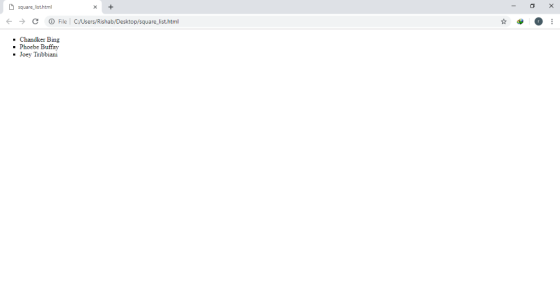
Add Answer to:
Write the CSS to configure an ordered list to display a square
list marker.
Select the code below that uses CSS to configure default text color as black and default...
Select the code below that uses CSS to configure default text color as black and default background color as white for a web page. body { color: black; background-color:white; } default { color: black; background-color:white; } p { color: black; background-color:white; } *.body { color: black; background-color:white; }
Select the code below that uses CSS to configure a class named "footnote" that configures small,...
Select the code below that uses CSS to configure a class named "footnote" that configures small, italic text. .footnote{ font-size= small; font-style= italic;} .footnote { font-size: small; font-style: italic;} #footnote{ font-size: small; font-style: italic;} #footnote{ font-size: small; font-weight: italic;}
where do i get started here? Use embedded CSS style sheets for the table and configure...
where do i get started here? Use embedded CSS style sheets for the table and configure color red, margin 1px, text align center, use a structural pseudo-class that will apply the style to the 1st row to have a dark blue background and to have a gray background of the odd-numbered table rows
1. Write the HTML code to create a fragment identifier at the beginning of a web...
1. Write the HTML code to create a fragment identifier at the beginning of a web page designated by the word “top”. 2. Write the HTML code to create a hyperlink to the named fragment designated by “top”. 3. Write the HTML code to assign the header element to the appropriate ARIA landmark role, as shown in the slides. 4. Write the HTML code to associate a web page with an external style sheet named myprint.css to configure a printout....
Given the HTML5 code below, please add embedded css snippets in the code to configure it...
Given the HTML5 code below, please add embedded css snippets in the code to configure it with the requirements below: (4%) for the entire web page, set text color as black and background color as white (3%); for text in heading 1 tags, set text font-size as 200%, text font type face as Arial, or sans-serif. (3%) You can copy the code below, paste it in answer area, and then insert your code appropriately): <!DOCTYPE html> <html lang="en"> <head> <meta...
please write a list of sql queries for these exercises 5. Display a list of countries...
please write a list of sql queries for these exercises 5. Display a list of countries whose official language is English. Show the names of the countries in alphabetical order.
Given an img element with class="block-image". Provide a CSS rule that causes the image to display...
Given an img element with class="block-image". Provide a CSS rule that causes the image to display using block formatting.
Javascript - Html - css write a function to get two parameters a and b and...
Javascript - Html - css write a function to get two parameters a and b and returns a floating point random number between the two. You cannot assume a is always less than b. you need to do some checking. invoke that function multiple times in console.log to test and display the result console.log(generateRandom(4,1)); console.log(generateRandom(4,1)); console.log(generateRandom(-9,10));
Write a python program that generates a list of 50 random numbers. The program should display...
Write a python program that generates a list of 50 random numbers. The program should display (with labels) the sum, average, largest, and smallest of the list along with the list before and after sorting. Bonus: Find the mode (if any)
3. Change CSS display type. a. Return to styles.css in your editor, then in the nav.sitenavigation...
3. Change CSS display type. a. Return to styles.css in your editor, then in the nav.sitenavigation rule, comment out the declarations for the width, padding, and float properties b. Repeat Step a to comment out the width and float declarations in the article style rule and the clear declaration in the footer style rule. c. Below the nav.sitenavigation rule, add a new style rule for p elements within the nav element with the class value sitenavigation, setting the display type...
Most questions answered within 3 hours.
-
Where is the error in this code sequence?
String s1 = "Hello";
String s2 = "ello";...
asked 10 months ago -
Financial data for Joel de Paris, Inc., for last year
follow:
Joel de Paris, Inc.
Balance...
asked 10 months ago -
Consider this reaction:
Al2(SO4)3 (aq)+ BaCl3
(aq) Al2Cl6 (aq)- +
3BaSO4(s) . What is the...
asked 10 months ago -
Suppose that Savneet is considering increasing her
recent random sample from 20 car rentals to 40...
asked 10 months ago -
Trucks arrive at an unloading terminal at an average rate of 120
per hour.
Trucks arrive...
asked 10 months ago -
Why are methanol and ethanol completely soluble in water while
octanol is not very little soluble....
asked 10 months ago -
A facilities manager at a university reads in a research report
that the mean amount of...
asked 10 months ago -
When the CuSO4 is rehydrated by adding water to the anhydrous
compound, is this an endothermic...
asked 10 months ago -
A ray of sunlight is passing from diamond into crown glass; the
angle of incidence is...
asked 10 months ago -
A block of mass 0.249 kg is placed on top of a light, vertical
spring of...
asked 10 months ago -
how do the kidneys compensate in the presences of acidosis
a) trigger hyperventilate
b) reserve acid...
asked 10 months ago -
Question 501 pts
The rental rate of capital to the firm increases. Which of the
following...
asked 10 months ago