Subject: Human Resources Information System(HRIS) Answer below questions in details 1. Discuss DFD diagram, definition &...
Homework Answers
1.DFD DIAGRAM,DEFINATION AND PURPOSE
Data flow diagrams are used to graphically represent the flow of data in a business information system. DFD describes the processes that are involved in a system to transfer data from the input to the file storage and reports generation.
Data flow diagrams can be divided into logical and physical. The logical data flow diagram describes flow of data through a system to perform certain functionality of a business. The physical data flow diagram describes the implementation of the logical data flow.
Why DFD?
DFD graphically representing the functions, or processes, which capture, manipulate, store, and distribute data between a system and its environment and between components of a system. The visual representation makes it a good communication tool between User and System designer. Structure of DFD allows starting from a broad overview and expand it to a hierarchy of detailed diagrams. DFD has often been used due to the following reasons:
- Logical information flow of the system
- Determination of physical system construction requirements
- Simplicity of notation
- Establishment of manual and automated systems requirements
DFD Symbols
There are four basic symbols that are used to represent a data-flow diagram.
Process
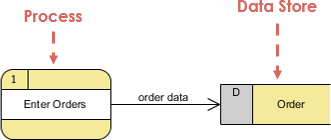
A process receives input data and produces output with a different content or form. Processes can be as simple as collecting input data and saving in the database, or it can be complex as producing a report containing monthly sales of all retail stores in the northwest region.
Every process has a name that identifies the function it performs.
The name consists of a verb, followed by a singular noun.
Example:
- Apply Payment
- Calculate Commission
- Verify Order
Notation
- A rounded rectangle represents a process
- Processes are given IDs for easy referencing

Process Example
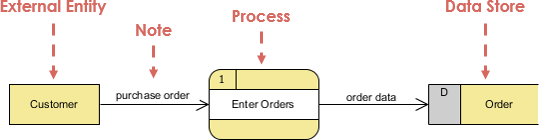
Data Flow
A data-flow is a path for data to move from one part of the information system to another. A data-flow may represent a single data element such the Customer ID or it can represent a set of data element (or a data structure).
Example:
- Customer_info (LastName, FirstName, SS#, Tel #, etc.)
- Order_info (OrderId, Item#, OrderDate, CustomerID, etc.).
Data flow Example:
Notation
- Straight lines with incoming arrows are input data flow
- Straight lines with outgoing arrows are output data flows
Note that:
Because every process changes data from one form into another, at least one data-flow must enter and one data-flow must exit each process symbol.
Rule of Data Flow
One of the rule for developing DFD is that all flow must begin with and end at a processing step. This is quite logical, because data can't transform on its own with being process. By using the thumb rule, it is quite easily to identify the illegal data flows and correct them in a DFD.
| Wrong | Right | Description |
|---|---|---|
 |
 |
An entity cannot provide data to another entity without some processing occurred. |
 |
 |
Data cannot move directly from an entity to a data story without being processed. |
 |
 |
Data cannot move directly from a data store without being processed. |
 |
 |
Data cannot move directly from one data store to another without being processed. |
Other frequently-made mistakes in DFD
A second class of DFD mistakes arise when the outputs from one processing step do not match its inputs and they can be classified as:
- Black holes - A processing step may have input flows but no output flows.
- Miracles - A processing step may have output flows but no input flows.
- Grey holes - A processing step may have outputs that are greater than the sum of its inputs
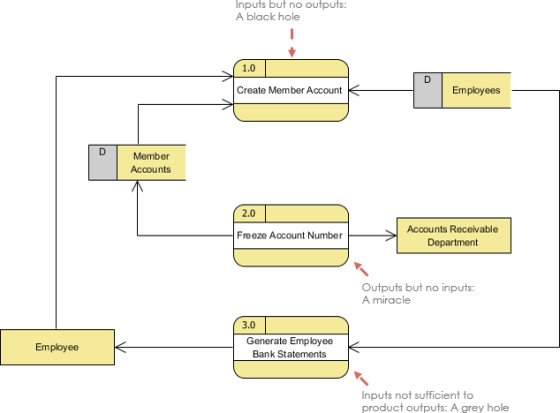
Data Store
A data store or data repository is used in a data-flow diagram to represent a situation when the system must retain data because one or more processes need to use the stored data in a later time.
Notation
- Data can be written into the data store, which is depicted by an outgoing arrow
- Data can be read from a data store, which is depicted by an incoming arrow.
- Examples are: inventory, Accounts receivables, Orders, and Daily Payments.

Data Store Example
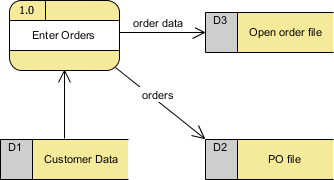
Note that:
- A data store must be connected to a process with a data-flow.
- Each data store must have at least one input data-flow and at least one output data-flow (even if the output data-flow is a control or confirmation message).
External Entity
An external entity is a person, department, outside organization, or other information system that provides data to the system or receives outputs from the system. External entities are components outside of the boundaries of the information systems. They represent how the information system interacts with the outside world.
- A rectangle represents an external entity
- They either supply data or receive data
- They do not process data
Notation
- A customer submitting an order and then receive a bill from the system
- A vendor issue an invoice

External Entity Example
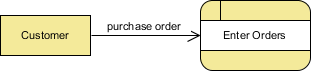
Note that:
- External entities also are called terminators because they are data origins or final destinations.
- An external entity must be connected to a process through a data-flow.
Top-Down Decomposition Techniques
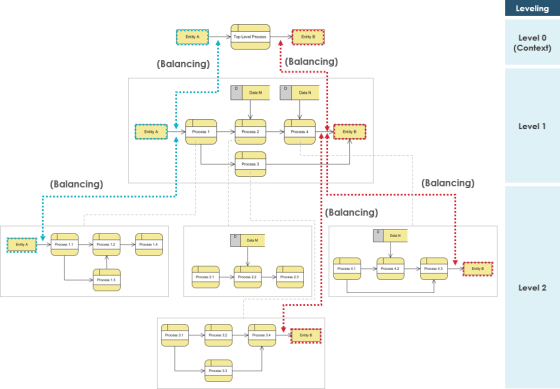
Top-down decomposition, also called leveling, is a technique used to show more detail in lower-level DFDs. Leveling is done by drawing a series of increasingly detailed diagrams until the desired degree of detail is reached. As shown in the Figure, DFD Leveling is first displaying the targeted system as a single process, and then showing more detail until all processes are functional primitives.
Balancing DFD
When performing top-down decomposition to a DFD to lower level DFDs, the inputs and outputs must be conserved between levels of DFDs. For example, level n & n+1 must have the same inputs and outputs
Guideline for Developing Data-Flow Diagram
Context Diagram - Level 0
- The context diagram must fit in one page.
- The process name in the context diagram should be the name of
the information system.
- For example, Grading System, Order Processing System, Registration System.
- The context level diagram gets the number 0 (level zero).
Unique Name for Levels
- Use unique names within each set of symbols.
- For example, there can be only one entity CUSTOMER in all levels of the data-flow diagrams; or here can be only one process named CALCULATE OVERTIME among all levels of data-flow diagrams.
No Cross Line in DFD
- One way to achieve this is to restrict the number of processes in a data-flow diagram.
Right Complexity for Human Mind - 7 + / - 2 Symbols
- On lower-level data-flow diagrams with multiple processes, one should not have more than nine process symbols.
- Another way to avoid crossing lines is to duplicate an external entity or data store. Use a special notation such as an asterisk, to denote the duplicate symbol.
Numbering Convention
- Use a unique reference number for each process symbol.
- Other process numbers are in the hierarchy of:
- (1, 2, 3,...);
- (1.1, 1.2, 1.3, ..., 2.1, 2.2, 2.3,...);
- (1.1.1, 1.1.2, 1.1.3,...).
Context-Level Diagram
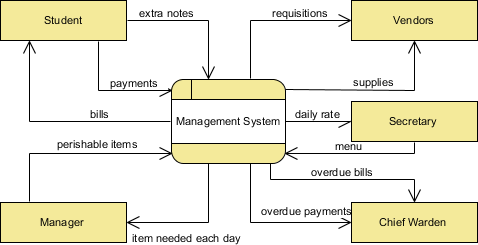
A context diagram gives an overview and it is the highest level in a data flow diagram, containing only one process representing the entire system. It should be split into major processes which give greater detail and each major process may further split to give more detail.
- All external entities are shown on the context diagram as well as major data flow to and from them.
- The diagram does not contain any data storage.
- The single process in the context-level diagram, representing the entire system, can be exploded to include the major processes of the system in the next level diagram, which is termed as diagram 0.
Level 1 DFD
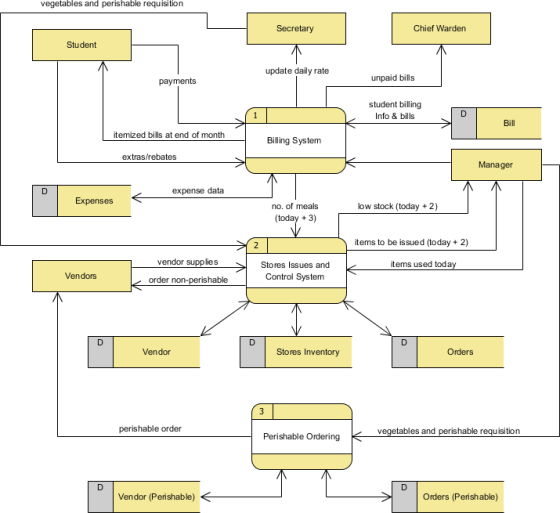
Processes in diagram 0 (with a whole number) can be exploded further to represent details of the processing activities. Example below shows the next level ((Diagram 1) of process explosion.
Note that:
Although the following level 1 DFD only has three processes, there are quite a few input and input from the processes to the external entities and that could end up to be a few cross lines among them in the diagram; to avoid this problem, we could use (master and auxiliary view) multiple views of the same external entity in the DFD.
Level 2 DFD
If a process with a lot of data flow linking between a few external entities, we could first extract that particular process and the associated external entities into a separate diagram similar to a context diagram, before you refine the process into a separate level of DFD; and by this way you can ensure the consistency between them much easier.
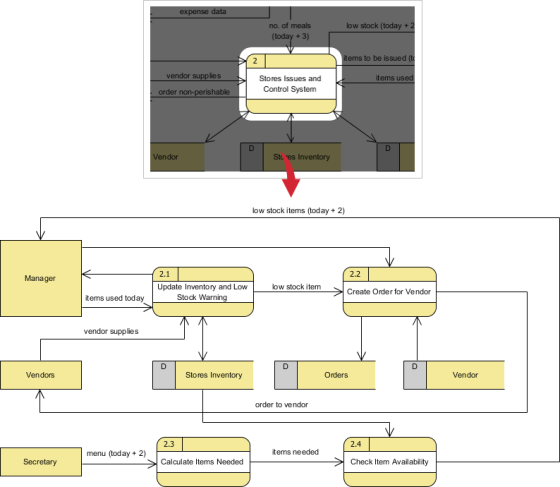
Logical vs Physical Data Flow Diagrams
Data flow diagrams are categorized as either logical or physical. A logical data flow diagram focuses on the business and how the business operates. It is not concerned with how the system will be constructed. We can ignore implementation specifics such as, computer configuration, data storage technology, communication or message passing methods by focusing on the functions performed by the system, such as, data collection, data to information transformation and information reporting.
A physical data flow diagram shows how the system will be implemented, including the hardware, software, files, and people in the system. It is developed such that the processes described in the logical data flow diagrams are implemented correctly to achieve the goal of the business.
Benefits of Logical Data Flow Diagram
- A logical diagram is drawn present business information and centered on business activities, which makes it an ideal communication tool when use in communicating with project users.
- Logical DFD is based on business events and independent of particular technology or physical arrangement, which makes the resulting system more stable.
- Logical DFD allows analyst to understand the business being studied and to identify the reason behind implementation plans.
- Systems implemented based on logical DFD will be easier to maintain because business functions are not subject to frequent change.
- Very often, logical DFD does not contain data stores other than files or a database, making less complex than physical DFD and is easier to develop.
- Physical DFD can be easily formed by modifying a logical DFD.
Benefits of Physical Data Flow Diagram
- Clarifying which processes are manual and which are automated: Manual processes require detailed documentation and automated process require computer programs to be developed.
- Describing processes in more detail than do logical DFDs: Describes all steps for processing of data.
- Sequencing processes that have to be done in a particular order: Sequence of activities that lead to a meaningful result are described. For example, update must be performed before a producing a summary report.
- Identifying temporary data storage: Temporary storage such as a sales transaction file for a customer receipt (report) in a grocery store, are described.
- Specifying actual names of files and printouts: Logical data flow diagrams describes actual filenames and reports, so that the programmers can relate those with the data dictionary during the developmental phase of the system.
- Adding controls to ensure the processes are done properly: These are conditions or validations of data that are to be met during input, update, delete, and other processing of data.
Refining Physical DFD for Logical DFD
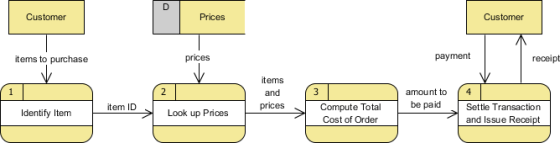
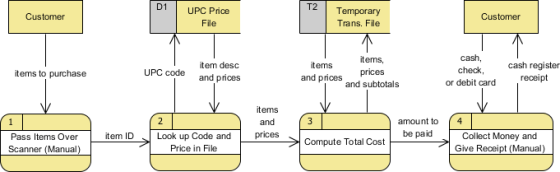
The example below shows a logical DFD and a physical DFD for a grocery store cashier:
- The CUSTOMER brings the ITEMS to the register;
- PRICES for all ITEMS are LOOKED UP, and then totaled;
- Next, PAYMENT is given to the cashier finally, the CUSTOMER is given a receipt.
Logical DFD Example - Grocery Store
The logical DFD illustrates the processes involved without going into detail about the physical implementation of activities.
Physical DFD Example - Grocery Store
- The physical DFD shows that a bar code-the UPC PRICE code found on most grocery store items is used
- In addition, the physical DFD mentions manual processes such as scanning, explains that a temporary file is used to keep a subtotal of items
- The PAYMENT could be made by CASH, CHECK, or DEBIT CARD
- Finally, it refers to the receipt by its name, CASH REGISTER RECEIPT
2. SUCCESS AND FAILURE FACTORS OF HRIS
A)SUCCESS FACTORS OF HRIS:
- Senior Management Support
Senior management’s interest and enthusiasm about the HRIS shows that they value the benefits that will be reaped from the HRIS. Since senior management set corporate direction, and an HRIS can assist HR in aligning with those objectives, their support for the implementation will likely be related to this alignment in some way. It may be important in your organization to ensure this level of support in order to garner some of the success factors listed below.
- Involvement of Stakeholders
Involve all stakeholders early in the implementation process to assist in defining the requirements and desired outputs, such as reporting and interfaces. Depending on the size of your organization, Payroll, IT, Finance, Training, Recruiting, and Benefits may be potential stakeholders. Early in the implementation process, identify who the key stakeholders are and encourage their participation. Implementation of an HRIS implies change to existing processes, and early involvement of stakeholders serves to heighten their buy-in to the HRIS, cooperation and acceptance of that change.
- Risk Assessment
There are potential and unanticipated roadblocks in organizations that can pose a risk to the successful implementation of an HRIS. For example, are there pockets within your organization that are resistant to change? Are there any corporate initiatives that will conflict with the timing of the HRIS implementation and would compete for your effort, or reduce stakeholder availability? A risk assessment will identify these risks and outline how they will be managed or overcome. It is far better to have identified the risks upfront and have a plan for dealing with them, than to be doing so in the midst of an implementation. Senior management support may be necessary, depending on the nature of the plan that is developed to mitigate identified risks.
- Time Budgeted for the Implementation
A significant amount of effort is involved in migrating from an existing solution to a new HRIS. You will be involved in designing the HRIS, learning the new software and testing. The effort that you devote to being involved in the implementation will make the go-live seamless and ensure that you get the most value from the HRIS. Senior management support is essential, especially if redistribution of day-to-day HR responsibilities is required at certain stages during the implementation timeframe. Keep in mind that a fully-implemented HRIS will likely eliminate some of those time-consuming day-to-day manual activities, and so it is a matter of getting over that “hump”. Rather than allowing this competition for your time to prevent you from devoting effort to the HRIS implementation, identify it as a potential risk (see above) early in the project so that a plan can be developed to address the conflict.
- Job Analysis
Conduct a job analysis. Jobs need to be defined, along with the talent requirements, valuations, and salary guidelines. Once connections have been made between positions (to which you assign employees and for which budgeting is done) and these categorized jobs, it will be possible to fully utilize position management functionality in your HRIS, for objectives such as filling vacancies effectively, compensation planning and succession planning. If you need assistance with conducting a job analysis, it is helpful to retain HR consulting services to complete this step prior to the implementation.
- Implementation Methodology
A structured approach to the implementation identifies key components that will act as building blocks to success. Many different recognized implementation methodologies exist. What is important is that you adopt one, and that it is suitable to your organization. Your software vendor will also have a preferred approach. An implementation methodology is different from a project plan, which incorporates those methodology components into a series of ordered milestones with deadlines. An implementation methodology provides content to the project plan, and the project plan delivers the methodology. Adopting an implementation methodology is a thorough approach and provides for stepping back to plan at a high level prior to delving into task completion – doing so contributes to success by preventing rework, encouraging process re-engineering, and getting to the real requirements.
- Business Process Overview (“BPO”)
A BPO involves mapping data sources, procedures and interfaces with other software. Usually the future state with the HRIS implemented will be quite different from the current state – for example, passing of data between the HRIS and other software may now be possible electronically rather than manually, or redundant data stores may be eliminated causing procedures to change. The BPO provides a vision of the future state and acts as a guiding light throughout the implementation, to keep your team focused on the desired outcomes. Do this early in the implementation as a means of involving all stakeholders, promoting the teamwork that will be required for sharing a database, flushing out all high-level requirements, establishing a common vision, and promoting acceptance of change.
- Clearly Defined Requirements
Requirements are as unique as the organizations that have them because HR strategies align with corporate strategies, and corporate strategies are unique. Document your requirements concisely, and include reporting needs in this step. This will help to ensure that the HRIS is configured to allow for the tracking of any data that will be required to meet reporting needs. Definition of requirements is a level deeper in detail than a BPO, and equally important.
- Understanding of Data
An HRIS is data intensive. It is important to understand, prior to an implementation, where all existing HR data is being maintained, so that it can best be determined how that same data will be tracked in the new HRIS, and how data will be converted into the new HRIS from (potentially several) current sources. HRIS value will be optimized when population of data is planned, and data is transformed into information. This begins with an understanding of the data.
- Openness to change
Embracing the change involved in an implementation in part relies on confidence in the product to meet the needs of your team, which can be addressed through the definition of requirements and the BPO. Preparedness for change opens the doors of thinking to creative solutions and reporting possibilities, which can actually increase the success of an implementation beyond original expectations. Promote openness to change throughout the steps identified above.
B) FAILURE FACTORS OF HRIS:
1. Is the Software Required or Not?
Prior to implementation, many businesses are not clear if they really require HR software or not. In fact, various implementation projects fail before they could not even start.
Most of the organizations already have HR management software in place but owing to issues in reporting, efficiency or integration associated with the current system, they are convinced that investing in a new one would be the right decision.
As such, companies bring in large and expensive software when a simple upgrade or small add-on application such as employee portal or better reporting can easily solve their purpose.
2. Lack of Clear Objectives
Before implementing the HR software for business, it is important to be clear about the expectations. The absence of objectives is one of the most common contributing factors related to the failure of implementations.
Many enterprises undertake a project without well-defined and measurable goals, which leads to various challenges and consequently controlling the scope of the software.
Clear objectives here mean defining the critical business processes, deadlines, financial benefits, etc. Even for calling a project unsuccessful, a company needs to measure the pre-implementation assessments of significant objectives.
Without a certain degree of measurement beforehand, it gets difficult to determine issues for failure or success of the project.
3. Improper Planning or Poor Project Management
For any HR tech to do wonders for your business, a strong and detailed plan is an absolute requirement.
Poor planning or improper project management will not just add to the failure of HR software implementation but it often leads to staff embarrassment as well as job loss.
When the project management is unrealistic, not detailed or specific enough, it is bound to result in failure of the project implementation.
It has been seen that companies frame high-level plans having assumptions at a wide level, but an essential part they underestimate during this stage is the number of business changes involved.
For successful HR software implementation, businesses need to make logical series of tasks to know the status of the project as well as determine any loopholes in the process.
4. Expecting the Software to Fix All the Issues
Most of the businesses forget the fact that HR software is simply a tool or an enabler; it cannot fix all your problems until and unless the company’s workflow is efficient.
Despite how obvious it may sound, but this is among the most common contributing factors for project implementation failure.
‘Rubbish in equals rubbish out’ is a popular saying in the technology industry. Irrespective of how advanced or robust your HR software is if the data is outdated and duplicate, you might end up with incorrect automation and data.
5. Deficiency of Staff Training & Support
Lack of appropriate training and support from the management can ruin a project.
The user adoption rates decline due to multiple issues but the two crucial reasons are the absence of training and much-needed support before and after the HR software implementation.
What’s surprising here is that many times, it is not due to insufficient training or support, but because these are not provided to the staff or employees in the right format.
When implementing new software in business, the workforce needs knowledge along with some new skill-set; not taking the personal development of employees seriously is a quick route to HR software implementation failure.
6. Underestimating the Power of Right Resources
Not involving the resources having right skills at the right time is another major reason that accounts for project failure.
It is imperative on the part of business project managers to conduct skill assessments of employees at the initial phase of the software implementation.
This will help them to understand the intricacies of the project, how to roll it out successfully and make it a part of other employee’s workloads.
7. Lack of Communication to Various Stakeholders
Many HR software implementations derail as the project management is more concerned about the installation and running phase.
They forget to communicate the employees about the new software installed in their systems.
For HR software system implementation, the management expects employees to update their records, access HR advice via new mediums or even get payslips online.
Be it any kind of change in the system, success can only be achieved when there are two-way communication and proper engagement of core stakeholders at almost all the levels.
8. Using & Adding Every Feature of the HR Software Straight Away
This can either attribute to the success or failure of new HR software in a business.
It is recommended to not implement each and every inherent feature right away.
To achieve success, it is better to adopt a phased approach i.e. have a list of key objectives and work in that particular direction. Further, too many customizations, in the beginning, can drag the project down, cost overrun and keep success away from sight.
9. Not Keeping Track of Changes
Mostly neglected, lack of tracking changes in the HR software can also fuel up the implementation failure.
Every single change made in the working of the software costs money and time.
It is essential to evaluate every change to determine that the cost of change implementation does not outweigh the benefit involved with it.
For instance, a little change in the interface of payroll software can have a huge impact on its collaboration with the finance system.
10. Insecure Hardware to Support the HR Software
Having an unstable network platform or insecure hardware can pose a threat to the system integrity that might end up in burying HR software implementation.
It is extremely critical in the case of hosted solutions that offer poor internet connectivity.
Prior to implementing hosted HR software, ensure that that you have reliable and fast internet connectivity.
3. PROJECT MANAGEMENT PROCESS IN HRIS:
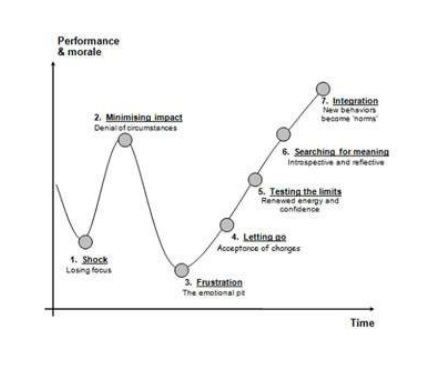
1.Change Management
When implementing an HRMS, the impact of change on the people working in the organization should be taken into consideration. In the broad, people respond to change in broadly predictable ways. For your HRMS implementation to be successful, you need to build your communication strategy based on a structured model, such as the Lewis-Parker diagram below:
2.Hiring an HRMS consultant
First assess the need for a consultant. You might consider hiring an external consultant for the following reasons:
- If your employee surveys indicate that HR is performing poorly, or is considered slow and unresponsive.
- If you’re anticipating a major change to your current HR systems and processes.
- If there are strong differences in opinion between major stakeholders.
Once you’ve decided you need an expert to select and/or implement your new HR technology, look for a credible HRMS consultant who you feel has the necessary skills and a good understanding of the HRMS market. Additional things to note include their ability to form relationships with senior executives and their potential cultural fit within your organization.
References are important at this stage because the size and structure of their previous HR projects are likely to inform their next endeavor. If this information isn’t clear, here are some questions you can ask a candidate's referees to gain a greater understanding of their past experience:
- What was the scope of their HRMS project?
- What exactly did the consultant contribute?
- Was the expected ROI achieved?
- What problems cropped up and how were they tackled?
3.Data Migration
When migrating data from your legacy HRMS to your new system, you first need to plan your approach. Firstly review your current data, identify gaps and check its accuracy. As part of the stakeholder engagement exercise, ask everyone to check their own personal information. Security should you be at the forefront on your mind, especially if your new HRMS is taking you into the cloud. Your IT manager can help oversee this process.
4.System Testing
Testing is an essential step when implementing a new HRMS. Look at employee lifecycle as a starting point for test scripts. Often processes will fail and require another round of testing. Only retest the broken aspect until it passes then run it through your end to end test processes to be sure everything is working as it should.
In addition to your main implementation plan, outline a schedule for testing, configuration and system setup. More aspects to take into account are integration with other business intelligence systems, procedures and parallel running with the system you were using before (particularly applicable to payroll). Your new system should be faster and more accurate than the last.
Expect to perform two types of tests: functional and those that require representative user groups to test the system to the limits of its capacity. Assuming you’re implementing a new HRMS of greater capabilities, some functions will have no prior benchmark for comparison. In this case, take a step back and evaluate whether wider business goals are being met.
5.User Training
Poor user adoption can result in the failure of an HRMS implementation project. Tying your user-training plan to wider business goals, such as reduced costs, improved employee satisfaction, enhanced reputation and better legislative compliance, will keep you on course.
Who should be involved in HRMS user-training?
| USER GROUP | ROLE |
|---|---|
| Executive or C-level users | HR analytics and strategic level reporting. |
| Line managers . |
Employee recordkeeping, workforce scheduling and leave management, recruitment and onboarding and performance management tracking. |
Individual employees |
Access to their own personal records, booking time off, making benefits choices etc. |
| HR Staff | Advisory, analytical. |
The table above outlines the minimal number of users you will usually need to train. Identify the capabilities of each group by identifying their current depth of knowledge or any skills gaps. Design appropriate levels of learning inventions required to bring users up to speed before go-live.
6.Budget
According to a 2019 HRIS report, you can expect to pay £6,125 per user for your software, but this is the average projected spend over five years. That creates a good idea of what your budget should be. But an HRMS budget can easily overrun. Several errors at the planning phase can cause problems here. A robust HRMS implementation plan will involve both HR and IT staff. But these relationships need to be managed. Functional specifications should be signed off before developers are allocated to start otherwise there could be complications.
Many companies forget to anticipate updates and maintenance costs. If you’ve opted for a cloud system, the pricing model will most likely be pay-as-you-go and the cost will depend on the number of users or employee records. With an on-premise system you’ll need to check if have to take out an additional maintenance contract. You should also factor in the cost of continued user training as it’s critical when it comes to ROI.
7.Go-Live
When it’s time for go-live, users’ first experience should be at the forefront of your mind. You should put together a detailed risk assessment of everything that could possibly go wrong with a contingency plan that outlines what to do if problems arise. An important part of preparing for go-live is establishing what support will be available to users for example:
Super-users: particularly proficient users with
an in-depth understanding of the project can be on hand for
colleague queries.
Technical support: for when a hardware or software
problem does occur and needs to be solved straight-away.
Automatic reminders: that let anyone who logs onto
the corporate system know that the new HRMS is about to go
live.
JiT: or ‘just-in-time’ training refers to learning
resources that are on demand for well-supported users to quickly
look up a piece of information they may have forgotten or
missed.
Remember to make arrangements for bug and glitch reporting.
8.Challenges
Most hrms implementation projects will face challenges. Here is a checklist of basic questions to ask post go-live:
- Are the features functioning as expected?
- What errors are occurring and are they within the expected margins?
- Were the bugs and glitches fixed within the desired timeframes? (And, are the fixes being applied with the longer term in mind?)
- How did data integrity stack up against expectations?
- Is the system working with other integrated databases and systems as expected?
- What ‘quick wins’ are emerging? And can you announce them so that you have some early positive news to give out?
Stakeholders who were involved in the earlier stages of implementation can give feedback in terms of whether their needs are being met. This will also help you identify fresh training gaps that should be addressed.
It’s rare that HRMS implementation runs completely smoothly. There’s will often be things we wish we did differently. Learn by acknowledging these mistakes and doing your best to rectify them as quickly and thoughtfully.
A final thought…
By following these steps you’ll give your HRMS implementation a good foundation from which you can build success. Inevitably there will be some pitfalls on the way but by preparing yourself and putting contingencies in place, you can handle any unforeseen variables that would otherwise significantly disrupt the project.
Add Answer to:
Subject: Human Resources Information System(HRIS) Answer below
questions in details
1. Discuss DFD diagram, definition &...
Discuss how a needs analysis fit within the broader scope of an HRIS project. Understand the...
Discuss how a needs analysis fit within the broader scope of an HRIS project. Understand the key deliverables of an HRIS needs analysis. Purpose: This assignment will help you understand how to utilize human resource information technology to make management decisions. Assignment Description: In a short essay list at least 3-4 HRIS needs which may exist in a company. Discuss 2-3 critical success factors for effectively conducting an analysis of HRIS needs. Points: 40 Parameters: The essay must be submitted...
THESE ARE THE QUESTIONS FROM THE SUBJECT POWER SYSTEM FUNDAMENTALS 1. What is the purpose of...
THESE ARE THE QUESTIONS FROM THE SUBJECT POWER SYSTEM FUNDAMENTALS 1. What is the purpose of an overhead transmission line ? How are these lines classified ? 2. Discuss the terms voltage regulation and transmission efficiency as applied to transmission line. 3. Deduce an expression for voltage regulation of a short transmission line, giving the vector diagram. 4. What is the effect of load power factor on regulation and efficiency of a transmission line ? 5. What do you understand...
ANSWER ALL THE QUESTIONS COMPLETELY WITH DETAILS AS ASKED! DO NOT COPY FROM OTHER POSTS AND...
ANSWER ALL THE QUESTIONS COMPLETELY WITH DETAILS AS ASKED! DO NOT COPY FROM OTHER POSTS AND GIVE ORIGINAL AND NEW ANSWERS OR ELSE I WILL REPORT YOU TO THE CHEGG ADMINISTRATION. THANK YOU. PURPOSE: To confirm your understanding of some baseline course concepts and then apply these concepts in taking positions on why something may be so, as well as discussing pros and cons. PROCESS: Completely answer the following four prompts: What is the definition of an organization? Briefly explain...
Good Morning. this is a quality management questions. Can someone help me with answer to the...
 Good Morning. this is a quality management questions. Can someone
help me with answer to the below questions today. Thank you.
Case 4- TBSM Quality Management Plan
Please review the TBSM template and respond to the
following:
1- Compare Project Quality Planning as defined in PMBOK with the
process described in this template;
--The Quality Management Plan documents the necessary
information required to effectively manage project quality from
project planning to delivery. It defines a project’s quality
policies, procedures, criteria...
Good Morning. this is a quality management questions. Can someone
help me with answer to the below questions today. Thank you.
Case 4- TBSM Quality Management Plan
Please review the TBSM template and respond to the
following:
1- Compare Project Quality Planning as defined in PMBOK with the
process described in this template;
--The Quality Management Plan documents the necessary
information required to effectively manage project quality from
project planning to delivery. It defines a project’s quality
policies, procedures, criteria...
Please answer the two questions with details I will give a rating up Question 1 (40...
 Please answer the two questions with details
I will give a rating up
Question 1 (40 points) A black belt engineer started a new six sigma project to minimize errors and improve processes in an outpatient clinic in a local hospital. Develop a Failure Mode and Effect Analysis (FMEA) to define potential process or product risks. Use Microsoft Excel to construct a complete FMEA tool by A. Identifying two possible failure modes for patient experience in the clinic. [20 points]...
Please answer the two questions with details
I will give a rating up
Question 1 (40 points) A black belt engineer started a new six sigma project to minimize errors and improve processes in an outpatient clinic in a local hospital. Develop a Failure Mode and Effect Analysis (FMEA) to define potential process or product risks. Use Microsoft Excel to construct a complete FMEA tool by A. Identifying two possible failure modes for patient experience in the clinic. [20 points]...
Use the information below answer questions 1-3: • Management is considering five different projects (Alpha, Beta,...
 Use the information below answer questions 1-3: • Management is considering five different projects (Alpha, Beta, Delta, Gamma, Theta) • There are no cash flows to consider besides the initial cash outlay and the payoff • All payoffs are expected in two years Project Alpha Beta Delta Gamma Theta Probabilty [Failure] 80% 60% 50% 40% 20% Payoff [Success] $ 320 $ 280 $ 400 $ 150 $ 150 Payoff [Failure] $ 280$ $ 200 $ $ 190 $ $ 140...
Choose ONE of the costing systems studied in this unit from the list below, and answer...
Choose ONE of the costing systems studied in this unit from the list below, and answer the questions that follow: • Job Costing • Process Costing • Operation Costing (Hybrid Costing) • Activity-based Costing (ABC) Questions: 1. Briefly discuss the features of your chosen costing system. (3 marks) 2. Identify 2 specific Australian companies that your chosen costing system is suitable for, and explain why. (3 marks) 3. Discuss two potential uses of the cost information for decision-making, to the...
The Vice Presidents of R&D, product management, information systems (IS), and environmental initiatives have questions about...
 The Vice Presidents of R&D, product management, information systems (IS), and environmental initiatives have questions about knowledge management. They feel they may fail if resources in their departments are drained by supporting the knowledge management project extensively, or if their employees are singled out as not supporting the project. The VP of human resources is tasked with exploring incentives to encourage employees to share knowledge and to make sure that future performance reviews of Ace employees will have a knowledge-...
Please answer all questions in Macroeconomics below, and answer them in detail and precisely. Question 1...
Please answer all questions in Macroeconomics below, and answer them in detail and precisely. Question 1 (20 marks) As a human resources manager, you are assigned to plan and organize an overseas trip for your sales and marketing colleagues due to their outstanding sales performance. Explain how you would apply the four management functions to effectively prepare and manage the trip. Question 2 (20 marks) Henry Anderson originally based at the headquarter office in Canada, has been sent by his...
5. Answer the following questions regarding the block diagram of the feedback control system. Gm (1)...
 5. Answer the following questions regarding the block diagram of the feedback control system. Gm (1) G,(s)= K., Gm (s) = Gy(s)=1, G,(s) = 100+1. Show that the feedback control system is always stable when K. > 0. (2) G(s)=K. Gr(s)= 1817, Gp(s)=1, Gr(s)=e** Use Bode Criterion to determine K range that ensure feedback control system stable (3) Also, Use 1* Padé approximant at time delay in (2) to determine the range of 1-5$ - K at which the feedback...
 Good Morning. this is a quality management questions. Can someone
help me with answer to the below questions today. Thank you.
Case 4- TBSM Quality Management Plan
Please review the TBSM template and respond to the
following:
1- Compare Project Quality Planning as defined in PMBOK with the
process described in this template;
--The Quality Management Plan documents the necessary
information required to effectively manage project quality from
project planning to delivery. It defines a project’s quality
policies, procedures, criteria...
Good Morning. this is a quality management questions. Can someone
help me with answer to the below questions today. Thank you.
Case 4- TBSM Quality Management Plan
Please review the TBSM template and respond to the
following:
1- Compare Project Quality Planning as defined in PMBOK with the
process described in this template;
--The Quality Management Plan documents the necessary
information required to effectively manage project quality from
project planning to delivery. It defines a project’s quality
policies, procedures, criteria...
 Please answer the two questions with details
I will give a rating up
Question 1 (40 points) A black belt engineer started a new six sigma project to minimize errors and improve processes in an outpatient clinic in a local hospital. Develop a Failure Mode and Effect Analysis (FMEA) to define potential process or product risks. Use Microsoft Excel to construct a complete FMEA tool by A. Identifying two possible failure modes for patient experience in the clinic. [20 points]...
Please answer the two questions with details
I will give a rating up
Question 1 (40 points) A black belt engineer started a new six sigma project to minimize errors and improve processes in an outpatient clinic in a local hospital. Develop a Failure Mode and Effect Analysis (FMEA) to define potential process or product risks. Use Microsoft Excel to construct a complete FMEA tool by A. Identifying two possible failure modes for patient experience in the clinic. [20 points]...
 Use the information below answer questions 1-3: • Management is considering five different projects (Alpha, Beta, Delta, Gamma, Theta) • There are no cash flows to consider besides the initial cash outlay and the payoff • All payoffs are expected in two years Project Alpha Beta Delta Gamma Theta Probabilty [Failure] 80% 60% 50% 40% 20% Payoff [Success] $ 320 $ 280 $ 400 $ 150 $ 150 Payoff [Failure] $ 280$ $ 200 $ $ 190 $ $ 140...
 The Vice Presidents of R&D, product management, information systems (IS), and environmental initiatives have questions about knowledge management. They feel they may fail if resources in their departments are drained by supporting the knowledge management project extensively, or if their employees are singled out as not supporting the project. The VP of human resources is tasked with exploring incentives to encourage employees to share knowledge and to make sure that future performance reviews of Ace employees will have a knowledge-...
 5. Answer the following questions regarding the block diagram of the feedback control system. Gm (1) G,(s)= K., Gm (s) = Gy(s)=1, G,(s) = 100+1. Show that the feedback control system is always stable when K. > 0. (2) G(s)=K. Gr(s)= 1817, Gp(s)=1, Gr(s)=e** Use Bode Criterion to determine K range that ensure feedback control system stable (3) Also, Use 1* Padé approximant at time delay in (2) to determine the range of 1-5$ - K at which the feedback...
Most questions answered within 3 hours.
-
Where is the error in this code sequence?
String s1 = "Hello";
String s2 = "ello";...
asked 10 months ago -
Financial data for Joel de Paris, Inc., for last year
follow:
Joel de Paris, Inc.
Balance...
asked 10 months ago -
Consider this reaction:
Al2(SO4)3 (aq)+ BaCl3
(aq) Al2Cl6 (aq)- +
3BaSO4(s) . What is the...
asked 10 months ago -
Suppose that Savneet is considering increasing her
recent random sample from 20 car rentals to 40...
asked 10 months ago -
Trucks arrive at an unloading terminal at an average rate of 120
per hour.
Trucks arrive...
asked 10 months ago -
Why are methanol and ethanol completely soluble in water while
octanol is not very little soluble....
asked 10 months ago -
A facilities manager at a university reads in a research report
that the mean amount of...
asked 10 months ago -
When the CuSO4 is rehydrated by adding water to the anhydrous
compound, is this an endothermic...
asked 10 months ago -
A ray of sunlight is passing from diamond into crown glass; the
angle of incidence is...
asked 10 months ago -
A block of mass 0.249 kg is placed on top of a light, vertical
spring of...
asked 10 months ago -
how do the kidneys compensate in the presences of acidosis
a) trigger hyperventilate
b) reserve acid...
asked 10 months ago -
Question 501 pts
The rental rate of capital to the firm increases. Which of the
following...
asked 10 months ago