Hey I am having an issue with my HTML5 document. Everything is working fine except that...
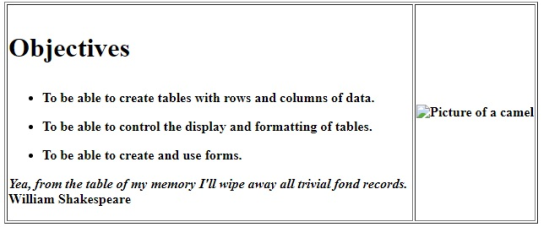
Hey I am having an issue with my HTML5 document. Everything is working fine except that I am not sure how to make my <h1> Objective </h1> to align towards the left.
I have tried for instance <p align = "Left"> <h1> <strong>Objective </strong> </h1> </p>
Any help would be great. Thanks
<!DOCTYPE html>
<html>
<!-- Do I need to use <head> right here? I tried it
without head or urf-8 and it worked-->
<!-- I'm still a bit confused about <meta charset =
"utf-8"> and where I should use it -->
<head>
<meta charset = "utf-8">
<title> Solutions 15</title>
</head>
<body>
<table border ="1">
<thead>
<tr>
<th rowspan = "2";>
<h1><strong> Objectives
</strong></h1>
<ul>
<li> To be able to create tables with rows and columns of
data. </li>
<li> To be able to control the display and formatting of
tables. </li>
<li> To be able to create and use forms. </li>
</ul>
<p align = "Left">
<em>
Yea, from the table of my memory I'll wipe away all trivial fond
records. </em> <br> William Shakespeare
</p>
</th>
<th> <img src = "camel.png" width = "150" height =
"250"
alt = "Picture of a camel">
</th>
</tr>
</thead>
</table>
</body>
</html>
Homework Answers
Answer)
Your question is that how to move the <h1> <strong>Objective </strong> </h1> to the left. You have used
<p align = "Left"> <h1> <strong>Objective </strong> </h1> </p>
instead of that you use
<h1><strong><p align=left> Objectives</p> </strong></h1>
When we are using <h1> then other tags will the inner tag of <h1> tag.
One more change I had done to make the <ul> to the left align by <p align=left> because I see that last line <li>To be able to create and use forms.<li> in <UL> is not left align. if you think it is not required then you can delete that.
<ul>
<li> <p align=left>To be able to create tables with
rows and columns of data. </p></li>
<li> <p align=left>To be able to control the display
and formatting of tables.</p> </li>
<li> <p align=left>To be able to create and use
forms.</p> </li>
</ul>
Any doubt please comment me.
The full code what I had done.
<!DOCTYPE html>
<html>
<!-- Do I need to use <head> right here? I tried it
without head or urf-8 and it worked-->
<!-- I'm still a bit confused about <meta charset =
"utf-8"> and where I should use it -->
<head>
<meta charset = "utf-8">
<title> Solutions 15</title>
</head>
<body>
<table border ="1">
<thead>
<tr>
<th rowspan = "2";>
<h1><strong><p align=left> Objectives</p>
</strong></h1>
<ul>
<li> <p align=left>To be able to create tables with
rows and columns of data. </p></li>
<li> <p align=left>To be able to control the display
and formatting of tables.</p> </li>
<li> <p align=left>To be able to create and use
forms.</p> </li>
</ul>
<p align = "Left">
<em>
Yea, from the table of my memory I'll wipe away all trivial fond
records. </em> <br> William Shakespeare
</p>
</th>
<th> <img src = "camel.png" width = "150" height =
"250"
alt = "Picture of a camel">
</th>
</tr>
</thead>
</table>
</body>
</html>
Screenshot
Add Answer to:
Hey I am having an issue with my HTML5 document. Everything is
working fine except that...
Hello Ive been tryting to add the CDN of jquery to my html code and I...
Hello Ive been tryting to add the CDN of jquery to my html code and I keep getting an error Need help with this : Navigate to www.code.jquery.com in your Chrome browser. On this page, you'll find different stable versions of jQuery. Select uncompressed for jQuery Core 3.3.1. Copy the <script> tag that is given to you. In store_hours.html, paste that tag directly above your body's closing tag. This is the jQuery CDN. After you paste this code into...
Kindly assist in fixing the error i got when I pasted my codes to validate it....
Kindly assist in fixing the error i got when I pasted my codes to validate it. The error is in bold. Error: Table column 2 established by element th has no cells beginning in it. From line 53, column 25; to line 55, column 40 <tr> <th colspan="2"> <!DOCTYPE HTML> <html lang="en"><!-- language is English--> <head> <meta charset="utf-8"/> <title>DA Website</title> <link rel="stylesheet" type="text/css" href="styles.css" /> </head> <body> <div id="wrapper"> <!-- start html...
1. Predict the Result.Draw and write a brief description of the Web page that will becreated...
1. Predict the Result.Draw and write a brief description of the Web page that will becreated with the following XHTML code:<!DOCTYPE html PUBLIC "-//W3C//DTD XHTML 1.0 Transitional//EN""http://www.w3.org/TR/xhtml1/DTD/xhtml1-transitional.dtd"><html xmlns="http://www.w3.org/1999/xhtml" lang="en" xml:lang="en"><head><title>CircleSoft Designs</title> <meta http-equiv="Content-Type" content="text/html; charset=utf-8" /><style type="text/css">body { background-color: #FFFFCC;color: #330000;font-family Arial,Helvetica,sans-serif; }.content { width: 750px; }</style></head>Apply Your Knowledge<body><div class="content"><h1>CircleSoft Design</h1><div><strong>CircleSoft Designs will </strong><ul><li>work with you to create a Web presence that fits yourcompany</li><li>listen to you and answer your questions</li><li>utilize the most appropriate technology for your sites:JavaScript, Java, PHP, databases,...
I need help incorporating javascript into my page. The Lessons page has a message box (not...
I need help incorporating javascript into my page. The Lessons page has a message box (not an alert box) that becomes visible/invisible when the mouse is moved over/off the small, red hyperlink on the last line that says, "note." The note is 10pt, red, and italic. The message box contains the text, "Students who pre-pay for the entire term will have the registration fee waved." It is 150px wide, with an "azure" background and a black border. It has 5px...
I am trying to create a slide show using JavaScript. This is what I have so...
I am trying to create a slide show using JavaScript. This is what I have so far: HTML: <!DOCTYPE html> <html lang="en"> <head> <meta charset="utf-8"> <title>Slide Show</title> <link rel="stylesheet" href="main.css"> <script src="http://html5shiv.googlecode.com/svn/trunk/html5.js"></script> <script src="slide_show.js"></script> </head> <body> <section> <h1>Fishing Slide Show</h1> <ul id="image_list"> <li><a href="images/casting1.jpg" title="Casting on the Upper Kings"></a></li> <li><a href="images/casting2.jpg" title="Casting on the Lower Kings"></a></li> <li><a href="images/catchrelease.jpg" title="Catch and Release on the Big Horn"></a></li> <li><a href="images/fish.jpg" title="Catching on the South Fork"></a></li> <li><a href="images/lures.jpg" title="The Lures for Catching"></a></li> </ul>...
Im working with php but having problem displaying the correct result. I need to show Order...
Im working with php but having problem displaying the correct result. I need to show Order processed at (time) HTML file: <!DOCTYPE html> <html> <head> <title>Bob's Auto Parts - Order Form</title> </head> <body> <form action="processorder.php" method="post"> <table style="border: 0px;"> <tr style="background: #cccccc;"> <td style="width: 150px; text-align: center;">Item</td> <td style="width: 15px; text-align: center;">Quantity</td> </tr> <tr> <td>Tires</td> <td><input type="text" name="tireqty" size="3" maxlength="3" /></td> </tr> <tr> <td>Oil</td> <td><input type="text" name="oilqty" size="3" maxlength="3" /></td> </tr> <tr> <td>Spark Plugs</td> <td><input type="text" name="sparkqty" size="3" maxlength="3" /></td>...
I am having an issue. When i press submit to test the code, it goes to...
I am having an issue. When i press submit to test the code, it goes to a blank screen. Please, will some one assist me? Thanks! <!DOCTYPE html PUBLIC "-//W3C//DTD XHTML 1.0 Strict//EN" "http://www.w3.org/TR/xhtml1/DTD/xhtml1-strict.dtd"> <html xmlns="http://www.w3.org/1999/xhtml"> <head> <title>Sign Guest Book</title> <meta http-equiv="content-type" content="text/html; charset=iso-8859-1" /> </head> <body> <?php if (empty($_POST['?rst_name']) || empty($_POST['last_name'])) echo "<p>You must enter your ?rst and last name! Click your browser's Back button to return to the Guest Book form.</p>"; else { $DBConnect = @mysql_connect("localhost", "root", ""); ...
How do I make these sheets into three different tabs for one website? This is all...
How do I make these sheets into three different tabs for one website? This is all using HTML. - Chade's Bicycle Company <!DOCTYPE html> <html> <head> <img src="Chade'sLogo.png"> </head> <body bgcolor= "white"> <center> Welcome to Chade's Bicycle Company!</center> <center> We aim towards making our customers happy. </center> <br> <center> Chade's Bicycle Company </center> <center>2900 Bicycle Ave.</center> <center>Seattle, Washington</center> <center>98101</center> <br> <center><img src="HappyCustomer.png" alt="Satisfied customers"></center> <br> <p align="right">Our mission statement:</p> <p align="right">Bicycles have always been a </p> <p align="right">positive part of...
Very basic HTML questions Why do companies like their programmers to follow standard coding conventions? What...
Very basic HTML questions Why do companies like their programmers to follow standard coding conventions? What does Google’s Style Guide have to say about trailing whitespace? Convert the following code so that it is compliant with HTML5 standards and also proper coding conventions. To ensure compliance with the HTML5 standards, I recommend that you enter your converted code into the W3C’s HTML validation service. To ensure proper coding conventions, please carefully review the HTML5 coding conventions document. <html> <head> <meta...
Convert attached servlet file to use ArrayList instead of using Enumeration string array. import java.io.*; import...
Convert attached servlet file to use ArrayList instead of using Enumeration string array. import java.io.*; import javax.servlet.*; import javax.servlet.annotation.*; import javax.servlet.http.*; import java.util.*; @WebServlet("/show-params") public class ShowParameters extends HttpServlet { @Override public void doGet(HttpServletRequest request, HttpServletResponse response) throws ServletException, IOException { response.setContentType("text/html"); PrintWriter out = response.getWriter(); String docType = "<!DOCTYPE HTML PUBLIC \"-//W3C//DTD HTML 4.0 " + "Transitional//EN\">\n"; String title = "Reading All Request Parameters"; out.println(docType + "<HTML>\n" + "<HEAD><TITLE>" + title + "</TITLE></HEAD>\n" + "<BODY BGCOLOR=\"#FDF5E6\">\n" + "<H1 ALIGN=CENTER>"...
Most questions answered within 3 hours.
-
Where is the error in this code sequence?
String s1 = "Hello";
String s2 = "ello";...
asked 10 months ago -
Financial data for Joel de Paris, Inc., for last year
follow:
Joel de Paris, Inc.
Balance...
asked 10 months ago -
Consider this reaction:
Al2(SO4)3 (aq)+ BaCl3
(aq) Al2Cl6 (aq)- +
3BaSO4(s) . What is the...
asked 10 months ago -
Suppose that Savneet is considering increasing her
recent random sample from 20 car rentals to 40...
asked 10 months ago -
Trucks arrive at an unloading terminal at an average rate of 120
per hour.
Trucks arrive...
asked 10 months ago -
Why are methanol and ethanol completely soluble in water while
octanol is not very little soluble....
asked 10 months ago -
A facilities manager at a university reads in a research report
that the mean amount of...
asked 10 months ago -
When the CuSO4 is rehydrated by adding water to the anhydrous
compound, is this an endothermic...
asked 10 months ago -
A ray of sunlight is passing from diamond into crown glass; the
angle of incidence is...
asked 10 months ago -
A block of mass 0.249 kg is placed on top of a light, vertical
spring of...
asked 10 months ago -
how do the kidneys compensate in the presences of acidosis
a) trigger hyperventilate
b) reserve acid...
asked 10 months ago -
Question 501 pts
The rental rate of capital to the firm increases. Which of the
following...
asked 10 months ago