I need the arduino code and circuit for Simon says game using arduino miga 2560,4 push...
I need the arduino code and circuit for Simon says game using arduino miga 2560,4 push buttons, 4 LEDs, 1 potentiometer,1 buzzer and resistors
Homework Answers
circuit for simon says game:
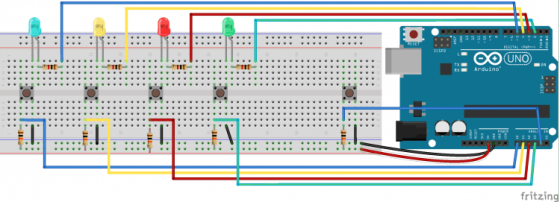
program:<p>/*This sketch is a simple version of the famous Simon Says game. You can use it and improved it adding<br />
levels and everything you want to increase the diffuculty!</p>
<p>There are five buttons connected to A0, A1, A2, A3 and A4.<br />
The buttons from A0 to A3 are used to insert the right sequence while A4 to start the game.</p>
<p>When a wrong sequence is inserted all the leds will blink for three time very fast otherwhise the<br />
inserted sequence is correct.</p>
<p>author : Arturo Guadalupi <a.guadalupi@arduino.cc><br />
Hardware needed:<br />
5x pushbuttons<br />
1x Blue led<br />
1x Yellow led<br />
1x Red led<br />
1x Green Led<br />
4x 1k resistors<br />
4x 10k resisors<br />
10x jumpers<br />
*/</p>
<p>const int MAX_LEVEL = 100;<br />
int sequence[MAX_LEVEL];<br />
int your_sequence[MAX_LEVEL];<br />
int level = 1;</p>
<p>int velocity = 1000;</p>
<p>void setup() {<br />
pinMode(A0, INPUT);<br />
pinMode(A1, INPUT);<br />
pinMode(A2, INPUT);<br />
pinMode(A3, INPUT);</p>
<p>pinMode(2, OUTPUT);<br />
pinMode(3, OUTPUT);<br />
pinMode(4, OUTPUT);<br />
pinMode(5, OUTPUT);</p>
<p>digitalWrite(2, LOW);<br />
digitalWrite(3, LOW);<br />
digitalWrite(4, LOW);<br />
digitalWrite(5, LOW);<br />
}</p>
<p>void loop()<br />
{<br />
if (level == 1)<br />
generate_sequence();//generate a sequence;</p>
<p>if (digitalRead(A4) == LOW || level != 1) //If start button is pressed or you're winning<br />
{<br />
show_sequence();    //show the sequence<br />
get_sequence();     //wait for your sequence<br />
}<br />
}</p>
<p>void show_sequence()<br />
{<br />
digitalWrite(2, LOW);<br />
digitalWrite(3, LOW);<br />
digitalWrite(4, LOW);<br />
digitalWrite(5, LOW);</p>
<p>for (int i = 0; i < level; i++)<br />
{<br />
digitalWrite(sequence[i], HIGH);<br />
delay(velocity);<br />
digitalWrite(sequence[i], LOW);<br />
delay(200);<br />
}<br />
}</p>
<p>void get_sequence()<br />
{<br />
int flag = 0; //this flag indicates if the sequence is correct</p>
<p>for (int i = 0; i < level; i++)<br />
{<br />
flag = 0;<br />
while(flag == 0)<br />
{<br />
if (digitalRead(A0) == LOW)<br />
{<br />
digitalWrite(5, HIGH);<br />
your_sequence[i] = 5;<br />
flag = 1;<br />
delay(200);<br />
if (your_sequence[i] != sequence[i])<br />
{<br />
wrong_sequence();<br />
return;<br />
}<br />
digitalWrite(5, LOW);<br />
}</p>
<p>if (digitalRead(A1) == LOW)<br />
{<br />
digitalWrite(4, HIGH);<br />
your_sequence[i] = 4;<br />
flag = 1;<br />
delay(200);<br />
if (your_sequence[i] != sequence[i])<br />
{<br />
wrong_sequence();<br />
return;<br />
}<br />
digitalWrite(4, LOW);<br />
}</p>
<p>if (digitalRead(A2) == LOW)<br />
{<br />
digitalWrite(3, HIGH);<br />
your_sequence[i] = 3;<br />
flag = 1;<br />
delay(200);<br />
if (your_sequence[i] != sequence[i])<br />
{<br />
wrong_sequence();<br />
return;<br />
}<br />
digitalWrite(3, LOW);<br />
}</p>
<p>if (digitalRead(A3) == LOW)<br />
{<br />
digitalWrite(2, HIGH);<br />
your_sequence[i] = 2;<br />
flag = 1;<br />
delay(200);<br />
if (your_sequence[i] != sequence[i])<br />
{<br />
wrong_sequence();<br />
return;<br />
}<br />
digitalWrite(2, LOW);<br />
}</p>
<p>}<br />
}<br />
right_sequence();<br />
}</p>
<p>void generate_sequence()<br />
{<br />
randomSeed(millis()); //in this way is really random!!!</p>
<p>for (int i = 0; i < MAX_LEVEL; i++)<br />
{<br />
sequence[i] = random(2,6);<br />
}<br />
}<br />
void wrong_sequence()<br />
{<br />
for (int i = 0; i < 3; i++)<br />
{<br />
digitalWrite(2, HIGH);<br />
digitalWrite(3, HIGH);<br />
digitalWrite(4, HIGH);<br />
digitalWrite(5, HIGH);<br />
delay(250);<br />
digitalWrite(2, LOW);<br />
digitalWrite(3, LOW);<br />
digitalWrite(4, LOW);<br />
digitalWrite(5, LOW);<br />
delay(250);<br />
}<br />
level = 1;<br />
velocity = 1000;<br />
}</p>
<p>void right_sequence()<br />
{<br />
digitalWrite(2, LOW);<br />
digitalWrite(3, LOW);<br />
digitalWrite(4, LOW);<br />
digitalWrite(5, LOW);<br />
delay(250);</p>
<p>digitalWrite(2, HIGH);<br />
digitalWrite(3, HIGH);<br />
digitalWrite(4, HIGH);<br />
digitalWrite(5, HIGH);<br />
delay(500);<br />
digitalWrite(2, LOW);<br />
digitalWrite(3, LOW);<br />
digitalWrite(4, LOW);<br />
digitalWrite(5, LOW);<br />
delay(500);</p>
<p>if (level < MAX_LEVEL);<br />
level++;</p>
<p>velocity -= 50; //increase difficulty<br />
}</p>
Add Answer to:
I need the arduino code and circuit for Simon says game using
arduino miga 2560,4 push...
By using Arduino write a code that connects two LEDs to two push-buttons. Each button controls...
By using Arduino write a code that connects two LEDs to two push-buttons. Each button controls the state of its connected LED. The LEDs can be in one of two states: Blink-mode or Off-mode. When a button-press event is detected, its connected LED will begin blinking (turning on and off) and when a button-press is detected, its connected LED will turn off. The application should blink one of the LEDs at a rate of 1 second, and the other LED...
I am doing an Arduino Uno project where I made a "Simon says" memory game with 3 neopixel LED str...
I am doing an Arduino Uno project where I made a "Simon says" memory game with 3 neopixel LED strips and 3 - ultrasonics. I have them working independently but I need to combine the code so they work together. Here is what I have: Memory Game #define PLAYER_WAIT_TIME 2000 // The time allowed between button presses - 2s byte sequence[100]; // Storage for the light sequence byte curLen = 0; // Current length of the sequence byte inputCount =...
This question is about the Arduino code. Please complete a 4-input circuit on your Arduino. Your...
 This question is about the Arduino code.
Please complete a 4-input circuit on your Arduino. Your circuit,
in addition to cycling through a binary representation of the
numbers 0-15 using LEDs, should use the Serial port to output the
decimal equivalent of each of the numbers in the format:
Output: 15
... if the value was 1111, and so forth.
You will be asked to upload your code as well as a photo of your
working breadboard circuit.
Add comments...
This question is about the Arduino code.
Please complete a 4-input circuit on your Arduino. Your circuit,
in addition to cycling through a binary representation of the
numbers 0-15 using LEDs, should use the Serial port to output the
decimal equivalent of each of the numbers in the format:
Output: 15
... if the value was 1111, and so forth.
You will be asked to upload your code as well as a photo of your
working breadboard circuit.
Add comments...
CHALLENGE ACTIVITY 4.8.1: Simon says Simon Says" is a memory game where Simon outputs a sequence...
 CHALLENGE ACTIVITY 4.8.1: Simon says Simon Says" is a memory game where Simon outputs a sequence of 10 characters (R, G, B, Y) and the user must repeat the sequence. Create a for loop that compares the two strings starting from index 0. For each match, add one point to userScore Upon a mismatch, exit the loop using a break statement. Ex: The following patterns yield a userScore of 4 simonPattern: RRGBRYYBGY userPattern: RRGBBRYBGY 1 import java.util.Scanner; 3 public class...
Write an Arduino code to read the current temperature using the LM35 temperature sensor. The code...
 Write an Arduino code to read the current temperature using the LM35 temperature sensor. The code should include the following if the temperature is more than 45 "C: • Turn ON red LED, and after 1 second turn ON the yellow LED, and after another 2 seconds tum On the Green LED. One second later the three LEDS should start blinking (all LEDs OFF for 0.5 seconds, then all LEDS ON for 1 minute), and turn OFF all LEDs after...
I need help with creating a arduino code using a GSR sensor that measures when a...
I need help with creating a arduino code using a GSR sensor that measures when a person is sweating or not.
Embedded Systems Project Assignment 02 Connect a potentiometer and a LDR to your Arduino board. Using...
 Embedded Systems Project Assignment 02 Connect a potentiometer and a LDR to your Arduino board. Using an H bridge connect a DC motor to the circuit. Control the speed (potentiometer) and direction of rotation (LDR). Display the speed and the direction of rotation on a 2X16 LCD display. 1 1.Written Report 1.1. Project Specification 1.2. Circuit schematic 10 points 25 points 10 points 1.3. Flow chart 1.4. Variable declarations 1.5. C code, uploadable on your Arduino Uno Board, that executes...
Task: Write an Arduino code to take voltage measurements across a potentiometer in a voltage divider circuit such as th...
 Task: Write an Arduino code to take voltage measurements across a potentiometer in a voltage divider circuit such as thee one built in class. Your code must also use the voltage divider equation to determine the resistance across the potentiometer. The code will record the Voltage and the Potentiometer Resistance measurements in the Serial Monitor. Assume R1 = 47 k0. The Serial Monitor window must give out the Voltage and Resistance values in different tabs, making a "table" such as...
I need help with creating a arduino code using a GSR sensor that measures when a person is sweati...
I need help with creating a arduino code using a GSR sensor that measures when a person is sweating or not.
need this in beginner arduino coding (simple ) ARDUINO 1. Complete the following problem using Arduino...
 need this in beginner arduino coding (simple )
ARDUINO 1. Complete the following problem using Arduino IDE Write a program to detect the temperature of the environment and provide audio and visual cue to user using LED, and Piezo sensor to notify the occupants about a potential fire in the building. In addition, upon fire detection entrance and exit should be opened using a servo motor. (a) Items used & Circuit Schematic (5points) (b) All sensor functionality included based on...
need this in beginner arduino coding (simple )
ARDUINO 1. Complete the following problem using Arduino IDE Write a program to detect the temperature of the environment and provide audio and visual cue to user using LED, and Piezo sensor to notify the occupants about a potential fire in the building. In addition, upon fire detection entrance and exit should be opened using a servo motor. (a) Items used & Circuit Schematic (5points) (b) All sensor functionality included based on...
 This question is about the Arduino code.
Please complete a 4-input circuit on your Arduino. Your circuit,
in addition to cycling through a binary representation of the
numbers 0-15 using LEDs, should use the Serial port to output the
decimal equivalent of each of the numbers in the format:
Output: 15
... if the value was 1111, and so forth.
You will be asked to upload your code as well as a photo of your
working breadboard circuit.
Add comments...
This question is about the Arduino code.
Please complete a 4-input circuit on your Arduino. Your circuit,
in addition to cycling through a binary representation of the
numbers 0-15 using LEDs, should use the Serial port to output the
decimal equivalent of each of the numbers in the format:
Output: 15
... if the value was 1111, and so forth.
You will be asked to upload your code as well as a photo of your
working breadboard circuit.
Add comments...
 CHALLENGE ACTIVITY 4.8.1: Simon says Simon Says" is a memory game where Simon outputs a sequence of 10 characters (R, G, B, Y) and the user must repeat the sequence. Create a for loop that compares the two strings starting from index 0. For each match, add one point to userScore Upon a mismatch, exit the loop using a break statement. Ex: The following patterns yield a userScore of 4 simonPattern: RRGBRYYBGY userPattern: RRGBBRYBGY 1 import java.util.Scanner; 3 public class...
 Write an Arduino code to read the current temperature using the LM35 temperature sensor. The code should include the following if the temperature is more than 45 "C: • Turn ON red LED, and after 1 second turn ON the yellow LED, and after another 2 seconds tum On the Green LED. One second later the three LEDS should start blinking (all LEDs OFF for 0.5 seconds, then all LEDS ON for 1 minute), and turn OFF all LEDs after...
 Embedded Systems Project Assignment 02 Connect a potentiometer and a LDR to your Arduino board. Using an H bridge connect a DC motor to the circuit. Control the speed (potentiometer) and direction of rotation (LDR). Display the speed and the direction of rotation on a 2X16 LCD display. 1 1.Written Report 1.1. Project Specification 1.2. Circuit schematic 10 points 25 points 10 points 1.3. Flow chart 1.4. Variable declarations 1.5. C code, uploadable on your Arduino Uno Board, that executes...
 Task: Write an Arduino code to take voltage measurements across a potentiometer in a voltage divider circuit such as thee one built in class. Your code must also use the voltage divider equation to determine the resistance across the potentiometer. The code will record the Voltage and the Potentiometer Resistance measurements in the Serial Monitor. Assume R1 = 47 k0. The Serial Monitor window must give out the Voltage and Resistance values in different tabs, making a "table" such as...
 need this in beginner arduino coding (simple )
ARDUINO 1. Complete the following problem using Arduino IDE Write a program to detect the temperature of the environment and provide audio and visual cue to user using LED, and Piezo sensor to notify the occupants about a potential fire in the building. In addition, upon fire detection entrance and exit should be opened using a servo motor. (a) Items used & Circuit Schematic (5points) (b) All sensor functionality included based on...
need this in beginner arduino coding (simple )
ARDUINO 1. Complete the following problem using Arduino IDE Write a program to detect the temperature of the environment and provide audio and visual cue to user using LED, and Piezo sensor to notify the occupants about a potential fire in the building. In addition, upon fire detection entrance and exit should be opened using a servo motor. (a) Items used & Circuit Schematic (5points) (b) All sensor functionality included based on...
Most questions answered within 3 hours.
-
Where is the error in this code sequence?
String s1 = "Hello";
String s2 = "ello";...
asked 10 months ago -
Financial data for Joel de Paris, Inc., for last year
follow:
Joel de Paris, Inc.
Balance...
asked 10 months ago -
Consider this reaction:
Al2(SO4)3 (aq)+ BaCl3
(aq) Al2Cl6 (aq)- +
3BaSO4(s) . What is the...
asked 10 months ago -
Suppose that Savneet is considering increasing her
recent random sample from 20 car rentals to 40...
asked 10 months ago -
Trucks arrive at an unloading terminal at an average rate of 120
per hour.
Trucks arrive...
asked 10 months ago -
Why are methanol and ethanol completely soluble in water while
octanol is not very little soluble....
asked 10 months ago -
A facilities manager at a university reads in a research report
that the mean amount of...
asked 10 months ago -
When the CuSO4 is rehydrated by adding water to the anhydrous
compound, is this an endothermic...
asked 10 months ago -
A ray of sunlight is passing from diamond into crown glass; the
angle of incidence is...
asked 10 months ago -
A block of mass 0.249 kg is placed on top of a light, vertical
spring of...
asked 10 months ago -
how do the kidneys compensate in the presences of acidosis
a) trigger hyperventilate
b) reserve acid...
asked 10 months ago -
Question 501 pts
The rental rate of capital to the firm increases. Which of the
following...
asked 10 months ago