LUNIX (Please Label) Exit vi (:q) and from the command line, type viscript4.sh. For this script,...
LUNIX (Please Label)
- Exit vi (:q) and from the command line, type
viscript4.sh.
- For this script, we will iterate through all files in the current directory print out their name using the for loop. Example (do not type yet):
foriin*;do …;done
where the…does some operation on$I, which stands for the current file.
To do this, enter the following in your script4.sh file:
#!/bin/bash
for i
in *; do
echo $i
done
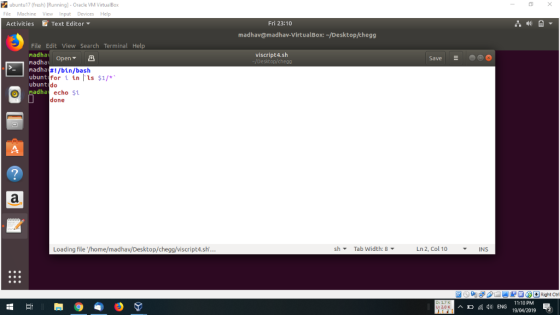
Once the above works, change the for loop to be foriin`ls$1/*`;do. Now when you run the script ,you are expected to pass a directory name asa parameter. Run the script on /etc. Since you are not root, you will not have access to all of the files and directories, but ignore any error messages. Let’s concentrate on just the number of files that are executable. Rerun the script and pipe the result to wc–l to find out how many files/directories matched. Note: the -l is the letter l, not the number 1. 5) What was the output?
Homework Answers
#!/bin/bash
for i in `ls $1/*`
do
echo $i
done
 if you have any doubt then
please ask me without any hesitation in the comment section below ,
if you like my answer then please thumbs up for the answer , before
giving thumbs down please discuss the question it may possible that
we may understand the question different way and we can edit and
change the answers if you argue, thanks :)
if you have any doubt then
please ask me without any hesitation in the comment section below ,
if you like my answer then please thumbs up for the answer , before
giving thumbs down please discuss the question it may possible that
we may understand the question different way and we can edit and
change the answers if you argue, thanks :)
Add Answer to:
LUNIX (Please Label)
Exit vi (:q) and from the command line, type
viscript4.sh.
For this script,...
LINUX 140U Create a file named script1.sh that contains a bash script that: Accepts NO command...
LINUX 140U Create a file named script1.sh that contains a bash script that: Accepts NO command line arguments and does NOT use the read command. I will give you no credit if your bash script includes a read command. Also, you need to have at least one for..in loop in your code even if there may be other ways to do this problem. The script will go through a list of entries in the current directory (do not process subdirectories):...
Copy/Paste your script from 5b here. 4. Let's look at a more complicated script executable. a....
 Copy/Paste your script from 5b here.
4. Let's look at a more complicated script executable. a. Write the following as script6.sh and change its permissions to count for num in d do if num eq 100 then count (count+1) done echo The number 10 was found $count times What is the output? Run the script as ./script6.sh 10 20 30 10 40 20 50 10 60 <enter Summarize what the script does r using the read command. The following script...
Copy/Paste your script from 5b here.
4. Let's look at a more complicated script executable. a. Write the following as script6.sh and change its permissions to count for num in d do if num eq 100 then count (count+1) done echo The number 10 was found $count times What is the output? Run the script as ./script6.sh 10 20 30 10 40 20 50 10 60 <enter Summarize what the script does r using the read command. The following script...
I am having trouble on what exactly to write so I can make the script work,...
I am having trouble on what exactly to write so I can make the script work, can someone show how to properly do it? Use the vi editor to enter the following script (name this file testscript): #!/bin/bash #script to demonstrate : reading arguments from a command line & # interactively from within script # selection (if… then… else…. fi) # iteration (for loop) # USE FILES ENTERED ON THE COMMAND LINE echo The script you are running is $0...
write the bash script Write a script compress_large_files.sh. This script accepts one or more command line...
write the bash script Write a script compress_large_files.sh. This script accepts one or more command line arguments. The first argument has to be an integer; let’s call it size. If this is the only command line argument, compress_large_files.sh inspects all files in the current working directory and compresses every file of size at least size. If there is more than one command line argument, all arguments except the first one must be valid directories. In this case, compress_large_files.sh inspects the...
Revision Question 3 on Linux. Please explain the shell script commands in the context of post...
Revision Question 3 on Linux. Please explain the shell script commands in the context of post execution. You have just logged in and have a directory called "novel" in your home directory containing the following files: chapter1.docx chapter2.docx chapter3.docx draft.pdf save where "save" is itself a directory and contains the files Attributes.txt draft.pdf.1 draft.pdf.2 draft.pdf.3 indexA.txt indexB.txt list1.txt list2.txt a) Describe the results you would expect when executing the following shell commands: i) ls novel/save/*A* ii) ls novel/*r[23]* iii) rmdir...
1. Install the supplied bash script on the Kali Linux VM BASH filename :ipLAN In text...
1. Install the supplied bash script on the Kali Linux VM BASH filename :ipLAN In text editor looks like this #!/bin/bash is_alive_ping() { ping -c 1 $1 >/dev/null 2 >&1 [ $? -eq 0 ] && echo Node with IP: $1 is UP. } for i in 192.168.1.{1..255} do is_alive_ping $1 & disown done QUESTION: Install the supplied bash script on the Kali Linux VM **NOte how do i install the above script in kali ,when i am...
Objective : Write a C Shell script which copies all files(*.java and *.class) from your home dire...
Objective : Write a C Shell script which copies all files(*.java and *.class) from your home directory to a new one, and Analyze the new directory information such as number of files, user permissions, and disk usage. Sample Output: << CS Directory Analysis >> Date: ============================================================ Current Directory: /home/tomss New Directory Created : /home/tomss/pgm01 File information Total Number of files : 22 files Directory files: 0 files Plain text files: 10 files File have read permissions: 3 files File have...
Task 2.6 : In this exercise, you will create a script to echo users, based on...
Task 2.6 : In this exercise, you will create a script to echo users, based on a list of usernames in a file. 1. create a new file called userlist. #vi userlist 2. Insert a short list of usernames, such as the following. Make sure that none are the names of existing users. moe larry curly binny 3. create a script file userscript.sh and type the following lines #!/bin/bash for TheUSER in $(cat userlist) do echo The user is $TheUSER...
5.Create two files also called file file1 and file2 in testdir_2 Use the ls -lR to show you created the directories 6. Change the permission of the files in the directories below and show their permi...
5.Create two files also called file file1 and file2 in testdir_2 Use the ls -lR to show you created the directories 6. Change the permission of the files in the directories below and show their permissions testdir/testdir_1/file1 where owner has read and execute permissions testdir/testdir_1/file2 where where owner has read, write and execute permissions. Group has read only permissions 7. Create a directory called newdir/newdir_1/newdir_2 copy the file testdir/testdir_1/file1 to this directory Change the permisions of the file to owner,...
 Copy/Paste your script from 5b here.
4. Let's look at a more complicated script executable. a. Write the following as script6.sh and change its permissions to count for num in d do if num eq 100 then count (count+1) done echo The number 10 was found $count times What is the output? Run the script as ./script6.sh 10 20 30 10 40 20 50 10 60 <enter Summarize what the script does r using the read command. The following script...
Copy/Paste your script from 5b here.
4. Let's look at a more complicated script executable. a. Write the following as script6.sh and change its permissions to count for num in d do if num eq 100 then count (count+1) done echo The number 10 was found $count times What is the output? Run the script as ./script6.sh 10 20 30 10 40 20 50 10 60 <enter Summarize what the script does r using the read command. The following script...
Most questions answered within 3 hours.
-
Where is the error in this code sequence?
String s1 = "Hello";
String s2 = "ello";...
asked 10 months ago -
Financial data for Joel de Paris, Inc., for last year
follow:
Joel de Paris, Inc.
Balance...
asked 10 months ago -
Consider this reaction:
Al2(SO4)3 (aq)+ BaCl3
(aq) Al2Cl6 (aq)- +
3BaSO4(s) . What is the...
asked 10 months ago -
Suppose that Savneet is considering increasing her
recent random sample from 20 car rentals to 40...
asked 10 months ago -
Trucks arrive at an unloading terminal at an average rate of 120
per hour.
Trucks arrive...
asked 10 months ago -
Why are methanol and ethanol completely soluble in water while
octanol is not very little soluble....
asked 10 months ago -
A facilities manager at a university reads in a research report
that the mean amount of...
asked 10 months ago -
When the CuSO4 is rehydrated by adding water to the anhydrous
compound, is this an endothermic...
asked 10 months ago -
A ray of sunlight is passing from diamond into crown glass; the
angle of incidence is...
asked 10 months ago -
A block of mass 0.249 kg is placed on top of a light, vertical
spring of...
asked 10 months ago -
how do the kidneys compensate in the presences of acidosis
a) trigger hyperventilate
b) reserve acid...
asked 10 months ago -
Question 501 pts
The rental rate of capital to the firm increases. Which of the
following...
asked 10 months ago