HTML: ch14 IC_1B - use a fadeToggle to control jQuery to show the second part of...
HTML: ch14 IC_1B - use a fadeToggle to control jQuery to show the second part of the content on Chp 14 slide 33.
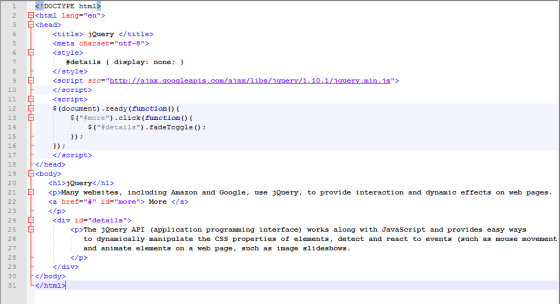
<!DOCTYPE html>
<html lang="en">
<head>
<title> jQuery </title>
<meta charset="utf-8">
<style>
#details { display: none; }
</style>
<xxxx
src="http://ajax.googleapis.com/ajax/libs/jquery/1.10.1/jquery.min.js"></xxxx>
</head>
<body>
<h1>jQuery</h1>
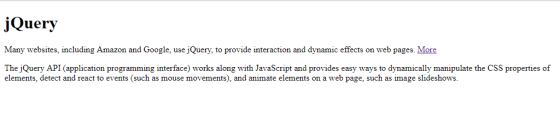
<p>Many websites, including
Amazon and Google, use jQuery, to provide interaction and dynamic
effects on web pages.
<a href="#" id="more"> More
</a>
<div id="details">
<p>The
jQuery API (application programming interface) works along with
JavaScript and provides easy ways
to dynamically manipulate the CSS properties of
elements, detect and react to events (such as mouse
movements),
and animate elements on a web page, such as
image slideshows.</p>
</div>
</body>
</html>
Homework Answers
Please download the HTML code from the below link:
https://www.dropbox.com/s/ypsegyj5sd5iwji/new%201.html?dl=0
Updated Code:
OUTPUT:

Add Answer to:
HTML: ch14 IC_1B - use a fadeToggle to control
jQuery to show the second part of...
Rewrite the code below using JavaScript only <!DOCTYPE html> <html> <head> <style> .hidden {display:none;} </style> <script...
Rewrite the code below using JavaScript only <!DOCTYPE html> <html> <head> <style> .hidden {display:none;} </style> <script src="https://ajax.googleapis.com/ajax/libs/jquery/3.2.1/jquery.min.js"></script> <script> $(document).ready(function(){ $("p").click(function(){ $(this).hide(); }); }); </script> </head> <body> <p>paragraph1</p> <p>paragraph2</p> <p>paragraph3</p> </body> </html>
How do i make my html show 10 results per page, and how do i make...
How do i make my html show 10 results per page, and how do i make the books clickable to show results about them? <!DOCTYPE html> <html> <head> <title>Google Books Search</title> <script src="https://code.jquery.com/jquery-2.1.4.min.js"> </script> <script src="https://ajax.googleapis.com/ajax/libs/jquery/2.2.2/jquery.min.js"></script> <style> body{ background:lightblue } .wrap{ max-width:400px; margin:auto; margin-top:10px; } .pagination, pagination-last{ float:left; } a{ text-decoration:none; padding:15px 20px; border:1px solid black; border-right:none; background:#f2f2f2; font-size:18px; font-weight:bold; } .pagination-last a{ border-right:1px solid black; } a:hover { background:orange; color;white; } </style> <!-- <script src="js/main.js"></script> --> <script> function B_Search()...
use the sample html file below with a submit button to modify the style of the...
use the sample html file below with a submit button to modify the style of the paragraph text through JavaScript code. By clicking on the button, the font, the font size, and the color of the paragraph text will be changed. <!DOCTYPE html> · <html> · <head> · <meta charset=utf-8 /> · <title>Change Paragraph Text</title> · </head> · <body> · <p id ='text'>I’m going to change this text, I hope.</p> · <div> · <button id="jschange" · onclick="js_style()">Style</button> · </div> · </body> · </html>
I'm having trouble to link the .js file to the html so changes for the html...
I'm having trouble to link the .js file to the html so changes for the html to be made in the .js file <!DOCTYPE html> <html> <head> <meta charset="utf-8"> <meta name="viewport" content="width=device-width"> <title>:JavaScript, HTML and jQuery</title> <link rel="stylesheet" href="https://maxcdn.bootstrapcdn.com/bootstrap/3.3.7/css/bootstrap.min.css" integrity="sha384-BVYiiSIFeK1dGmJRAkycuHAHRg32OmUcww7on3RYdg4Va+PmSTsz/K68vbdEjh4u" crossorigin="anonymous"> <!-- this is so I don't have to give you a separate CSS file --> <style> .hidden {display: none;} .menu { width: 100px;} </style> </head> <body> <div class="container"> <h1>Assignment 2: JavaScript, HTML and jQuery</h1> <p>To complete this...
Task 3: Creating a Simple jQuery Application 1. Launch HTML-Kit. 2. Create a new HTML file...
Task 3: Creating a Simple jQuery Application 1. Launch HTML-Kit. 2. Create a new HTML file and save it as nnLab8.htm. 3. Add the following HTML to the file: <!DOCTYPE HTML> <html> <head> <title>Hello World - jQuery Style</title> </head> <body> <div id="first"></div> <div id="second"></div> <a href="#" id="link">Click Me!</a><br /> <span id="greeting"></span> </body> </html> 4. Add the following<script> element to the<head> section. NOTE: Use the jQuery version number that matches the file name of the file you downloaded in Step 1....
Hello Ive been tryting to add the CDN of jquery to my html code and I...
Hello Ive been tryting to add the CDN of jquery to my html code and I keep getting an error Need help with this : Navigate to www.code.jquery.com in your Chrome browser. On this page, you'll find different stable versions of jQuery. Select uncompressed for jQuery Core 3.3.1. Copy the <script> tag that is given to you. In store_hours.html, paste that tag directly above your body's closing tag. This is the jQuery CDN. After you paste this code into...
HTML css When i refresh the page, the picture doesnt move at all for #i1 i...
HTML css When i refresh the page, the picture doesnt move at all for #i1 i have width and height but the pictuers doesn't move please fix it. <!DOCTYPE html> <html> <head> <meta charset="UTF-8"> <title>Title of the document</title> <style> body{ background-color:#FFA07A; } #h1{ color:white; text-decoration:none; padding:30px; } #h2{ color:white; text-decoration:none; padding:30px; } #navbar1{ background-color:grey; text-align:center; font-size:35px; height:100%px; border:1px solid black; position:absolute; text-decoration:none; margin-left:300px; } #h3{ color:white; text-decoration:none; padding:30px; } #b1{ background-color:grey; font-size:30px; } i1{ width:10px; height:20px; } </style> <body> <div...
HTML and css using notepad++ WHen you run the code, you will see a horizontal menue...
HTML and css using notepad++ WHen you run the code, you will see a horizontal menue with several options. I want a small horizontal line between each option. I also want that done using div inside a div. Thank you <!DOCTYPE html> <html> <head> <meta charset="UTF-8"> <title>Title of the document</title> <style> body{ background-color:#FFA07A; } #h1{ color:white; text-decoration:none; padding:30px; } #h2{ color:white; text-decoration:none; padding:30px; } #navbar1{ background-color:grey; text-align:center; font-size:35px; height:100%px; border:1px solid black; position:absolute; text-decoration:none; margin-left:300px; } #h3{ color:white; text-decoration:none; padding:30px;...
Look at the following illustrated output for an HTML and a css given below <!DOCTYPE html>...
 Look at the following illustrated output for an HTML and
a css given below
<!DOCTYPE html>
<head>
<title>TABLE with STYLE
SHEET</title>
<meta charset="utf-8" />
<meta name="description" content="Godaddy Webpage
original" />
<link rel = "stylesheet"
href="GoDaddy_assignment_1.css">
<body>
<img src= "GoDaddy.png"/>
<p>Welcome
to:<strong>webhamster.com</strong></br>
This web page is
parked<strong>Free</strong>courtesy of
<a class="aclass1" href
="https://www.godaddy.com">GoDaddy.com</a></p>
<h1>Want to buy<span class
="span2">webmaster.com ?</span></h1>
<div class ="div1">
<a class ="aclass2"
href="https://www.godaddy.com">Learn How</a>
</div>
</hr>
<button>Search Ads</button>
</body>
</html>
“
QUESTION continued Given the corresponding css
file
.aclass1{color:purple;}...
Look at the following illustrated output for an HTML and
a css given below
<!DOCTYPE html>
<head>
<title>TABLE with STYLE
SHEET</title>
<meta charset="utf-8" />
<meta name="description" content="Godaddy Webpage
original" />
<link rel = "stylesheet"
href="GoDaddy_assignment_1.css">
<body>
<img src= "GoDaddy.png"/>
<p>Welcome
to:<strong>webhamster.com</strong></br>
This web page is
parked<strong>Free</strong>courtesy of
<a class="aclass1" href
="https://www.godaddy.com">GoDaddy.com</a></p>
<h1>Want to buy<span class
="span2">webmaster.com ?</span></h1>
<div class ="div1">
<a class ="aclass2"
href="https://www.godaddy.com">Learn How</a>
</div>
</hr>
<button>Search Ads</button>
</body>
</html>
“
QUESTION continued Given the corresponding css
file
.aclass1{color:purple;}...
<!-- DOCTYPE declaration --> <!DOCTYPE html> <!-- HTML boilerplate code --> <html lang="en"> <!-- head...
<!-- DOCTYPE declaration --> <!DOCTYPE html> <!-- HTML boilerplate code --> <html lang="en"> <!-- head tag --> <head> <meta http-equiv="content-type" content="text/html; charset=UTF-8"> <title>Personal Webpage</title> </head> <!-- body tag --> <body> <style> .sidenav { height: 100%; width: 160px; position: fixed; z-index: 1; top: 0; left: 0; ...
 Look at the following illustrated output for an HTML and
a css given below
<!DOCTYPE html>
<head>
<title>TABLE with STYLE
SHEET</title>
<meta charset="utf-8" />
<meta name="description" content="Godaddy Webpage
original" />
<link rel = "stylesheet"
href="GoDaddy_assignment_1.css">
<body>
<img src= "GoDaddy.png"/>
<p>Welcome
to:<strong>webhamster.com</strong></br>
This web page is
parked<strong>Free</strong>courtesy of
<a class="aclass1" href
="https://www.godaddy.com">GoDaddy.com</a></p>
<h1>Want to buy<span class
="span2">webmaster.com ?</span></h1>
<div class ="div1">
<a class ="aclass2"
href="https://www.godaddy.com">Learn How</a>
</div>
</hr>
<button>Search Ads</button>
</body>
</html>
“
QUESTION continued Given the corresponding css
file
.aclass1{color:purple;}...
Look at the following illustrated output for an HTML and
a css given below
<!DOCTYPE html>
<head>
<title>TABLE with STYLE
SHEET</title>
<meta charset="utf-8" />
<meta name="description" content="Godaddy Webpage
original" />
<link rel = "stylesheet"
href="GoDaddy_assignment_1.css">
<body>
<img src= "GoDaddy.png"/>
<p>Welcome
to:<strong>webhamster.com</strong></br>
This web page is
parked<strong>Free</strong>courtesy of
<a class="aclass1" href
="https://www.godaddy.com">GoDaddy.com</a></p>
<h1>Want to buy<span class
="span2">webmaster.com ?</span></h1>
<div class ="div1">
<a class ="aclass2"
href="https://www.godaddy.com">Learn How</a>
</div>
</hr>
<button>Search Ads</button>
</body>
</html>
“
QUESTION continued Given the corresponding css
file
.aclass1{color:purple;}...
Most questions answered within 3 hours.
-
Where is the error in this code sequence?
String s1 = "Hello";
String s2 = "ello";...
asked 10 months ago -
Financial data for Joel de Paris, Inc., for last year
follow:
Joel de Paris, Inc.
Balance...
asked 10 months ago -
Consider this reaction:
Al2(SO4)3 (aq)+ BaCl3
(aq) Al2Cl6 (aq)- +
3BaSO4(s) . What is the...
asked 10 months ago -
Suppose that Savneet is considering increasing her
recent random sample from 20 car rentals to 40...
asked 10 months ago -
Trucks arrive at an unloading terminal at an average rate of 120
per hour.
Trucks arrive...
asked 10 months ago -
Why are methanol and ethanol completely soluble in water while
octanol is not very little soluble....
asked 10 months ago -
A facilities manager at a university reads in a research report
that the mean amount of...
asked 10 months ago -
When the CuSO4 is rehydrated by adding water to the anhydrous
compound, is this an endothermic...
asked 10 months ago -
A ray of sunlight is passing from diamond into crown glass; the
angle of incidence is...
asked 10 months ago -
A block of mass 0.249 kg is placed on top of a light, vertical
spring of...
asked 10 months ago -
how do the kidneys compensate in the presences of acidosis
a) trigger hyperventilate
b) reserve acid...
asked 10 months ago -
Question 501 pts
The rental rate of capital to the firm increases. Which of the
following...
asked 10 months ago