Given the SQL table Select the prices that occur in the alp_inventory table. A specific price...
Given the SQL table
- Select the prices that occur in the alp_inventory table. A specific price should only appear once. Display the Price.
- Select the alp_inventory items that are in stock. Display Id, Price and Quantity on Hand
- List the alp_inventory items that are ‘Coral’ or ‘Olive’ and have a Quantity on Hand of less than 105. Display Id and Quantity on Hand
CREATE TABLE alp_inventory
(inv_id int primary key auto_increment not null,
item_id int not null,
item_size varchar(2),
alp_color varchar(15),
price decimal(6,2) not null,
quantity_on_hand int not null);
INSERT INTO alp_inventory
VALUES(null, 5, null, 'Sienna', 274.99, 14);
INSERT INTO alp_inventory
VALUES(null, 5, null, 'Forest', 274.99, 8);
INSERT INTO alp_inventory
VALUES(null, 1, 'S', 'Khaki', 32.95, 57);
INSERT INTO alp_inventory
VALUES(null, 1, 'M', 'Khaki', 32.95, 89);
INSERT INTO alp_inventory
VALUES(null, 1, 'L', 'Khaki', 32.95, 0);
INSERT INTO alp_inventory
VALUES(null, 1, 'S', 'Olive', 32.95, 110);
INSERT INTO alp_inventory
VALUES(null, 1, 'M', 'Olive', 32.95, 51);
INSERT INTO alp_inventory
VALUES(null, 1, 'L', 'Olive', 32.95, 23);
INSERT INTO alp_inventory
VALUES(null, 2, 'S', 'Teal', 64.95, 112);
INSERT INTO alp_inventory
VALUES(null, 2, 'M', 'Teal', 64.95, 37);
INSERT INTO alp_inventory
VALUES(null, 2, 'L', 'Teal', 64.95, 125);
INSERT INTO alp_inventory
VALUES(null, 2, 'S', 'Coral', 64.95, 0);
INSERT INTO alp_inventory
VALUES(null, 2, 'M', 'Coral', 64.95, 86);
INSERT INTO alp_inventory
VALUES(null, 2, 'L', 'Coral', 64.95, 140);
INSERT INTO alp_inventory
VALUES(null, 3, '10', 'Blue', 15.99, 78);
INSERT INTO alp_inventory
VALUES(null, 3, '11', 'Blue', 15.99, 86);
INSERT INTO alp_inventory
VALUES(null, 3, '12', 'Blue', 15.99, 23);
INSERT INTO alp_inventory
VALUES(null, 3, '6', 'Blue', 15.99, 89);
INSERT INTO alp_inventory
VALUES(null, 3, '10', 'Red', 15.99, 56);
INSERT INTO alp_inventory
VALUES(null, 3, '11', 'Red', 15.99, 35);
INSERT INTO alp_inventory
VALUES(null, 3, '12', 'Red', 15.99, 84);
INSERT INTO alp_inventory
VALUES(null, 3, '6', 'Red', 15.99, 0);
INSERT INTO alp_inventory
VALUES(null, 4, 'S', 'Green', 199.95, 92);
INSERT INTO alp_inventory
VALUES(null, 4, 'M', 'Green', 199.95, 17);
INSERT INTO alp_inventory
VALUES(null, 4, 'L', 'Green', 209.95, 0);
INSERT INTO alp_inventory
VALUES(null, 4, 'XL', 'Green', 209.95, 12);
Homework Answers
Solution:
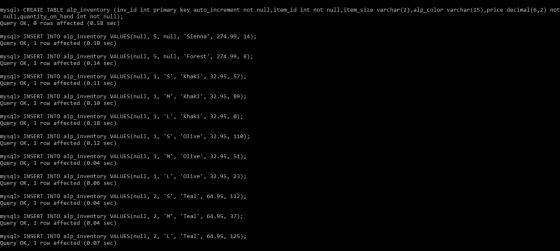
Create table:
CREATE TABLE alp_inventory (inv_id int primary key
auto_increment not null,item_id int not null,item_size
varchar(2),
alp_color varchar(15),price decimal(6,2) not null,quantity_on_hand
int not null);
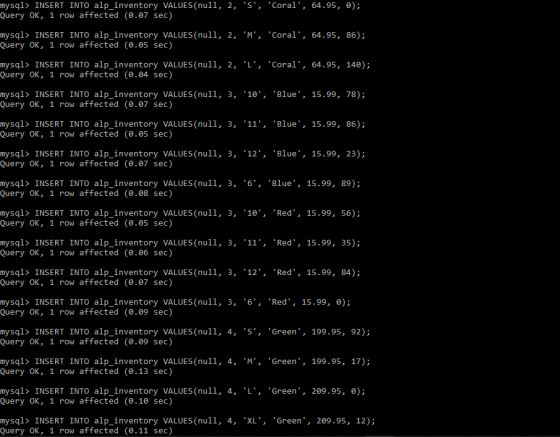
Insert values into table:
INSERT INTO alp_inventory VALUES(null, 5, null, 'Sienna',
274.99, 14);
INSERT INTO alp_inventory VALUES(null, 5, null, 'Forest', 274.99,
8);
INSERT INTO alp_inventory VALUES(null, 1, 'S', 'Khaki', 32.95,
57);
INSERT INTO alp_inventory VALUES(null, 1, 'M', 'Khaki', 32.95,
89);
INSERT INTO alp_inventory VALUES(null, 1, 'L', 'Khaki', 32.95,
0);
INSERT INTO alp_inventory VALUES(null, 1, 'S', 'Olive', 32.95,
110);
INSERT INTO alp_inventory VALUES(null, 1, 'M', 'Olive', 32.95,
51);
INSERT INTO alp_inventory VALUES(null, 1, 'L', 'Olive', 32.95,
23);
INSERT INTO alp_inventory VALUES(null, 2, 'S', 'Teal', 64.95,
112);
INSERT INTO alp_inventory VALUES(null, 2, 'M', 'Teal', 64.95,
37);
INSERT INTO alp_inventory VALUES(null, 2, 'L', 'Teal', 64.95,
125);
INSERT INTO alp_inventory VALUES(null, 2, 'S', 'Coral', 64.95,
0);
INSERT INTO alp_inventory VALUES(null, 2, 'M', 'Coral', 64.95,
86);
INSERT INTO alp_inventory VALUES(null, 2, 'L', 'Coral', 64.95,
140);
INSERT INTO alp_inventory VALUES(null, 3, '10', 'Blue', 15.99,
78);
INSERT INTO alp_inventory VALUES(null, 3, '11', 'Blue', 15.99,
86);
INSERT INTO alp_inventory VALUES(null, 3, '12', 'Blue', 15.99,
23);
INSERT INTO alp_inventory VALUES(null, 3, '6', 'Blue', 15.99,
89);
INSERT INTO alp_inventory VALUES(null, 3, '10', 'Red', 15.99,
56);
INSERT INTO alp_inventory VALUES(null, 3, '11', 'Red', 15.99,
35);
INSERT INTO alp_inventory VALUES(null, 3, '12', 'Red', 15.99,
84);
INSERT INTO alp_inventory VALUES(null, 3, '6', 'Red', 15.99,
0);
INSERT INTO alp_inventory VALUES(null, 4, 'S', 'Green', 199.95,
92);
INSERT INTO alp_inventory VALUES(null, 4, 'M', 'Green', 199.95,
17);
INSERT INTO alp_inventory VALUES(null, 4, 'L', 'Green', 209.95,
0);
INSERT INTO alp_inventory VALUES(null, 4, 'XL', 'Green', 209.95,
12);
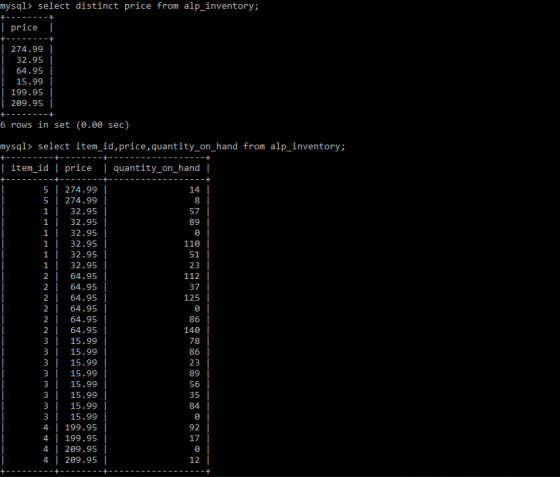
Query 1:
select distinct price from alp_inventory;
Explanation:
By using distinct keyword we can print the unique values.
Query 2:
select item_id,price,quantity_on_hand from alp_inventory;
Query 3:
select item_id,quantity_on_hand from alp_inventory where alp_color in ('Coral','Olive') and quantity_on_hand <105;
Explanation:
By using IN Keyword we are checking color of item is olive or coral and checking quantity is less than 105 or not.
Code and Output Screenshots:

Note : if you have any queries please post a comment thanks a lot..always available to help you....
Add Answer to:
Given the SQL table
Select the prices that occur in the alp_inventory table. A
specific price...
Provide the syntax answers for the following script, doesn't matter what table or columns. CREATE TABLE...
 Provide the syntax answers for the following script, doesn't
matter what table or columns.
CREATE TABLE customer
(c_id NUMBER(5),
c_last VARCHAR2(30),
c_first VARCHAR2(30),
c_mi CHAR(1),
c_birthdate DATE,
c_address VARCHAR2(30),
c_city VARCHAR2(30),
c_state CHAR(2),
c_zip VARCHAR2(10),
c_dphone VARCHAR2(10),
c_ephone VARCHAR2(10),
c_userid VARCHAR2(50),
c_password VARCHAR2(15),
CONSTRAINT customer_c_id_pk PRIMARY KEY (c_id));
CREATE TABLE order_source
(os_id NUMBER(3),
os_desc VARCHAR2(30),
CONSTRAINT order_source_os_id_pk PRIMARY KEY(os_id));
CREATE TABLE orders
(o_id NUMBER(8),
o_date DATE,
o_methpmt VARCHAR2(10),
c_id NUMBER(5),
os_id NUMBER(3),
CONSTRAINT orders_o_id_pk PRIMARY KEY (o_id),
CONSTRAINT orders_c_id_fk FOREIGN...
Provide the syntax answers for the following script, doesn't
matter what table or columns.
CREATE TABLE customer
(c_id NUMBER(5),
c_last VARCHAR2(30),
c_first VARCHAR2(30),
c_mi CHAR(1),
c_birthdate DATE,
c_address VARCHAR2(30),
c_city VARCHAR2(30),
c_state CHAR(2),
c_zip VARCHAR2(10),
c_dphone VARCHAR2(10),
c_ephone VARCHAR2(10),
c_userid VARCHAR2(50),
c_password VARCHAR2(15),
CONSTRAINT customer_c_id_pk PRIMARY KEY (c_id));
CREATE TABLE order_source
(os_id NUMBER(3),
os_desc VARCHAR2(30),
CONSTRAINT order_source_os_id_pk PRIMARY KEY(os_id));
CREATE TABLE orders
(o_id NUMBER(8),
o_date DATE,
o_methpmt VARCHAR2(10),
c_id NUMBER(5),
os_id NUMBER(3),
CONSTRAINT orders_o_id_pk PRIMARY KEY (o_id),
CONSTRAINT orders_c_id_fk FOREIGN...
SQL I have a database CREATE TABLE vendor ( vid CHAR(2) NOT NULL, vname VARCHAR(25) NOT...
 SQL
I have a database
CREATE TABLE vendor
( vid CHAR(2) NOT NULL,
vname VARCHAR(25) NOT NULL,
PRIMARY KEY (vid) );
CREATE TABLE category
( catid CHAR(2) NOT NULL,
catname VARCHAR(25) NOT NULL,
PRIMARY KEY (catid) );
CREATE TABLE product
( pid CHAR(3) NOT NULL,
pname VARCHAR(25) NOT NULL,
price NUMERIC (7,2) NOT NULL,
vid CHAR(2) NOT NULL,
categoryid CHAR(2) NOT NULL,
PRIMARY KEY (pid));
CREATE TABLE region
( rid CHAR NOT NULL,
rname VARCHAR(25) NOT NULL,
PRIMARY KEY (rid)...
SQL
I have a database
CREATE TABLE vendor
( vid CHAR(2) NOT NULL,
vname VARCHAR(25) NOT NULL,
PRIMARY KEY (vid) );
CREATE TABLE category
( catid CHAR(2) NOT NULL,
catname VARCHAR(25) NOT NULL,
PRIMARY KEY (catid) );
CREATE TABLE product
( pid CHAR(3) NOT NULL,
pname VARCHAR(25) NOT NULL,
price NUMERIC (7,2) NOT NULL,
vid CHAR(2) NOT NULL,
categoryid CHAR(2) NOT NULL,
PRIMARY KEY (pid));
CREATE TABLE region
( rid CHAR NOT NULL,
rname VARCHAR(25) NOT NULL,
PRIMARY KEY (rid)...
a. Write five select statements to select data from each table individually. b. Write one select...
a. Write five select statements to select data from each table individually. b. Write one select statement with joins to list the playlist name, playlist track number, song name, artist name, album name, sorted by playlist name and playlist track number. DROP TABLE Artists CASCADE CONSTRAINTS; DROP TABLE Albums CASCADE CONSTRAINTS; DROP TABLE Songs CASCADE CONSTRAINTS; DROP TABLE Playlists CASCADE CONSTRAINTS; DROP TABLE PlaylistSongs CASCADE CONSTRAINTS; CREATE TABLE Artists ( ArtistID int NOT NULL, ArtistName varchar(255), PRIMARY KEY (ArtistID) );...
Given (Oracle) SQL Script " CREATE TABLE Members( MemberID NUMBER(4) NOT NULL PRIMARY KEY, ...
Given (Oracle) SQL Script " CREATE TABLE Members( MemberID NUMBER(4) NOT NULL PRIMARY KEY, MFirst VARCHAR(25) NOT NULL, MLast VARCHAR(25) NOT NULL, Street VARCHAR(64) NOT NULL, City VARCHAR(25) NOT NULL, State VARCHAR(2) NOT NULL, ZipCode NUMBER(5) NOT NULL, CreditLimit NUMBER(7,2) NOT NULL, Gender VARCHAR(1) NOT NULL CHECK (Gender IN('F','M')) ); CREATE TABLE Employees( EmployeeID NUMBER(3) NOT NULL PRIMARY KEY, EFirst VARCHAR(25) NOT NULL, ELast VARCHAR(25) NOT NULL, ...
please answer 56789 CREATE TABLE ALLDRINKS( /* All legal drinks */ DRINK VARCHAR(30) NOT NULL, ...
 please answer 56789
CREATE TABLE ALLDRINKS( /* All legal drinks */
DRINK VARCHAR(30) NOT
NULL, /* Drink name */
CONSTRAINT DRINKNAME_PKEY PRIMARY KEY(DRINK) );
CREATE TABLE DRINKERS ( /* All drinkers */
DRINKER VARCHAR(30) NOT NULL,
CONSTRAINT DRINKERS_PKEY PRIMARY KEY (DRINKER));
CREATE TABLE LOCATED( /* Pubs have locations
*/
PUB
VARCHAR(30) NOT NULL, /* Pub
name */
STREET VARCHAR(30) NOT
NULL, /* Street name */
BLDG_NO DECIMAL(4) NOT
NULL, /* Building number */...
please answer 56789
CREATE TABLE ALLDRINKS( /* All legal drinks */
DRINK VARCHAR(30) NOT
NULL, /* Drink name */
CONSTRAINT DRINKNAME_PKEY PRIMARY KEY(DRINK) );
CREATE TABLE DRINKERS ( /* All drinkers */
DRINKER VARCHAR(30) NOT NULL,
CONSTRAINT DRINKERS_PKEY PRIMARY KEY (DRINKER));
CREATE TABLE LOCATED( /* Pubs have locations
*/
PUB
VARCHAR(30) NOT NULL, /* Pub
name */
STREET VARCHAR(30) NOT
NULL, /* Street name */
BLDG_NO DECIMAL(4) NOT
NULL, /* Building number */...
Database HW help!!!!!!! Provide the SQL statements for the following queries. (1) Provide the names and...
Database HW help!!!!!!! Provide the SQL statements for the following queries. (1) Provide the names and phones of all swimmers currently in level (of id) 3. +-------+---------+---------------------------+ | FName | LName | EMail | +-------+---------+---------------------------+ | Bobby | Khan | theBKhan1 | | Clara | Johnson | ClaraJohnson_11 | +-------+---------+---------------------------+ 2 rows in set (0.00 sec) (2) Provide the names of swimmers who have signed up to participate in the event '100M Butterfly' of Meet id 1. +-------+---------+ | FName...
already created table now need php and html Write SQL statements to delete the above table....
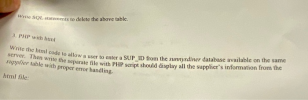 already created table now need php and html
Write SQL statements to delete the above table. 3. PHP with html Write the html code to allow a user to enter a SUP_ID from the sunnysdiner database available on the same scrver. Then write the separate file with PHP script should display all the supplier's information from the supplier table with proper error handling. html file: a) use sunnysdiner; CREATE TABLE supplier ( food_item varchar(30) not null primary ley, SUP_ID INT,...
already created table now need php and html
Write SQL statements to delete the above table. 3. PHP with html Write the html code to allow a user to enter a SUP_ID from the sunnysdiner database available on the same scrver. Then write the separate file with PHP script should display all the supplier's information from the supplier table with proper error handling. html file: a) use sunnysdiner; CREATE TABLE supplier ( food_item varchar(30) not null primary ley, SUP_ID INT,...
write an SQL statement to list all the people in the Owner table, along with their...
write an SQL statement to list all the people in the Owner table, along with their pets' names if any. That is, for each pet an owner has, there will be a record containing the owner and the pet's name. For any owner contained in the Owner table, the output should always contain the owner's record even if no pets are associated with this owner. Hint: outer join/s may be needed. -- DROP TABLE PetAndOwner, Pet, PetType, Owner; CREATE TABLE...
I need help with the following SQL query for a company database (script given below). The...
I need help with the following SQL query for a company database (script given below). The name of the Department. The number of employees working in that department. The number of different projects controlled by this department. The name of the project controlled by this department that has the maximum number of employees of the company working on it. The number of the above project. The cumulative sum of the number of employees of the company working on the projects...
MICROSOFT SQL SERVER - Create the following views 1.List the employee assigned to the most projects...
MICROSOFT SQL SERVER - Create the following views 1.List the employee assigned to the most projects 2.List the project with the most hours SCRIPT TO BUILD DATABASE create table department ( dept_ID int not null , dept_name char(50) NOT NULL, manager_ID int not null, manager_start_date date not null, constraint Dept_PK primary key (dept_ID), constraint D_Name_AK unique (dept_name) ); insert into department values(1,'abc',1,'2019-01-08'); insert into department values(2,'abc2',2,'2019-01-08'); insert into department values(3,'abc3',2,'2019-01-08'); insert into department values(4,'abc4',2,'2019-01-08'); /*project table done*/ create table project...
 Provide the syntax answers for the following script, doesn't
matter what table or columns.
CREATE TABLE customer
(c_id NUMBER(5),
c_last VARCHAR2(30),
c_first VARCHAR2(30),
c_mi CHAR(1),
c_birthdate DATE,
c_address VARCHAR2(30),
c_city VARCHAR2(30),
c_state CHAR(2),
c_zip VARCHAR2(10),
c_dphone VARCHAR2(10),
c_ephone VARCHAR2(10),
c_userid VARCHAR2(50),
c_password VARCHAR2(15),
CONSTRAINT customer_c_id_pk PRIMARY KEY (c_id));
CREATE TABLE order_source
(os_id NUMBER(3),
os_desc VARCHAR2(30),
CONSTRAINT order_source_os_id_pk PRIMARY KEY(os_id));
CREATE TABLE orders
(o_id NUMBER(8),
o_date DATE,
o_methpmt VARCHAR2(10),
c_id NUMBER(5),
os_id NUMBER(3),
CONSTRAINT orders_o_id_pk PRIMARY KEY (o_id),
CONSTRAINT orders_c_id_fk FOREIGN...
Provide the syntax answers for the following script, doesn't
matter what table or columns.
CREATE TABLE customer
(c_id NUMBER(5),
c_last VARCHAR2(30),
c_first VARCHAR2(30),
c_mi CHAR(1),
c_birthdate DATE,
c_address VARCHAR2(30),
c_city VARCHAR2(30),
c_state CHAR(2),
c_zip VARCHAR2(10),
c_dphone VARCHAR2(10),
c_ephone VARCHAR2(10),
c_userid VARCHAR2(50),
c_password VARCHAR2(15),
CONSTRAINT customer_c_id_pk PRIMARY KEY (c_id));
CREATE TABLE order_source
(os_id NUMBER(3),
os_desc VARCHAR2(30),
CONSTRAINT order_source_os_id_pk PRIMARY KEY(os_id));
CREATE TABLE orders
(o_id NUMBER(8),
o_date DATE,
o_methpmt VARCHAR2(10),
c_id NUMBER(5),
os_id NUMBER(3),
CONSTRAINT orders_o_id_pk PRIMARY KEY (o_id),
CONSTRAINT orders_c_id_fk FOREIGN...
 SQL
I have a database
CREATE TABLE vendor
( vid CHAR(2) NOT NULL,
vname VARCHAR(25) NOT NULL,
PRIMARY KEY (vid) );
CREATE TABLE category
( catid CHAR(2) NOT NULL,
catname VARCHAR(25) NOT NULL,
PRIMARY KEY (catid) );
CREATE TABLE product
( pid CHAR(3) NOT NULL,
pname VARCHAR(25) NOT NULL,
price NUMERIC (7,2) NOT NULL,
vid CHAR(2) NOT NULL,
categoryid CHAR(2) NOT NULL,
PRIMARY KEY (pid));
CREATE TABLE region
( rid CHAR NOT NULL,
rname VARCHAR(25) NOT NULL,
PRIMARY KEY (rid)...
SQL
I have a database
CREATE TABLE vendor
( vid CHAR(2) NOT NULL,
vname VARCHAR(25) NOT NULL,
PRIMARY KEY (vid) );
CREATE TABLE category
( catid CHAR(2) NOT NULL,
catname VARCHAR(25) NOT NULL,
PRIMARY KEY (catid) );
CREATE TABLE product
( pid CHAR(3) NOT NULL,
pname VARCHAR(25) NOT NULL,
price NUMERIC (7,2) NOT NULL,
vid CHAR(2) NOT NULL,
categoryid CHAR(2) NOT NULL,
PRIMARY KEY (pid));
CREATE TABLE region
( rid CHAR NOT NULL,
rname VARCHAR(25) NOT NULL,
PRIMARY KEY (rid)...
 please answer 56789
CREATE TABLE ALLDRINKS( /* All legal drinks */
DRINK VARCHAR(30) NOT
NULL, /* Drink name */
CONSTRAINT DRINKNAME_PKEY PRIMARY KEY(DRINK) );
CREATE TABLE DRINKERS ( /* All drinkers */
DRINKER VARCHAR(30) NOT NULL,
CONSTRAINT DRINKERS_PKEY PRIMARY KEY (DRINKER));
CREATE TABLE LOCATED( /* Pubs have locations
*/
PUB
VARCHAR(30) NOT NULL, /* Pub
name */
STREET VARCHAR(30) NOT
NULL, /* Street name */
BLDG_NO DECIMAL(4) NOT
NULL, /* Building number */...
please answer 56789
CREATE TABLE ALLDRINKS( /* All legal drinks */
DRINK VARCHAR(30) NOT
NULL, /* Drink name */
CONSTRAINT DRINKNAME_PKEY PRIMARY KEY(DRINK) );
CREATE TABLE DRINKERS ( /* All drinkers */
DRINKER VARCHAR(30) NOT NULL,
CONSTRAINT DRINKERS_PKEY PRIMARY KEY (DRINKER));
CREATE TABLE LOCATED( /* Pubs have locations
*/
PUB
VARCHAR(30) NOT NULL, /* Pub
name */
STREET VARCHAR(30) NOT
NULL, /* Street name */
BLDG_NO DECIMAL(4) NOT
NULL, /* Building number */...
 already created table now need php and html
Write SQL statements to delete the above table. 3. PHP with html Write the html code to allow a user to enter a SUP_ID from the sunnysdiner database available on the same scrver. Then write the separate file with PHP script should display all the supplier's information from the supplier table with proper error handling. html file: a) use sunnysdiner; CREATE TABLE supplier ( food_item varchar(30) not null primary ley, SUP_ID INT,...
already created table now need php and html
Write SQL statements to delete the above table. 3. PHP with html Write the html code to allow a user to enter a SUP_ID from the sunnysdiner database available on the same scrver. Then write the separate file with PHP script should display all the supplier's information from the supplier table with proper error handling. html file: a) use sunnysdiner; CREATE TABLE supplier ( food_item varchar(30) not null primary ley, SUP_ID INT,...
Most questions answered within 3 hours.
-
Where is the error in this code sequence?
String s1 = "Hello";
String s2 = "ello";...
asked 10 months ago -
Financial data for Joel de Paris, Inc., for last year
follow:
Joel de Paris, Inc.
Balance...
asked 10 months ago -
Consider this reaction:
Al2(SO4)3 (aq)+ BaCl3
(aq) Al2Cl6 (aq)- +
3BaSO4(s) . What is the...
asked 10 months ago -
Suppose that Savneet is considering increasing her
recent random sample from 20 car rentals to 40...
asked 10 months ago -
Trucks arrive at an unloading terminal at an average rate of 120
per hour.
Trucks arrive...
asked 10 months ago -
Why are methanol and ethanol completely soluble in water while
octanol is not very little soluble....
asked 10 months ago -
A facilities manager at a university reads in a research report
that the mean amount of...
asked 10 months ago -
When the CuSO4 is rehydrated by adding water to the anhydrous
compound, is this an endothermic...
asked 10 months ago -
A ray of sunlight is passing from diamond into crown glass; the
angle of incidence is...
asked 10 months ago -
A block of mass 0.249 kg is placed on top of a light, vertical
spring of...
asked 10 months ago -
how do the kidneys compensate in the presences of acidosis
a) trigger hyperventilate
b) reserve acid...
asked 10 months ago -
Question 501 pts
The rental rate of capital to the firm increases. Which of the
following...
asked 10 months ago