Compare and contrast InputStream/OutputStream based file I/O to Scanner/Printwriter based file I/O:
Compare and contrast InputStream/OutputStream based file I/O to Scanner/Printwriter based file I/O:
Homework Answers
InputStream/OutputStream based File I/O
A stream can be defined as a sequence of data. There are two kinds of Streams −
-
InputStream − The InputStream is used to read data from a source.
-
OutputStream − The OutputStream is used for writing data to a destination
Java byte streams are used to perform input and output of 8-bit bytes. Though there are many classes related to byte streams but for File I/O there are FileInputStream and FileOutputStream.
Scanner/PrintWriter based File I/O
The Scanner class is available in Java 5 (JDK 1.5). It provides methods to convert text into appropriate Java types (integer, float, etc). A scanner splits text into a succession of tokens (text representations of data values) according to specific rules.
For example, in the String object "ab*cd 12.34 253", "ab*cd" is a String token, "12.34" is a double token and "253" is an integer token.
Objects of type Scanner are useful for breaking down formatted input into tokens and translating individual tokens according to their data type.
Selected Constructors:
public Scanner(String s): Constructs a new Scanner that produces
values scanned from the specified string.
public Scanner(InputStream source): Constructs a new Scanner that
produces values scanned from the specif
Selected Methods:
public String nextLine(): Scan the next line of input
public int nextInt(): Scan the next integer
public double nextDouble(): Scan the next double
PrintWiter
public class PrintWriter
extends Writer
Prints formatted representations of objects to a text-output
stream. This class implements all of the print methods found in
PrintStream. It does not contain methods for writing raw bytes, for
which a program should use unencoded byte streams.
Some differences are:-
|
InputStream/OutputStream based file I/O |
Scanner/PrintWriter based file I/O |
| It provides a convenient means for handling input and output of bytes. | A scanner uses white space to separate tokens. (White space characters include blanks, tabs, and line terminators of character format and PrintWriter is used where it is required to write data in characters. |
| Throws checked Exception | Doesn't throw checked exceptions |
|
It can read chars, char arrays, and lines |
Difficult to read single characters |
|
It provides read() : reads byte of data and write() : Writes byte of data. |
It provides public String nextLine(): Scan the next line of input |
| It is available from beginning of Java | It came in JDK 1.5 |
| These used to perform input and output of 8-bit bytes | These are used to perform input and output for 16-bit unicode. |
| When we want to send data on network,we use byte stream . | It is suitable for local machine operations.. |
Add Answer to:
Compare and contrast InputStream/OutputStream based file I/O to
Scanner/Printwriter based file I/O:
java expert please help Values of text messages to a user change based on Locale. True...
 java expert please help
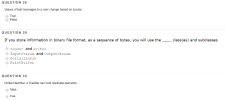
Values of text messages to a user change based on Locale. True False If you store information in binary file format, as a sequence of bytes, you will use the_class(es) and subclasses. Header and Writer InputStream and OutputStream Serializable PrintWriter Unlike HashSet, a TreeSet can hold duplicate elements. false true
java expert please help
Values of text messages to a user change based on Locale. True False If you store information in binary file format, as a sequence of bytes, you will use the_class(es) and subclasses. Header and Writer InputStream and OutputStream Serializable PrintWriter Unlike HashSet, a TreeSet can hold duplicate elements. false true
Write a java program that creates a file called numbers.txt that uses the PrintWriter class. Write...
Write a java program that creates a file called numbers.txt that uses the PrintWriter class. Write the odd numbers 1 to 99 into the file. Close the file. Using Scanner, open the numbers.txt file and read in the numbers. Add them all up and print the total. Close the file.
JAVA: amortization table: Hi, I have built this code and in one of my methods: printDetailsToConsole...
JAVA: amortization table: Hi, I have built this code and in one of my methods: printDetailsToConsole I would like it to print the first 3 payments and the last 3 payments if n is larger than 6 payments. Please help! Thank you!! //start of program import java.util.Scanner; import java.io.FileOutputStream; import java.io.FileNotFoundException; import java.io.PrintWriter; import java.lang.Math; //345678901234567890123456789012345678901234567890123456789012345678901234567890 /** * Write a description of class MortgageCalculator here. * * @author () * @version () */ public class LoanAmortization { /* *...
Write a program to create a file named integerFile.txt if it does not exist. Write 100...
Write a program to create a file named integerFile.txt if it does not exist. Write 100 integers created randomly into the file using text I/O. The random integers should be in the range 0 to 100 (including 0 and 100). Integers should be separated by spaces in the file. Read the data back from the file and display the data in increasing order This is what I have so far: import java.io.File; import java.util.Scanner; import java.io.PrintWriter; public class integerFile {...
Compare and contrast meiosis I and meiosis II based on the following: A. ) Interphase and...
Compare and contrast meiosis I and meiosis II based on the following: A. ) Interphase and checkpoints B.) Chromosome number of daughter cells and how those chromosomes separate C.) Final number of daughter cells.
JAVA Which of these statements does not match by using exception action in Java? 1. Exception...
JAVA Which of these statements does not match by using exception action in Java? 1. Exception action makes it possible for the calling method to handle errors in called methods. 2. Exception action simplifies programming since incorrect reporting and handling can be located in catch blocks separately from the rest of the code. 3. Exception action increases the performance of programs. 4. Java separates exception action from common processes. Why create instances of File Class? - several alternatives...
The following code uses a Scanner object to read a text file called dogYears.txt. Notice that...
The following code uses a Scanner object to read a text file called dogYears.txt. Notice that each line of this file contains a dog's name followed by an age. The program then outputs this data to the console. The output looks like this: Tippy 2 Rex 7 Desdemona 5 1. Your task is to use the Scanner methods that will initialize the variables name1, name2, name3, age1, age2, age3 so that the execution of the three println statements below will...
Help check why the exception exist do some change but be sure to use the printwriter...
Help check why the exception exist do some change but be sure to use the printwriter and scanner and make the code more readability Input.txt format like this: Joe sam, thd, 9, 4, 20 import java.io.File; import java.io.PrintWriter; import java.io.IOException; import java.io.FileNotFoundException; import java.io.FileWriter; import java.util.Scanner; public class Main1 { private static final Scanner scan = new Scanner(System.in); private static String[] player = new String[622]; private static String DATA = " "; private static int COUNTS = 0; public static...
java read integers from this binary file and when the value is 0 then stop reads...
java read integers from this binary file and when the value is 0 then stop reads and print its summation here is my code import java.io.FileOutputStream; import java.io.FileNotFoundException; import java.io.IOException; import java.util.Random; import java.io.ObjectInputStream; import java.io.ObjectOutputStream; import java.io.FileInputStream; class Main { public static void main(String[] args) { String fname = "out.txt"; prepare(fname); ObjectInputStream inputStream = null; // create code here } public static void prepare(String fname) { ...
a) compare and contrast photosystem i and photosystem ii in green plants. b) compare and contrast...
a) compare and contrast photosystem i and photosystem ii in green plants. b) compare and contrast the processes of lactic acid and eathanol fermetation. Please be clear and thank you
 java expert please help
Values of text messages to a user change based on Locale. True False If you store information in binary file format, as a sequence of bytes, you will use the_class(es) and subclasses. Header and Writer InputStream and OutputStream Serializable PrintWriter Unlike HashSet, a TreeSet can hold duplicate elements. false true
java expert please help
Values of text messages to a user change based on Locale. True False If you store information in binary file format, as a sequence of bytes, you will use the_class(es) and subclasses. Header and Writer InputStream and OutputStream Serializable PrintWriter Unlike HashSet, a TreeSet can hold duplicate elements. false true
Most questions answered within 3 hours.
-
Where is the error in this code sequence?
String s1 = "Hello";
String s2 = "ello";...
asked 10 months ago -
Financial data for Joel de Paris, Inc., for last year
follow:
Joel de Paris, Inc.
Balance...
asked 10 months ago -
Consider this reaction:
Al2(SO4)3 (aq)+ BaCl3
(aq) Al2Cl6 (aq)- +
3BaSO4(s) . What is the...
asked 10 months ago -
Suppose that Savneet is considering increasing her
recent random sample from 20 car rentals to 40...
asked 10 months ago -
Trucks arrive at an unloading terminal at an average rate of 120
per hour.
Trucks arrive...
asked 10 months ago -
Why are methanol and ethanol completely soluble in water while
octanol is not very little soluble....
asked 10 months ago -
A facilities manager at a university reads in a research report
that the mean amount of...
asked 10 months ago -
When the CuSO4 is rehydrated by adding water to the anhydrous
compound, is this an endothermic...
asked 10 months ago -
A ray of sunlight is passing from diamond into crown glass; the
angle of incidence is...
asked 10 months ago -
A block of mass 0.249 kg is placed on top of a light, vertical
spring of...
asked 10 months ago -
how do the kidneys compensate in the presences of acidosis
a) trigger hyperventilate
b) reserve acid...
asked 10 months ago -
Question 501 pts
The rental rate of capital to the firm increases. Which of the
following...
asked 10 months ago