Background: This assignment covers Macros. Macros are a pretty advanced Excel tool. You may only see...
Background: This assignment covers Macros. Macros are a pretty advanced Excel tool. You may only see these at places you work depending on who is the Excel Wizard. It is essentially a way of making your redundant tasks done with the simply click of a button. For this example you will simply be recording random macro and pasting a random name with formatting of your choice in an Excel spreadsheet.
Objectives: Record a macro. Discuss the process of creating a macro and its uses. Instructions: Create your own file. Create a new Excel Spreadsheet. Record a Macro that will write a random name in a cell of your choice. Create a text box on that Excel spreadsheet detailing the steps you took to record the macro. You will want to describe what cell you told it to go in, the formatting, and the color.
Homework Answers
Macros are advanced excel which is related to programming. With macros, we can define customized features to meet the needs of an organization. Since it is not possible for naïve user to write code and to automate repetitive actions, we do have an option called recording a macro. With this option, whatever the user performing in an excel sheet being recorded and converted into code. The end user just needs to play the macro to do the repetitive task.
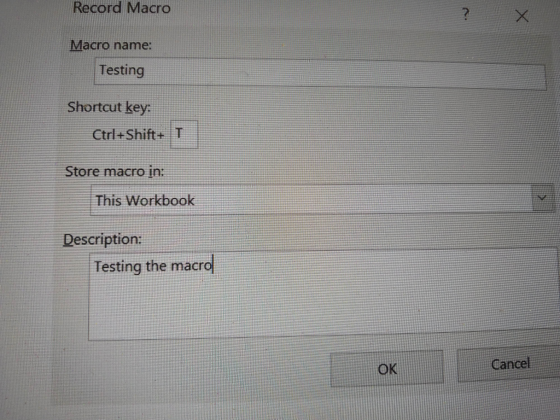
To record a macro, we need to have “Developer” tab option enabled in Excel. The steps to record a macro is given below:
- Go to “Developer” tab.
- Under “Code” category of “Developer” tab, select “Record Macro” option.
- Once you click on “Record Macro” option, the window pops up. Enter the name of the macro, need of macro in the Description, you can also define your own shortcut key for the macro. You can just press this shortcut key.
- Perform your actions. In this case, I entered “Hello World” in the cell. Added background color and changed the text to bold.
- After completing the task, go to “Developer” tab again and click on “Stop Recording”
- Click on “Macros” and select “Testing” macro which was created. Click on “Edit” this would take you to code.
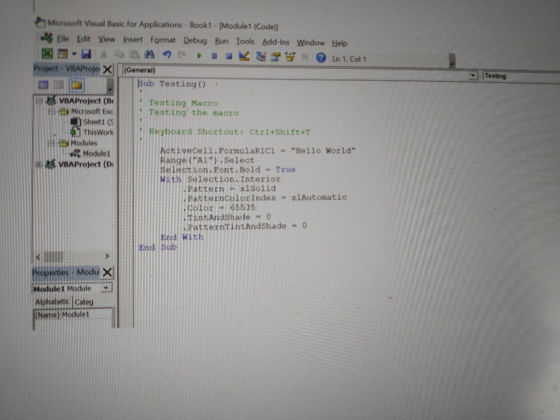
- You can see the code has been recorded for each action in a procedure.
Sub Testing()
'
' Testing Macro
' Testing the macro
'
' Keyboard Shortcut: Ctrl+Shift+T
'
ActiveCell.FormulaR1C1 = "Hello World"
Range("A1").Select
Selection.Font.Bold = True
With Selection.Interior
.Pattern = xlSolid
.PatternColorIndex = xlAutomatic
.Color = 65535
.TintAndShade = 0
.PatternTintAndShade = 0
End With
End Sub
Please do comment for any queries please
Add Answer to:
Background: This assignment covers Macros. Macros are a pretty
advanced Excel tool. You may only see...
Mostly stuck around the first part Internal Control and Cash Using Excel for a Bank Reconciliation...
 Mostly stuck around the first part
Internal Control and Cash Using Excel for a Bank Reconciliation Lori Anders of Wilderness Associates is getting ready to prepare the October bank reconciliation. The cash balance on the books of Wilderness Associates on October 31 is $3,546. Lori reviews the bank statement, and notes the cash balance at October 31 of $2,445. The bank statement also reveals that the bank collected a note receivable on behalf of Wilderness Associates -- the principal was...
Mostly stuck around the first part
Internal Control and Cash Using Excel for a Bank Reconciliation Lori Anders of Wilderness Associates is getting ready to prepare the October bank reconciliation. The cash balance on the books of Wilderness Associates on October 31 is $3,546. Lori reviews the bank statement, and notes the cash balance at October 31 of $2,445. The bank statement also reveals that the bank collected a note receivable on behalf of Wilderness Associates -- the principal was...
 Mostly stuck around the first part
Internal Control and Cash Using Excel for a Bank Reconciliation Lori Anders of Wilderness Associates is getting ready to prepare the October bank reconciliation. The cash balance on the books of Wilderness Associates on October 31 is $3,546. Lori reviews the bank statement, and notes the cash balance at October 31 of $2,445. The bank statement also reveals that the bank collected a note receivable on behalf of Wilderness Associates -- the principal was...
Mostly stuck around the first part
Internal Control and Cash Using Excel for a Bank Reconciliation Lori Anders of Wilderness Associates is getting ready to prepare the October bank reconciliation. The cash balance on the books of Wilderness Associates on October 31 is $3,546. Lori reviews the bank statement, and notes the cash balance at October 31 of $2,445. The bank statement also reveals that the bank collected a note receivable on behalf of Wilderness Associates -- the principal was...
Most questions answered within 3 hours.
-
Where is the error in this code sequence?
String s1 = "Hello";
String s2 = "ello";...
asked 10 months ago -
Financial data for Joel de Paris, Inc., for last year
follow:
Joel de Paris, Inc.
Balance...
asked 10 months ago -
Consider this reaction:
Al2(SO4)3 (aq)+ BaCl3
(aq) Al2Cl6 (aq)- +
3BaSO4(s) . What is the...
asked 10 months ago -
Suppose that Savneet is considering increasing her
recent random sample from 20 car rentals to 40...
asked 10 months ago -
Trucks arrive at an unloading terminal at an average rate of 120
per hour.
Trucks arrive...
asked 10 months ago -
Why are methanol and ethanol completely soluble in water while
octanol is not very little soluble....
asked 10 months ago -
A facilities manager at a university reads in a research report
that the mean amount of...
asked 10 months ago -
When the CuSO4 is rehydrated by adding water to the anhydrous
compound, is this an endothermic...
asked 10 months ago -
A ray of sunlight is passing from diamond into crown glass; the
angle of incidence is...
asked 10 months ago -
A block of mass 0.249 kg is placed on top of a light, vertical
spring of...
asked 10 months ago -
how do the kidneys compensate in the presences of acidosis
a) trigger hyperventilate
b) reserve acid...
asked 10 months ago -
Question 501 pts
The rental rate of capital to the firm increases. Which of the
following...
asked 10 months ago