in python how to I get python to display 1 of 3 message every 45 seconds...
in python how to I get python to display 1 of 3 message every 45 seconds in a graphics window
Homework Answers
Note: Implemented as asked. Please comment for further help. Please uprate.
Also update time to 45 in line 23.
Code:
from graphics import *
import random
import time
def main():
win = GraphWin('Message', 400, 400,autoflush=False) # give title
and dimensions
listOfMessages=['First Message','Second Message','Third Message']
#list of messages
while True: #infinite loop
timeBegin = time.time() #variable to store start time
choosenMessage = random.choice(listOfMessages) #randomly select
message from list
message = Text(Point(win.getWidth()/2, win.getHeight()/2),
choosenMessage) #mid point of screen
message.draw(win) #draw message
win.update() #update window
timeEnd = time.time() #take end time
timeElapsed = timeEnd - timeBegin #calculate timeElapsed
time.sleep(max(0, 5-timeElapsed)) #sleep for 5 seconds. Update it
to 45 for 45 seconds
message.undraw() # remove message from screen
win.getMouse() #on mouse click close window
win.close()
main()
CodeSnapshot:
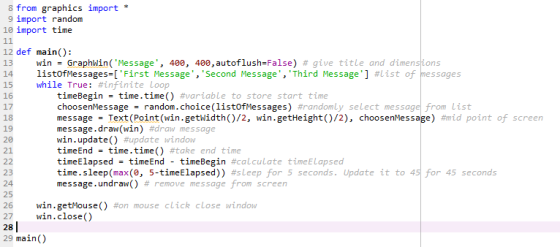
Output:
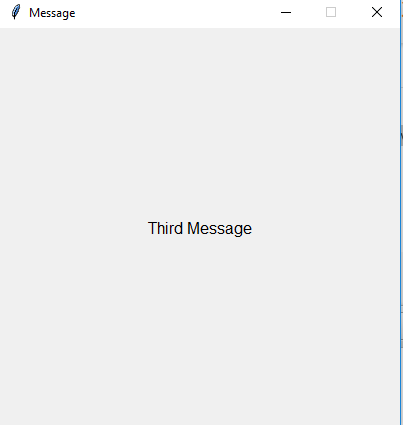
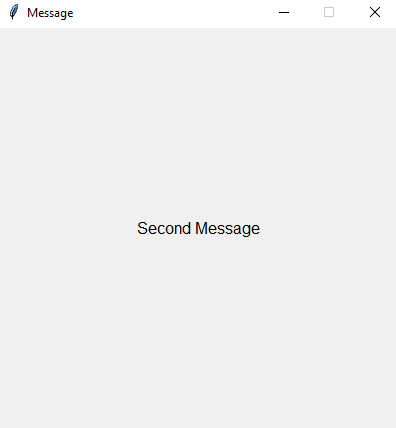
Add Answer to:
in python how to I get python to display 1 of 3 message every 45
seconds...
Using cron executing a bash script: -every 12 minutes get the temperture(Python) -Display the time, temperture,...
Using cron executing a bash script: -every 12 minutes get the temperture(Python) -Display the time, temperture, and location(curses) -Blink the LED 20 times once every 5 seconds (C) Using cron: -Every 5 minutes send the temperture, location, and time to professor Donald's server (TCP-C) -Blink the LED 40 times once a second(C) -Professor Donald's return message will include a JSON string; display the returned "value" from Prof. Donald's server in the middle of your screen(C and Curses?)
Hi, I wanted to know if it is possible to get information from Python and display...
Hi, I wanted to know if it is possible to get information from Python and display onto a app made using MIT App Inventor. Currently the best solution I thought of is to create a web server using python that MIT App Inventor connects based on the video: "Easy Python tutorial 16: Android-PC communication" from youtube but I don't understand it fully. What would be the best and easiest way to display python data onto a app using MIT App...
Write a C program that reads a sequence of numbers and display a message 1. The...
 Write a C program that reads a sequence of numbers and display a message 1. The numbers a re red from the standard input. 2. The first number is the length of the sequence (n) followed by n numbers. 3. If n is 0 or negative, the program displays the message "Error_1" followed 4. If the length is shorter than n, it displays "Error_2" followed by a new line 5. The program inspects the list and display one of the...
How can I create a python gooey that will display an image and as well zoom...
How can I create a python gooey that will display an image and as well zoom in on that image?
i have problem trying to create the class in this python 3 promblem In this problem...
 i have problem trying to create the class in this python 3
promblem
In this problem you will be creating a Caterpillar class that will draw a caterpillar using turtle graphics. Your caterpillar object will contain the following information: 1. Body color (default "green") 2. Legs color (default "purple") 3. Body size (the radius of the 5 circles that make the caterpillars body) (default- 50) You are going to want to create a turtle object that you will use to...
i have problem trying to create the class in this python 3
promblem
In this problem you will be creating a Caterpillar class that will draw a caterpillar using turtle graphics. Your caterpillar object will contain the following information: 1. Body color (default "green") 2. Legs color (default "purple") 3. Body size (the radius of the 5 circles that make the caterpillars body) (default- 50) You are going to want to create a turtle object that you will use to...
Python 3 How to change the icon in the error message want to put a yellow...
 Python 3
How to change the icon in the error message want to put a yellow
warning icon
import tkinter as tk
from tkcalendar import DateEntry
from openpyxl import load_workbook
from tkinter import messagebox
window = tk.Tk()
window.title("daily logs")
window.grid_columnconfigure(1,weight=1)
window.grid_rowconfigure(1,weight=1)
# labels
tk.Label(window, text="Bar code").grid(row=0, sticky="W", pady=20, padx=20)
tk.Label(window, text="Products failed").grid(row=1, sticky="W", pady=20, padx=20)
tk.Label(window, text="Money Lost").grid(row=2, sticky="W", pady=20, padx=20)
tk.Label(window, text="sold by").grid(row=3, sticky="W", pady=20, padx=20)
tk.Label(window, text="Failed date").grid(row=4, sticky="W", pady=20, padx=20)
# entries
barcode = tk.Entry(window)
product =...
Python 3
How to change the icon in the error message want to put a yellow
warning icon
import tkinter as tk
from tkcalendar import DateEntry
from openpyxl import load_workbook
from tkinter import messagebox
window = tk.Tk()
window.title("daily logs")
window.grid_columnconfigure(1,weight=1)
window.grid_rowconfigure(1,weight=1)
# labels
tk.Label(window, text="Bar code").grid(row=0, sticky="W", pady=20, padx=20)
tk.Label(window, text="Products failed").grid(row=1, sticky="W", pady=20, padx=20)
tk.Label(window, text="Money Lost").grid(row=2, sticky="W", pady=20, padx=20)
tk.Label(window, text="sold by").grid(row=3, sticky="W", pady=20, padx=20)
tk.Label(window, text="Failed date").grid(row=4, sticky="W", pady=20, padx=20)
# entries
barcode = tk.Entry(window)
product =...
If an inch worm travels 1 inch every 0.3 seconds, how many hours will it take...
If an inch worm travels 1 inch every 0.3 seconds, how many hours will it take to get across a 2 km cornfield in Ohio? (1 foot = 0.3048)
This question is for Python 3. I can get the first couple of steps in this...
This question is for Python 3. I can get the first couple of steps in this question but I get errors. Create a program that: Creates a sales receipt, displays the receipt entries and totals, and saves the receipt entries to a file Prompt the user to enter the Item Name Item Quantity Item Price Display the item name, the quantity, and item price, and the extended price (Item Quantity multiplied by Item Price) after the entry is made Save...
Can i get Playfair Cipher for python 3 that encrypts a message and decrypts it, could...
Can i get Playfair Cipher for python 3 that encrypts a message and decrypts it, could you possibly make it as simple as you can without losing functionality. please include comments, that would help me better understand Example of PlayFair Cipher: https://en.wikipedia.org/wiki/Playfair_cipher The Playfair cipher uses a 5 by 5 table containing a key word or phrase. Memorization of the keyword and 4 simple rules was all that was required to create the 5 by 5 table and use the...
IN PYTHON PLEASE 1. Let the user input a string. (10 points) 2. Display how many...
 IN PYTHON PLEASE
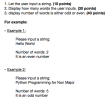
1. Let the user input a string. (10 points) 2. Display how many words the user inputs. (30 points) 3. display number of words is either odd or even. (40 points) For example: • Example 1: Please input a string: Hello World Number of words: 2 It is an even number • Example 2: Please input a string: Python Programming for Non Major Number of words: 5 It is an odd number
IN PYTHON PLEASE
1. Let the user input a string. (10 points) 2. Display how many words the user inputs. (30 points) 3. display number of words is either odd or even. (40 points) For example: • Example 1: Please input a string: Hello World Number of words: 2 It is an even number • Example 2: Please input a string: Python Programming for Non Major Number of words: 5 It is an odd number
 Write a C program that reads a sequence of numbers and display a message 1. The numbers a re red from the standard input. 2. The first number is the length of the sequence (n) followed by n numbers. 3. If n is 0 or negative, the program displays the message "Error_1" followed 4. If the length is shorter than n, it displays "Error_2" followed by a new line 5. The program inspects the list and display one of the...
 i have problem trying to create the class in this python 3
promblem
In this problem you will be creating a Caterpillar class that will draw a caterpillar using turtle graphics. Your caterpillar object will contain the following information: 1. Body color (default "green") 2. Legs color (default "purple") 3. Body size (the radius of the 5 circles that make the caterpillars body) (default- 50) You are going to want to create a turtle object that you will use to...
i have problem trying to create the class in this python 3
promblem
In this problem you will be creating a Caterpillar class that will draw a caterpillar using turtle graphics. Your caterpillar object will contain the following information: 1. Body color (default "green") 2. Legs color (default "purple") 3. Body size (the radius of the 5 circles that make the caterpillars body) (default- 50) You are going to want to create a turtle object that you will use to...
 Python 3
How to change the icon in the error message want to put a yellow
warning icon
import tkinter as tk
from tkcalendar import DateEntry
from openpyxl import load_workbook
from tkinter import messagebox
window = tk.Tk()
window.title("daily logs")
window.grid_columnconfigure(1,weight=1)
window.grid_rowconfigure(1,weight=1)
# labels
tk.Label(window, text="Bar code").grid(row=0, sticky="W", pady=20, padx=20)
tk.Label(window, text="Products failed").grid(row=1, sticky="W", pady=20, padx=20)
tk.Label(window, text="Money Lost").grid(row=2, sticky="W", pady=20, padx=20)
tk.Label(window, text="sold by").grid(row=3, sticky="W", pady=20, padx=20)
tk.Label(window, text="Failed date").grid(row=4, sticky="W", pady=20, padx=20)
# entries
barcode = tk.Entry(window)
product =...
Python 3
How to change the icon in the error message want to put a yellow
warning icon
import tkinter as tk
from tkcalendar import DateEntry
from openpyxl import load_workbook
from tkinter import messagebox
window = tk.Tk()
window.title("daily logs")
window.grid_columnconfigure(1,weight=1)
window.grid_rowconfigure(1,weight=1)
# labels
tk.Label(window, text="Bar code").grid(row=0, sticky="W", pady=20, padx=20)
tk.Label(window, text="Products failed").grid(row=1, sticky="W", pady=20, padx=20)
tk.Label(window, text="Money Lost").grid(row=2, sticky="W", pady=20, padx=20)
tk.Label(window, text="sold by").grid(row=3, sticky="W", pady=20, padx=20)
tk.Label(window, text="Failed date").grid(row=4, sticky="W", pady=20, padx=20)
# entries
barcode = tk.Entry(window)
product =...
 IN PYTHON PLEASE
1. Let the user input a string. (10 points) 2. Display how many words the user inputs. (30 points) 3. display number of words is either odd or even. (40 points) For example: • Example 1: Please input a string: Hello World Number of words: 2 It is an even number • Example 2: Please input a string: Python Programming for Non Major Number of words: 5 It is an odd number
IN PYTHON PLEASE
1. Let the user input a string. (10 points) 2. Display how many words the user inputs. (30 points) 3. display number of words is either odd or even. (40 points) For example: • Example 1: Please input a string: Hello World Number of words: 2 It is an even number • Example 2: Please input a string: Python Programming for Non Major Number of words: 5 It is an odd number
Most questions answered within 3 hours.
-
Where is the error in this code sequence?
String s1 = "Hello";
String s2 = "ello";...
asked 10 months ago -
Financial data for Joel de Paris, Inc., for last year
follow:
Joel de Paris, Inc.
Balance...
asked 10 months ago -
Consider this reaction:
Al2(SO4)3 (aq)+ BaCl3
(aq) Al2Cl6 (aq)- +
3BaSO4(s) . What is the...
asked 10 months ago -
Suppose that Savneet is considering increasing her
recent random sample from 20 car rentals to 40...
asked 10 months ago -
Trucks arrive at an unloading terminal at an average rate of 120
per hour.
Trucks arrive...
asked 10 months ago -
Why are methanol and ethanol completely soluble in water while
octanol is not very little soluble....
asked 10 months ago -
A facilities manager at a university reads in a research report
that the mean amount of...
asked 10 months ago -
When the CuSO4 is rehydrated by adding water to the anhydrous
compound, is this an endothermic...
asked 10 months ago -
A ray of sunlight is passing from diamond into crown glass; the
angle of incidence is...
asked 10 months ago -
A block of mass 0.249 kg is placed on top of a light, vertical
spring of...
asked 10 months ago -
how do the kidneys compensate in the presences of acidosis
a) trigger hyperventilate
b) reserve acid...
asked 10 months ago -
Question 501 pts
The rental rate of capital to the firm increases. Which of the
following...
asked 10 months ago