Using Java Write a simple calculator which can add, subtract, multiply, and divide. Here are the...
Using Java
Write a simple calculator which can add, subtract, multiply, and divide. Here are the specifications for the calculator:
- The calculator has one “accumulator”, which holds the result of all prior calculations. The calculator is set to 0.0 when the calculator is turned on (i.e., instantiated).
- On the console, the user then enters an operator (+, -, *, or /) and a number. Your console will then apply the operator and operand to the number in the accumulator, and store the result back in the accumulator
- The user can also enter ‘R’ to reset the accumulator to 0, or the letter “P” to turn the calculator’s power off
The calculator will need to trap the following exception conditions:
- If the user enters something other than +, -, *, /, R, or P for the operator, an UnknownOperatorException exception should be thrown.
- If the user enters something other than a valid number for the operand, a NumberFormatException exception should be thrown. (You can ignore this exception if the user enters R or P for the operator.)
- If the user tries to divide by zero, an DivideByZeroException exception should be thrown.
The NumberFormatException is already provided in Java. You will write your own UnknownOperatorException and DivideByZeroException classes.
All exception classes should have at least two constructors:
- one which takes no arguments and provides a default Exception message
- another which takes a String as an argument and sets the contents of the String as the Exception message
Please provide listings for your Calculator class (or classes) and your exception class. Also provide a PrintScreen(s) demonstrating each of the six operators and three exceptions in use.
Here’s a sample dialog that a user might have with the calculator:
  Your calculator is now on.
  The result is currently 0.0

  Enter an operator (+, -, *, or /) and a number,
     "R" to reset, or "P" to turn off power
  + 5
  The result of 0.0 + 5.0  is 5.0

  Enter an operator (+, -, *, or /) and a number,
     "R" to reset, or "P" to turn off power
  / 2
  The result of 5.0 / 2.0 is 2.5

  Enter an operator (+, -, *, or /) and a number,
     "R" to reset, or "P" to turn off power
  / 0
  You cannot divide by 0.  The result is still 2.5.

  Enter an operator (+, -, *, or /) and a number,
     "R" to reset, or "P" to turn off power
  R
  The calculator has been reset to 0.

  Enter an operator (+, -, *, or /) and a number,
     "R" to reset, or "P" to turn off power
  – 18.4
  The result of 0.0 - 18.4 is -18.4

  Enter an operator (+, -, *, or /) and a number,
     "R" to reset, or "P" to turn off power
  * 20
  The result of -18.4 * 20.0 is -368.0

  Enter an operator (+, -, *, or /) and a number,
     "R" to reset, or "P" to turn off power
  + abc
  "abc" is not a valid number.  The result is still -360.0

  Enter an operator (+, -, *, or /) and a number,
     "R" to reset, or "P" to turn off power
  & 15
  "&" is not a valid operator.  The result is still -368.0

  Enter an operator (+, -, *, or /) and a number,
     "R" to reset, or "P" to turn off power
  P
Good bye. |
Homework Answers
//Java code
public class UnknownOperatorException extends Exception {
    public UnknownOperatorException()
    {
        super();
    }
    public UnknownOperatorException(String msg)
    {
        super(msg);
    }
}
//===============================
public class DivideByZeroException extends Exception {
    public DivideByZeroException()
    {
        super();
    }
    public DivideByZeroException(String msg)
    {
        super(msg);
    }
}
//===============================
import java.util.Scanner;

public class Calculator {
    public static void main(String[] args) throws UnknownOperatorException {
        String expression ="";
        Scanner input  = new Scanner(System.in);
        System.out.println("Your calculator is now on.");
        double currentResult =0.0;
        System.out.println("The result is currently "+currentResult);
        do {
            menu();
            char[] chars=null;
            boolean success = false;
            expression = input.nextLine();
            chars = expression.toCharArray();
            while (!success) {

                try {
                    if (chars[0] != '+' && chars[0] != '-' && chars[0] != '/' && chars[0] != '*' && chars[0] != 'p' && chars[0] != 'P' && chars[0] != 'R' && chars[0] != 'r') {
                        throw new UnknownOperatorException("Wrong operator ....");
                    }
                    else
                    {
                        success = true;
                    }
                } catch (UnknownOperatorException u) {
                    System.out.println(chars[0]+ " is not a valid character. Result is still "+currentResult);
                    success= false;
                    expression = input.nextLine();
                    chars = expression.toCharArray();
                }
            }


            String[] tokens = expression.split(" ");


            switch (chars[0])
            {
                case '+':
                    try {
                        System.out.print("The result of " + currentResult + " + " + Double.parseDouble(tokens[1]) + " is ");
                        currentResult += Double.parseDouble(tokens[1]);
                        System.out.println(currentResult);
                    }
                    catch (NumberFormatException e)
                    {
                        System.err.println("Not Valid number...");
                        System.out.println(tokens[1] +" is not a valid number. The result is still "+currentResult);
                    }
                    break;
                case '-':
                    try {
                        System.out.print("The result of " + currentResult + " - " + Double.parseDouble(tokens[1]) + " is ");
                        currentResult -= Double.parseDouble(tokens[1]);
                        System.out.println(currentResult);
                    }
                    catch (NumberFormatException e)
                    {
                        System.err.println("Not Valid number...");
                        System.out.println(tokens[1] +" is not a valid number. The result is still "+currentResult);
                    }
                    break;
                case '*':
                    try {
                        System.out.print("The result of " + currentResult + " * " + Double.parseDouble(tokens[1]) + " is ");
                        currentResult *= Double.parseDouble(tokens[1]);
                        System.out.println(currentResult);
                    }
                    catch (NumberFormatException e)
                    {
                        System.err.println("Not Valid number...");
                        System.out.println(tokens[1] +" is not a valid number. The result is still "+currentResult);
                    }

                    break;
                case '/':
                    try {
                        System.out.print("The result of " + currentResult + " / " + Double.parseDouble(tokens[1]) + " is ");

                            double num = Double.parseDouble(tokens[1]);
                            if(num==0)
                                throw new DivideByZeroException();
                            currentResult /= num;
                            System.out.println(currentResult);
                        }
                         catch (DivideByZeroException e)
                         {
                             System.err.println("\nCan't divide by zero...");
                         }
                    catch (NumberFormatException e)
                    {
                        System.err.println("Not Valid number...");
                        System.out.println(tokens[1] +" is not a valid number. The result is still "+currentResult);
                    }
                    break;
                case 'R':
                case 'r':
                    currentResult =0;
                    System.out.println("The calculator has been reset to 0.");
                    break;
                case 'P':
                case 'p':
                    System.out.println("Good Bye...");
                    break;
                    default:
                        System.err.println("ERROR!!! invalid input... try again!");
                        break;
            }
            if(chars[0]=='p'|| chars[0]=='P')
                break;
        }while (true);
    }
    private static void menu()
    {
        System.out.println("Enter an operator (+, -, *, or /) and a number,\n" +
                "     \"R\" to reset, or \"P\" to turn off power  ");
    }
}
//Output
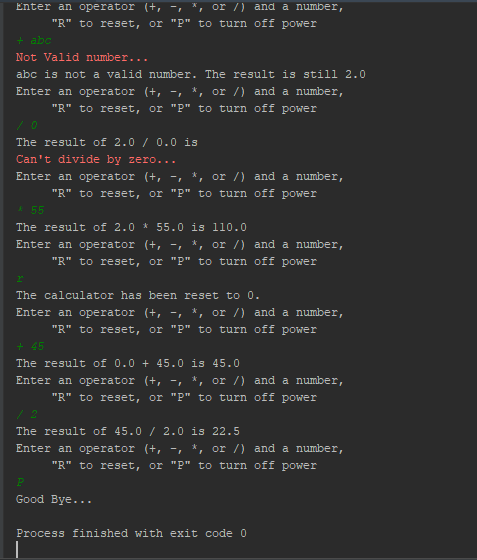
//If you need any help regarding this solution ........... please leave a comment ........ thanks
Add Answer to:
Using Java
Write a simple calculator which can add, subtract, multiply, and
divide. Here are the...
Write a calculator that will give the user this menu options: 1)Add 2)Subtract 3)Multiply 4)Divide 5)Exit...
Write a calculator that will give the user this menu options: 1)Add 2)Subtract 3)Multiply 4)Divide 5)Exit . Your program should continue asking until the user chooses 5. If user chooses to exit give a goodbye message. After the user selections options 1 - 4, prompt the user for two numbers. Perform the requested mathematical operation on those two numbers. Round the result to 1 decimal place. Please answer in python and make it simple. Please implement proper indentation, not just...
A Simple Calculator Summary: Write a console program (character based) to do simple calculations (addition, subtraction,...
A Simple Calculator Summary: Write a console program (character based) to do simple calculations (addition, subtraction, multiplication and division) of two numbers, using your understanding of Java. Description: You need to write a program that will display a menu when it is run. The menu gives five choices of operation: addition, subtraction, multiplication, division, and a last choice to exit the program. It then prompts the user to make a choice of the calculation they want to do. Once the...
1) [5 pts] Build a simple calculator using switch statements which can perform the four operations...
 1) [5 pts] Build a simple calculator using switch statements which can perform the four operations +, -, *,/. Write a program that asks the user to enter two numbers/operands. Then prompt the user to enter the operator +,, ). Perform the corresponding operation and display the answer to user. The format Example of multiplication Microsoft Visual Studio Debug Console an operator (+, -, *, ): Enter two operands: 25.5 2.314 25.5 2.314597 2) [5 pts] Create a program to...
Write a Java program which allows the user to perform simple tasks on a calculator. A...
Write a Java program which allows the user to perform simple tasks on a calculator. A series of methods allows the user to select an operation to perform and then enter operands. The first method displays a menu, giving the user the choice of typing in any one of the following: +, -, *, /, or % representing the usual arithmetic operators (Each operation should be done on numbers negative(-) to positive(+), positive(+) to negative(-), negative(-) to negative(-), and positive(+)...
Program using visual basic.net You will create a very simple two numbers calculator with save options;...
Program using visual basic.net You will create a very simple two numbers calculator with save options; here is the specifications for the application. Create a form divided vertically in two halves with right and left panels 1- In the left panel you will create the following control, the label or the value of the control will be in "" and the type of the control will in [] a- "First Number" [textbox] b- "Second number" [texbox] c- "Result" [textbox] -...
You will be writing a simple Java program that implements an ancient form of encryption known...
You will be writing a simple Java program that implements an ancient form of encryption known as a substitution cipher or a Caesar cipher (after Julius Caesar, who reportedly used it to send messages to his armies) or a shift cipher. In a Caesar cipher, the letters in a message are replaced by the letters of a "shifted" alphabet. So for example if we had a shift of 3 we might have the following replacements: Original alphabet: A B C...
Can you please help me with creating this Java Code using the following pseudocode? Make Change C...
Can you please help me with creating this Java Code using the following pseudocode? Make Change Calculator (100 points + 5 ex.cr.) 2019 In this program (closely related to the change calculator done as the prior assignment) you will make “change for a dollar” using the most efficient set of coins possible. In Part A you will give the fewest quarters, dimes, nickels, and pennies possible (i.e., without regard to any ‘limits’ on coin counts), but in Part B you...
 1) [5 pts] Build a simple calculator using switch statements which can perform the four operations +, -, *,/. Write a program that asks the user to enter two numbers/operands. Then prompt the user to enter the operator +,, ). Perform the corresponding operation and display the answer to user. The format Example of multiplication Microsoft Visual Studio Debug Console an operator (+, -, *, ): Enter two operands: 25.5 2.314 25.5 2.314597 2) [5 pts] Create a program to...
Most questions answered within 3 hours.
-
Where is the error in this code sequence?
String s1 = "Hello";
String s2 = "ello";...
asked 11 months ago -
Financial data for Joel de Paris, Inc., for last year
follow:
Joel de Paris, Inc.
Balance...
asked 11 months ago -
Consider this reaction:
Al2(SO4)3 (aq)+ BaCl3
(aq) Al2Cl6 (aq)- +
3BaSO4(s) . What is the...
asked 11 months ago -
Suppose that Savneet is considering increasing her
recent random sample from 20 car rentals to 40...
asked 11 months ago -
Trucks arrive at an unloading terminal at an average rate of 120
per hour.
Trucks arrive...
asked 11 months ago -
Why are methanol and ethanol completely soluble in water while
octanol is not very little soluble....
asked 11 months ago -
A facilities manager at a university reads in a research report
that the mean amount of...
asked 11 months ago -
When the CuSO4 is rehydrated by adding water to the anhydrous
compound, is this an endothermic...
asked 11 months ago -
A ray of sunlight is passing from diamond into crown glass; the
angle of incidence is...
asked 11 months ago -
A block of mass 0.249 kg is placed on top of a light, vertical
spring of...
asked 11 months ago -
how do the kidneys compensate in the presences of acidosis
a) trigger hyperventilate
b) reserve acid...
asked 11 months ago -
Question 501 pts
The rental rate of capital to the firm increases. Which of the
following...
asked 11 months ago