What are the differences between traditional error-handling methods and object-oriented exception-handling methods? Describe situations in which...
What are the differences between traditional error-handling methods and object-oriented exception-handling methods? Describe situations in which each might be appropriate.
Homework Answers
Error handling: Improved error recovery is one of the most powerful ways you can increase the robustness of your code.
Error handling in C
Error handling is quite straightforward in situations where you check some condition and you know exactly what to do because you have all the necessary information in that context. Of course, you just handle the error at that point.
The problem occurs when you don’t have enough information in that context, and you need to pass the error information into a larger context where that information does exist. There are three typical approaches in C to handle this situation.
- Return error information from the function or, if the return value cannot be used this way, set a global error condition flag.
- Use the little-known Standard C library signal-handling system, implemented with the signal( ) function (to determine what happens when the event occurs) and raise( ) (to generate an event). Again, this has high coupling because it requires the user of any library that generates signals to understand and install the appropriate signal-handling mechanism, also in large projects the signal numbers from different libraries may clash with each other.
- Use the nonlocal goto functions in the Standard C library: setjmp( ) and longjmp( ).
- With setjmp( ) you save a known good state in the program, and if you get into trouble, longjmp( ) will restore that state. Again, there is high coupling between the place where the state is stored and the place where the error occurs.
Throwing an exception
If you encounter an exceptional situation in your code – that is, one where you don’t have enough information in the current context to decide what to do – you can send information about the error into a larger context by creating an object containing that information and “throwing” it out of your current context. This is called throwing an exception. Here’s what it looks like:
throw myerror(“something bad happened”);
myerror is an ordinary class, which takes a char* as its argument. You can use any type when you throw (including built-in types), but often you’ll use special types created just for throwing exceptions.
The keyword throw creates an object that isn’t there under normal program execution, and of course the constructor is called for that object. Then the object is, in effect, “returned” from the function, even though that object type isn’t normally what the function is designed to return. A simplistic way to think about exception handling is as an alternate return mechanism, although you get into trouble if you take the analogy too far – you can also exit from ordinary scopes by throwing an exception. But a value is returned, and the function or scope exits.
Catching an exception
If a function throws an exception, it must assume that exception is caught and dealt with. As mentioned before, one of the advantages of C++ exception handling is that it allows you to concentrate on the problem you’re actually trying to solve in one place, and then deal with the errors from that code in another place.
The try block
If you’re inside a function and you throw an exception , that function will exit in the process of throwing. If you don’t want a throw to leave a function, you can set up a special block within the function where you try to solve your actual programming problem.This is called the try block because you try your various function calls there.
The try block is an ordinary scope, preceded by the keyword try:
try {
  // Code that may generate exceptions
}
Exception handlers
Of course, the thrown exception must end up someplace. This is the exception handler, and there’s one for every exception type you want to catch.
Exception handlers immediately follow the try block and are denoted by the keyword catch:
try {
// Code that may generate exceptions
} catch(type1 id1) {
  // Handle exceptions of type1
} catch(type2 id2) {
  // Handle exceptions of type2
}
Each catch clause is like a little function that takes a single argument of one particular type. The identifier (id1, id2, and so on) may be used inside the handler, just like a function argument, although sometimes there is no identifier because it’s not needed in the handler – the exception type gives you enough information to deal with it.
The handlers must appear directly after the try block. If an exception is thrown, the exception-handling mechanism goes hunting for the first handler with an argument that matches the type of the exception. Then it enters that catch clause, and the exception is considered handled. Only the matching catch clause executes, it’s not like a switch statement where you need a break after each case to prevent the remaining ones from executing.
Point to rememeber is that, within the try block, a number of different function calls might generate the same exception, but you only need one handler.
In traditional programming languages like C, Pascal etc. this exception handling is an overhead of the programmer to make the program robust by including lot of if statement and error-handler routine which make the programs more complicated. Java programmer(OOP) are released from this overhead by the exception handling mechanism in Java.
Built-in classes for exceptions handling in Java
To handle the common possible exceptions ,Java defined a class hierarchy as shown below :
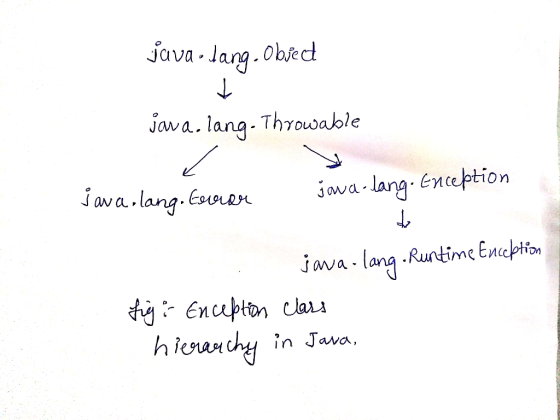
The class Throwable is used to represent all exceptional conditions. Two immediate subclasses of Throwable are Exception, and Error.
The class Exception is used for exceptional conditions that user programs can catch.
The other branch of the throwable tree is the class Error, which defines the conditions that should not be expected to be caught under normal circumstances. These class is responsible for giving errors in some catastrophic failures.
A further refinement is there by a sub class of Exception, which is for exceptional condition that created by the run time called RuntimeException. These exceptions are typically created automatically during the run time in response to some execution error.
Exceptions Handling in Java
Java exception handling is managed through five key words : try, catch, throw, throws, and finally. Here is the basic form of an exception handling block.
try
{
// block of code
} catch ( ExceptionType1 e) {
// Exception handling routine for ExceptionType1 (optional)
} catch (ExceptionType2 e ) {
// Exception handling routine for ExceptionType2 (optional) }
. . . catch (ExceptionType_n e) {
// Exception handling routine for ExceptionType_n (optional)
}
finally{
// Program code of exit (optional)
}
Here, when you try to execute a block of code, and if an error occurs, you may catch based on what type of exception it is, or finally dealt with by a default handler.
Error Handling Exception Classes
- ArithmeticException: An ArithmeticException is thrown if one try to divide an integer by zero or take a modules by zero.
- ArrayIndexOutofBoundsException : In ArrayIndexOutofBoundsException is thrown when one try to access an array element that is out of bounds, meaning that one using an index of less than zero or greater than or equal to the size of the array.
- ArrayStoreException : This exception occurs when one try to store a value into an array of incompatible class or type.
- ClassCastException : In Java, an instance of a class of one type can be possible to cast for another type. Here an instance of class can be casted to its super class but one can not cast an instance of class to its subclasses. If one attempt this cast, a ClassCasteException will occur.
- IllegalArgumentException : This IllegalArgumentException occurs when one attempt to pass a parameter that is not in valid range or value for the method.
- IllegalThreadStateException : This exception is thrown by some methods in the system package classes when one try to illegally change the state of thread, for example, by trying to start a thread that is already running.
- NegativeArraySizeException : This exception is thrown when an array with a negative size is attempted to be allocated
- NullPointerException : This exception is thrown when one attempt to use a method or variable in a variable name that contains a null object reference.
-
ClassNoFoundException : This exception is thrown by the class loader when a class file is not found when a class is attempted to be instantiated.
-
DataFormatException : This exception is thrown when data being read from a string appears to be in an invalid format.
-
IllegalAccessException : This exception is thrown by methods in java.lang class when instantiating a class by its name if the class is not public or there is no public constructor. One might encounter this exception if calling a method that, in turn, calls one of these methods.
-
InstantiationException : This exception is thrown when an attempt is made to instantiate an abstract class, primarily by methods in java.lang class when instantiating a class by its name.
-
InterruptedException : This exception is thrown within a thread when it is interrupted by some other thread. This exception will be illustrated during the discussion of Thread in Java.
-
NoSuchMethodException : This exception is thrown when a particular method in an object or class cannot be found.
Add Answer to:
What are the differences between traditional error-handling
methods and object-oriented exception-handling methods? Describe
situations in which...
What are the differences between the traditional program paradigm (procedural programming) and the newer object oriented...
What are the differences between the traditional program paradigm (procedural programming) and the newer object oriented paradigm? What are the advantages and disadvantages of each? Which paradigm would you prefer to work with? Explain and give your reasons.
Advanced Object-Oriented Programming using Java Assignment 4: Exception Handling and Testing in Java Introduction - This assignment...
 Advanced Object-Oriented Programming using
Java
Assignment 4: Exception Handling and Testing in
Java
Introduction - This assignment is
meant to introduce you to design and implementation of
exceptions in an object-oriented language. It will
also give you experience in testing an
object-oriented support class.
You will be designing and implementing a version of the game
Nim. Specifically, you will design and implement a
NimGame support class that stores all actual
information about the state of the game, and detects and throws...
Advanced Object-Oriented Programming using
Java
Assignment 4: Exception Handling and Testing in
Java
Introduction - This assignment is
meant to introduce you to design and implementation of
exceptions in an object-oriented language. It will
also give you experience in testing an
object-oriented support class.
You will be designing and implementing a version of the game
Nim. Specifically, you will design and implement a
NimGame support class that stores all actual
information about the state of the game, and detects and throws...
Compare exception handling and traditional handling errors techniques in Java. Which one is better for using?...
Compare exception handling and traditional handling errors techniques in Java. Which one is better for using? Why?
Answers required: 1. Broadly speaking, what are some of the benefits of an object-oriented approach when...
Answers required: 1. Broadly speaking, what are some of the benefits of an object-oriented approach when developing a system? 2. Broadly speaking, how is testing in an object-oriented approach different to testing in traditional software development? 3. In object-oriented development, why is it necessary to use drivers and stubs in testing? 4. When testing classes what difficulties does inheritance cause? 5. What type of object-oriented models is useful for guiding a tester? 6. What is thread-based testing in object-oriented systems?...
Explain the following object-oriented(OO) concepts with the aid of code examples (either C++ or Java): Inheritance Over-riding . Over-loading Describe any differences between C++ and Java in how the...
 Explain the following object-oriented(OO) concepts with the aid of code examples (either C++ or Java): Inheritance Over-riding . Over-loading Describe any differences between C++ and Java in how these OO concepts are implemented? 3(c) 17 Marks] Describe C++ namespaces using a code example. Describe Java packages, again using a code example. How do C++ namespaces compare to Java packages? 3(d) [5 Marks] What are inline methods in C++/Java? Explain the terms accessor and mutator.
Explain the following object-oriented(OO) concepts with...
Explain the following object-oriented(OO) concepts with the aid of code examples (either C++ or Java): Inheritance Over-riding . Over-loading Describe any differences between C++ and Java in how these OO concepts are implemented? 3(c) 17 Marks] Describe C++ namespaces using a code example. Describe Java packages, again using a code example. How do C++ namespaces compare to Java packages? 3(d) [5 Marks] What are inline methods in C++/Java? Explain the terms accessor and mutator.
Explain the following object-oriented(OO) concepts with...
Explain both object-oriented programming and structured programming. Following your explanation of these programming methods, describe the...
Explain both object-oriented programming and structured programming. Following your explanation of these programming methods, describe the various advantages and disadvantages of each method. Lastly, provide a justification of which method you prefer and why.
Could you tell us the differences between “Structure oriented language” and “Object oriented language”? please justify...
Could you tell us the differences between “Structure oriented language” and “Object oriented language”? please justify your answer with examples?
What are the benefits and disadvantages of object-oriented programming? What is the difference between a flat-file...
What are the benefits and disadvantages of object-oriented programming? What is the difference between a flat-file database and a relational database? In what situations is it more appropriate to a flat-file database over a relational database, and vice versa? What are the advantages to using cookies to power a web application? Are there any risks involved using cookies?
What are the main differences in a relational and object-oriented database model?
What are the main differences in a relational and object-oriented database model?
Describe two group communication situations. What similarities and differences between the groups and their group communication...
Describe two group communication situations. What similarities and differences between the groups and their group communication situations. specifically discuss the type of group(s), group communication norms, of group communication interaction patterns.
 Advanced Object-Oriented Programming using
Java
Assignment 4: Exception Handling and Testing in
Java
Introduction - This assignment is
meant to introduce you to design and implementation of
exceptions in an object-oriented language. It will
also give you experience in testing an
object-oriented support class.
You will be designing and implementing a version of the game
Nim. Specifically, you will design and implement a
NimGame support class that stores all actual
information about the state of the game, and detects and throws...
Advanced Object-Oriented Programming using
Java
Assignment 4: Exception Handling and Testing in
Java
Introduction - This assignment is
meant to introduce you to design and implementation of
exceptions in an object-oriented language. It will
also give you experience in testing an
object-oriented support class.
You will be designing and implementing a version of the game
Nim. Specifically, you will design and implement a
NimGame support class that stores all actual
information about the state of the game, and detects and throws...
 Explain the following object-oriented(OO) concepts with the aid of code examples (either C++ or Java): Inheritance Over-riding . Over-loading Describe any differences between C++ and Java in how these OO concepts are implemented? 3(c) 17 Marks] Describe C++ namespaces using a code example. Describe Java packages, again using a code example. How do C++ namespaces compare to Java packages? 3(d) [5 Marks] What are inline methods in C++/Java? Explain the terms accessor and mutator.
Explain the following object-oriented(OO) concepts with...
Explain the following object-oriented(OO) concepts with the aid of code examples (either C++ or Java): Inheritance Over-riding . Over-loading Describe any differences between C++ and Java in how these OO concepts are implemented? 3(c) 17 Marks] Describe C++ namespaces using a code example. Describe Java packages, again using a code example. How do C++ namespaces compare to Java packages? 3(d) [5 Marks] What are inline methods in C++/Java? Explain the terms accessor and mutator.
Explain the following object-oriented(OO) concepts with...
Most questions answered within 3 hours.
-
Where is the error in this code sequence?
String s1 = "Hello";
String s2 = "ello";...
asked 11 months ago -
Financial data for Joel de Paris, Inc., for last year
follow:
Joel de Paris, Inc.
Balance...
asked 11 months ago -
Consider this reaction:
Al2(SO4)3 (aq)+ BaCl3
(aq) Al2Cl6 (aq)- +
3BaSO4(s) . What is the...
asked 11 months ago -
Suppose that Savneet is considering increasing her
recent random sample from 20 car rentals to 40...
asked 11 months ago -
Trucks arrive at an unloading terminal at an average rate of 120
per hour.
Trucks arrive...
asked 11 months ago -
Why are methanol and ethanol completely soluble in water while
octanol is not very little soluble....
asked 11 months ago -
A facilities manager at a university reads in a research report
that the mean amount of...
asked 11 months ago -
When the CuSO4 is rehydrated by adding water to the anhydrous
compound, is this an endothermic...
asked 11 months ago -
A ray of sunlight is passing from diamond into crown glass; the
angle of incidence is...
asked 11 months ago -
A block of mass 0.249 kg is placed on top of a light, vertical
spring of...
asked 11 months ago -
how do the kidneys compensate in the presences of acidosis
a) trigger hyperventilate
b) reserve acid...
asked 11 months ago -
Question 501 pts
The rental rate of capital to the firm increases. Which of the
following...
asked 11 months ago