2D Lists + File I/O In a comma-separated input file named results.txt, you have been given...
2D Lists + File I/O
In a comma-separated input file named results.txt, you have been given the following information that records the weekly (movie) box office sales for 5 movies. A sample input file will include the following. The movie’s title is listed first, then its sales (in million dollars) for 7 days are listed.
|
Avengers,169.1,125.8,101.7,40.5,38.2,24.2,55.7 Shazam!,8.6,14.1,8.2,7.3,31.4,44.2,26.8 Breakthrough,14.8,16.1,18.0,18.9,19.8,21.8,24.6 The Best of Enemies,4.7,5.4,5.8,6.1,6.7,7.6,8.1 Dumbo,9.9,14.8,9.0,7.9,40.6,52.5,36.3 |
Write a complete Python program that includes code to do the following:
- read in the data from the results.txt file into a 2D list named results
- include a separate function named average that will calculate (and display to the screen) the average sales for each movie. (Your output should show the movie title and the amount. For example, Breakthrough’s average is $19.1 million)
- include a separate function named lowest that will calculate (and display to the screen) the lowest sales for each day.(Your output should show the day number and the amount. For example, Day 1’s lowest is $4.7 million)
- call the functions to execute within the “main” function
***Please be sure that any calculation results are printed showing one (1) decimal place.***
~~~~~~~~~~~~~~~~~~~~~~~~~~~~~~~~~~~~~~~~~~~~~~~~~~~~~~~~
def main():
infile=open('results.txt','r')
movie=infile.readlines()
for x in range(len(movie)):
movie[x]= movie[x].rstrip('\n')
movie[x]= movie[x].split(',')
for row in range(len(movie)):
for col in range(1,len(movie[0])):
movie[row][col]=float(movie[row][col])
print(movie)
lowest(movie)
average(movie)
infile.close()
def lowest(movie):
for col in range(1,len(movie[0])):
smallest =movie[0][col]
for row in range(len(movie)):
if movie[row][col]<smallest:
smallest=movie[row][col]
print("Day",col,"'s lowest=$",format(smallest,'.2f'))
def average(movie):
for row in range(len(movie)):
total=0
for col in range(1,len(movie[0])):
total+=movies[row][col]
avg=total/(len( movie[0])-1)
print(movie[row][0],"'s average=$",format(avg,'.2f'))
main()
This is the program I have written myself . I have listed the error below. any help?
Traceback (most recent call last):
File "/Users/user1/Downloads/StubbsLab5py.py", line 36, in
<module>
main()
File "/Users/user1/Downloads/StubbsLab5py.py", line 13, in
main
movie[row][col]=float(movie[row][col])
IndexError: list index out of range
>>>
Homework Answers
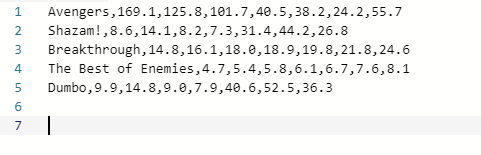
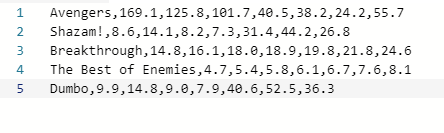
your code worked fine. The problem is in the input file. The code will throw the particular error if you have extra empty lines after the text as shown in the first screenshot. So remove those extra lines and your code shall work fine.
# If you have a query/issue with respect to the answer, please drop a comment. I will surely try to address your query ASAP and resolve the issue
# # Please consider providing a thumbs up to this question if it helps you. by doing that, you will help other students who are facing a similar issue.
#------------------------FAULTY INPUT FILE---------------------
#----------------CORRECT INPUT FILE-----------------------------------------------
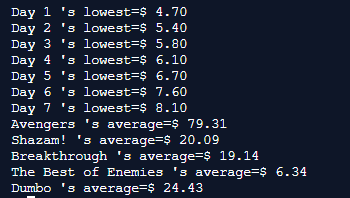
#----------------OUTPUT--------------------------
#-------------------------------------------------------
def main():
infile=open('results.txt','r')
movie=infile.readlines()
# print(movie)
for x in range(len(movie)):
movie[x]= movie[x].rstrip('\n')
movie[x]= movie[x].split(',')
# print(movie)
for row in range(len(movie)):
for col in range(1,len(movie[0])):
movie[row][col]=float(movie[row][col])
# print(movie)
lowest(movie)
average(movie)
infile.close()
def lowest(movie):
for col in range(1,len(movie[0])):
smallest =movie[0][col]
for row in range(len(movie)):
if movie[row][col]<smallest:
smallest=movie[row][col]
print("Day",col,"'s lowest=$",format(smallest,'.2f'))
def average(movie):
for row in range(len(movie)):
total=0
for col in range(1,len(movie[0])):
total+=movie[row][col]
avg=total/(len( movie[0])-1)
print(movie[row][0],"'s average=$",format(avg,'.2f'))
main()
Add Answer to:
2D Lists + File I/O
In a comma-separated input file named
results.txt, you have been given...
For this lab, you will work with two-dimensional lists in Python. Do the following: Write a...
For this lab, you will work with two-dimensional lists in Python. Do the following: Write a function that returns the sum of all the elements in a specified column in a matrix using the following header: def sumColumn(matrix, columnIndex) Write a function display() that displays the elements in a matrix row by row, where the values in each row are displayed on a separate line. Use a single space to separate different values. Sample output from this function when it...
//please help I can’t figure out how to print and can’t get the random numbers to...
 //please help
I can’t figure out how to print and can’t get the random numbers to
print. Please help, I have the prompt attached. Thanks
import java.util.*;
public
class
Test
{
/**
Main method */
public
static
void main(String[]
args)
{
double[][]
matrix
=
getMatrix();
//
Display the sum of each column
for
(int
col
= 0;
col
<
matrix[0].length;
col++)
{
System.out.println(
"Sum
" + col
+
" is
" +
sumColumn(matrix,
col));
}
}
/**
getMatrix initializes an...
//please help
I can’t figure out how to print and can’t get the random numbers to
print. Please help, I have the prompt attached. Thanks
import java.util.*;
public
class
Test
{
/**
Main method */
public
static
void main(String[]
args)
{
double[][]
matrix
=
getMatrix();
//
Display the sum of each column
for
(int
col
= 0;
col
<
matrix[0].length;
col++)
{
System.out.println(
"Sum
" + col
+
" is
" +
sumColumn(matrix,
col));
}
}
/**
getMatrix initializes an...
C++ Language I have a class named movie which allows a movie object to take the...
C++ Language I have a class named movie which allows a movie object to take the name, movie and rating of a movie that the user inputs. Everything works fine but when the user enters a space in the movie's name, the next function that is called loops infinetly. I can't find the source of the problem. Down below are my .cpp and .h file for the program. #include <iostream> #include "movie.h" using namespace std; movie::movie() { movieName = "Not...
Please assist. I keep getting the error message in the middle screen when I run the...
 Please assist. I keep getting the error message in the middle
screen when I run the program on the left. The image on the right
is the section of images.py where it's indicating the issue with
the .split is. How do I fix this?
images.cy - /Users/carrietarpy Downloads/lab9-3/images.py 12.7.18) Python 2.7.18 Shell Python 2.7.15 (v2.7.18:542 102112, Apr 19 2820, 29:48:48) [GCC 4.7.1 Compatible Apple II w 6.3 Clong-FA3.0.57)] on der in Type "help", "copyright', 'credits' or "license()' for more inforyotion...
Please assist. I keep getting the error message in the middle
screen when I run the program on the left. The image on the right
is the section of images.py where it's indicating the issue with
the .split is. How do I fix this?
images.cy - /Users/carrietarpy Downloads/lab9-3/images.py 12.7.18) Python 2.7.18 Shell Python 2.7.15 (v2.7.18:542 102112, Apr 19 2820, 29:48:48) [GCC 4.7.1 Compatible Apple II w 6.3 Clong-FA3.0.57)] on der in Type "help", "copyright', 'credits' or "license()' for more inforyotion...
In this part, you will complete the code to solve a maze.
- Complete the code to solve a maze- Discuss related data structures topicsProgramming-----------In this part, you will complete the code to solve a maze.Begin with the "solveMaze.py" starter file.This file contains comment instructions that tell you where to add your code.Each maze resides in a text file (with a .txt extension).The following symbols are used in the mazes:BARRIER = '-' # barrierFINISH = 'F' # finish (goal)OPEN = 'O' # open stepSTART = 'S' # start stepVISITED = '#' #...
My Python file will not work below and I am not sure why, please help me...
My Python file will not work below and I am not sure why, please help me debug! ********************************* Instructions for program: You’ll use these functions to put together a program that does the following: Gives the user sentences to type, until they type DONE and then the test is over. Counts the number of seconds from when the user begins to when the test is over. Counts and reports: The total number of words the user typed, and how many...
Mountain Paths (Part 1) Objectives 2d arrays Store Use Nested Loops Parallel data structures (i.e...
Mountain Paths (Part 1) in C++ Objectives 2d arrays Store Use Nested Loops Parallel data structures (i.e. parallel arrays … called multiple arrays in the zyBook) Transform data Read from files Write to files structs Code Requirements Start with this code: mtnpathstart.zip Do not modify the function signatures provided. Do not #include or #include Program Flow Read the data into a 2D array Find min and max elevation to correspond to darkest and brightest color, respectively Compute the shade of...
Mountain Paths (Part 1) in C++ Objectives 2d arrays Store Use Nested Loops Parallel data structures...
Mountain Paths (Part 1) in C++ Objectives 2d arrays Store Use Nested Loops Parallel data structures (i.e. parallel arrays … called multiple arrays in the zyBook) Transform data Read from files Write to files structs Code Requirements Start with this code: mtnpathstart.zip Do not modify the function signatures provided. Do not #include or #include Program Flow Read the data into a 2D array Find min and max elevation to correspond to darkest and brightest color, respectively Compute the shade of...
This interactive program focuses on if/else statements, Scanner, and returning values. Turn in a file named...
This interactive program focuses on if/else statements, Scanner, and returning values. Turn in a file named Budgeter.java. To use a Scanner for console input, you must import java.util.*; in your code. This program prompts a person for income and expense amounts, then calculates their net monthly income. Below are two example logs of execution from the program. This program’s behavior is dependent on the user input (user input is bold and underlined below to make it stand out and differentiate...
 //please help
I can’t figure out how to print and can’t get the random numbers to
print. Please help, I have the prompt attached. Thanks
import java.util.*;
public
class
Test
{
/**
Main method */
public
static
void main(String[]
args)
{
double[][]
matrix
=
getMatrix();
//
Display the sum of each column
for
(int
col
= 0;
col
<
matrix[0].length;
col++)
{
System.out.println(
"Sum
" + col
+
" is
" +
sumColumn(matrix,
col));
}
}
/**
getMatrix initializes an...
//please help
I can’t figure out how to print and can’t get the random numbers to
print. Please help, I have the prompt attached. Thanks
import java.util.*;
public
class
Test
{
/**
Main method */
public
static
void main(String[]
args)
{
double[][]
matrix
=
getMatrix();
//
Display the sum of each column
for
(int
col
= 0;
col
<
matrix[0].length;
col++)
{
System.out.println(
"Sum
" + col
+
" is
" +
sumColumn(matrix,
col));
}
}
/**
getMatrix initializes an...
 Please assist. I keep getting the error message in the middle
screen when I run the program on the left. The image on the right
is the section of images.py where it's indicating the issue with
the .split is. How do I fix this?
images.cy - /Users/carrietarpy Downloads/lab9-3/images.py 12.7.18) Python 2.7.18 Shell Python 2.7.15 (v2.7.18:542 102112, Apr 19 2820, 29:48:48) [GCC 4.7.1 Compatible Apple II w 6.3 Clong-FA3.0.57)] on der in Type "help", "copyright', 'credits' or "license()' for more inforyotion...
Please assist. I keep getting the error message in the middle
screen when I run the program on the left. The image on the right
is the section of images.py where it's indicating the issue with
the .split is. How do I fix this?
images.cy - /Users/carrietarpy Downloads/lab9-3/images.py 12.7.18) Python 2.7.18 Shell Python 2.7.15 (v2.7.18:542 102112, Apr 19 2820, 29:48:48) [GCC 4.7.1 Compatible Apple II w 6.3 Clong-FA3.0.57)] on der in Type "help", "copyright', 'credits' or "license()' for more inforyotion...
Most questions answered within 3 hours.
-
Where is the error in this code sequence?
String s1 = "Hello";
String s2 = "ello";...
asked 10 months ago -
Financial data for Joel de Paris, Inc., for last year
follow:
Joel de Paris, Inc.
Balance...
asked 10 months ago -
Consider this reaction:
Al2(SO4)3 (aq)+ BaCl3
(aq) Al2Cl6 (aq)- +
3BaSO4(s) . What is the...
asked 10 months ago -
Suppose that Savneet is considering increasing her
recent random sample from 20 car rentals to 40...
asked 10 months ago -
Trucks arrive at an unloading terminal at an average rate of 120
per hour.
Trucks arrive...
asked 10 months ago -
Why are methanol and ethanol completely soluble in water while
octanol is not very little soluble....
asked 10 months ago -
A facilities manager at a university reads in a research report
that the mean amount of...
asked 10 months ago -
When the CuSO4 is rehydrated by adding water to the anhydrous
compound, is this an endothermic...
asked 10 months ago -
A ray of sunlight is passing from diamond into crown glass; the
angle of incidence is...
asked 10 months ago -
A block of mass 0.249 kg is placed on top of a light, vertical
spring of...
asked 10 months ago -
how do the kidneys compensate in the presences of acidosis
a) trigger hyperventilate
b) reserve acid...
asked 10 months ago -
Question 501 pts
The rental rate of capital to the firm increases. Which of the
following...
asked 10 months ago