Create another Java class named EmployeeMain within the same project, which includes the main method. a....
Create another Java class named EmployeeMain within the same project, which includes the main method.
a. Include another class named Employee in the same Java file. This class has the following instance variables and instance methods. Define all the instance/static variables with private access modifier and constructors, instance/static methods with public access modifier.
| Instance Variables | empID: int |
| employeeName: String | |
| basicSalary: double | |
| Constructor | Set the value for empID. |
| Instance Methods | Get and set methods for all instance variables. |
|
displayEmployee: Display the empID, employeeName, and the basicSalary of the employee in the following format: Employee: <<empID>> Name: <<employeeName>> Basic Salary: <<basicSalary>> |
|
|
calculateBonus: Calculate bonus and return it. Bonus = basicSalary * 0.01 |
b. Create an array of Employee class with 5 elements within the main method.
Employee[] empArray = new Employee[5];
c. Create Employee object for each element of the array.
for(int i=0; i<5; i++)
{
 empArray[i] = new Employee(i+1);
}
d. Get user input for employeeName and basicSalary for each of 5 employees.
e. Display the details of 5 employees as follows:
Employee 1
Name: XXXXXX
Basic Salary: YYYY.YY
Bonus: ZZZZ.ZZ
.
.
.
Homework Answers
//Java code
import java.text.NumberFormat;

public class Employee {
    //instance variable
    private int empID;
    private String employeeName;
    private double basicSalary;

    //Constructor
    //set the value for empID

    public Employee(int empID) {
        this.empID = empID;
    }

    //instance methods
    //getters and setters

    public int getEmpID() {
        return empID;
    }

    public void setEmpID(int empID) {
        this.empID = empID;
    }

    public String getEmployeeName() {
        return employeeName;
    }

    public void setEmployeeName(String employeeName) {
        this.employeeName = employeeName;
    }

    public double getBasicSalary() {
        return basicSalary;
    }

    public void setBasicSalary(double basicSalary) {
        this.basicSalary = basicSalary;
    }

    /**
     * calculateBonus: Calculate bonus and return it.
     *
     * Bonus = basicSalary * 0.01
     * @return calculatedBonus
     */
    public double calculateBonus()
    {
        double calculatedBonus =basicSalary*0.01;
        return calculatedBonus;

    }
    /**
     * displayEmployee: Display the empID, employeeName, and the basicSalary of the employee in the following format:
     *
     * Employee: <<empID>>
     * Name: <<employeeName>>
     * Basic Salary: <<basicSalary>>
     */
    @Override
    public String toString() {
        return "Employee: "+empID+"\nName: "+employeeName+"\nBasic Salary: "+NumberFormat.getCurrencyInstance().format(basicSalary)
                +"\nBonus: "+NumberFormat.getCurrencyInstance().format(calculateBonus());
    }
}
//===================================================================
import java.util.Scanner;

public class EmployeeMain {
    public static void main(String[] args)
    {
        //Create an array of Employee class with 5 elements
        int size=5;
        Employee[] empArray = new Employee[size];
        //Create Employee object for each element of the array.
        for(int i=0; i<empArray.length; i++)
        {
            empArray[i] = new Employee(i+1);

        }
        //Set other attributes of Employee using setters
        //get the user input
        Scanner input = new Scanner(System.in);
        for (int i = 0; i <empArray.length ; i++) {
            System.out.print("Enter the Employee"+empArray[i].getEmpID()+" Name: ");
            empArray[i].setEmployeeName(input.nextLine());

            System.out.print("Enter the Employee"+empArray[i].getEmpID()+" Basic Salary: ");
            empArray[i].setBasicSalary(input.nextDouble());
            input.nextLine();
        }
        //print the info of each employee
        for (int i = 0; i <empArray.length ; i++) {
            System.out.println(empArray[i]);
        }

    }
}
//Output
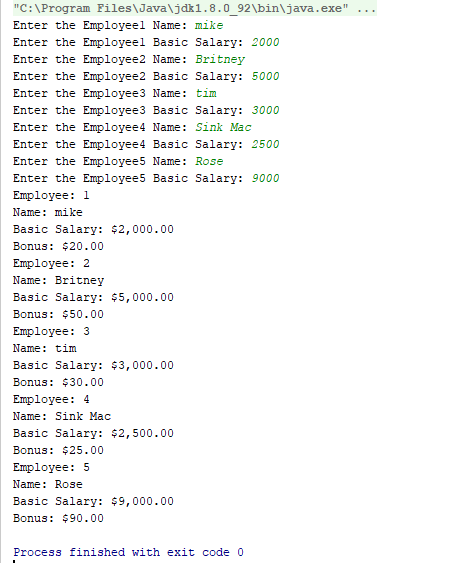
//If you need any help regarding this solution ........... please leave a comment ........ thanks
Add Answer to:
Create another Java class named EmployeeMain within the
same project, which includes the main method.
a....
Programming 5_1: Create a Java class named <YourName>5_1 In this class create a main method...
Programming 5_1: Create a Java class named <YourName>5_1 In this class create a main method, but for now leave it empty. Then write a Java method getAverage which takes an array of integers as it’s argument. The method calculate the average of all the elements in the array, and returns that average. The method should work for an array of integers of any length greater than or equal to one. The method signature is shown below: public static double getAverage(...
Create a C++ project Create an Employee class using a separate header file and implementation file....
Create a C++ project Create an Employee class using a separate header file and implementation file. The calculatePay() method should return 0.0f. The toString() method should return the attribute values ("state of the object"). Create an Hourly class using a separate header file and implementation file. The Hourly class needs to inherit from the Employee class The calculatePay() method should return the pay based on the number of hours worked and the pay rate. Remember to calculate overtime! Create a...
Programming assignment for Java: Do not add any other instance variables to any class, but you...
 Programming assignment for Java:
Do not add any other instance variables to any class, but you
can create local variables in a method to accomplish tasks. Do not
create any methods other than the ones listed below.
Step 1 Develop the following class: Class Name: College Degree Access Modifier: public Instance variables Name: major Access modifier: private Data type: String Name: numberOfCourses Access modifier: private Data type: int Name: courseNameArray Access modifier: private Data type: String Name: courseCreditArray Access modifier:...
Programming assignment for Java:
Do not add any other instance variables to any class, but you
can create local variables in a method to accomplish tasks. Do not
create any methods other than the ones listed below.
Step 1 Develop the following class: Class Name: College Degree Access Modifier: public Instance variables Name: major Access modifier: private Data type: String Name: numberOfCourses Access modifier: private Data type: int Name: courseNameArray Access modifier: private Data type: String Name: courseCreditArray Access modifier:...
Create a class Payroll system in Java. Design a class employee with members eid, ename, basicsalary,...
Create a class Payroll system in Java. Design a class employee with members eid, ename, basicsalary, overtime, allowance, deduction, leave ,net. ( basicsalary, overtime, allowance, deduction, leave ,net are all double values).Design the program for 3 employees(Array of Objects) Methods: Read() : Accept eid,ename and basicsalary from keyboard Calculate() : Peform the following:- Accept overtimehours and calculate overtime =( basic / 240 ) * overtimehours Accept housingallowance and other allowance and calculate allowance = housingallowance + other allowance Accept deductionhours...
create java application with the following specifications: -create an employee class with the following attibutes: name...
create java application with the following specifications: -create an employee class with the following attibutes: name and salary -add constuctor with arguments to initialize the attributes to valid values -write corresponding get and set methods for the attributes -add a method in Employee called verify() that returns true/false and validates that the salary falls in range1,000.00-99,999.99 Add a test application class to allow the user to enter employee information and display output: -using input(either scanner or jOption), allow user to...
You may not add any instance variables to any class, though you may create local variables...
You may not add any instance variables to any class, though you may create local variables inside of a method to accomplish its task. No other methods should be created other than the ones listed here. (I need step 2 please.) Step 1 Develop the following class: Class Name: CollegeDegree Access Modifier: public Instance variables Name: major Access modifier: private Data type: String Name: numberOfCourses Access modifier: private Data type: int Name: courseNameArray Access modifier: private Data type: String [...
Java 1. Create an application named NumbersDemo whose main() method holds two integer variables. Assign values...
Java 1. Create an application named NumbersDemo whose main() method holds two integer variables. Assign values to the variables. In turn, pass each value to methods named displayTwiceTheNumber(), displayNumberPlusFive(), and displayNumberSquared(). Create each method to perform the task its name implies. 2. Modify the NumbersDemo class to accept the values of the two integers from a user at the keyboard. This is the base code given: public class NumbersDemo { public static void main (String args[]) { // Write your...
In JAVA 1. Create a class called Rectangle that has integer data members named - length...
 In JAVA
1. Create a class called Rectangle that has integer data members named - length and width. Your class should have a default constructor (no arg constructor) Rectangle() that initializes the two instance variables of the object Rect1. The second overloading constructor should initializes the value of the second object Rect2. The class should have a member function named GetWidth() and GetLength() that display rectangle's length and width. OUTPUT: Rectl width: 5 Rectl length: 10 Enter a width :...
In JAVA
1. Create a class called Rectangle that has integer data members named - length and width. Your class should have a default constructor (no arg constructor) Rectangle() that initializes the two instance variables of the object Rect1. The second overloading constructor should initializes the value of the second object Rect2. The class should have a member function named GetWidth() and GetLength() that display rectangle's length and width. OUTPUT: Rectl width: 5 Rectl length: 10 Enter a width :...
You may not add any instance variables to any class, though you may create local variables...
You may not add any instance variables to any class, though you may create local variables inside of a method to accomplish its task. No other methods should be created other than the ones listed here. Step 1 Develop the following class: Class Name: CollegeDegree Access Modifier: public Instance variables Name: major Access modifier: private Data type: String Name: numberOfCourses Access modifier: private Data type: int Name: courseNameArray Access modifier: private Data type: String [ ] Name: courseCreditArray Access...
java
You may not add any instance variables to any class, though you may create local variables inside of a method to accomplish its task. No other methods should be created other than the ones listed here. Step 1Develop the following class:ClassName: CollegeDegreeAccess Modifier: publicInstance variablesName: majorAccess modifier: privateData type: StringName: numberOfCoursesAccess modifier: privateData type: intName: courseNameArrayAccess modifier: privateData type: String [ ]Name: courseCreditArrayAccess modifier: privateData type: int [ ]Static variablesName: maximumNumberOfCoursesAccess modifier: privateData type: intInitial Value: 40ConstructorName: CollegeDegreeAccess modifier: publicParameters: none...
 Programming assignment for Java:
Do not add any other instance variables to any class, but you
can create local variables in a method to accomplish tasks. Do not
create any methods other than the ones listed below.
Step 1 Develop the following class: Class Name: College Degree Access Modifier: public Instance variables Name: major Access modifier: private Data type: String Name: numberOfCourses Access modifier: private Data type: int Name: courseNameArray Access modifier: private Data type: String Name: courseCreditArray Access modifier:...
Programming assignment for Java:
Do not add any other instance variables to any class, but you
can create local variables in a method to accomplish tasks. Do not
create any methods other than the ones listed below.
Step 1 Develop the following class: Class Name: College Degree Access Modifier: public Instance variables Name: major Access modifier: private Data type: String Name: numberOfCourses Access modifier: private Data type: int Name: courseNameArray Access modifier: private Data type: String Name: courseCreditArray Access modifier:...
 In JAVA
1. Create a class called Rectangle that has integer data members named - length and width. Your class should have a default constructor (no arg constructor) Rectangle() that initializes the two instance variables of the object Rect1. The second overloading constructor should initializes the value of the second object Rect2. The class should have a member function named GetWidth() and GetLength() that display rectangle's length and width. OUTPUT: Rectl width: 5 Rectl length: 10 Enter a width :...
In JAVA
1. Create a class called Rectangle that has integer data members named - length and width. Your class should have a default constructor (no arg constructor) Rectangle() that initializes the two instance variables of the object Rect1. The second overloading constructor should initializes the value of the second object Rect2. The class should have a member function named GetWidth() and GetLength() that display rectangle's length and width. OUTPUT: Rectl width: 5 Rectl length: 10 Enter a width :...
Most questions answered within 3 hours.
-
Where is the error in this code sequence?
String s1 = "Hello";
String s2 = "ello";...
asked 11 months ago -
Financial data for Joel de Paris, Inc., for last year
follow:
Joel de Paris, Inc.
Balance...
asked 11 months ago -
Consider this reaction:
Al2(SO4)3 (aq)+ BaCl3
(aq) Al2Cl6 (aq)- +
3BaSO4(s) . What is the...
asked 11 months ago -
Suppose that Savneet is considering increasing her
recent random sample from 20 car rentals to 40...
asked 11 months ago -
Trucks arrive at an unloading terminal at an average rate of 120
per hour.
Trucks arrive...
asked 11 months ago -
Why are methanol and ethanol completely soluble in water while
octanol is not very little soluble....
asked 11 months ago -
A facilities manager at a university reads in a research report
that the mean amount of...
asked 11 months ago -
When the CuSO4 is rehydrated by adding water to the anhydrous
compound, is this an endothermic...
asked 11 months ago -
A ray of sunlight is passing from diamond into crown glass; the
angle of incidence is...
asked 11 months ago -
A block of mass 0.249 kg is placed on top of a light, vertical
spring of...
asked 11 months ago -
how do the kidneys compensate in the presences of acidosis
a) trigger hyperventilate
b) reserve acid...
asked 11 months ago -
Question 501 pts
The rental rate of capital to the firm increases. Which of the
following...
asked 11 months ago