Having trouble with a Zoo Monitoring system. Using NetBeans. i have worked out most of the...
Having trouble with a Zoo Monitoring system. Using NetBeans. i have worked out most of the bugs but now its only printing the first few lines of the text file (it prints the lines that begin with "Details" and not continuing to the rest to find the lines with ***** in them to pop up the Joption pane with the alert for that line. below is the code for both java files, as well as the .txt files its reading from.
ZooMonitor.java
package zoomonitor;
//import needed options
import java.io.FileNotFoundException;
import java.io.IOException;
import java.util.Scanner;
import java.util.logging.Level;
import java.util.logging.Logger;
/**
*
* @author jsacc
*/
public class ZooMonitor {
static FileRead fr=new FileRead();
private static final Scanner sc=new Scanner(System.in);
public static void main(String[] args) throws
FileNotFoundException {
while(true) {
int choice=menu();
if(choice==1) {
// Select animal
int animal = animalSelect();
String Type="";
String Name="";
switch (animal) {
case 1:
Name = "Animal-Lion";
break;
case 2:
Name = "Animal-Tiger";
break;
case 3:
Name = "Animal-Bear";
break;
case 4:
Name = "Animal-Giraffe";
break;
}
try {
// read from the file
fr.readAnimal(Name);
} catch (IOException ex) {
Logger.getLogger(ZooMonitor.class.getName()).log(Level.SEVERE,
null, ex);
}
}
else if(choice==2) {
//select the habitat
int habitat = habitatSelect();
String Type="";
String Name="";
switch (habitat) {
case 1:
Name = "Habitat - Penguin";
break;
case 2:
Name = "Habitat - Bird";
break;
case 3:
Name = "Habitat - Aquarium";
break;
}
// read the file
fr.readHabitat(Name, Type);
}
else {
System.exit(0);
}
}
}
private static int menu() {
// Main menu
System.out.println("1 to Monitor animal");
System.out.println("2 to Monitor habitat");
System.out.println("3 to Exit");
int choice=Integer.parseInt(sc.nextLine());
return choice;
}
private static int animalSelect() {
// Show animal menu
System.out.println("1 for Animal - Lion");
System.out.println("2 for Animal - Tiger");
System.out.println("3 for Animal - Bear");
System.out.println("4 for Animal - Giraffe");
System.out.println("Enter your choice");
int choice=Integer.parseInt(sc.nextLine());
return choice;
}
private static int habitatSelect() {
// Show habitat menu
System.out.println("1 for Habitat - Penguin");
System.out.println("2 for Habitat - Bird");
System.out.println("3 for Habitat - Aquarium");
System.out.println("Enter your choice");
int choice=Integer.parseInt(sc.nextLine());
return choice;
}
}
FileRead.java
package zoomonitor;
import java.io.File;
import java.io.FileNotFoundException;
import java.io.IOException;
import java.util.Scanner;
import javax.swing.JOptionPane;
public class FileRead {
static Scanner fileread;
public static void readAnimal(String Name) throws IOException
{
//read file Animals.txt
try {
fileread = new Scanner (new
File("src/zoomonitor/Animals.txt"));
}
catch (FileNotFoundException e) {
}
String Type="";
// read from the file
String details=fileread.nextLine();
String name=fileread.nextLine();
String age=fileread.nextLine();
String health=fileread.nextLine();
String feeding=fileread.nextLine();
// Output
System.out.println(name);
System.out.println(age);
// if warning is there show dialog box
if(health.startsWith("**"))
JOptionPane.showMessageDialog(null,
health.substring(5,health.length()), "Warning : " + Type,
JOptionPane.INFORMATION_MESSAGE);
else
System.out.println(health);
// if warning is there show dialog box
if(feeding.startsWith("**"))
JOptionPane.showMessageDialog(null,
feeding.substring(5,feeding.length()), "Warning : " + Type,
JOptionPane.INFORMATION_MESSAGE);
else
System.out.println(feeding);
}
public static void readHabitat(String Name, String Type) throws
FileNotFoundException {
//read file Habitats.txt
try {
fileread = new Scanner (new
File("src/zoomonitor/Habitats.txt"));
}
catch (FileNotFoundException e) {
}
//read file until match found
// read from file
String details=fileread.nextLine();
String temperature=fileread.nextLine();
String food=fileread.nextLine();
String cleanliness=fileread.nextLine();
// if warning is there show dialog box
if(temperature.contains("*****"))
JOptionPane.showMessageDialog(null,
temperature.substring(5,temperature.length()), "Warning : " + Type,
JOptionPane.INFORMATION_MESSAGE);
else
System.out.println(temperature);
// if warning is there show dialog box
if(food.contains("*****"))
JOptionPane.showMessageDialog(null,
food.substring(5,food.length()), "Warning : " + Type,
JOptionPane.INFORMATION_MESSAGE);
else
System.out.println(food);
// if warning is there show dialog box
if(cleanliness.contains("*****"))
JOptionPane.showMessageDialog(null,
cleanliness.substring(5,cleanliness.length()), "Warning : " + Type,
JOptionPane.INFORMATION_MESSAGE);
else
System.out.println(cleanliness);
}
}
Animals.txt
Details on lions
Details on tigers
Details on bears
Details on giraffes
Animal - Lion
Name: Leo
Age: 5
*****Health concerns: Cut on left front paw
Feeding schedule: Twice daily
Animal - Tiger
Name: Maj
Age: 15
Health concerns: None
Feeding schedule: 3x daily
Animal - Bear
Name: Baloo
Age: 1
Health concerns: None
*****Feeding schedule: None on record
Animal - Giraffe
Name: Spots
Age: 12
Health concerns: None
Feeding schedule: Grazing
Habitats.txt
Details on penguin habitat
Details on bird house
Details on aquarium
Habitat - Penguin
Temperature: Freezing
*****Food source: Fish in water running low
Cleanliness: Passed
Habitat - Bird
Temperature: Moderate
Food source: Natural from environment
Cleanliness: Passed
Habitat - Aquarium
Temperature: Varies with output temperature
Food source: Added daily
*****Cleanliness: Needs cleaning from algae
Homework Answers
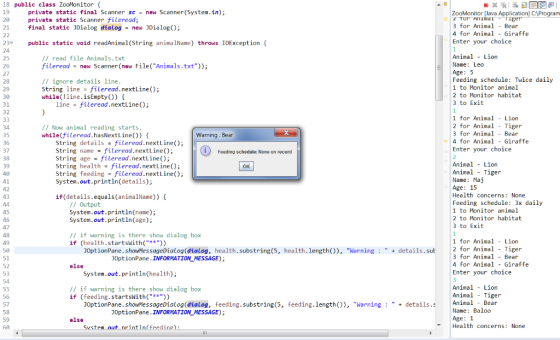
//import needed options
import java.io.File;
import java.io.FileNotFoundException;
import java.io.IOException;
import java.util.Scanner;
import java.util.logging.Level;
import java.util.logging.Logger;

import javax.swing.JDialog;
import javax.swing.JOptionPane;


/**
 *
 * @author jsacc
 */
public class ZooMonitor {
        private static final Scanner sc = new Scanner(System.in);
        private static Scanner fileread;
        final static JDialog dialog = new JDialog();

        public static void readAnimal(String animalName) throws IOException {

                // read file Animals.txt
                fileread = new Scanner(new File("Animals.txt"));

                // ignore details line.
                String line = fileread.nextLine();
                while(!line.isEmpty()) {
                        line = fileread.nextLine();
                }

                // Now animal reading starts.
                while(fileread.hasNextLine()) {
                        String details = fileread.nextLine();
                        String name = fileread.nextLine();
                        String age = fileread.nextLine();
                        String health = fileread.nextLine();
                        String feeding = fileread.nextLine();
                        System.out.println(details);

                        if(details.equals(animalName)) {
                                // Output
                                System.out.println(name);
                                System.out.println(age);

                                // if warning is there show dialog box
                                if (health.startsWith("**"))
                                        JOptionPane.showMessageDialog(dialog, health.substring(5, health.length()), "Warning : " + details.substring(9),
                                                        JOptionPane.INFORMATION_MESSAGE);
                                else
                                        System.out.println(health);

                                // if warning is there show dialog box
                                if (feeding.startsWith("**"))
                                        JOptionPane.showMessageDialog(dialog, feeding.substring(5, feeding.length()), "Warning : " + details.substring(9),
                                                        JOptionPane.INFORMATION_MESSAGE);
                                else
                                        System.out.println(feeding);

                                return;
                        }

                        // read the blank line.
                        if(fileread.hasNextLine()) {
                                fileread.nextLine();
                        }
                }

        }

        public static void readHabitat(String Name, String Type) throws FileNotFoundException {

                // read file Habitats.txt
                try {

                        fileread = new Scanner(new File("src/zoomonitor/Habitats.txt"));

                } catch (FileNotFoundException e) {
                }

                // read file until match found

                // read from file
                String details = fileread.nextLine();
                String temperature = fileread.nextLine();
                String food = fileread.nextLine();
                String cleanliness = fileread.nextLine();

                // if warning is there show dialog box
                if (temperature.contains("*****"))
                        JOptionPane.showMessageDialog(dialog, temperature.substring(5, temperature.length()), "Warning : " + Type,
                                        JOptionPane.INFORMATION_MESSAGE);
                else
                        System.out.println(temperature);
                // if warning is there show dialog box
                if (food.contains("*****"))
                        JOptionPane.showMessageDialog(dialog, food.substring(5, food.length()), "Warning : " + Type,
                                        JOptionPane.INFORMATION_MESSAGE);
                else
                        System.out.println(food);

                // if warning is there show dialog box
                if (cleanliness.contains("*****"))
                        JOptionPane.showMessageDialog(dialog, cleanliness.substring(5, cleanliness.length()), "Warning : " + Type,
                                        JOptionPane.INFORMATION_MESSAGE);
                else
                        System.out.println(cleanliness);
        }


        public static void main(String[] args) throws FileNotFoundException {

                dialog.setAlwaysOnTop(true);

                while (true) {
                        int choice = menu();
                        if (choice == 1) {

                                // Select animal
                                int animal = animalSelect();
                                String Name = "";
                                switch (animal) {
                                case 1:
                                        Name = "Animal - Lion";
                                        break;
                                case 2:
                                        Name = "Animal - Tiger";
                                        break;
                                case 3:
                                        Name = "Animal - Bear";
                                        break;
                                case 4:
                                        Name = "Animal - Giraffe";
                                        break;
                                }

                                try {
                                        // read from the file
                                        readAnimal(Name);
                                } catch (IOException ex) {
                                        //Logger.getLogger(ZooMonitor.class.getName()).log(Level.SEVERE, null, ex);
                                }
                        } else if (choice == 2) {
                                // select the habitat
                                int habitat = habitatSelect();
                                String Type = "";
                                String Name = "";
                                switch (habitat) {
                                case 1:
                                        Name = "Habitat - Penguin";
                                        break;
                                case 2:
                                        Name = "Habitat - Bird";
                                        break;
                                case 3:
                                        Name = "Habitat - Aquarium";
                                        break;
                                }

                                // read the file
                                readHabitat(Name, Type);
                        } else {
                                System.exit(0);
                        }
                }
        }

        private static int menu() {
                // Main menu
                System.out.println("1 to Monitor animal");
                System.out.println("2 to Monitor habitat");
                System.out.println("3 to Exit");
                int choice = Integer.parseInt(sc.nextLine());
                return choice;
        }

        private static int animalSelect() {
                // Show animal menu
                System.out.println("1 for Animal - Lion");
                System.out.println("2 for Animal - Tiger");
                System.out.println("3 for Animal - Bear");
                System.out.println("4 for Animal - Giraffe");
                System.out.println("Enter your choice");
                int choice = Integer.parseInt(sc.nextLine());
                return choice;
        }

        private static int habitatSelect() {

                // Show habitat menu
                System.out.println("1 for Habitat - Penguin");
                System.out.println("2 for Habitat - Bird");
                System.out.println("3 for Habitat - Aquarium");
                System.out.println("Enter your choice");
                int choice = Integer.parseInt(sc.nextLine());
                return choice;

        }

}
I corrected your code for Animal, similarly, you can do for
Habitat also.
=========
Animals.txt:
Details on lions
Details on tigers
Details on bears
Details on giraffes

Animal - Lion
Name: Leo
Age: 5
*****Health concerns: Cut on left front paw
Feeding schedule: Twice daily

Animal - Tiger
Name: Maj
Age: 15
Health concerns: None
Feeding schedule: 3x daily

Animal - Bear
Name: Baloo
Age: 1
Health concerns: None
*****Feeding schedule: None on record

Animal - Giraffe
Name: Spots
Age: 12
Health concerns: None
Feeding schedule: Grazing
Add Answer to:
Having trouble with a Zoo Monitoring system. Using NetBeans. i
have worked out most of the...
In JAVA, In two classes: As a zookeeper, it is important to know the activities of...
In JAVA, In two classes: As a zookeeper, it is important to know the activities of the animals in your care and to monitor their living habitats. Create a monitoring system that does all of the following: -Asks a user if they want to monitor an animal, monitor a habitat, or exit -Displays a list of animal/habitat options (based on the previous selection) as read from either the animals or habitats file and asks the user to enter one of...
As a zookeeper, it is important to know the activities of the animals in your care...
As a zookeeper, it is important to know the activities of the animals in your care and to monitor their living habitats. Crea te a monitoring system that does all of the following: Asks a user if they want to monitor an animal, monitor a habitat, or exit Displays a list of animal/habitat options (based on the previous selection) as read from either the animals or habitats file o Asks the user to enter one of the options ...
I keep getting the compilation error: pass the filename from command line arguement... Can you please...
I keep getting the compilation error: pass the filename from command line arguement... Can you please tell me what im doing wrong? here is the code: import java.io.File; import java.io.FileNotFoundException; import java.util.Scanner; public class ShipDemo { public static void main(String[] args) { String companyName; int num_ships, total_passengers=0, total_tonnage=0; Ship[] shipInventory; try { if(args.length == 1) { File file = new File(args[0]); Scanner fileScan = new Scanner(file); companyName = fileScan.nextLine(); num_ships = fileScan.nextInt(); shipInventory = new Ship[num_ships]; int n=0; String type,name;...
Problem: Use the code I have provided to start writing a program that accepts a large...
Problem: Use the code I have provided to start writing a program that accepts a large file as input (given to you) and takes all of these numbers and enters them into an array. Once all of the numbers are in your array your job is to sort them. You must use either the insertion or selection sort to accomplish this. Input: Each line of input will be one item to be added to your array. Output: Your output will...
When I invoke the forward or backward method the current_number isnt being changed. Not sure if...
When I invoke the forward or backward method the current_number isnt being changed. Not sure if its something in my switch case or my methods.. package project4; import java.awt.image.BufferedImage; import java.net.URL; import java.util.Scanner; import javax.imageio.ImageIO; import javax.swing.ImageIcon; import javax.swing.JFrame; import javax.swing.JLabel; import javax.swing.JPanel; public class PictureViewer { final static int MIN_NUMBER = 0; final static int MAX_NUMBER = 8; static int image_number = 1; public static int forward(int current_number) { if (current_number < MAX_NUMBER) { return current_number ++; }...
I need to add a method high school student, I couldn't connect high school student to...
I need to add a method high school student, I couldn't connect high school student to student please help!!! package chapter.pkg9; import java.util.ArrayList; import java.util.Scanner; public class Main { public static Student student; public static ArrayList<Student> students; public static HighSchoolStudent highStudent; public static void main(String[] args) { int choice; Scanner scanner = new Scanner(System.in); students = new ArrayList<>(); while (true) { displayMenu(); choice = scanner.nextInt(); switch (choice) { case 1: addCollegeStudent(); break; case 2: addHighSchoolStudent(); case 3: deleteStudent(); break; case...
I have spent so much time on this and I am having trouble getting all the...
I have spent so much time on this and I am having trouble getting all the methods to work together correctly to run the code right, and I am not sure what is wrong with it. /* You will recreate one or two versions of the logic game shown in the Algorithms movie and you will ask which one the user would like to play. Upon completion of the game, display who won and ask if they would like to...
For this code after case 0, I need it to ask the user if they would...
For this code after case 0, I need it to ask the user if they would like to see the menu again and some type of if statement or loop to ask them yes or no and if yes print again and if no end program. So it would ask if they would like to see the menu again then ask what their choice is. If yes print menu and if no end program. import java.util.InputMismatchException; import java.util.*; import java.io.*;...
Could you help me pleas , this is my code I want change it to insert...
Could you help me pleas , this is my code I want change it to insert student by user , and i have problem when i want append name it just one time i can't append or present more one. >>>>>>>>>>>>>>>>>>>. import java.util.Iterator; import java.util.Scanner; public class studentDLLTest { static int getChoice() { Scanner in = new Scanner(System.in); int choice; do { System.out.print("\nYour choice? : "); choice = in.nextInt(); } while (choice < 1 || choice > 9); return choice;...
Hello Can you help to fix the program. When running, it still show Exception in thread...
Hello Can you help to fix the program. When running, it still show Exception in thread "main" java.lang.RuntimeException: Uncompilable source code - cannot find symbol symbol: class Contact location: class ContactMap at ContactMap.main(ContactMap.java:40) C:\Users\user\AppData\Local\NetBeans\Cache\8.1\executor-snippets\run.xml:53: Java returned: 1 BUILD FAILED (total time: 1 second) ************************ import java.io.BufferedReader; import java.io.FileNotFoundException; import java.io.FileReader; import java.io.IOException; import java.util.HashMap; import java.util.Map; import java.util.Scanner; import java.util.TreeMap; public class ContactMap { public static void main(String args[]) throws IOException { Scanner input=new Scanner(System.in); //Create a TreeMap ,...
Most questions answered within 3 hours.
-
Where is the error in this code sequence?
String s1 = "Hello";
String s2 = "ello";...
asked 11 months ago -
Financial data for Joel de Paris, Inc., for last year
follow:
Joel de Paris, Inc.
Balance...
asked 11 months ago -
Consider this reaction:
Al2(SO4)3 (aq)+ BaCl3
(aq) Al2Cl6 (aq)- +
3BaSO4(s) . What is the...
asked 11 months ago -
Suppose that Savneet is considering increasing her
recent random sample from 20 car rentals to 40...
asked 11 months ago -
Trucks arrive at an unloading terminal at an average rate of 120
per hour.
Trucks arrive...
asked 11 months ago -
Why are methanol and ethanol completely soluble in water while
octanol is not very little soluble....
asked 11 months ago -
A facilities manager at a university reads in a research report
that the mean amount of...
asked 11 months ago -
When the CuSO4 is rehydrated by adding water to the anhydrous
compound, is this an endothermic...
asked 11 months ago -
A ray of sunlight is passing from diamond into crown glass; the
angle of incidence is...
asked 11 months ago -
A block of mass 0.249 kg is placed on top of a light, vertical
spring of...
asked 11 months ago -
how do the kidneys compensate in the presences of acidosis
a) trigger hyperventilate
b) reserve acid...
asked 11 months ago -
Question 501 pts
The rental rate of capital to the firm increases. Which of the
following...
asked 11 months ago