In PYTHON 3- Implement a subclass (described below) of "Word Guess", a variant of the game...
In PYTHON 3- Implement a subclass (described below) of "Word Guess", a variant of the game Hangman. In this game, a word is first randomly chosen. Initially, the letters in the word are displayed represented by "_”.
For example, if the random word is "yellow”, the game initially displays "_ _ _ _ _ _”.
Then, each turn, the player guesses a single letter that has yet to be guessed. If the letter is in the secret word, then the corresponding "_” are replaced with the letter. If the letter appears more than once in the secret word, then "_” is replaced with the letter for each instance. For example, if the player guesses the letter "l”, then the game's progress will be updated to "_ _ l l _ _”.
TASK:
You will implement the WordGuess class in WordGuess.py. This class consists of the methods required to play a single Word Guess game. In the version of Word Guess you are creating, the allotted number of guesses is not constant. The allotted number of guesses is a function of the "edit distance” between the randomly chosen word and the alphabetically sorted random chosen word. The "edit distance” between two strings is the minimum number of insertions and deletions required to convert the first string into the second string. For example, the edit distance between "brain” and "crane” is 4:
-
Delete b at position 0
-
Insert c at position 0
-
Delete i at position 3
-
Insert e at position 4
Suppose the randomly chosen word is "brain”. When sorted, "brain” becomes "abinr”. The edit distance between "brain” and "abinr” is 4: abin
-
Insert a at position 0
-
Delete r at position 2
-
Delete a at position 2
-
Insert r at position 4
Once the edit distance is calculated, it is used to calculate the number of allotted guesses. The number of allotted guesses is bounded by the range [5,15] (inclusive). We set the number of allotted guesses to be 2*(edit distance). If this value is less than 5, then the number of allotted guesses is set to 5. If this value is greater than 15, then the number of allotted guesses is set to 15. Using this information, write the following methods:
-
__init__(): Set the necessary attributes
-
chooseSecretWord(): Randomly choose a secret word from the list of words read in from the input file
-
editDistance(s1, s2): Returns the edit distance between s1 and s2, s1 being the string representations of the secret word and s2 the sorted secret word. Remember that the edit distance between s1 and s2 is the minimum number of insertions and deletions needed to convert s1 into s2. You must compute the edit distance using recursion.
-
getGuess(): Asks the user to guess a letter they have yet to guess in the secret word. The game keeps querying the player for a letter until they enter a letter that hasn't been guessed yet. A class attribute will be needed to keep track of which letter have been guessed. The user may also enter the '*' character if they would like a hint that gives information about the secret word. If the user enters '*', they lose one of their allotted guesses.
-
play(): Plays out a single full game of Word Guess. Initially, a secret word is chosen at random. Then, the edit distance is computed between the secret word and the sorted secret word. This edit distance is used to compute the number of allotted guesses. Then, while the player hasn't guessed the word and still has guesses available, the game progress is displayed, and the game queries the player for a guess. If the player correctly guesses a letter in the secret word, the number of allotted guesses remains the same. If the player enters a guess not in the secret word, the number of allotted guesses decrements by 1. If the user guesses a letter they have already guessed, they do not lose a guess. The game ends once the player has guessed all the letters in the secret word or has run out of guesses.
WordGuess.py TEMPLATE:
import random
from SecretWord import SecretWord

class WordGuess:

    def __init__(self, wordDic):
        #TODO

    def play(self):
        """ Plays out a single full game of Word Guess """
        #TODO

    def chooseSecretWord(self):
        """ Chooses the secret word that will be guessed """
        #TODO

    def editDistance(self, s1, s2):
        """ Recursively returns the total number of insertions and deletions required to convert S1 into S2 """
        #TODO

    def getGuess(self):
        """ Queries the user to guess a character in the secret word """
        #TODO
NOTE: SecretWord methods and their functionality are listed below. You do not have to implement these. The SecretWord class represents the randomly chosen word that is being guessed in the Word Guess game.
setWord(self, word):
    """ Adds the characters in 'word' to self.linkedList in the given order """

sort(self):
   """ Sorts the characters stored in self.linkedList in alphabetical order """

isSolved(self):
  """ Returns whether SecretWord has been solved (all letters in the word have been guessed by the user) """

update(self, guess):
    """ Updates the nodes in self.linkedList that match 'guess' """

printProgress(self):
    """ Prints the current game progress
    Ex: y _ l l _ w """

__str__(self):
""" Converts the characters in self.linkedList into a string """Homework Answers
class Node:
def __init__(self, initData, initNext):
""" Constructs a new node and initializes it to contain
the given object (initData) and link to the given next node.
"""
self.data = initData
self.next = initNext
self.display = False
def getData(self):
""" Returns the element """
return self.data
def getNext(self):
""" Returns the next node """
return self.next
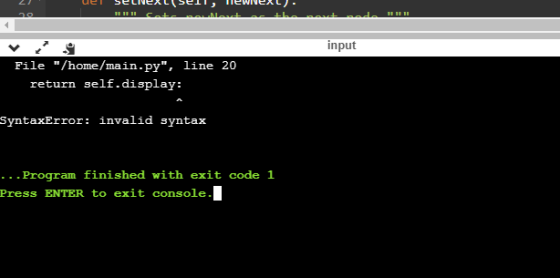
def getDisplay(self):
return self.display:
def setData(self, newData):
""" Sets newData as the element """
self.data = newData
def setNext(self, newNext):
""" Sets newNext as the next node """
self.next = newNext
def setDisplay(self, newDisplay):
self.display = newDisplay
Add Answer to:
In PYTHON 3- Implement
a subclass (described below) of "Word Guess", a variant of the game...
In PYTHON 3- Implement a subclass (described below) of "Word Guess", a variant of the game...
In PYTHON 3- Implement a subclass (described below) of "Word Guess", a variant of the game Hangman. In this game, a word is first randomly chosen. Initially, the letters in the word are displayed represented by "_”. For example, if the random word is "yellow”, the game initially displays "_ _ _ _ _ _”. Then, each turn, the player guesses a single letter that has yet to be guessed. If the letter is in the secret word, then the...
Do in Python please provide screenshots aswell. Here are the requirements for your game: 1. The...
 Do in Python please provide screenshots aswell.
Here are the requirements for your game: 1. The computer must select a word at random from the list of avail- able words that was provided in words.txt. The functions for loading the word list and selecting a random word have already been provided for you in ps3 hangman.py. 2. The game must be interactive; the flow of the game should go as follows: • At the start of the game, let the...
Do in Python please provide screenshots aswell.
Here are the requirements for your game: 1. The computer must select a word at random from the list of avail- able words that was provided in words.txt. The functions for loading the word list and selecting a random word have already been provided for you in ps3 hangman.py. 2. The game must be interactive; the flow of the game should go as follows: • At the start of the game, let the...
Create a script that presents a word guessing game. Allow users to guess the word letter-by-letter by entering a character in a form. Start by assigning a secret word to a variable named $secret. Afte...
Create a script that presents a word guessing game. Allow users to guess the word letter-by-letter by entering a character in a form. Start by assigning a secret word to a variable named $secret. After each guess, print the word using asterisks for each remaining letter but fill in the letters that the user guessed correctly. You need to store the user’s guess in a hidden text field name $hidden_guess. For example, if the word you want users to guess...
//SCROLL TO BOTTOM FOR WAYS TO GET A MEETING AND AN EXCEEDING var secretWord = "secretword"...
//SCROLL TO BOTTOM FOR WAYS TO GET A MEETING AND AN EXCEEDING var secretWord = "secretword" function setup() { createCanvas(400, 400); background(220); } function draw() { rect(100,150,100,70) text("Click to \nstart hangman",110,175) rect(225,150,100,70) text("Click to \nguess letter",235,175) } function mousePressed(){ if(mouseOnRect(100,150,100,70)){ //begin hangman game //create variable to hold secret word as an array split by letter //create variable to hold display word as an array of * or _ that takes the place of each letter //get the...
Create a script that presents a word-guessing game. Allow users to guess the word one letter at a...
Create a script that presents a word-guessing game. Allow users to guess the word one letter at a time by entering a character in a form. Start by assigning a secret word to a variable. After each guess, print the word using asterisks for each remaining letter, but fill in the letters that the user guessed correctly. Store the user’s guess in a form field. For example, if the word you want users to guess is “suspicious” and the user...
Need help with this C program? I cannot get it to compile. I have to use...
Need help with this C program? I cannot get it to compile. I have to use Microsoft Studio compiler for my course. It's a word game style program and I can't figure out where the issue is. \* Program *\ // Michael Paul Laessig, 07 / 17 / 2019. /*COP2220 Second Large Program (LargeProg2.c).*/ #define _CRT_SECURE_NO_DEPRECATE //Include the following libraries in the preprocessor directives: stdio.h, string.h, ctype.h #include <stdio.h> /*printf, scanf definitions*/ #include <string.h> /*stings definitions*/ #include <ctype.h> /*toupper, tolower...
Task 2: SecretWord class: Download and save a copy of LinkedLists.py (found at the bottom of...
 Task 2: SecretWord class:
Download and save a copy of LinkedLists.py (found at the bottom
of this assignment page on eClass). In this file, you have been
given the complete code for a LinkedList class. Familiarize
yourself with this class, noticing that it uses the Node class from
Task 1 and is almost identical to the SLinkedList class given in
the lectures. However, it also has a complete insert(pos, item)
method (which should be similar to the insert method you...
Task 2: SecretWord class:
Download and save a copy of LinkedLists.py (found at the bottom
of this assignment page on eClass). In this file, you have been
given the complete code for a LinkedList class. Familiarize
yourself with this class, noticing that it uses the Node class from
Task 1 and is almost identical to the SLinkedList class given in
the lectures. However, it also has a complete insert(pos, item)
method (which should be similar to the insert method you...
Hangman is a game for two or more players. One player thinks of a word, phrase...
Hangman is a game for two or more players. One player thinks of a word, phrase or sentence and the other tries to guess it by suggesting letters or numbers, within a certain number of guesses. You have to implement this game for Single Player, Where Computer (Your Program) will display a word with all characters hidden, which the player needed to be guessed. You have to maintain a dictionary of Words. One word will be selected by your program....
Overview In this exercise you are going to recreate the classic game of hangman. Your program...
Overview In this exercise you are going to recreate the classic game of hangman. Your program will randomly pick from a pool of words for the user who will guess letters in order to figure out the word. The user will have a limited number of wrong guesses to complete the puzzle or lose the round. Though if the user answers before running out of wrong answers, they win. Requirements Rules The program will use 10 to 15 words as...
In Java You’re going to make a Guess the Number game. The computer will "think" of...
In Java You’re going to make a Guess the Number game. The computer will "think" of a secret number from 1 to 20 and ask the user to guess it. After each guess, the computer will tell the user whether the number is too high or too low. The user wins if they can guess the number within six tries. The program should look like this in the console, player input is in bold: Hello! What is your name? Abaddon...
 Do in Python please provide screenshots aswell.
Here are the requirements for your game: 1. The computer must select a word at random from the list of avail- able words that was provided in words.txt. The functions for loading the word list and selecting a random word have already been provided for you in ps3 hangman.py. 2. The game must be interactive; the flow of the game should go as follows: • At the start of the game, let the...
Do in Python please provide screenshots aswell.
Here are the requirements for your game: 1. The computer must select a word at random from the list of avail- able words that was provided in words.txt. The functions for loading the word list and selecting a random word have already been provided for you in ps3 hangman.py. 2. The game must be interactive; the flow of the game should go as follows: • At the start of the game, let the...
 Task 2: SecretWord class:
Download and save a copy of LinkedLists.py (found at the bottom
of this assignment page on eClass). In this file, you have been
given the complete code for a LinkedList class. Familiarize
yourself with this class, noticing that it uses the Node class from
Task 1 and is almost identical to the SLinkedList class given in
the lectures. However, it also has a complete insert(pos, item)
method (which should be similar to the insert method you...
Task 2: SecretWord class:
Download and save a copy of LinkedLists.py (found at the bottom
of this assignment page on eClass). In this file, you have been
given the complete code for a LinkedList class. Familiarize
yourself with this class, noticing that it uses the Node class from
Task 1 and is almost identical to the SLinkedList class given in
the lectures. However, it also has a complete insert(pos, item)
method (which should be similar to the insert method you...
Most questions answered within 3 hours.
-
Where is the error in this code sequence?
String s1 = "Hello";
String s2 = "ello";...
asked 11 months ago -
Financial data for Joel de Paris, Inc., for last year
follow:
Joel de Paris, Inc.
Balance...
asked 11 months ago -
Consider this reaction:
Al2(SO4)3 (aq)+ BaCl3
(aq) Al2Cl6 (aq)- +
3BaSO4(s) . What is the...
asked 11 months ago -
Suppose that Savneet is considering increasing her
recent random sample from 20 car rentals to 40...
asked 11 months ago -
Trucks arrive at an unloading terminal at an average rate of 120
per hour.
Trucks arrive...
asked 11 months ago -
Why are methanol and ethanol completely soluble in water while
octanol is not very little soluble....
asked 11 months ago -
A facilities manager at a university reads in a research report
that the mean amount of...
asked 11 months ago -
When the CuSO4 is rehydrated by adding water to the anhydrous
compound, is this an endothermic...
asked 11 months ago -
A ray of sunlight is passing from diamond into crown glass; the
angle of incidence is...
asked 11 months ago -
A block of mass 0.249 kg is placed on top of a light, vertical
spring of...
asked 11 months ago -
how do the kidneys compensate in the presences of acidosis
a) trigger hyperventilate
b) reserve acid...
asked 11 months ago -
Question 501 pts
The rental rate of capital to the firm increases. Which of the
following...
asked 11 months ago