WRITE IN PYTHON: 2. Guess the Number The Goal: Similar to the first project, this project...
WRITE IN PYTHON:
2. Guess the Number
The Goal: Similar to the first project, this project also uses the random module in Python. The program will first randomly generate a number unknown to the user. The user needs to guess what that number is. (In other words, the user needs to be able to input information.) If the user’s guess is wrong, the program should return some sort of indication as to how wrong (e.g. The number is too high or too low). If the user guesses correctly, a positive indication should appear. You’ll need functions to check if the user input is an actual number, to see the difference between the inputted number and the randomly generated numbers, and to then compare the numbers.
Concepts to keep in mind:
- Random function
- Variables
- Integers
- Input/Output
- While loops
- If/Else statements
Homework Answers
`Hey,
Note: Brother in case of any queries, just comment in box I would be very happy to assist all your queries
Note: Brother sometimes while uploading on HomeworkLib the indentations change. So, I request you to verify it with screenshot once. This is the link where I have saved the code too
https://onlinegdb.com/B1THWZ7cV
#Imported Random module
#To generate random numbers
import random
while(True): #While loop for user to play the game until he wants to exit.
RandomNumber = random.randint(1,11)#To generate the random number in between 1 to 10.
UsersGuess = int(input("Please guess the number in between 1 to 10:\t"))#Taking user guess
if(RandomNumber == UsersGuess):#Comparing guess and randomly generated number
print("\nCongrats , Your guess is Correct")#success case
elif(RandomNumber > UsersGuess):
print("\nYour guess is too low")#Guess is low
else:
print("\nYour guess is too high")#Guess is high
playagain = int(input("\n1. Please enter 1 to play again\n2. Enter 2 to Exit\n"))
#Giving option to user that he wants to play the #game still or he wants to exit the game.
if(playagain == 1):
continue
else:
break

Kindly revert for any queries
Thanks.
Add Answer to:
WRITE IN PYTHON:
2. Guess the Number
The Goal: Similar to the first project, this project...
Create a HTML with Java Script such that you input a number between 222 and 333....
Create a HTML with Java Script such that you input a number between 222 and 333. Then the user needs to guess the number. If the user’s guess is higher than the number, the program should display “Too high, try again.” If the user’s guess is lower than the number, the program should display “Too low, try again.” If the difference is less than 10, it should also mention "too close". When the user guesses the number, the program should...
Write a program to play "guess my number". The program should generate a random number between...
Write a program to play "guess my number". The program should generate a random number between 0 and 100 and then prompt the user to guess the number. If the user guesses incorrectly the program gives the user a hint using the words 'higher' or 'lower' (as shown in the sample output). It prints a message 'Yes - it is' if the guessed number is same as the random number generated. ANSWER IN C LANGUAGE. ====================== Sample Input / Output:...
help me do flowchart please Project Design: Project Scop To create a "guess the number" game...
 help me do flowchart please
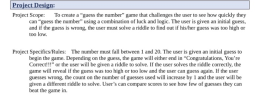
Project Design: Project Scop To create a "guess the number" game that challenges the user to see how quickly they can "guess the number" using a combination of luck and logic. The user is given an initial guess, and if the guess is wrong, the user must solve a riddle to find out if his/her guess was too high or too low. Project Specifics/Rules: The number must fall between 1 and 20. The user is...
help me do flowchart please
Project Design: Project Scop To create a "guess the number" game that challenges the user to see how quickly they can "guess the number" using a combination of luck and logic. The user is given an initial guess, and if the guess is wrong, the user must solve a riddle to find out if his/her guess was too high or too low. Project Specifics/Rules: The number must fall between 1 and 20. The user is...
(c++) Write a program that generates a random number between 1 and 100 and asks the...
(c++) Write a program that generates a random number between 1 and 100 and asks the user to guess what the number is. If the user’s guess is higher than the random number, the program should display “Too high, try again.” If the user’s guess is lower than the random number, the program should display “Too low, try again.” The program should use a loop that repeats until the user correctly guesses the random number. Be sure that your program...
Can you add code comments where required throughout this Python Program, Guess My Number Program, and...
Can you add code comments where required throughout this Python Program, Guess My Number Program, and describe this program as if you were presenting it to the class. What it does and everything step by step. import random def menu(): #function for getting the user input on what he wants to do print("\n\n1. You guess the number\n2. You type a number and see if the computer can guess it\n3. Exit") while True: #using try-except for the choice will handle the...
write a python program to guess a number between 1 to 9. The user is prompted...
write a python program to guess a number between 1 to 9. The user is prompted to enter a guess. when the user's guess in not correct, ask them for another guess. when the user guesses the correct number, print "correct" and exit the program #use these two lines to begin the program: from random import randint correctNum=randit(0, 9) #now write a while loop to play the game
Solve Question using While loops-MATLAB Write a program that generates a random number and asks the...
Solve Question using While loops-MATLAB Write a program that generates a random number and asks the user to guess what the number is. If the user's guess is higher than the random number, the program should display "Too high, try again." If the user's guess is lower than the random number, the program should display "Too low, try again." The program should use a loop that repeats until the user correctly guesses the random number.
newd in C++ Exercise #3 Guess the Number Write a "Guess the Number" game that randomly...
 newd in C++
Exercise #3 Guess the Number Write a "Guess the Number" game that randomly assigns a secret number [1,20] for the user to guess. I recommend hard coding your secret number at first to make testing your code easier. You can write this a number of ways, but try to stick to the instructions outlined here. Write three methods to make your game work. The first method should generate a random number and return the value to main...
newd in C++
Exercise #3 Guess the Number Write a "Guess the Number" game that randomly assigns a secret number [1,20] for the user to guess. I recommend hard coding your secret number at first to make testing your code easier. You can write this a number of ways, but try to stick to the instructions outlined here. Write three methods to make your game work. The first method should generate a random number and return the value to main...
python code for guessing game users enter the number the computer will guess 8:38 PM 100...
 python code for guessing game users enter the number the computer
will guess
8:38 PM 100 nstructure.com 1. Number guessing game : (5 points) 1) Requirements: Your program will ask the user to enter a number between 1 and 1000. Then it will try to guess the correct number with the guaranteed minimal average number of guesses. Which search algorithm should you use? 2) Expected Output: Enter a number between 1 and 1000? 784 Computer guesses: 500 Type 'l' if...
python code for guessing game users enter the number the computer
will guess
8:38 PM 100 nstructure.com 1. Number guessing game : (5 points) 1) Requirements: Your program will ask the user to enter a number between 1 and 1000. Then it will try to guess the correct number with the guaranteed minimal average number of guesses. Which search algorithm should you use? 2) Expected Output: Enter a number between 1 and 1000? 784 Computer guesses: 500 Type 'l' if...
Guess My Number Create a mul5-func5on version of the Guess My Number game. Your game should...
Guess My Number Create a mul5-func5on version of the Guess My Number game. Your game should generate a random number between 1 and 99, ask the user for a guess, and respond to each guess with correct, too high, or too low as needed. Once the user guesses the number correctly, report how many guesses it took and ask if they want to play again. You need to have at least the following three func5ons: displayInstruc5ons — no inputs, displays...
 help me do flowchart please
Project Design: Project Scop To create a "guess the number" game that challenges the user to see how quickly they can "guess the number" using a combination of luck and logic. The user is given an initial guess, and if the guess is wrong, the user must solve a riddle to find out if his/her guess was too high or too low. Project Specifics/Rules: The number must fall between 1 and 20. The user is...
help me do flowchart please
Project Design: Project Scop To create a "guess the number" game that challenges the user to see how quickly they can "guess the number" using a combination of luck and logic. The user is given an initial guess, and if the guess is wrong, the user must solve a riddle to find out if his/her guess was too high or too low. Project Specifics/Rules: The number must fall between 1 and 20. The user is...
 newd in C++
Exercise #3 Guess the Number Write a "Guess the Number" game that randomly assigns a secret number [1,20] for the user to guess. I recommend hard coding your secret number at first to make testing your code easier. You can write this a number of ways, but try to stick to the instructions outlined here. Write three methods to make your game work. The first method should generate a random number and return the value to main...
newd in C++
Exercise #3 Guess the Number Write a "Guess the Number" game that randomly assigns a secret number [1,20] for the user to guess. I recommend hard coding your secret number at first to make testing your code easier. You can write this a number of ways, but try to stick to the instructions outlined here. Write three methods to make your game work. The first method should generate a random number and return the value to main...
 python code for guessing game users enter the number the computer
will guess
8:38 PM 100 nstructure.com 1. Number guessing game : (5 points) 1) Requirements: Your program will ask the user to enter a number between 1 and 1000. Then it will try to guess the correct number with the guaranteed minimal average number of guesses. Which search algorithm should you use? 2) Expected Output: Enter a number between 1 and 1000? 784 Computer guesses: 500 Type 'l' if...
python code for guessing game users enter the number the computer
will guess
8:38 PM 100 nstructure.com 1. Number guessing game : (5 points) 1) Requirements: Your program will ask the user to enter a number between 1 and 1000. Then it will try to guess the correct number with the guaranteed minimal average number of guesses. Which search algorithm should you use? 2) Expected Output: Enter a number between 1 and 1000? 784 Computer guesses: 500 Type 'l' if...
Most questions answered within 3 hours.
-
Where is the error in this code sequence?
String s1 = "Hello";
String s2 = "ello";...
asked 11 months ago -
Financial data for Joel de Paris, Inc., for last year
follow:
Joel de Paris, Inc.
Balance...
asked 11 months ago -
Consider this reaction:
Al2(SO4)3 (aq)+ BaCl3
(aq) Al2Cl6 (aq)- +
3BaSO4(s) . What is the...
asked 11 months ago -
Suppose that Savneet is considering increasing her
recent random sample from 20 car rentals to 40...
asked 11 months ago -
Trucks arrive at an unloading terminal at an average rate of 120
per hour.
Trucks arrive...
asked 11 months ago -
Why are methanol and ethanol completely soluble in water while
octanol is not very little soluble....
asked 11 months ago -
A facilities manager at a university reads in a research report
that the mean amount of...
asked 11 months ago -
When the CuSO4 is rehydrated by adding water to the anhydrous
compound, is this an endothermic...
asked 11 months ago -
A ray of sunlight is passing from diamond into crown glass; the
angle of incidence is...
asked 11 months ago -
A block of mass 0.249 kg is placed on top of a light, vertical
spring of...
asked 11 months ago -
how do the kidneys compensate in the presences of acidosis
a) trigger hyperventilate
b) reserve acid...
asked 11 months ago -
Question 501 pts
The rental rate of capital to the firm increases. Which of the
following...
asked 11 months ago