using pygame: 1. - Implement a simple application in which an image of your choice chases...
using pygame: 1. - Implement a simple application in which an image of your choice chases after the mouse cursor. Initially the image starts moving in the direction (0,0). During each frame, the object looks at the current location of the cursor using pygame.mouse.get_pos() and updates it's direction to be direction = .9*direction + v where v is a vector of length 10 that points from the center of your image to the mouse position.
Homework Answers
Note: The code is for Python 3. Please indent the code as shown in the screenshots. Place all the files in the same folder to avoid locations issues.
Program screenshots:
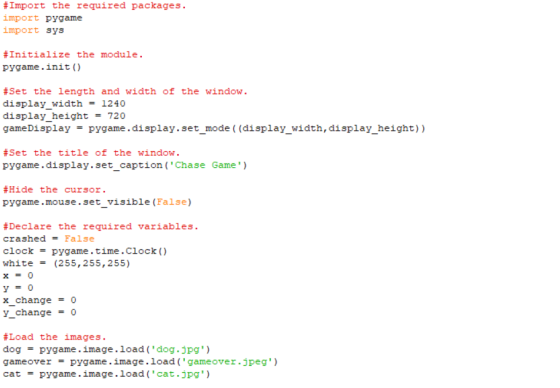
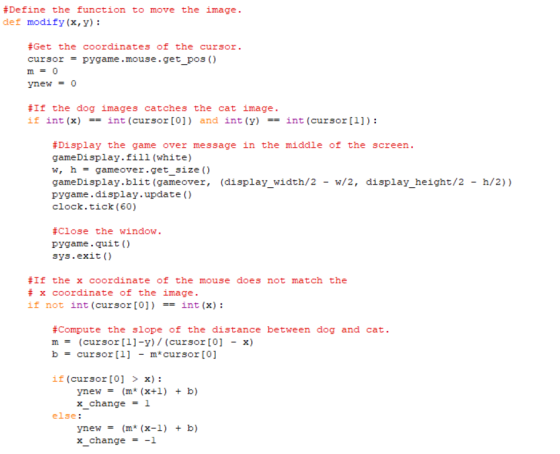
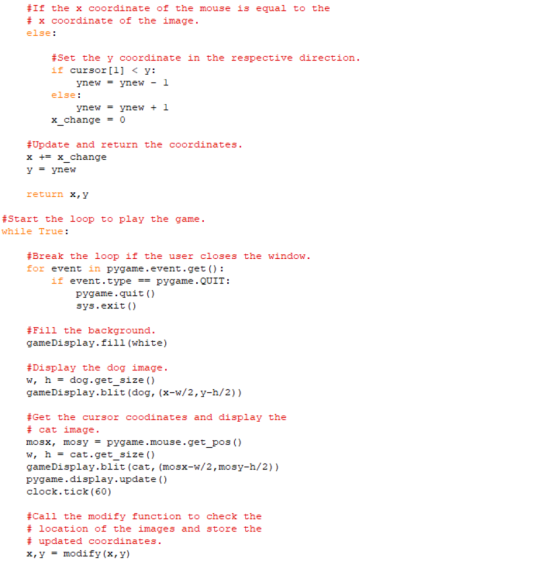
Sample output:
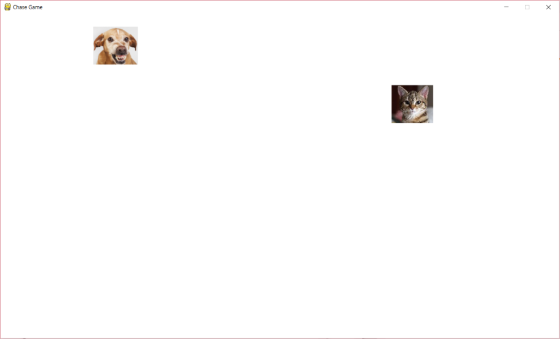
Code to copy:
#Import the required packages.
import pygame
import sys
#Initialize the module.
pygame.init()
#Set the length and width of the window.
display_width = 1240
display_height = 720
gameDisplay = pygame.display.set_mode((display_width,display_height))
#Set the title of the window.
pygame.display.set_caption('Chase Game')
#Hide the cursor.
pygame.mouse.set_visible(False)
#Declare the required variables.
crashed = False
clock = pygame.time.Clock()
white = (255,255,255)
x = 0
y = 0
x_change = 0
y_change = 0
#Load the images.
dog = pygame.image.load('dog.jpg')
gameover = pygame.image.load('gameover.jpeg')
cat = pygame.image.load('cat.jpg')
#Define the function to move the image.
def modify(x,y):
#Get the coordinates of the cursor.
cursor = pygame.mouse.get_pos()
m = 0
ynew = 0
#If the dog images catches the cat image.
if int(x) == int(cursor[0]) and int(y) == int(cursor[1]):
#Display the game over message in the middle of the screen.
gameDisplay.fill(white)
w, h = gameover.get_size()
gameDisplay.blit(gameover, (display_width/2 - w/2, display_height/2 - h/2))
pygame.display.update()
clock.tick(60)
#Close the window.
pygame.quit()
sys.exit()
#If the x coordinate of the mouse does not match the
# x coordinate of the image.
if not int(cursor[0]) == int(x):
#Compute the slope of the distance between dog and cat.
m = (cursor[1]-y)/(cursor[0] - x)
b = cursor[1] - m*cursor[0]
if(cursor[0] > x):
ynew = (m*(x+1) + b)
x_change = 1
else:
ynew = (m*(x-1) + b)
x_change = -1
#If the x coordinate of the mouse is equal to the
# x coordinate of the image.
else:
#Set the y coordinate in the respective direction.
if cursor[1] < y:
ynew = ynew - 1
else:
ynew = ynew + 1
x_change = 0
#Update and return the coordinates.
x += x_change
y = ynew
return x,y
#Start the loop to play the game.
while True:
#Break the loop if the user closes the window.
for event in pygame.event.get():
if event.type == pygame.QUIT:
pygame.quit()
sys.exit()
#Fill the background.
gameDisplay.fill(white)
#Display the dog image.
w, h = dog.get_size()
gameDisplay.blit(dog,(x-w/2,y-h/2))
#Get the cursor coodinates and display the
# cat image.
mosx, mosy = pygame.mouse.get_pos()
w, h = cat.get_size()
gameDisplay.blit(cat,(mosx-w/2,mosy-h/2))
pygame.display.update()
clock.tick(60)
#Call the modify function to check the
# location of the images and store the
# updated coordinates.
x,y = modify(x,y)
dog.jpg:

gameover.jpeg:

cat.jpg:

Add Answer to:
using pygame: 1. - Implement a simple application in which an
image of your choice chases...
This task is a program framework that you should complete. The program should allow the user...
 This task is a program framework that you should complete. The
program should allow the user to move a circular figure with the
mouse over a drawing area. The current position of the figure is
displayed continuously:
Given is the main program:
import javafx.scene.Scene;
import javafx.application.Application;
import javafx.beans.value.*;
import javafx.scene.*;
import javafx.scene.paint.Color;
import javafx.scene.text.Text;
import javafx.stage.Stage;
public class Main extends Application {
private DraggableCircle dc;
private Text text;
private void updateText() {
text.setText("("+dc.getCenterX()+", "+dc.getCenterY()+")");
}
@Override
public void start(final Stage...
This task is a program framework that you should complete. The
program should allow the user to move a circular figure with the
mouse over a drawing area. The current position of the figure is
displayed continuously:
Given is the main program:
import javafx.scene.Scene;
import javafx.application.Application;
import javafx.beans.value.*;
import javafx.scene.*;
import javafx.scene.paint.Color;
import javafx.scene.text.Text;
import javafx.stage.Stage;
public class Main extends Application {
private DraggableCircle dc;
private Text text;
private void updateText() {
text.setText("("+dc.getCenterX()+", "+dc.getCenterY()+")");
}
@Override
public void start(final Stage...
1. A firework (small rocket) whose shell has a mass of m 12kg was initially on the ground before being launched to a height of 100m above the ground at which point its horizontal displacement from it...
 1. A firework (small rocket) whose shell has a mass of m 12kg was initially on the ground before being launched to a height of 100m above the ground at which point its horizontal displacement from its starting position is 17.6m. At this location its speed is 68m/s and it's at an angle relative to (and above) the horizontal of 80 as depicted in the diagram below. Once it reaches this height it goes off and its shell splits into...
For this assignment, your job is to create a simple game called Opoly. The objectives of...
 For this assignment, your job is to create a simple game called
Opoly.
The objectives of this assignment are to:
Break down a problem into smaller, easier problems.
Write Java methods that call upon other methods to accomplish
tasks.
Use a seed value to generate random a sequence of random
numbers.
Learn the coding practice of writing methods that perform a
specific task.
Opoly works this way: The board is a circular track of variable
length (the user determines the...
For this assignment, your job is to create a simple game called
Opoly.
The objectives of this assignment are to:
Break down a problem into smaller, easier problems.
Write Java methods that call upon other methods to accomplish
tasks.
Use a seed value to generate random a sequence of random
numbers.
Learn the coding practice of writing methods that perform a
specific task.
Opoly works this way: The board is a circular track of variable
length (the user determines the...
In this assignment, you design a simple chat room in the form of a network application which uses the services of a TCP/IP computer network. Your design should have a clientserver architecture in whic...
In this assignment, you design a simple chat room in the form of a network application which uses the services of a TCP/IP computer network. Your design should have a clientserver architecture in which the server is multi-threaded. Then, you need to implement the server-side of the chat-room application in Java (implementing the client-side is optional). The server maintains a list (an ArrayList will work well) of all the active connections. It will listen on a port for a new...
TACTICS BOX 1.5 Drawing a pictorial representation Draw a motion diagram. The motion diagram develops your...
 TACTICS BOX 1.5 Drawing a pictorial representation
Draw a motion diagram. The motion diagram
develops your intuition for the motion and, especially important,
determines whether the signs of v? and
a? are positive or negative.
Establish a coordinate system. Select your axes
and origin to match the motion. For one-dimensional motion, you
want either the x axis or the y axis parallel to
the motion.
Sketch the situation. Not just any sketch. Show
the object at the beginning of the motion, at...
TACTICS BOX 1.5 Drawing a pictorial representation
Draw a motion diagram. The motion diagram
develops your intuition for the motion and, especially important,
determines whether the signs of v? and
a? are positive or negative.
Establish a coordinate system. Select your axes
and origin to match the motion. For one-dimensional motion, you
want either the x axis or the y axis parallel to
the motion.
Sketch the situation. Not just any sketch. Show
the object at the beginning of the motion, at...
Problem1 In the concentric spherical conductors system shown in Figure 1, the inner conductor has positive charge-q and radius a. The outer conductor has radius b a) Using Gauss' Law determin...
 Problem1 In the concentric spherical conductors system shown in Figure 1, the inner conductor has positive charge-q and radius a. The outer conductor has radius b a) Using Gauss' Law determine the electric field vector E(r) in the region between the conductors (acrcb) and the potential difference Vab between them. b) Calculate E(r) and Vab if the two conductors have a 30 mm, b-40 mm, q 10uc, r-35 mm ε,-8.85x10⁻¹²C3(N.m2. For the circuit shown in Figure 2 find: a) the...
1. Multiply the following and round your answer to the appropriate number of significant figures. ...
1. Multiply the following and round your answer to the appropriate number of significant figures. (3875.20) (0.102) 2. Add the following and round your answer to the appropriate number of significant figures. (3005.20) + (7.1225) 3. A ball is thrown straight up, reaches a maximum height, then falls to its initial height. As the ball is going up: a. its velocity points upward and its acceleration points downward. b. its velocity points downward and its acceleration...
C++ for this exercise, you will make a simple Dungeon Crawl game. For an enhanced version,...
C++ for this exercise, you will make a simple Dungeon Crawl game. For an enhanced version, you can add monsters that randomly move around. Program Requirements While the program is an introduction to two-dimensional arrays, it is also a review of functions and input validation. check: Does the program compile and properly run? does all functions have prototypes? Are all functions commented? Is the program itself commented? Are constants used where appropriate? Are the required functions implemented? Is the dungeon...
You shall develop a grammar and implement a parser which recognizes valid statements as described below in the assignment specification. You may develop your code using C, C++. The test file include...
 You shall develop a grammar and implement a parser which
recognizes valid statements as described below in the assignment
specification. You may develop your code using C, C++.
The test file include these expressions below. The first
six should pass and the rest should fail:
first = one1 + two2 - three3 / four4 ;
second = one1 * (two2 * three3) ;
second = one1 * (two2 * three3) ;
third = ONE + twenty - three3 ;
third...
You shall develop a grammar and implement a parser which
recognizes valid statements as described below in the assignment
specification. You may develop your code using C, C++.
The test file include these expressions below. The first
six should pass and the rest should fail:
first = one1 + two2 - three3 / four4 ;
second = one1 * (two2 * three3) ;
second = one1 * (two2 * three3) ;
third = ONE + twenty - three3 ;
third...
(Dynamics Examination) ist 1, S: 4 If a partide moves along a curve with a constant...
 (Dynamics Examination) ist 1, S: 4 If a partide moves along a curve with a constant speed, then its tangential component of acceleration is A: zero. B: positive. C. constant D: negative. 2. 单选题的重点 The position, s. is given as a function of angular positione. as s = 10 sin(28). The velocity, v, is A: 20 sin(2) B: 20 cos(20) C: 20 w cos(20) D: 20 w sin(2) 3. S10 The 15-kg disk is pinned at and is initially at...
 This task is a program framework that you should complete. The
program should allow the user to move a circular figure with the
mouse over a drawing area. The current position of the figure is
displayed continuously:
Given is the main program:
import javafx.scene.Scene;
import javafx.application.Application;
import javafx.beans.value.*;
import javafx.scene.*;
import javafx.scene.paint.Color;
import javafx.scene.text.Text;
import javafx.stage.Stage;
public class Main extends Application {
private DraggableCircle dc;
private Text text;
private void updateText() {
text.setText("("+dc.getCenterX()+", "+dc.getCenterY()+")");
}
@Override
public void start(final Stage...
This task is a program framework that you should complete. The
program should allow the user to move a circular figure with the
mouse over a drawing area. The current position of the figure is
displayed continuously:
Given is the main program:
import javafx.scene.Scene;
import javafx.application.Application;
import javafx.beans.value.*;
import javafx.scene.*;
import javafx.scene.paint.Color;
import javafx.scene.text.Text;
import javafx.stage.Stage;
public class Main extends Application {
private DraggableCircle dc;
private Text text;
private void updateText() {
text.setText("("+dc.getCenterX()+", "+dc.getCenterY()+")");
}
@Override
public void start(final Stage...
 1. A firework (small rocket) whose shell has a mass of m 12kg was initially on the ground before being launched to a height of 100m above the ground at which point its horizontal displacement from its starting position is 17.6m. At this location its speed is 68m/s and it's at an angle relative to (and above) the horizontal of 80 as depicted in the diagram below. Once it reaches this height it goes off and its shell splits into...
 For this assignment, your job is to create a simple game called
Opoly.
The objectives of this assignment are to:
Break down a problem into smaller, easier problems.
Write Java methods that call upon other methods to accomplish
tasks.
Use a seed value to generate random a sequence of random
numbers.
Learn the coding practice of writing methods that perform a
specific task.
Opoly works this way: The board is a circular track of variable
length (the user determines the...
For this assignment, your job is to create a simple game called
Opoly.
The objectives of this assignment are to:
Break down a problem into smaller, easier problems.
Write Java methods that call upon other methods to accomplish
tasks.
Use a seed value to generate random a sequence of random
numbers.
Learn the coding practice of writing methods that perform a
specific task.
Opoly works this way: The board is a circular track of variable
length (the user determines the...
 TACTICS BOX 1.5 Drawing a pictorial representation
Draw a motion diagram. The motion diagram
develops your intuition for the motion and, especially important,
determines whether the signs of v? and
a? are positive or negative.
Establish a coordinate system. Select your axes
and origin to match the motion. For one-dimensional motion, you
want either the x axis or the y axis parallel to
the motion.
Sketch the situation. Not just any sketch. Show
the object at the beginning of the motion, at...
TACTICS BOX 1.5 Drawing a pictorial representation
Draw a motion diagram. The motion diagram
develops your intuition for the motion and, especially important,
determines whether the signs of v? and
a? are positive or negative.
Establish a coordinate system. Select your axes
and origin to match the motion. For one-dimensional motion, you
want either the x axis or the y axis parallel to
the motion.
Sketch the situation. Not just any sketch. Show
the object at the beginning of the motion, at...
 Problem1 In the concentric spherical conductors system shown in Figure 1, the inner conductor has positive charge-q and radius a. The outer conductor has radius b a) Using Gauss' Law determine the electric field vector E(r) in the region between the conductors (acrcb) and the potential difference Vab between them. b) Calculate E(r) and Vab if the two conductors have a 30 mm, b-40 mm, q 10uc, r-35 mm ε,-8.85x10⁻¹²C3(N.m2. For the circuit shown in Figure 2 find: a) the...
 You shall develop a grammar and implement a parser which
recognizes valid statements as described below in the assignment
specification. You may develop your code using C, C++.
The test file include these expressions below. The first
six should pass and the rest should fail:
first = one1 + two2 - three3 / four4 ;
second = one1 * (two2 * three3) ;
second = one1 * (two2 * three3) ;
third = ONE + twenty - three3 ;
third...
You shall develop a grammar and implement a parser which
recognizes valid statements as described below in the assignment
specification. You may develop your code using C, C++.
The test file include these expressions below. The first
six should pass and the rest should fail:
first = one1 + two2 - three3 / four4 ;
second = one1 * (two2 * three3) ;
second = one1 * (two2 * three3) ;
third = ONE + twenty - three3 ;
third...
 (Dynamics Examination) ist 1, S: 4 If a partide moves along a curve with a constant speed, then its tangential component of acceleration is A: zero. B: positive. C. constant D: negative. 2. 单选题的重点 The position, s. is given as a function of angular positione. as s = 10 sin(28). The velocity, v, is A: 20 sin(2) B: 20 cos(20) C: 20 w cos(20) D: 20 w sin(2) 3. S10 The 15-kg disk is pinned at and is initially at...
Most questions answered within 3 hours.
-
Where is the error in this code sequence?
String s1 = "Hello";
String s2 = "ello";...
asked 10 months ago -
Financial data for Joel de Paris, Inc., for last year
follow:
Joel de Paris, Inc.
Balance...
asked 10 months ago -
Consider this reaction:
Al2(SO4)3 (aq)+ BaCl3
(aq) Al2Cl6 (aq)- +
3BaSO4(s) . What is the...
asked 10 months ago -
Suppose that Savneet is considering increasing her
recent random sample from 20 car rentals to 40...
asked 10 months ago -
Trucks arrive at an unloading terminal at an average rate of 120
per hour.
Trucks arrive...
asked 10 months ago -
Why are methanol and ethanol completely soluble in water while
octanol is not very little soluble....
asked 10 months ago -
A facilities manager at a university reads in a research report
that the mean amount of...
asked 10 months ago -
When the CuSO4 is rehydrated by adding water to the anhydrous
compound, is this an endothermic...
asked 10 months ago -
A ray of sunlight is passing from diamond into crown glass; the
angle of incidence is...
asked 10 months ago -
A block of mass 0.249 kg is placed on top of a light, vertical
spring of...
asked 10 months ago -
how do the kidneys compensate in the presences of acidosis
a) trigger hyperventilate
b) reserve acid...
asked 10 months ago -
Question 501 pts
The rental rate of capital to the firm increases. Which of the
following...
asked 10 months ago