[IN JAVA] Finish the program. There are instructions in the comments. You may want to comment...
[IN JAVA]
Finish the program. There are instructions in the
comments.
You may want to comment out the function calls in main, and get one
function to work at a time.
Thanks in advance!
Template
import java.util.Scanner;

public class Main{

    public static Scanner kb = new Scanner(System.in);

    public static void main(String [] args) {

        String productName;
        double productPrice;
        int productQuantity;
        double shipping;
        int quantityDiscount;
        double finalTotal;

        productName = queryName();
        productPrice = queryPrice();
        productQuantity = queryQuantity();

        System.out.println();

        quantityDiscount = computeQuantityDiscount(productQuantity);

        shipping = computeShippingCost(productQuantity, productPrice);

        finalTotal = computeFinalTotal(productPrice, productQuantity, quantityDiscount, shipping);

        printFinalInvoice(productName, productQuantity, productPrice, quantityDiscount, shipping, finalTotal);

        System.out.println();

        printStringBackward(productName);

    }

    // Write a method that asks the user to enter an item and returns it.


    // Write a method that asks the user to enter a price and returns it.


    // Write a method that asks the user to enter a quantity and returns it.


    // Write a method to compute the quantity discount. They get a 15% discount for 50 or more items,
    // a 5% discount for 10 - 49 items, and no discount for less than 10 items.
    // The method returns the discount as an integer


    // Write a method that computes the shipping cost. It is $1.99
    // if they spent $50.00 or more before discounts, otherwise
    // it is $6.99. The shipping cost is returned.


    // Write a method called computeFinalTotal(). It takes in the cost of the item,
    // the quantity of the item, the discount for the order, and the
    // shipping cost for the order. It returns the order total.


    // Write a method that prints the final invoice. It should take in
    // the item name, quantity, cost of the item, the discount for the order,
    // and the shipping cost. It returns nothing to the user.


    //Write a method that takes in a string and prints it backwards. The method ends with a new line.
Output #1
Enter product: Grapes
Enter price: 1.59
Enter quantity: 22

Order Summary
Item: Grapes
Quantity: 22
You are receiving a 5% quantity discount.
Your shipping cost is $6.99

Total with shipping and discounts: $40.22

separG
Output #2
Enter product: Grapes
Enter price: 1.59
Enter quantity: 7

Order Summary
Item: Grapes
Quantity: 7
You are receiving a 0% quantity discount.
Your shipping cost is $6.99

Total with shipping and discounts: $18.12

separG
Output #3
Enter product: Grapes
Enter price: 1.59
Enter quantity: 220

Order Summary
Item: Grapes
Quantity: 220
You are receiving a 15% quantity discount.
Your shipping cost is $1.99

Total with shipping and discounts: $299.32

separG
Homework Answers
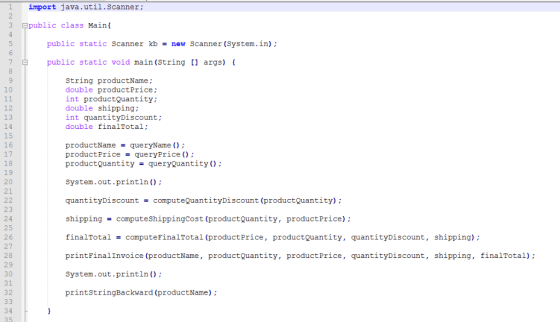
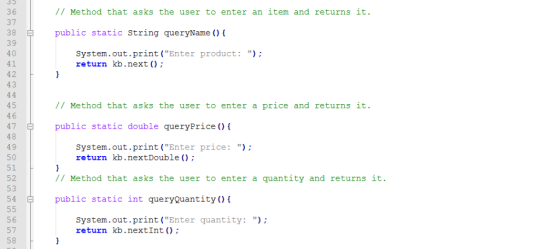
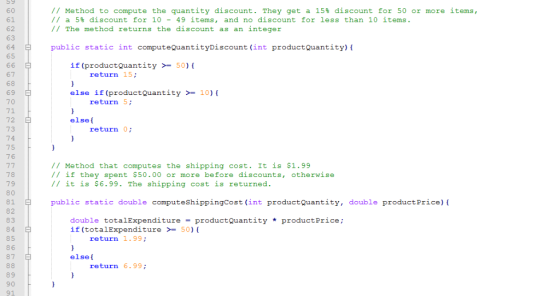
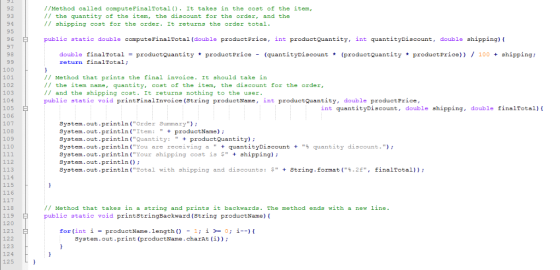
SOLUTION: Following will be the required code in java for the same:
OUTPUT:
#1
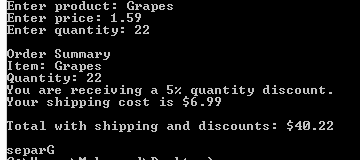
#2
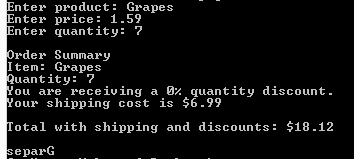
#3
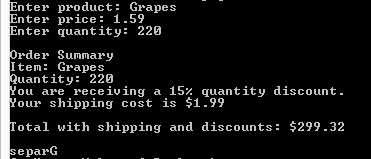
CODE:
import java.util.Scanner;
public class Main{
public static Scanner kb = new Scanner(System.in);
public static void main(String [] args) {
String productName;
double productPrice;
int productQuantity;
double shipping;
int quantityDiscount;
double finalTotal;
productName = queryName();
productPrice = queryPrice();
productQuantity = queryQuantity();
System.out.println();
quantityDiscount = computeQuantityDiscount(productQuantity);
shipping = computeShippingCost(productQuantity, productPrice);
finalTotal = computeFinalTotal(productPrice, productQuantity, quantityDiscount, shipping);
printFinalInvoice(productName, productQuantity, productPrice, quantityDiscount, shipping, finalTotal);
System.out.println();
printStringBackward(productName);
}
// Method that asks the user to enter an item and returns it.
public static String queryName(){
System.out.print("Enter product: ");
return kb.next();
}
// Method that asks the user to enter a price and returns it.
public static double queryPrice(){
System.out.print("Enter price: ");
return kb.nextDouble();
}
// Method that asks the user to enter a quantity and returns
it.
public static int queryQuantity(){
System.out.print("Enter quantity: ");
return kb.nextInt();
}
// Method to compute the quantity discount. They get a 15%
discount for 50 or more items,
// a 5% discount for 10 - 49 items, and no discount for less than
10 items.
// The method returns the discount as an integer
public static int computeQuantityDiscount(int productQuantity){
if(productQuantity >= 50){
return 15;
}
else if(productQuantity >= 10){
return 5;
}
else{
return 0;
}
}
// Method that computes the shipping cost. It is $1.99
// if they spent $50.00 or more before discounts, otherwise
// it is $6.99. The shipping cost is returned.
public static double computeShippingCost(int productQuantity, double productPrice){
double totalExpenditure = productQuantity *
productPrice;
if(totalExpenditure >= 50){
return 1.99;
}
else{
return 6.99;
}
}
//Method called computeFinalTotal(). It takes in the cost of the
item,
// the quantity of the item, the discount for the order, and
the
// shipping cost for the order. It returns the order total.
public static double computeFinalTotal(double productPrice, int productQuantity, int quantityDiscount, double shipping){
double finalTotal = productQuantity * productPrice
- (quantityDiscount * (productQuantity * productPrice)) / 100 +
shipping;
return finalTotal;
}
// Method that prints the final invoice. It should take in
// the item name, quantity, cost of the item, the discount for the
order,
// and the shipping cost. It returns nothing to the user.
public static void printFinalInvoice(String productName, int
productQuantity, double productPrice,
int quantityDiscount, double shipping, double
finalTotal){
System.out.println("Order Summary");
System.out.println("Item: " +
productName);
System.out.println("Quantity: " +
productQuantity);
System.out.println("You are receiving a " +
quantityDiscount + "% quantity discount.");
System.out.println("Your shipping cost is $" +
shipping);
System.out.println();
System.out.println("Total with shipping and
discounts: $" + String.format("%.2f", finalTotal));
}
// Method that takes in a string and prints it backwards. The
method ends with a new line.
public static void printStringBackward(String productName){
for(int i = productName.length() - 1; i >=
0; i--){
System.out.print(productName.charAt(i));
}
}
}
EXPLANATION:
Simple java syntax is followed. Instructions as per given in the comments were implemented.
The java string format() method returns a formatted string using the given locale, specified format string and arguments.We can concatenate the strings using this method and at the same time, we can format the output concatenated string
Add Answer to:
[IN JAVA]
Finish the program. There are instructions in the
comments.
You may want to comment...
Need three seperate files. ShoppingCartManager.java ShoppingCart.java ItemsToPurchase.java These are from part 1 what do you mean...
 Need three seperate files. ShoppingCartManager.java
ShoppingCart.java
ItemsToPurchase.java
These are from part 1
what do you mean by deep study
7.25 LAB*: Program: Online shopping cart (Part 2) Note: Creating multiple Scanner objects for the same input stream yields unexpected behavior. Thus, good practice is to use a single Scanner object for reading input from System.in. That Scanner object can be passed as an argument to any methods that read input This program extends the earlier Online shopping cart program (Consider...
Need three seperate files. ShoppingCartManager.java
ShoppingCart.java
ItemsToPurchase.java
These are from part 1
what do you mean by deep study
7.25 LAB*: Program: Online shopping cart (Part 2) Note: Creating multiple Scanner objects for the same input stream yields unexpected behavior. Thus, good practice is to use a single Scanner object for reading input from System.in. That Scanner object can be passed as an argument to any methods that read input This program extends the earlier Online shopping cart program (Consider...
In this practice program you are going to practice creating graphical user interface controls and placing...
 In this practice program you are going to practice creating
graphical user interface controls and placing them on a form. You
are given a working NetBeans project shell to start that works with
a given Invoice object that keeps track of a product name, quantity
of the product to be ordered and the cost of each item. You will
then create the necessary controls to extract the user input and
display the results of the invoice.
If you have any...
In this practice program you are going to practice creating
graphical user interface controls and placing them on a form. You
are given a working NetBeans project shell to start that works with
a given Invoice object that keeps track of a product name, quantity
of the product to be ordered and the cost of each item. You will
then create the necessary controls to extract the user input and
display the results of the invoice.
If you have any...
in java PART ONE ======================================= Below is the "RetailItem" class definition that we used in Chapter 6. Write a "CashRegister" class that leverages this "Ret...
in java PART ONE ======================================= Below is the "RetailItem" class definition that we used in Chapter 6. Write a "CashRegister" class that leverages this "RetailItem" class which simulates the sale of a retail item. It should have a constructor that accepts a "RetailItem" object as an argument. The constructor should also accept an integer that represents the quantity of items being purchased. Your class should have these methods: getSubtotal: returns the subtotal of the sale, which is quantity times price....
JAVA Code Requried Copy the file java included below. This program will compile, but, when you...
JAVA Code Requried Copy the file java included below. This program will compile, but, when you run it, it doesn’t appear to do anything except wait. That is because it is waiting for user input, but the user doesn’t have the menu to choose from yet. We will need to create this. Below the main method, but in the Geometry class, create a static method called printMenu that has no parameter list and does not return a value. It will...
Use java and continue stage 2 and 3 stage 1 code public abstract class BabyItem { protected String name;...
 Use java and continue stage 2 and 3
stage 1 code
public abstract class BabyItem {
protected String name;
public BabyItem() {
name="";
}
public BabyItem(String name) {
this.name = name;
}
public String getName() {
return name;
}
public void setName(String name) {
}
public abstract double getCost();
}
========================================================================================
public class BabyFood extends BabyItem {
private int numberOfJars;
private double pricePerDozen;
public BabyFood() {
super();
numberOfJars = 0;
pricePerDozen = 0;
}
public BabyFood(int numberOfJars, double pricePerDozen) {...
Use java and continue stage 2 and 3
stage 1 code
public abstract class BabyItem {
protected String name;
public BabyItem() {
name="";
}
public BabyItem(String name) {
this.name = name;
}
public String getName() {
return name;
}
public void setName(String name) {
}
public abstract double getCost();
}
========================================================================================
public class BabyFood extends BabyItem {
private int numberOfJars;
private double pricePerDozen;
public BabyFood() {
super();
numberOfJars = 0;
pricePerDozen = 0;
}
public BabyFood(int numberOfJars, double pricePerDozen) {...
JAVA, please help asap! Its due very soon and I cant figure it out StringUtils You...
JAVA, please help asap! Its due very soon and I cant figure it out StringUtils You are to complete the class StringUtils, which is below. public static void genGauge(String currentString) { System.out.println(currentString); int c = 0; int l = currentString.length(); String genGauge = ""; while(c < l) { genGauge = genGauge + c; if (c < 9) {c++;} else {c = 0; l = l - 10;} } System.out.println(genGauge); } Add the following public static methods: copy Write a method...
Objectives By the end of this program, the student will have demonstrated the ability to Write...
Objectives By the end of this program, the student will have demonstrated the ability to Write static methods Use methods in a different class Write a sentinel-controlled loop Write nested if/else statements Manipulate Strings by character position StringUtils You are to complete the class StringUtils, which is in the attached zip file. Add the following public static methods: copy Write a method String copy(String currentString, int startPosition, int onePastLastPosition). This method returns a substring of currentString, including startPosition, but ending...
For this question, we want to implement the basic java classes to support the concept of an...
For this question, we want to implement the basic java classes to support the concept of an Online Store and a shopping cart. Consider an e-store with various types of items: books, flowers, gift cards, etc... and we like to be able to support the ability to handle a shopping cart that can contain various types of items. For this question you are asked to create the following classes: abstract class: “Item” every item has a unique item_id (a positive integer,...
please write code in java and comment. thanks. the program is about interface . Implement the...
please write code in java and comment. thanks. the program is about interface . Implement the basics of Fitness and types of Fitness: Aerobic. Implement specific Fitness types such as Swimming, Cycling, Fitness Task: public interface Fitness (10pts) This will be used as a starting point for deriving any specific Fitness type. Every fitness exercise type has one or more muscle group it affects. Therefor a Fitness has the following abstarct method (Note that all methods in an interface are...
In C++ Programming Write a program in Restaurant.cpp to help a local restaurant automate its breakfast...
In C++ Programming Write a program in Restaurant.cpp to help a local restaurant automate its breakfast billing system. The program should do the following: Show the customer the different breakfast items offered by the restaurant. Allow the customer to select more than one item from the menu. Calculate and print the bill. Assume that the restaurant offers the following breakfast items (the price of each item is shown to the right of the item): Name Price Egg (cooked to order)...
 Need three seperate files. ShoppingCartManager.java
ShoppingCart.java
ItemsToPurchase.java
These are from part 1
what do you mean by deep study
7.25 LAB*: Program: Online shopping cart (Part 2) Note: Creating multiple Scanner objects for the same input stream yields unexpected behavior. Thus, good practice is to use a single Scanner object for reading input from System.in. That Scanner object can be passed as an argument to any methods that read input This program extends the earlier Online shopping cart program (Consider...
Need three seperate files. ShoppingCartManager.java
ShoppingCart.java
ItemsToPurchase.java
These are from part 1
what do you mean by deep study
7.25 LAB*: Program: Online shopping cart (Part 2) Note: Creating multiple Scanner objects for the same input stream yields unexpected behavior. Thus, good practice is to use a single Scanner object for reading input from System.in. That Scanner object can be passed as an argument to any methods that read input This program extends the earlier Online shopping cart program (Consider...
 In this practice program you are going to practice creating
graphical user interface controls and placing them on a form. You
are given a working NetBeans project shell to start that works with
a given Invoice object that keeps track of a product name, quantity
of the product to be ordered and the cost of each item. You will
then create the necessary controls to extract the user input and
display the results of the invoice.
If you have any...
In this practice program you are going to practice creating
graphical user interface controls and placing them on a form. You
are given a working NetBeans project shell to start that works with
a given Invoice object that keeps track of a product name, quantity
of the product to be ordered and the cost of each item. You will
then create the necessary controls to extract the user input and
display the results of the invoice.
If you have any...
 Use java and continue stage 2 and 3
stage 1 code
public abstract class BabyItem {
protected String name;
public BabyItem() {
name="";
}
public BabyItem(String name) {
this.name = name;
}
public String getName() {
return name;
}
public void setName(String name) {
}
public abstract double getCost();
}
========================================================================================
public class BabyFood extends BabyItem {
private int numberOfJars;
private double pricePerDozen;
public BabyFood() {
super();
numberOfJars = 0;
pricePerDozen = 0;
}
public BabyFood(int numberOfJars, double pricePerDozen) {...
Use java and continue stage 2 and 3
stage 1 code
public abstract class BabyItem {
protected String name;
public BabyItem() {
name="";
}
public BabyItem(String name) {
this.name = name;
}
public String getName() {
return name;
}
public void setName(String name) {
}
public abstract double getCost();
}
========================================================================================
public class BabyFood extends BabyItem {
private int numberOfJars;
private double pricePerDozen;
public BabyFood() {
super();
numberOfJars = 0;
pricePerDozen = 0;
}
public BabyFood(int numberOfJars, double pricePerDozen) {...
Most questions answered within 3 hours.
-
Where is the error in this code sequence?
String s1 = "Hello";
String s2 = "ello";...
asked 11 months ago -
Financial data for Joel de Paris, Inc., for last year
follow:
Joel de Paris, Inc.
Balance...
asked 11 months ago -
Consider this reaction:
Al2(SO4)3 (aq)+ BaCl3
(aq) Al2Cl6 (aq)- +
3BaSO4(s) . What is the...
asked 11 months ago -
Suppose that Savneet is considering increasing her
recent random sample from 20 car rentals to 40...
asked 11 months ago -
Trucks arrive at an unloading terminal at an average rate of 120
per hour.
Trucks arrive...
asked 11 months ago -
Why are methanol and ethanol completely soluble in water while
octanol is not very little soluble....
asked 11 months ago -
A facilities manager at a university reads in a research report
that the mean amount of...
asked 11 months ago -
When the CuSO4 is rehydrated by adding water to the anhydrous
compound, is this an endothermic...
asked 11 months ago -
A ray of sunlight is passing from diamond into crown glass; the
angle of incidence is...
asked 11 months ago -
A block of mass 0.249 kg is placed on top of a light, vertical
spring of...
asked 11 months ago -
how do the kidneys compensate in the presences of acidosis
a) trigger hyperventilate
b) reserve acid...
asked 11 months ago -
Question 501 pts
The rental rate of capital to the firm increases. Which of the
following...
asked 11 months ago