Building on a code in the Serial Monitor video, add in the ability to type the...
Building on a code in the Serial Monitor video, add in the ability to type the word “off” into the serial monitor and have both the red and green LEDs turn off simultaneously.
Arduino code only.... Thank You.
Homework Answers
int red_led = 13;
int green_led=12;
void setup()
{
pinMode(red_led, OUTPUT); //pins are declared as output
pinMode(green_led, OUTPUT);
Serial.begin(9600);
pinMode(13,OUTPUT);
pinMode(12,OUTPUT);
}
void loop() {
if (Serial.available()){
char s=Serial.read();
Serial.println("on");
if(s=='on'){
digitalWrite(13, HIGH); // LED will be on for this condition
digitalWrite(12, HIGH);
Serial.println("green and red_LED are
ON");
}
if(s=='off'){
digitalWrite(13,LOW); // led will be off for this condition
digitalWrite(12,LOW);
Serial.println("red_LED and green_led are OFF");
}}}
Explanation:
In this program, when we type "on" in serial monitor then both led's will be on and similarly when we type "off" they will become "off". Ensure that your system is connected to arduino board.
Add Answer to:
Building on a code in the Serial Monitor video, add in the
ability to type the...
Write an Arduino code to read the current temperature using the LM35 temperature sensor. The code...
 Write an Arduino code to read the current temperature using the LM35 temperature sensor. The code should include the following if the temperature is more than 45 "C: • Turn ON red LED, and after 1 second turn ON the yellow LED, and after another 2 seconds tum On the Green LED. One second later the three LEDS should start blinking (all LEDs OFF for 0.5 seconds, then all LEDS ON for 1 minute), and turn OFF all LEDs after...
MICROCONTROLLERS (Arduino Uno) Submit a schematic drawing and source code: Operating a simple DC...
MICROCONTROLLERS (Arduino Uno) Submit a schematic drawing and source code: Operating a simple DC motor with a Potentiometer Minimum 3 speeds; fast, slow, stop (0/mph) At fast, green LED on At slow, yellow LED on At stop, red & blue LEDs alternating on/off Thank you in advance
C CODE LANGUAGE. MSP430. #include <msp430fr6989.h> #define redLED BIT0 // Red LED at P1.0 #define greenLED...
 C CODE LANGUAGE. MSP430.
#include <msp430fr6989.h>
#define redLED BIT0 // Red LED at P1.0
#define greenLED BIT7 // Green LED at P9.7
#define BUT1 BIT1 // Button S1 at P1.1
#define BUT2 BIT2 // Button S2 at P1.2
void main(void) {
WDTCTL = WDTPW | WDTHOLD; // Stop the Watchdog timer
PM5CTL0 &= ~LOCKLPM5; // Enable the GPIO pins
// Configure and initialize LEDs
P1DIR |= redLED; // Direct pin as output
P9DIR |= greenLED; // Direct pin as output...
C CODE LANGUAGE. MSP430.
#include <msp430fr6989.h>
#define redLED BIT0 // Red LED at P1.0
#define greenLED BIT7 // Green LED at P9.7
#define BUT1 BIT1 // Button S1 at P1.1
#define BUT2 BIT2 // Button S2 at P1.2
void main(void) {
WDTCTL = WDTPW | WDTHOLD; // Stop the Watchdog timer
PM5CTL0 &= ~LOCKLPM5; // Enable the GPIO pins
// Configure and initialize LEDs
P1DIR |= redLED; // Direct pin as output
P9DIR |= greenLED; // Direct pin as output...
You are to create a new application that will execute on your Arduino platform based upon...
 You are to create a new application that will execute on your Arduino platform based upon the Blink example that is available in the Arduino Examples folder that you downloaded as part of the IDE. Your application will use a toggle switch to interface with the user. The application will operate by controlling the LEDs based upon the position of the toggle switch. If the user moves the LEDs until new user input is provided. When the user moves the...
Looking for help to create the arduino program for this in C. dont need the breadboard...
 Looking for help to create the arduino program for this in
C.
dont need the breadboard information just the arduino code to
run it all,
and as an expection to handle a case where a letter not 'g' or
's' to send output invalid response and not stop the exection of
the blinking
based You are to create a new application that will execute on your Arduino platform upon the Blink example that is available in the Arduino Examples folder...
Looking for help to create the arduino program for this in
C.
dont need the breadboard information just the arduino code to
run it all,
and as an expection to handle a case where a letter not 'g' or
's' to send output invalid response and not stop the exection of
the blinking
based You are to create a new application that will execute on your Arduino platform upon the Blink example that is available in the Arduino Examples folder...
Assignment 2: Simulate a Sensor to control an alarm Before you attempt this assignment, it is...
Assignment 2: Simulate a Sensor to control an alarm Before you attempt this assignment, it is suggested you understand circuits (and the Arduino code) 1B and 1C. Sensor That being said, in this assignment, we’ll be mimicking an Infrared Sensor (detects objects) by utilizing the potentiometer. The potentiometer will provide us voltage potential that we can vary from 0V to 5V (similar to 1B). This voltage potential represents the output of a sensor. Assume the sensor cannot detect anything beyond...
Simulate a Sensor to control an alarm Before you attempt this assignment, it is suggested you...
Simulate a Sensor to control an alarm Before you attempt this assignment, it is suggested you understand circuits (and the Arduino code) 1B and 1C. Sensor That being said, in this assignment, we’ll be mimicking an Infrared Sensor (detects objects) by utilizing the potentiometer. The potentiometer will provide us voltage potential that we can vary from 0V to 5V (similar to 1B). This voltage potential represents the output of a sensor. Assume the sensor cannot detect anything beyond 10 yards....
Experiment D: Conductivities of Solutions Purpose: To record the conductivity of each solution of ammonia, vinegar,...
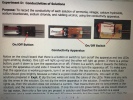 Experiment D: Conductivities of Solutions Purpose: To record the conductivity of each solution of ammonia, vinegar, calcium hydroxide, sodium bicarbonate, sodium chloride, and rubbing alcohol, using the conductivity apparatus. 0 Energizer On/Off Button On/Off Switch Conductivity Apparatus Notice on the circuit board that there is a button or switch to turn on/off the apparatus and two LEDs 9 (light emitting diodes). One LED will light up red and the other will light up green. If there is a yellow button,...
I need a code an arduino code that works with RFID RC522, 4 x4 Matrix Keypad,...
I need a code an arduino code that works with RFID RC522, 4 x4 Matrix Keypad, 2 LEDS and 1602 I2C LC Display I am building a project for school security, So the user must use their ID to access the system. When access is granted then student has the options to choose 1 or 2 ... (1) Green LED = Safe (2) Red LED = Danger .. I am also thinking about adding a camera to the system but...
I have a program for Arduino written such that when I hold a button down, it...
 I have a program for Arduino written such that when I hold a
button down, it will turn an LED off. I want to be able to print to
the serial monitor how long the button was pressed for after I let
go of the button. Does anybody have any ideas? Below is the code I
have written thus far:
Text of Code:
#define LED RED_LED
#define buttonPIN PUSH2
const int buttonPin = PUSH2; // the number of the pushbutton...
I have a program for Arduino written such that when I hold a
button down, it will turn an LED off. I want to be able to print to
the serial monitor how long the button was pressed for after I let
go of the button. Does anybody have any ideas? Below is the code I
have written thus far:
Text of Code:
#define LED RED_LED
#define buttonPIN PUSH2
const int buttonPin = PUSH2; // the number of the pushbutton...
 Write an Arduino code to read the current temperature using the LM35 temperature sensor. The code should include the following if the temperature is more than 45 "C: • Turn ON red LED, and after 1 second turn ON the yellow LED, and after another 2 seconds tum On the Green LED. One second later the three LEDS should start blinking (all LEDs OFF for 0.5 seconds, then all LEDS ON for 1 minute), and turn OFF all LEDs after...
 C CODE LANGUAGE. MSP430.
#include <msp430fr6989.h>
#define redLED BIT0 // Red LED at P1.0
#define greenLED BIT7 // Green LED at P9.7
#define BUT1 BIT1 // Button S1 at P1.1
#define BUT2 BIT2 // Button S2 at P1.2
void main(void) {
WDTCTL = WDTPW | WDTHOLD; // Stop the Watchdog timer
PM5CTL0 &= ~LOCKLPM5; // Enable the GPIO pins
// Configure and initialize LEDs
P1DIR |= redLED; // Direct pin as output
P9DIR |= greenLED; // Direct pin as output...
C CODE LANGUAGE. MSP430.
#include <msp430fr6989.h>
#define redLED BIT0 // Red LED at P1.0
#define greenLED BIT7 // Green LED at P9.7
#define BUT1 BIT1 // Button S1 at P1.1
#define BUT2 BIT2 // Button S2 at P1.2
void main(void) {
WDTCTL = WDTPW | WDTHOLD; // Stop the Watchdog timer
PM5CTL0 &= ~LOCKLPM5; // Enable the GPIO pins
// Configure and initialize LEDs
P1DIR |= redLED; // Direct pin as output
P9DIR |= greenLED; // Direct pin as output...
 You are to create a new application that will execute on your Arduino platform based upon the Blink example that is available in the Arduino Examples folder that you downloaded as part of the IDE. Your application will use a toggle switch to interface with the user. The application will operate by controlling the LEDs based upon the position of the toggle switch. If the user moves the LEDs until new user input is provided. When the user moves the...
 Looking for help to create the arduino program for this in
C.
dont need the breadboard information just the arduino code to
run it all,
and as an expection to handle a case where a letter not 'g' or
's' to send output invalid response and not stop the exection of
the blinking
based You are to create a new application that will execute on your Arduino platform upon the Blink example that is available in the Arduino Examples folder...
Looking for help to create the arduino program for this in
C.
dont need the breadboard information just the arduino code to
run it all,
and as an expection to handle a case where a letter not 'g' or
's' to send output invalid response and not stop the exection of
the blinking
based You are to create a new application that will execute on your Arduino platform upon the Blink example that is available in the Arduino Examples folder...
 Experiment D: Conductivities of Solutions Purpose: To record the conductivity of each solution of ammonia, vinegar, calcium hydroxide, sodium bicarbonate, sodium chloride, and rubbing alcohol, using the conductivity apparatus. 0 Energizer On/Off Button On/Off Switch Conductivity Apparatus Notice on the circuit board that there is a button or switch to turn on/off the apparatus and two LEDs 9 (light emitting diodes). One LED will light up red and the other will light up green. If there is a yellow button,...
 I have a program for Arduino written such that when I hold a
button down, it will turn an LED off. I want to be able to print to
the serial monitor how long the button was pressed for after I let
go of the button. Does anybody have any ideas? Below is the code I
have written thus far:
Text of Code:
#define LED RED_LED
#define buttonPIN PUSH2
const int buttonPin = PUSH2; // the number of the pushbutton...
I have a program for Arduino written such that when I hold a
button down, it will turn an LED off. I want to be able to print to
the serial monitor how long the button was pressed for after I let
go of the button. Does anybody have any ideas? Below is the code I
have written thus far:
Text of Code:
#define LED RED_LED
#define buttonPIN PUSH2
const int buttonPin = PUSH2; // the number of the pushbutton...
Most questions answered within 3 hours.
-
Where is the error in this code sequence?
String s1 = "Hello";
String s2 = "ello";...
asked 10 months ago -
Financial data for Joel de Paris, Inc., for last year
follow:
Joel de Paris, Inc.
Balance...
asked 10 months ago -
Consider this reaction:
Al2(SO4)3 (aq)+ BaCl3
(aq) Al2Cl6 (aq)- +
3BaSO4(s) . What is the...
asked 10 months ago -
Suppose that Savneet is considering increasing her
recent random sample from 20 car rentals to 40...
asked 10 months ago -
Trucks arrive at an unloading terminal at an average rate of 120
per hour.
Trucks arrive...
asked 10 months ago -
Why are methanol and ethanol completely soluble in water while
octanol is not very little soluble....
asked 10 months ago -
A facilities manager at a university reads in a research report
that the mean amount of...
asked 10 months ago -
When the CuSO4 is rehydrated by adding water to the anhydrous
compound, is this an endothermic...
asked 10 months ago -
A ray of sunlight is passing from diamond into crown glass; the
angle of incidence is...
asked 10 months ago -
A block of mass 0.249 kg is placed on top of a light, vertical
spring of...
asked 10 months ago -
how do the kidneys compensate in the presences of acidosis
a) trigger hyperventilate
b) reserve acid...
asked 10 months ago -
Question 501 pts
The rental rate of capital to the firm increases. Which of the
following...
asked 10 months ago