IN JAVA Overview In this project you will implement a Java program that will print several...
IN JAVA
Overview
In this project you will implement a Java program that will print several shapes and patterns according to uses input. This program will allow the use to select the type (say, rectangle, triangle, or diamond), the size and the fill character for a shape. All operations will be performed based on the user input which will respond to a dynamic menu that will be presented. Specifically, the menu will guide the user to decide between different forms to print in text mode. The forms to select from will be rectangle, triangle. and diamond. Additionally. there will be a pattern to print which will be explained later in this document. The size of the form/pattern will be also determined by the user which will be validated to be complying with specific values depending on the form.
Description
This section describes as detailed as possible all the options that need to be accomplished in the project.
Main Method
The main method must print as the first line of output
Project 2: Developed by John Smith
Note that you should replace the text John Smith with your name. It will then call getMenuSelection() to start the rest of the operations of this program.
Menu Options
The menu should be implemented with two methods:
Please, select one of the following options
0. Exit
1. Print a Rectangle
2. Print a Triangle
3. Print a Diamond
4. Print a Pattern
- printMenu(). This method will print the following menu.
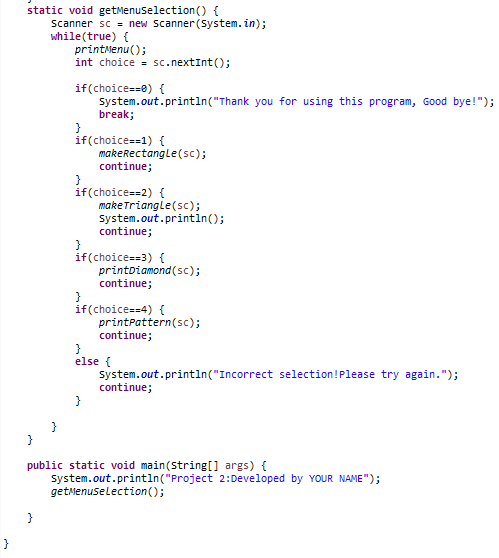
- getMenuSelection(). This method will use the printMenu() method
to print the menu, and validate that the user inputs a correct
value from 0 to 4. If the user input is invalid, print a message
"Incorrect selection, please try again", and print the menu again.
This should repeat until correct input is obtained from the user.
If user enters a valid input, this method will do the following
based on user's input.
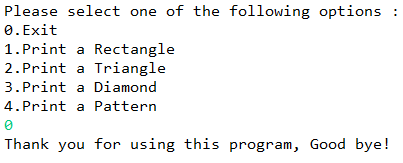
- 0: Prints the message "Thank you for using this program, Good bye!" and exits the program.
- 1: Call the method makeRectangle (see description later).
- 2: Call the method makeTriangle.
- 3: Call the method makeDiamond.
- 4: Call the method printPattern.
Rectangle Shape
You should implement the following three methods to print a rectangle shape.
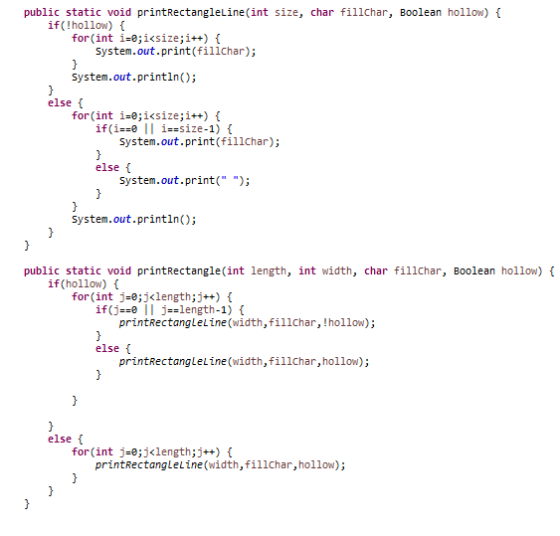
- public static void printRectangleLine(int size, char fillChar, Boolean hollow). This method will print a line of size filled with the character fillChar, unless hollow is true, in that case, only print fillChar at the first and the last position and print a blank character at all other positions.
- public static void printRectangle(int length, int width, char fillChar, Boolean hollow). This method will use printRectangleLine() method to print a rectangle shape with the given length and width, If the hollow is true, the shape will be hollow rectangle, otherwise a filled rectangle. This method must not interact with the user.
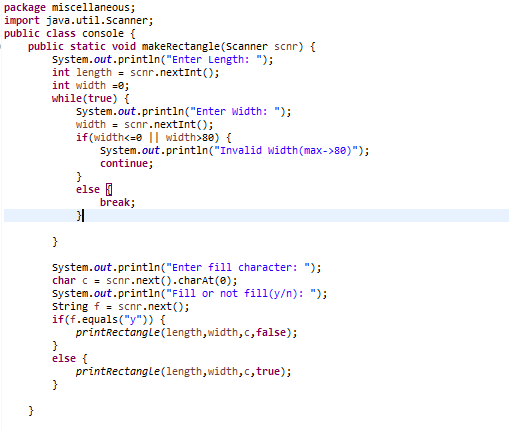
- public static void makeRectangle(Scanner scnr). This method will prompt the user for entering the length, width, fillChar and the choice of fill or not fill. For this project, we limit the width of a rectangle to no more than 80 characters. This method must validate the input. Once the user entered valid input, this method will call the printRectangle() method to print the shape.
Triangle Shape (Using Nested Loops)
You should implement the following two methods to print a triangle shape.
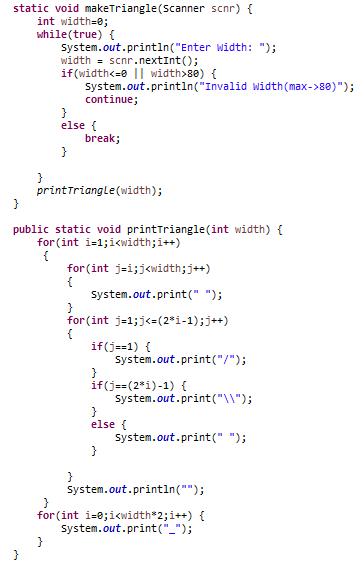
- public static void printTriangle(int width). This method will print a hollow equi-side triangle with the given width. The left side should be printed with character '/', the right side with '\' and the bottom with '_'. This method must use a nested for-loop to print the shape.
- public static void makeTriangle(Scanner scnr). This method will prompt the user for entering the width. We limit the width of a rectangle to no more than 80 characters. Again, this method must validate the user's input and call the method printTriangle().
Diamond Shape
You should implement the following three methods to print a diamond shape.
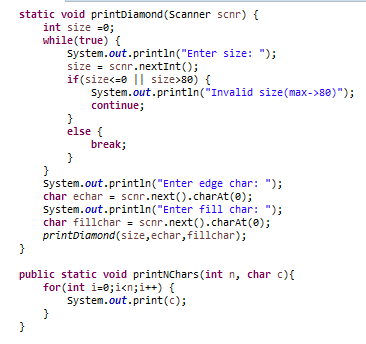
- public static void printNChars(int n, char c)). This method will print n times the character c in a row,
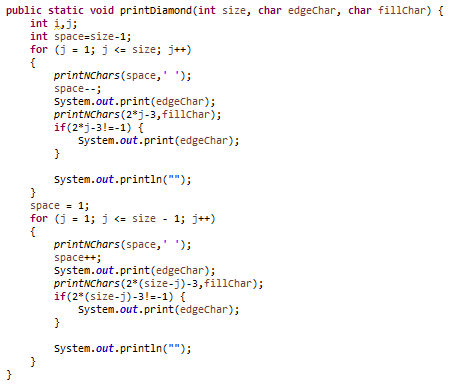
- public static void printDiamond(int size, char edgeChar, char fillChar). This method will call printNChars() method to print the shape. It will use the edgeChar to print the sides and the fillChar to fill the interior of the shape. The shape will have a height and a width of the given size.
- public static void printDiamond(Scanner scnr). This method will prompt the user for entering the size, the edgeChar and the fillChar. We limit the size to no more than 80 characters. Again, this method must validate the user's input. Notice that this method has the same name as the previous method but has a different set of parameters.
Pattern Shape (Using Nested Loops)
You should implement the following two methods to print a triangle shape.
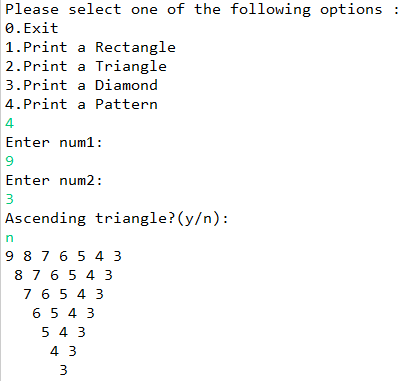
9 8 7 6 5 4 3
  8 7 6 5 4 3
    7 6 5 4 3
      6 5 4 3
        5 4 3
          4 3
            3
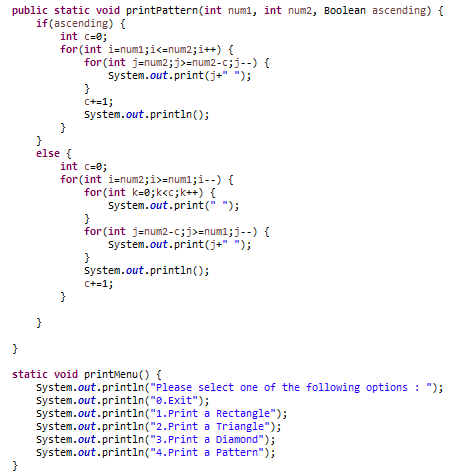
- public static void printPattern(int num1, int num2, Boolean ascending). This method will print a upper-triangle matrix-like layout filled will a sequence of integers between num1 and num2 inclusive. Each subsequent row will contain the postfix of the previous row. For example for num1=3 and num2=9, the pattern should look like the follows.
- If the ascending is true, the numbers should printed in the ascending order.
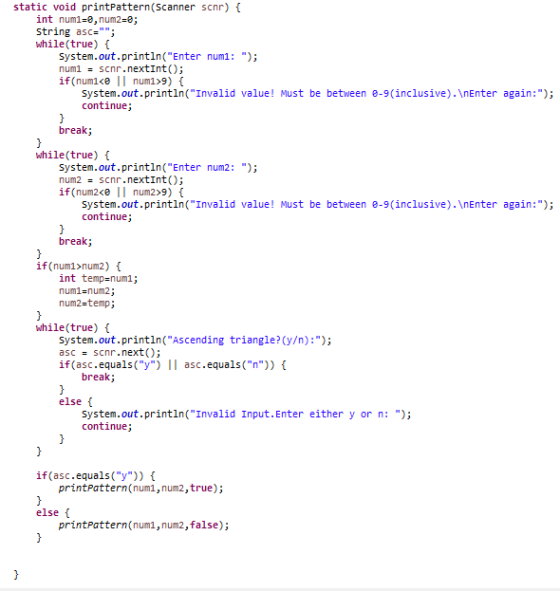
- public static void printPattern(Scanner scnr). This method will prompt the user for entering thenum1, num2, and ascending, and call the other method to print the pattern. Again, this method must validate the user's input. Notice that this method have the same name as the previous method but has a different set of parameters.
Sample Input/Output
Please refer to this link for sample input/output expected of this program.
Rubric
- [2 points] Menu works with all the requirements stated above:
- It iterates until 0 is input.
- If is selected any value from 1 to 4, it calls the different methods for the different classes.
- If it shows the farewell message when 0 is selected.
- [3 points] Prints the rectangle:
- Asks correctly for the values allowed.
- If the value is incorrect it keeps looping and shows the indications again.
- Prints the rectangle with the size selected by the user.
- It uses the three methods to print the rectangle as specified above.
- [4 points] Prints the triangle:
- Asks correctly for the values allowed.
- If the value is incorrect it keeps looping and shows the indications again. Pay attention that here it has to be a pair between 1 and 80.
- Prints triangle with the size selected by the user using nested loops.
- [4 points] Prints the diamond:
- Asks correctly for the values allowed.
- If the value is incorrect it keeps looping and shows the indications again. Pay attention that here it has to be a pair between 1 and 80.
- Prints the diamond with the size selected by the user using the different method calls.
- The program asks and prints the different values to output outside and inside the contour of the program.
- [5 points] Prints the pattern:
- Asks correctly for the values allowed.
- If the values are incorrect it keeps looping and shows the indications again. Pay attention that here it has to be any integer value between 0 and 9.
- Asks the user if the numbers will be printed in ascending or descending order and loop until a valid value is input.
- Prints the pattern with the numbers and sorted the user inputs.
Homework Answers
JAVA CODE
package miscellaneous;
import java.util.Scanner;
public class console {
public static void makeRectangle(Scanner scnr) {
System.out.println("Enter Length:
");
int length = scnr.nextInt();
int width =0;
while(true) {
System.out.println("Enter Width: ");
width =
scnr.nextInt();
if(width<=0
|| width>80) {
System.out.println("Invalid
Width(max->80)");
continue;
}
else {
break;
}
}
System.out.println("Enter fill
character: ");
char c =
scnr.next().charAt(0);
System.out.println("Fill or not
fill(y/n): ");
String f = scnr.next();
if(f.equals("y")) {
printRectangle(length,width,c,false);
}
else {
printRectangle(length,width,c,true);
}
}
public static void printRectangleLine(int size, char
fillChar, Boolean hollow) {
if(!hollow) {
for(int
i=0;i<size;i++) {
System.out.print(fillChar);
}
System.out.println();
}
else {
for(int
i=0;i<size;i++) {
if(i==0 || i==size-1) {
System.out.print(fillChar);
}
else {
System.out.print(" ");
}
}
System.out.println();
}
}
public static void printRectangle(int length, int
width, char fillChar, Boolean hollow) {
if(hollow) {
for(int
j=0;j<length;j++) {
if(j==0 || j==length-1) {
printRectangleLine(width,fillChar,!hollow);
}
else {
printRectangleLine(width,fillChar,hollow);
}
}
}
else {
for(int
j=0;j<length;j++) {
printRectangleLine(width,fillChar,hollow);
}
}
}
static void makeTriangle(Scanner scnr) {
int width=0;
while(true) {
System.out.println("Enter Width: ");
width =
scnr.nextInt();
if(width<=0
|| width>80) {
System.out.println("Invalid
Width(max->80)");
continue;
}
else {
break;
}
}
printTriangle(width);
}
public static void printTriangle(int width) {
for(int i=1;i<width;i++)
{
for(int j=i;j<width;j++)
{
System.out.print(" ");
}
for(int j=1;j<=(2*i-1);j++)
{
if(j==1) {
System.out.print("/");
}
if(j==(2*i)-1) {
System.out.print("\\");
}
else {
System.out.print(" ");
}
}
System.out.println("");
}
for(int i=0;i<width*2;i++)
{
System.out.print("_");
}
}
static void printDiamond(Scanner scnr) {
int size =0;
while(true) {
System.out.println("Enter size: ");
size =
scnr.nextInt();
if(size<=0 ||
size>80) {
System.out.println("Invalid
size(max->80)");
continue;
}
else {
break;
}
}
System.out.println("Enter edge
char: ");
char echar =
scnr.next().charAt(0);
System.out.println("Enter fill
char: ");
char fillchar =
scnr.next().charAt(0);
printDiamond(size,echar,fillchar);
}
public static void printNChars(int n, char c){
for(int i=0;i<n;i++) {
System.out.print(c);
}
}
public static void printDiamond(int size, char
edgeChar, char fillChar) {
int i,j;
int space=size-1;
for (j = 1; j <= size;
j++)
{
printNChars(space,' ');
space--;
System.out.print(edgeChar);
printNChars(2*j-3,fillChar);
if(2*j-3!=-1) {
System.out.print(edgeChar);
}
System.out.println("");
}
space = 1;
for (j = 1; j <= size - 1; j++)
{
printNChars(space,' ');
space++;
System.out.print(edgeChar);
printNChars(2*(size-j)-3,fillChar);
if(2*(size-j)-3!=-1) {
System.out.print(edgeChar);
}
System.out.println("");
}
}
static void printPattern(Scanner scnr) {
int num1=0,num2=0;
String asc="";
while(true) {
System.out.println("Enter num1: ");
num1 =
scnr.nextInt();
if(num1<0 ||
num1>9) {
System.out.println("Invalid value! Must be
between 0-9(inclusive).\nEnter again:");
continue;
}
break;
}
while(true) {
System.out.println("Enter num2: ");
num2 =
scnr.nextInt();
if(num2<0 ||
num2>9) {
System.out.println("Invalid value! Must be
between 0-9(inclusive).\nEnter again:");
continue;
}
break;
}
if(num1>num2) {
int
temp=num1;
num1=num2;
num2=temp;
}
while(true) {
System.out.println("Ascending triangle?(y/n):");
asc =
scnr.next();
if(asc.equals("y") || asc.equals("n")) {
break;
}
else {
System.out.println("Invalid Input.Enter either y
or n: ");
continue;
}
}
if(asc.equals("y")) {
printPattern(num1,num2,true);
}
else {
printPattern(num1,num2,false);
}
}
public static void printPattern(int num1, int num2,
Boolean ascending) {
if(ascending) {
int c=0;
for(int
i=num1;i<=num2;i++) {
for(int j=num2;j>=num2-c;j--) {
System.out.print(j+"
");
}
c+=1;
System.out.println();
}
}
else {
int c=0;
for(int
i=num2;i>=num1;i--) {
for(int k=0;k<c;k++) {
System.out.print(" ");
}
for(int j=num2-c;j>=num1;j--) {
System.out.print(j+"
");
}
System.out.println();
c+=1;
}
}
}
static void printMenu() {
System.out.println("Please select
one of the following options : ");
System.out.println("0.Exit");
System.out.println("1.Print a
Rectangle");
System.out.println("2.Print a
Triangle");
System.out.println("3.Print a
Diamond");
System.out.println("4.Print a
Pattern");
}
static void getMenuSelection() {
Scanner sc = new
Scanner(System.in);
while(true) {
printMenu();
int choice =
sc.nextInt();
if(choice==0)
{
System.out.println("Thank you for using this
program, Good bye!");
break;
}
if(choice==1)
{
makeRectangle(sc);
continue;
}
if(choice==2)
{
makeTriangle(sc);
System.out.println();
continue;
}
if(choice==3)
{
printDiamond(sc);
continue;
}
if(choice==4)
{
printPattern(sc);
continue;
}
else {
System.out.println("Incorrect selection!Please
try again.");
continue;
}
}
}
public static void main(String[] args) {
System.out.println("Project
2:Developed by YOUR NAME");
getMenuSelection();
}
}
Screenshot of code
Sample Output
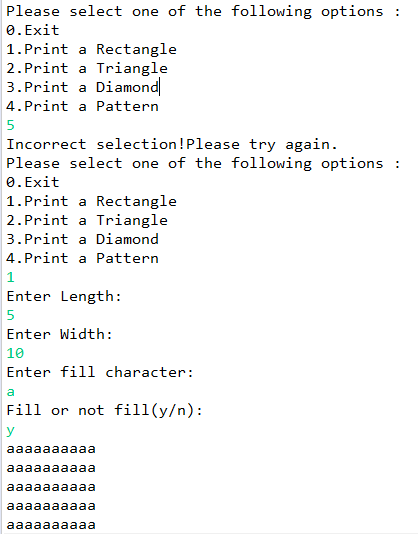
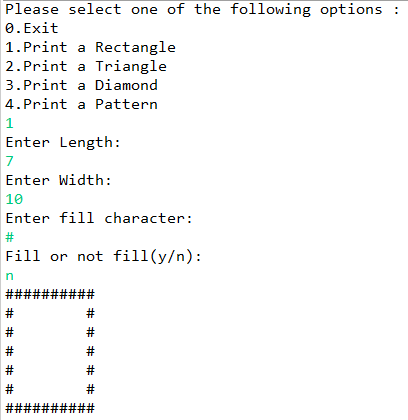
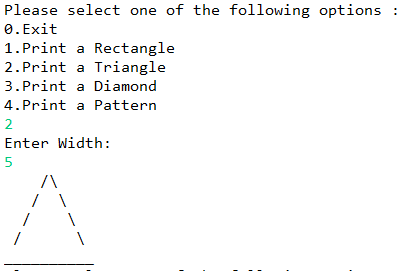
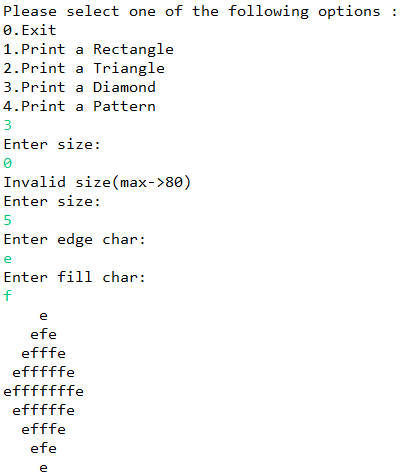
Add Answer to:
IN JAVA
Overview
In this project you will implement a Java program that will
print several...
Hello Guys. I need help with this its in java In this project you will implement...
Hello Guys. I need help with this its in java In this project you will implement a Java program that will print several shapes and patterns according to uses input. This program will allow the use to select the type (say, rectangle, triangle, or diamond), the size and the fill character for a shape. All operations will be performed based on the user input which will respond to a dynamic menu that will be presented. Specifically, the menu will guide...
How can i print a diamond implementing these methods public static void printNChars(int n, char c))....
How can i print a diamond implementing these methods public static void printNChars(int n, char c)). This method will print n times the character c in a row, public static void printDiamond(int size, char edgeChar, char fillChar). This method will call printNChars() method to print the shape. It will use the edgeChar to print the sides and the fillChar to fill the interior of the shape. The shape will have a height and a width of the given size. public...
Python 3: Please follow the respective rubric for the following function definition. Rubric: Rectangle Shape You...
 Python 3: Please follow the respective rubric
for the following function definition.
Rubric:
Rectangle Shape You should implement the following functions to print a rectangle shape. • print_rectangle(length, width, fillChar, hollow). This function will use draw_shape_line() function to print a rectangle shape with the given length and width, If the hollow is true, the shape will be hollow rectangle, otherwise a filled rectangle. This function must not interact with the user. For example, the call print_rectangle(5, 10, '*', False) should...
Python 3: Please follow the respective rubric
for the following function definition.
Rubric:
Rectangle Shape You should implement the following functions to print a rectangle shape. • print_rectangle(length, width, fillChar, hollow). This function will use draw_shape_line() function to print a rectangle shape with the given length and width, If the hollow is true, the shape will be hollow rectangle, otherwise a filled rectangle. This function must not interact with the user. For example, the call print_rectangle(5, 10, '*', False) should...
Hello, I need help writing the two methods to print a triangle shape in java. An...
Hello, I need help writing the two methods to print a triangle shape in java. An example of the shape is as follows: 9 8 7 6 5 4 3 8 7 6 5 4 3 7 6 5 4 3 6 5 4 3 5 4 3 4 3 3 One method should be defined as "public static void printPattern(int num1, int num2, Boolean ascending)". This method will print a upper-triangle matrix-like layout filled will a sequence of integers...
JAVA Code Requried Copy the file java included below. This program will compile, but, when you...
JAVA Code Requried Copy the file java included below. This program will compile, but, when you run it, it doesn’t appear to do anything except wait. That is because it is waiting for user input, but the user doesn’t have the menu to choose from yet. We will need to create this. Below the main method, but in the Geometry class, create a static method called printMenu that has no parameter list and does not return a value. It will...
Write a C program that does the following: Displays a menu (similar to what you see...
Write a C program that does the following: Displays a menu (similar to what you see in a Bank ATM machine) that prompts the user to enter a single character S or D or Q and then prints a shape of Square,Diamond (with selected height and selected symbol), or Quits if user entered Q.Apart from these 2 other shapes, add a new shape of your choice for any related character. Program then prompts the user to enter a number and...
in java M al you wille to print: • The area of the box if the...
 in
java
M al you wille to print: • The area of the box if the user gives valid sizes "Invalid size given', otherwise . For example, if the user enters: 'small medium large', the program will print Area of the box is 6 . For example, if the user enters: 'small medium big', the program will print 'Invalid size given LAB ACTIVITY 31.24.1: Chapter 7: Area of a box (Methods) 0/5 Main.java Load default template. 1 import java.util.Scanner; LD...
in
java
M al you wille to print: • The area of the box if the user gives valid sizes "Invalid size given', otherwise . For example, if the user enters: 'small medium large', the program will print Area of the box is 6 . For example, if the user enters: 'small medium big', the program will print 'Invalid size given LAB ACTIVITY 31.24.1: Chapter 7: Area of a box (Methods) 0/5 Main.java Load default template. 1 import java.util.Scanner; LD...
Write a Python program in this Jupyter Notebook. This program will allow a user to choose...
Write a Python program in this Jupyter Notebook. This program will allow a user to choose from a menu to print various text shapes includeing rectangle, triangle, and diamond as well as a set of numbers in a pattern. This program will allow the user to select the type, the size and/or the fill character for a shape. Your program will verify user inputs such as size for certain range specifications, depending on the shapes.
Project Objectives: To develop ability to write void and value returning methods and to call them...
Project Objectives: To develop ability to write void and value returning methods and to call them -- Introduction: Methods are commonly used to break a problem down into small manageable pieces. A large task can be broken down into smaller tasks (methods) that contain the details of how to complete that small task. The larger problem is then solved by implementing the smaller tasks (calling the methods) in the correct order. This also allows for efficiencies, since the method can...
Assignment: Write a program with each of the following methods. You can assume this program is...
Assignment: Write a program with each of the following methods. You can assume this program is saved in a file called multiArrays.java. A sample main method and sample output is provided at the end of this section. All arrays created are of integer-type. Write a method to declare, initialize, and populate a two-dimensional array. Using the following header: public static int[ ][ ] declare2D(Scanner scnr) The user will indicate the size of the array. Write a method to declare,...
 Python 3: Please follow the respective rubric
for the following function definition.
Rubric:
Rectangle Shape You should implement the following functions to print a rectangle shape. • print_rectangle(length, width, fillChar, hollow). This function will use draw_shape_line() function to print a rectangle shape with the given length and width, If the hollow is true, the shape will be hollow rectangle, otherwise a filled rectangle. This function must not interact with the user. For example, the call print_rectangle(5, 10, '*', False) should...
Python 3: Please follow the respective rubric
for the following function definition.
Rubric:
Rectangle Shape You should implement the following functions to print a rectangle shape. • print_rectangle(length, width, fillChar, hollow). This function will use draw_shape_line() function to print a rectangle shape with the given length and width, If the hollow is true, the shape will be hollow rectangle, otherwise a filled rectangle. This function must not interact with the user. For example, the call print_rectangle(5, 10, '*', False) should...
 in
java
M al you wille to print: • The area of the box if the user gives valid sizes "Invalid size given', otherwise . For example, if the user enters: 'small medium large', the program will print Area of the box is 6 . For example, if the user enters: 'small medium big', the program will print 'Invalid size given LAB ACTIVITY 31.24.1: Chapter 7: Area of a box (Methods) 0/5 Main.java Load default template. 1 import java.util.Scanner; LD...
in
java
M al you wille to print: • The area of the box if the user gives valid sizes "Invalid size given', otherwise . For example, if the user enters: 'small medium large', the program will print Area of the box is 6 . For example, if the user enters: 'small medium big', the program will print 'Invalid size given LAB ACTIVITY 31.24.1: Chapter 7: Area of a box (Methods) 0/5 Main.java Load default template. 1 import java.util.Scanner; LD...
Most questions answered within 3 hours.
-
Where is the error in this code sequence?
String s1 = "Hello";
String s2 = "ello";...
asked 11 months ago -
Financial data for Joel de Paris, Inc., for last year
follow:
Joel de Paris, Inc.
Balance...
asked 11 months ago -
Consider this reaction:
Al2(SO4)3 (aq)+ BaCl3
(aq) Al2Cl6 (aq)- +
3BaSO4(s) . What is the...
asked 11 months ago -
Suppose that Savneet is considering increasing her
recent random sample from 20 car rentals to 40...
asked 11 months ago -
Trucks arrive at an unloading terminal at an average rate of 120
per hour.
Trucks arrive...
asked 11 months ago -
Why are methanol and ethanol completely soluble in water while
octanol is not very little soluble....
asked 11 months ago -
A facilities manager at a university reads in a research report
that the mean amount of...
asked 11 months ago -
When the CuSO4 is rehydrated by adding water to the anhydrous
compound, is this an endothermic...
asked 11 months ago -
A ray of sunlight is passing from diamond into crown glass; the
angle of incidence is...
asked 11 months ago -
A block of mass 0.249 kg is placed on top of a light, vertical
spring of...
asked 11 months ago -
how do the kidneys compensate in the presences of acidosis
a) trigger hyperventilate
b) reserve acid...
asked 11 months ago -
Question 501 pts
The rental rate of capital to the firm increases. Which of the
following...
asked 11 months ago