Read Carefully: You are given a class called Record, which defines an audio (pre-CD or MP3)...
Read Carefully:
You are given a class called Record, which defines an audio (pre-CD or MP3) Record. If you need to, you can add methods to this class.
You are to write a class called Jukebox, which holds a number of Records. Jukebox can use either an ArrayList or a Vector to store its data (Records). This will be referred to as AL or V from here on.
Your Jukebox class should implement JukeInterface, which is also in this Minilab’s folder. It will tell what methods must be implemented (and the comments describe how the methods should work).
You can write Jukebox in either one of two ways:
1)Jukebox can be a subclass of AL or V (using “implements”). This makes all of the AL or V methods automatically inherited by Jukebox. So in the Jukebox code, you can access the .indexOf method (for example) by calling indexOf or this.indexOf. This is because it is the Jukebox’s own method.
The disadvantage of this is that outside programs (like the tester) can call Jukebox’s methods and also call the AL or V methods.
2)Jukebox can be a class that has an AL or V as part of its data. In the Polymorphism Minilab, this is how Course was implemented – it had an Array as part of its data. If you do it this way, you should
-declare the AL or V as data and then
-create it (with a “new” statement) in the constructor.
The advantage is that outside programs (like the tester) can now only “see” the Jukebox’s methods.
In addition, you have 2 other requirements:
1)You should use Generics to define your AL or V. In your program, it will only hold Records.
2)You should not traverse the AL or V to try to “do things yourself.” You can look up built-in AL or V methods which will do everything you need. NOTE: In order for some built-in AL or V methods to work correctly, you will have to add a specific method to Record (as described in class).
A driver program called JukeTester.java is provided. There are some subtle relationships between the Record class and Jukebox’s AL or V. I have some explanations as .txt files, but try them yourself first.
Comments and formatting: Please put in an opening comment that briefly describes the purpose of your program. Each constructor/method should haYou are given a class called Record, which defines an audio (pre-CD or MP3) Record. If you need to, you can add methods to this class.
You are to write a class called Jukebox, which holds a number of Records. Jukebox can use either an ArrayList or a Vector to store its data (Records). This will be referred to as AL or V from here on.
Your Jukebox class should implement JukeInterface, which is also in this Minilab’s folder. It will tell what methods must be implemented (and the comments describe how the methods should work).
You can write Jukebox in either one of two ways:
1)Jukebox can be a subclass of AL or V (using “implements”). This makes all of the AL or V methods automatically inherited by Jukebox. So in the Jukebox code, you can access the .indexOf method (for example) by calling indexOf or this.indexOf. This is because it is the Jukebox’s own method.
The disadvantage of this is that outside programs (like the tester) can call Jukebox’s methods and also call the AL or V methods.
2)Jukebox can be a class that has an AL or V as part of its data. In the Polymorphism Minilab, this is how Course was implemented – it had an Array as part of its data. If you do it this way, you should
-declare the AL or V as data and then
-create it (with a “new” statement) in the constructor.
The advantage is that outside programs (like the tester) can now only “see” the Jukebox’s methods.
In addition, you have 2 other requirements:
1)You should use Generics to define your AL or V. In your program, it will only hold Records.
2)You should not traverse the AL or V to try to “do things yourself.” You can look up built-in AL or V methods which will do everything you need. NOTE: In order for some built-in AL or V methods to work correctly, you will have to add a specific method to Record (as described in class).
A driver program called JukeTester.java is provided. There are some subtle relationships between the Record class and Jukebox’s AL or V. I have some explanations as .txt files, but try them yourself first.
Comments and formatting: Please put in an opening comment that briefly describes the purpose of your program. Each constructor/method should have a brief descriptive comment. Also, please be sure that your indenting is correct and that your variable names are meaningful.ve a brief descriptive comment. Also, please be sure that your indenting is correct and that your variable names are meaningful.
Some Code and Tester:
Record:
//This class describes a (pre-CD) record

public class Record
{
        //data
        private String title;
        private String artist;

        //constructor
        public Record(String theTitle, String theArtist)
        {
                this.title = theTitle;
                this.artist = theArtist;
        }

}
Jukebox class:
public interface JukeInterface
{
        //insert(Record aRecord) - inserts a Record at the last position in the jukebox
        public void insert(Record aRecord);

        //insert(int slot, Record aRecord) - inserts a Record into a specific slot in the jukebox
        public void insert(int slot, Record aRecord);

        //remove(Record aRecord) - removes a Record from the jukebox.   If the
        //                         Record does not exist, it is unchanged.
        public boolean remove(Record aRecord);

        //contains(Record aRecord) - returns true if the jukebox contains the Record
        public boolean contains(Record aRecord);

        //findSlot(Record aRecord) - returns the slot that has the Record (-1 if not there)
        public int findSlot(Record aRecord);

        //random() - returns a Record, chosen at random
        //                                      FOR EXAMPLE, to generate a random int between 0 and 9 (inclusive)
        //                                              1.  create a new instance of Random -->  Random gen = new Random();
        //                                              2.  tell it to return a random int between 0 and 9 (inclusive) --> int theRand = gen.nextInt(10);
        //                                      OR: to generate a random int between 0 and 9 (inclusive), use (int)(Math.random()*10);
        public Record random();

        //toString() - returns this jukebox's representation as a String.  Should show the contents.
        public String toString();
}
Tester:
//This class will test the Jukebox and Record classes which were parts
//of the ArrayLists, Vectors minilab

public class JukeTester
{
        public static void main(String[] args)
        {
                //testRecord will be used for queries
                Record testRecord;

                System.out.println("------- Creating a new Jukebox and inserting only 1 Record");
                Jukebox myJukebox = new Jukebox();
                myJukebox.insert(new Record("Kokomo", "The Beach Boys"));

                //print it (using S.O.P.)
                System.out.println("\n------- printing the Jukebox (tests Jukebox's and Record's toString())");
                System.out.println("Jukebox now contains: " + myJukebox);

                //tell it to return 5 random records
                System.out.println("\n------- telling it to return 5 random Records (should all be the same)");
                System.out.println("\nA random Record is: " + myJukebox.random());
                System.out.println("A random Record is: " + myJukebox.random());
                System.out.println("A random Record is: " + myJukebox.random());
                System.out.println("A random Record is: " + myJukebox.random());
                System.out.println("A random Record is: " + myJukebox.random());

                System.out.println("\n------- creating a different new Jukebox and telling it to insert 5 Records");
                myJukebox = new Jukebox();
                myJukebox.insert(new Record("Kokomo", "The Beach Boys"));
                myJukebox.insert(new Record("Wooly Bully", "Sam the Sham & the Pharaohs"));
                myJukebox.insert(new Record("Mustang Sally", "Wilson Pickett"));
                myJukebox.insert(1, new Record( "Great Balls of Fire", "Jerry Lee Lewis"));
                myJukebox.insert(0, new Record("I Feel Good", "James Brown"));

                //print it (using S.O.P.)
                System.out.println("\n------- printing the Jukebox (tests Jukebox's and Record's toString())");
                System.out.println("Jukebox now contains: " + myJukebox);

                //tell it to return 5 random records
                System.out.println("\n------- telling it to return 5 random Records (the random Records will vary)");
                System.out.println("\nA random Record is: " + myJukebox.random());
                System.out.println("A random Record is: " + myJukebox.random());
                System.out.println("A random Record is: " + myJukebox.random());
                System.out.println("A random Record is: " + myJukebox.random());
                System.out.println("A random Record is: " + myJukebox.random());

                //ask it if it contains "Kokomo" by The Beach Boys
                System.out.println("\n------- asking if it contains \"Komomo\" by the Beach Boys");
                System.out.println("            (tests existance of .equals that receives an Object)");
                testRecord = new Record("Kokomo", "The Beach Boys");
                System.out.println("\nDoes it contain " + testRecord + "?: " + myJukebox.contains(testRecord));

                //ask it if it contains "Kokomo" by The Beach Boys (with different Strings for title/artist)
                System.out.println("\n------- asking if it contains \"Komomo\" by the Beach Boys");
                System.out.println("            (test created with title/artist in different memory locations)");
                System.out.println("            tests whether Records .equals usings String's .equals when comparing title and artist)");
                testRecord = new Record(new String("Kokomo"), new String("The Beach Boys"));
                System.out.println("\nDoes it contain " + testRecord + "?: " + myJukebox.contains(testRecord));

                //ask it if it contains "Mustang Sally" by the Commitments
                System.out.println("\n------- asking if it contains \"Mustang Sally\" by the Commitments");
                testRecord = new Record("Mustang Sally", "The Commitments");
                System.out.println("Does it contain " + testRecord + "?: " + myJukebox.contains(testRecord));

                //ask it if it contains "Its Too Late" by Wilson Pickett
                System.out.println("\n------- asking if it contains \"Its Too Late\" by Wilson Pickett");
                testRecord = new Record("Its Too Late", "Wilson Pickett");
                System.out.println("Does it contain " + testRecord + "?: " + myJukebox.contains(testRecord));

                //ask it what slot "Great Balls of Fire" by Jerry Lee Lewis is in
                System.out.println("\n------- asking what slot \"Great Balls of Fire\" by Jerry Lee Lewis is in");
                testRecord = new Record("Great Balls of Fire", "Jerry Lee Lewis");
                System.out.println("\nWhat slot is " + testRecord + " in?: " + myJukebox.findSlot(testRecord));

                //ask it what slot "The Great Pretender" by The Platters is in
                System.out.println("\n------- asking what slot \"The Great Pretender\" by The Platters is in");
                testRecord = new Record("The Great Pretender", "The Platters");
                System.out.println("What slot is " + testRecord + " in?: " + myJukebox.findSlot(testRecord));

                //tell it to remove "Wooly Booly" by Sam the Sham & the Pharaohs
                System.out.println("\n------- telling it to remove \"Wooly Booly\" by Sam the Sham & the Pharaohs");
                testRecord = new Record("Wooly Bully", "Sam the Sham & the Pharaohs");
                System.out.println("\nDid it successfully remove " + testRecord + "?: " + myJukebox.remove(testRecord));

                //tell it to remove "Heartbreak Hotel" by Elvis Presley
                System.out.println("\n------- telling it to remove \"Heartbreak Hotel\" by Elvis Presley");
                testRecord = new Record("Heartbreak Hotel", "Elvis Presley");
                System.out.println("Did it successfully remove " + testRecord + "?: " + myJukebox.remove(testRecord));

                //print it (using S.O.P)
                System.out.println("\n------- printing the Jukebox (should have 4 Records, without \"Wooly Booly\" by Sam the Sham & the Pharaohs");
                System.out.println("\nJukebox now contains: " + myJukebox);

        }
}
Homework Answers
/**
* This class describes a (pre-CD) record
*/
public class Record {
// data
private String title;
private String artist;
/**
* Default constructor
* @param theTitle
* @param theArtist
*/
public Record(String theTitle, String theArtist)
{
this.title = theTitle;
this.artist = theArtist;
}
/**
* @return the title
*/
public String getTitle() {
return title;
}
/**
* @param title the title to set
*/
public void setTitle(String title) {
this.title = title;
}
/**
* @return the artist
*/
public String getArtist() {
return artist;
}
/**
* @param artist the artist to set
*/
public void setArtist(String artist) {
this.artist = artist;
}
@Override
public boolean equals(Object obj) {
if(obj != null) {
if(obj
instanceof Record) {
Record other = (Record) obj;
if((this.artist.equalsIgnoreCase(other.artist))
&&
(this.title.equalsIgnoreCase(other.title)))
return true;
}
}
return false;
}
@Override
public String toString() {
return String.format("%-7s %-20s
\t%-7s %s", "Title: ", this.title, "Artist: ", this.artist);
}
}
public interface JukeInterface {
/**
* insert(Record aRecord) - inserts a Record at the
last position in
* thejukebox
*
* @param aRecord
*/
public void insert(Record aRecord);
/**
* insert(int slot, Record aRecord) - inserts a Record
into a specific slot
* in the jukebox
*
* @param slot
* @param aRecord
*/
public void insert(int slot, Record aRecord);
/**
* remove(Record aRecord) - removes a Record from the
jukebox. If the Record
* does not exist, it is unchanged.
*
* @param aRecord
* @return
*/
public boolean remove(Record aRecord);
/**
* contains(Record aRecord) - returns true if the
jukebox contains the
* Record
*
* @param aRecord
* @return
*/
public boolean contains(Record aRecord);
/**
* findSlot(Record aRecord) - returns the slot that has
the Record (-1 if
* not there)
*
* @param aRecord
* @return
*/
public int findSlot(Record aRecord);
/**
* random() - returns a Record, chosen at random FOR
EXAMPLE, to generate a
* random int between 0 and 9 (inclusive) 1. create a
new instance of Random
* --> Random gen = new Random(); 2. tell it to
return a random int between
* 0 and 9 (inclusive) --> int theRand =
gen.nextInt(10); OR: to generate a
* random int between 0 and 9 (inclusive), use
(int)(Math.random()*10);
*
* @return
*/
public Record random();
/**
* toString() - returns this jukebox's representation
as a String. Should
* show the contents.
*
* @return
*/
public String toString();
}
/**
* This class implements the methods of the JukeInterface
* to modify the arraylist recordList
*/
import java.util.ArrayList;
import java.util.Random;
public class Jukebox implements JukeInterface {
//Attributes
private ArrayList<Record> recordList;
/**
* Defautlt constructor
*/
public Jukebox() {
this.recordList = new
ArrayList<Record>();
}
/**
* insert(Record aRecord) - inserts a Record at the
last position in
* thejukebox
*
* @param aRecord
*/
@Override
public void insert(Record aRecord) {
if(aRecord != null)
this.recordList.add(aRecord);
}
/**
* insert(int slot, Record aRecord) - inserts a Record
into a specific slot
* in the jukebox
*
* @param slot
* @param aRecord
*/
@Override
public void insert(int slot, Record aRecord) {
if(aRecord != null)
this.recordList.add(slot, aRecord);
}
/**
* remove(Record aRecord) - removes a Record from the
jukebox. If the Record
* does not exist, it is unchanged.
*
* @param aRecord
* @return
*/
@Override
public boolean remove(Record aRecord) {
return
this.recordList.remove(aRecord);
}
/**
* contains(Record aRecord) - returns true if the
jukebox contains the
* Record
*
* @param aRecord
* @return
*/
@Override
public boolean contains(Record aRecord) {
return
this.recordList.contains(aRecord);
}
/**
* findSlot(Record aRecord) - returns the slot that has
the Record (-1 if
* not there)
*
* @param aRecord
* @return
*/
@Override
public int findSlot(Record aRecord) {
return
this.recordList.indexOf(aRecord);
}
/**
* random() - returns a Record, chosen at random FOR
EXAMPLE, to generate a
* random int between 0 and 9 (inclusive)
* 1. create a new instance of Random
* --> Random gen = new Random();
* 2. tell it to return a random int between
* 0 and 9 (inclusive) --> int theRand =
gen.nextInt(10);
* OR:
* to generate a
* random int between 0 and 9 (inclusive), use
(int)(Math.random()*10);
*
* @return
*/
@Override
public Record random() {
Random r = new Random();
int size =
this.recordList.size();
return
this.recordList.get(r.nextInt(size));
}
/**
* toString() - returns this jukebox's representation
as a String. Should
* show the contents.
*
* @return
*/
@Override
public String toString() {
StringBuffer sb = new
StringBuffer();
for (Record record : recordList)
{
sb.append("\n" +
record);
}
return sb.toString();
}
}
/**
* This class will test the Jukebox and Record classes which were
parts of the
* ArrayLists, Vectors minilab
*
* @author Admin
*
*/
public class JukeTester {
public static void main(String[] args) {
// testRecord will be used for
queries
Record testRecord;
System.out.println("-------
Creating a new Jukebox and inserting only 1 Record");
Jukebox myJukebox = new
Jukebox();
myJukebox.insert(new
Record("Kokomo", "The Beach Boys"));
// print it (using S.O.P.)
System.out.println("\n-------
printing the Jukebox (tests Jukebox's and Record's
toString())");
System.out.println("Jukebox now
contains: " + myJukebox);
// tell it to return 5 random
records
System.out.println("\n-------
telling it to return 5 random Records (should all be the
same)");
System.out.println("\nA random
Record is: " + myJukebox.random());
System.out.println("A random Record
is: " + myJukebox.random());
System.out.println("A random Record
is: " + myJukebox.random());
System.out.println("A random Record
is: " + myJukebox.random());
System.out.println("A random Record
is: " + myJukebox.random());
System.out.println("\n-------
creating a different new Jukebox and telling it to insert 5
Records");
myJukebox = new Jukebox();
myJukebox.insert(new
Record("Kokomo", "The Beach Boys"));
myJukebox.insert(new Record("Wooly
Bully", "Sam the Sham & the Pharaohs"));
myJukebox.insert(new
Record("Mustang Sally", "Wilson Pickett"));
myJukebox.insert(1, new
Record("Great Balls of Fire", "Jerry Lee Lewis"));
myJukebox.insert(0, new Record("I
Feel Good", "James Brown"));
// print it (using S.O.P.)
System.out.println("\n-------
printing the Jukebox (tests Jukebox's and Record's
toString())");
System.out.println("Jukebox now
contains: " + myJukebox);
// tell it to return 5 random
records
System.out.println("\n-------
telling it to return 5 random Records (the random Records will
vary)");
System.out.println("\nA random
Record is: " + myJukebox.random());
System.out.println("A random Record
is: " + myJukebox.random());
System.out.println("A random Record
is: " + myJukebox.random());
System.out.println("A random Record
is: " + myJukebox.random());
System.out.println("A random Record
is: " + myJukebox.random());
// ask it if it contains
"Kokomo" by The Beach Boys
System.out.println("\n-------
asking if it contains \"Komomo\" by the Beach Boys");
System.out.println("
(tests existance of .equals that receives an Object)");
testRecord = new Record("Kokomo",
"The Beach Boys");
System.out.println("\nDoes it
contain " + testRecord + "?: " +
myJukebox.contains(testRecord));
// ask it if it contains
"Kokomo" by The Beach Boys (with different
// Strings for title/artist)
System.out.println("\n-------
asking if it contains \"Komomo\" by the Beach Boys");
System.out.println("
(test created with title/artist in different memory
locations)");
System.out.println("
tests whether Records .equals usings String's .equals when
comparing title and artist)");
testRecord = new Record(new
String("Kokomo"), new String("The Beach Boys"));
System.out.println("\nDoes it
contain " + testRecord + "?: "+
myJukebox.contains(testRecord));
// ask it if it contains
"Mustang Sally" by the Commitments
System.out.println("\n-------
asking if it contains \"Mustang Sally\" by the Commitments");
testRecord = new Record("Mustang
Sally", "The Commitments");
System.out.println("Does it contain
" + testRecord + "?: " + myJukebox.contains(testRecord));
// ask it if it contains "Its
Too Late" by Wilson Pickett
System.out.println("\n-------
asking if it contains \"Its Too Late\" by Wilson Pickett");
testRecord = new Record("Its Too
Late", "Wilson Pickett");
System.out.println("Does it contain
" + testRecord + "?: " + myJukebox.contains(testRecord));
// ask it what slot "Great Balls
of Fire" by Jerry Lee Lewis is in
System.out.println("\n-------
asking what slot \"Great Balls of Fire\" by Jerry Lee Lewis is
in");
testRecord = new Record("Great
Balls of Fire", "Jerry Lee Lewis");
System.out.println("\nWhat slot is
" + testRecord + " in?: " + myJukebox.findSlot(testRecord));
// ask it what slot "The Great
Pretender" by The Platters is in
System.out.println("\n-------
asking what slot \"The Great Pretender\" by The Platters is
in");
testRecord = new Record("The Great
Pretender", "The Platters");
System.out.println("What slot is "
+ testRecord + " in?: " + myJukebox.findSlot(testRecord));
// tell it to remove "Wooly
Booly" by Sam the Sham & the Pharaohs
System.out.println("\n-------
telling it to remove \"Wooly Bully\" by Sam the Sham & the
Pharaohs");
testRecord = new Record("Wooly
Bully", "Sam the Sham & the Pharaohs");
System.out.println("\nDid it
successfully remove " + testRecord + "?: " +
myJukebox.remove(testRecord));
// tell it to remove "Heartbreak
Hotel" by Elvis Presley
System.out.println("\n-------
telling it to remove \"Heartbreak Hotel\" by Elvis Presley");
testRecord = new Record("Heartbreak
Hotel", "Elvis Presley");
System.out.println("Did it
successfully remove " + testRecord + "?: " +
myJukebox.remove(testRecord));
// print it (using S.O.P)
System.out.println("\n-------
printing the Jukebox (should have 4 Records, without \"Wooly
Booly\" by Sam the Sham & the Pharaohs");
System.out.println("\nJukebox now
contains: " + myJukebox);
}
}
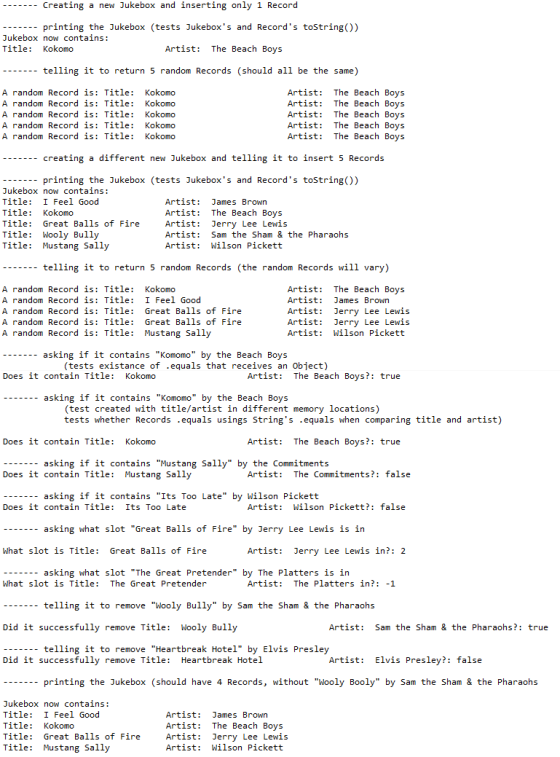
SAMPLE OUTPUT:
Add Answer to:
Read Carefully:
You are given a class called Record, which defines an audio
(pre-CD or MP3)...
public class ArrayHeadTailList<T> implements HeadTailListInterface<T> You are given an interface for a type of list. The...
public class ArrayHeadTailList<T> implements HeadTailListInterface<T> You are given an interface for a type of list. The list works like this: entries can only be added to and removed from the beginning or end of the list entries can be accessed in any position entries begin at index 0 Write a class that implements this interface. The class uses arrays to implement the list. Your class header and instance data variables will be: public class ArrayHeadTailList<T> implements HeadTailListInterface<T> private T[] listArray;...
Using your Dog class from earlier this week, complete the following: Create a new class called...
Using your Dog class from earlier this week, complete the following: Create a new class called DogKennel with the following: Instance field(s) - array of Dogs + any others you may want Contructor - default (no parameters) - will make a DogKennel with no dogs in it Methods: public void addDog(Dog d) - which adds a dog to the array public int currentNumDogs() - returns number of dogs currently in kennel public double averageAge() - which returns the average age...
(Java with Netbeans) Programming. Please show modified programming code for already given Main class, and programming...
 (Java with Netbeans) Programming. Please show modified
programming code for already given Main class, and programming for
code for the new GameChanger class.
// the code for Main class for step number 6 has already
been given, please show modified progrraming for Main class and
GameCHanger class, thank you.
package .games;
import java.util.Random;
import java.util.Scanner;
public class Main {
public static void main(String args[]) {
System.out.println("Welcome to the Number Guessing Game");
System.out.println();
Scanner sc = new Scanner(System.in);
// Get upper...
(Java with Netbeans) Programming. Please show modified
programming code for already given Main class, and programming for
code for the new GameChanger class.
// the code for Main class for step number 6 has already
been given, please show modified progrraming for Main class and
GameCHanger class, thank you.
package .games;
import java.util.Random;
import java.util.Scanner;
public class Main {
public static void main(String args[]) {
System.out.println("Welcome to the Number Guessing Game");
System.out.println();
Scanner sc = new Scanner(System.in);
// Get upper...
Java you are required to add a public Object get( Object key) method into the Hashtable...
Java you are required to add a public Object get( Object key) method into the Hashtable class. As defined in the Java documentation, the get() method returns the value with which the specified key is associated, or null if this hash table contains no record for the key. More formally, if this hash table contains a mapping from a key k to a value v such that (key.equals(k)), then this method returns v; otherwise it returns null. (There can be...
Lab Exercise 05.1 Interest Rate PLEASE USE JAVA Compound interest is the way that you can...
Lab Exercise 05.1 Interest Rate PLEASE USE JAVA Compound interest is the way that you can turn a little bit of money into a lot of money, if you have enough time. We have seen this calculation in a previous lab. This exercise will rewrite the program but will define a class named interestRate which will contain several separate methods. These methods will be incorporated into the class definition so that they can be tested by a main test program...
In this assignment, you will add several methods to the Binary Search Tree. You should have compl...
In this assignment, you will add several methods to the Binary Search Tree. You should have completed the following three methods in the lab: public void insert(Key key, Value value) public Value get(Key key) public void inorder(Node root) For this assignment, you will implement the following: public void remove(Node root, Key key) public Key getMin(Node n) public Key getMax(Node n) public int height(Node n) The main method contains the statements to check whether your implementation works. You need to change...
You will create a class to keep student's information: name, student ID, and grade. The program...
You will create a class to keep student's information: name, student ID, and grade. The program will have the following functionality: - The record is persistent, that is, the whole registry should be saved on file upon exiting the program, and after any major change. - The program should provide the option to create a new entry with a student's name, ID, and grade. - There should be an option to lookup a student from his student ID (this will...
In Lab 5, you completed the MyRectangle class, which is a simple representation of a rectangle....
In Lab 5, you completed the MyRectangle class, which is a simple representation of a rectangle. Review Lab 5 before completing this lab and retrieve the MyRectangle class that you completed for this lab, since you will need it again in this lab. Before starting this lab, edit your MyRectangle class in the following way: • change the declaration of your instance variables from private to protected This will enable access of these variables by your MySquare subclass. Here is...
JAVA You are given a class Critter which represents an animal. Critter class will be the...
JAVA You are given a class Critter which represents an animal. Critter class will be the superclass of a set of subclasses classes. A Critter has a weight and a position on a number line. The constructor initializes the position to 0 and sets the weight from the parameter. Critter has an ArrayList of Strings to keep a log of its activities. It has other methods which you can view here You are to implement the following subclasses of Critter...
please help fill out the class menu create a prototype that will display information about housing...
please help fill out the class menu create a prototype that will display information about housing data1. In this prototype you will use dynamic array data structures to store the data and compute metrics. For the requirements of the prototype, your client has given you a list of metrics and operations. The user interface will be a menu that displays this list and prompts the user to choose which option to execute.You will create two classes. First you will create...
 (Java with Netbeans) Programming. Please show modified
programming code for already given Main class, and programming for
code for the new GameChanger class.
// the code for Main class for step number 6 has already
been given, please show modified progrraming for Main class and
GameCHanger class, thank you.
package .games;
import java.util.Random;
import java.util.Scanner;
public class Main {
public static void main(String args[]) {
System.out.println("Welcome to the Number Guessing Game");
System.out.println();
Scanner sc = new Scanner(System.in);
// Get upper...
(Java with Netbeans) Programming. Please show modified
programming code for already given Main class, and programming for
code for the new GameChanger class.
// the code for Main class for step number 6 has already
been given, please show modified progrraming for Main class and
GameCHanger class, thank you.
package .games;
import java.util.Random;
import java.util.Scanner;
public class Main {
public static void main(String args[]) {
System.out.println("Welcome to the Number Guessing Game");
System.out.println();
Scanner sc = new Scanner(System.in);
// Get upper...
Most questions answered within 3 hours.
-
Where is the error in this code sequence?
String s1 = "Hello";
String s2 = "ello";...
asked 10 months ago -
Financial data for Joel de Paris, Inc., for last year
follow:
Joel de Paris, Inc.
Balance...
asked 10 months ago -
Consider this reaction:
Al2(SO4)3 (aq)+ BaCl3
(aq) Al2Cl6 (aq)- +
3BaSO4(s) . What is the...
asked 10 months ago -
Suppose that Savneet is considering increasing her
recent random sample from 20 car rentals to 40...
asked 10 months ago -
Trucks arrive at an unloading terminal at an average rate of 120
per hour.
Trucks arrive...
asked 10 months ago -
Why are methanol and ethanol completely soluble in water while
octanol is not very little soluble....
asked 10 months ago -
A facilities manager at a university reads in a research report
that the mean amount of...
asked 10 months ago -
When the CuSO4 is rehydrated by adding water to the anhydrous
compound, is this an endothermic...
asked 10 months ago -
A ray of sunlight is passing from diamond into crown glass; the
angle of incidence is...
asked 10 months ago -
A block of mass 0.249 kg is placed on top of a light, vertical
spring of...
asked 10 months ago -
how do the kidneys compensate in the presences of acidosis
a) trigger hyperventilate
b) reserve acid...
asked 10 months ago -
Question 501 pts
The rental rate of capital to the firm increases. Which of the
following...
asked 10 months ago