Write a script that tells you today’s date and who is currently logged on. Write a...
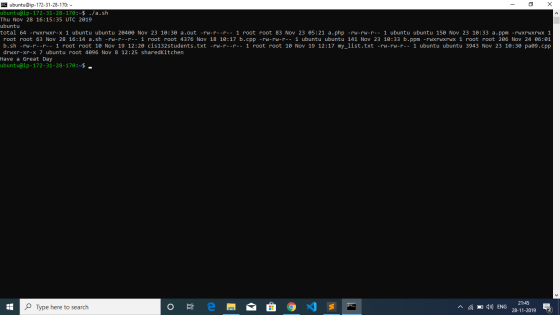
Write a script that tells you today’s date and who is currently logged on. Write a script that gives you the time of day gives you a long listing of files in your directory tells you Have a Great Day. It should be in Ubuntu.
Homework Answers
/* Below is your a.sh file, to run it first change the permission by entering chmod 777 a.sh then ./a.sh to run it*/
echo `date`
echo `whoami`
echo `ls -l`
echo 'Have a Great Day'
Add Answer to:
Write a script that tells you today’s date and who is currently
logged on. Write a...
Write a script using simple shell commands. The script takes a command line argument that specifies...
Write a script using simple shell commands. The script takes a command line argument that specifies a directory dir. The script first changes directory to dir, then prints the following in sequence: (a) A line starting “Current date and time: ”. Then on the same line, the current time and date. (b) A line starting “Current directory is : ”. Then, on the same line, the absolute pathname of the current working directory. (c) An empty line (d) The line...
I need this done ASAP. Please write a bash shell script that does the following: Prints...
I need this done ASAP. Please write a bash shell script that does the following: Prints out how many users are logged on. This can be accomplished using who and wc. Prints out a list of currently logged on users. This can be accomplished using who, grep, regular expressions, and echo. Prints out how many processes you have running from past days, and a list of those jobs. Use `whoami` to get your username. Run ps -ef and see how...
Open vi or pico and create a script called Information. Add the contents from the following table to the script: (Hin...
Open vi or pico and create a script called Information. Add the contents from the following table to the script: (Hint: use echo to add blank lines to your output and to write out the headings). Headings: Utilities (command to execute) Today’s date is: date The current users logged on to the system are: who My current startup directory is: pwd Today’s identification information is: id The processes running on my system are: ps Add a header to your Information...
Examine the following script, n-on: who | sort | awk '{print $1}' | uniq | wc...
Examine the following script, n-on: who | sort | awk '{print $1}' | uniq | wc -l What will be the output of n-on? (A) The number of processes running for each user that is currently logged on to the system. (B) The number of users logged on to the system at the time the script is run. (C) The date and time of your last login to the system. (D) A list of all the users currently logged on...
1. Write the command to set the following permissions on a script file with the following...
1. Write the command to set the following permissions on a script file with the following name; myscript.sh Owner: full access; read, write and execute Group: read and execute Other: no access 2. Create a new file with the name "myfirstscript.sh". Write a new script that performs the following tasks in sequence; Display the usernames of currently logged in users; sorted from a-z HINT: You will need to filter the output of the whocommand Display a list of usernames who...
write the bash script Write a script compress_large_files.sh. This script accepts one or more command line...
write the bash script Write a script compress_large_files.sh. This script accepts one or more command line arguments. The first argument has to be an integer; let’s call it size. If this is the only command line argument, compress_large_files.sh inspects all files in the current working directory and compresses every file of size at least size. If there is more than one command line argument, all arguments except the first one must be valid directories. In this case, compress_large_files.sh inspects the...
Write a script named listEmptyDir.sh that will do the following: (a) take a name of a...
Write a script named listEmptyDir.sh that will do the following: (a) take a name of a directory as a parameter; (b) loop through all files in this directory and display their names; (c) if a file is a directory and has no files in it (empty directory), add the name of this empty directory to the file EmptyDir.txt in your current directory. If the number of parameters is not 1 or a parameter is not a directory, display the “usage”...
Write a bash script to protect a directory. Your script should notify a user of the...
Write a bash script to protect a directory. Your script should notify a user of the following: -New file was created -Permission changes -Ownership changes -File size changes -Modification date changes Your script should have two operation modes, protect and check. Use command line flags, -p <directory> and -c <directory> to decide which mode to operate in. In protect mode, your script should create a file called .protect inside the directory you want to watch. You will use this file...
Write a shell script to solve the following business problem. Create a file called whoislogin.out...
Write a shell script to solve the following business problem. Create a file called whoislogin.out that contains the output of the who command, then append to the whois.out file, the output of the date and finger commands. Your script should prompt to pick any users from the list of users currently logged onto the system. Use the variable concept to search for the specific user from those displayed on the screen coming from the who is.out file created. Show a...
Write a bash shell script, deleteFilesWithZeroLength.sh, that removes all zero length ordinary files in the directory passed as an optional argument. If you do not specify the directory argument, the script uses the present working directory as the defaul
Write a bash shell script, deleteFilesWithZeroLength.sh, that removes all zero length ordinary files in the directory passed as an optional argument. If you do not specify the directory argument, the script uses the present working directory as the default argument. Do appropriate exception handling in your script such as:If the arguments are more than 1, print out “Too many arguments passed”.If the argument passed is a regular file, print out “XXX is regular file”.1c. If the directory doesn’t exist, print out “Directory...
Most questions answered within 3 hours.
-
Where is the error in this code sequence?
String s1 = "Hello";
String s2 = "ello";...
asked 10 months ago -
Financial data for Joel de Paris, Inc., for last year
follow:
Joel de Paris, Inc.
Balance...
asked 10 months ago -
Consider this reaction:
Al2(SO4)3 (aq)+ BaCl3
(aq) Al2Cl6 (aq)- +
3BaSO4(s) . What is the...
asked 10 months ago -
Suppose that Savneet is considering increasing her
recent random sample from 20 car rentals to 40...
asked 10 months ago -
Trucks arrive at an unloading terminal at an average rate of 120
per hour.
Trucks arrive...
asked 10 months ago -
Why are methanol and ethanol completely soluble in water while
octanol is not very little soluble....
asked 10 months ago -
A facilities manager at a university reads in a research report
that the mean amount of...
asked 10 months ago -
When the CuSO4 is rehydrated by adding water to the anhydrous
compound, is this an endothermic...
asked 10 months ago -
A ray of sunlight is passing from diamond into crown glass; the
angle of incidence is...
asked 10 months ago -
A block of mass 0.249 kg is placed on top of a light, vertical
spring of...
asked 10 months ago -
how do the kidneys compensate in the presences of acidosis
a) trigger hyperventilate
b) reserve acid...
asked 10 months ago -
Question 501 pts
The rental rate of capital to the firm increases. Which of the
following...
asked 10 months ago