This needs to be written in Python. I'm writing this but I'd love to see how...
This needs to be written in Python. I'm writing this but I'd love to see how others would do it.
I have idea to make a program to keep track of reading. Set goal per day. Input minutes per day & book read. Could accumulate for whole month.
Input daily, but you can input it all at the end of the week if you want. I want the user to be prompted to enter a numerical value and book for each day. How would I go about prompting/keeping track of that? Maybe I should prompt the user to enter the date and keep track in a range of 7 days and start there.
Output: Hours total per week, book(s) read, average per day. Determine if goal was met.
Option to include genre into input/ output, but not required. I'd like the program to be able to run with or without it.
Below are the assignment requirements. A test plan is also required.
- Full pseudocode should be included in the comments.
- It must have at least one input and at least one output.
- It must validate the user input. This means the user is not allowed to just enter any value. You must check the value, and ask the user to enter it again, and repeat this loop until the user enters a valid value.
- Your program must use at least two loops in meaningful ways. The loops you use for input validation count for at most one of the two required loops. If you use loops to validate two separate inputs, that does not count as two loops for satisfying this lab requirement.
- It should be organized into separate modules (one module for input, one module for output, and one module for each separate calculation or action that the program is to perform [that is, each module should be "cohesive" and should only do one thing]).
- Use parameters and arguments to pass values into your modules (don't use global variables).
- The Python code should run correctly, and the logic should match your pseudocode.
The test plan should meet all of the following requirements:
- Follow the format given in the example test plans (one below, and one on the Testingpage). You can download and copy the test plan document below and use it as a template: replace the content of each section with your own content.
- Write the test plan as if for someone who cannot see your source code (utilize black-box testing). They can only run the program, provide inputs, and observe outputs.
- For each test case, include at least the following fields: Summary, Test Procedure, Test Data, Expected Result. Feel free to add more fields if you want to. (See Test Case for additional fields.)
- Include test cases for all important categories of input
(valid, invalid, boundary, etc.). If your program passes every test
case in your test plan, you should be confident that it functions
correctly.
- Be sure to run your program against the test plan to determine its correctness, and fix any bugs found.
Homework Answers
Program screenshot:
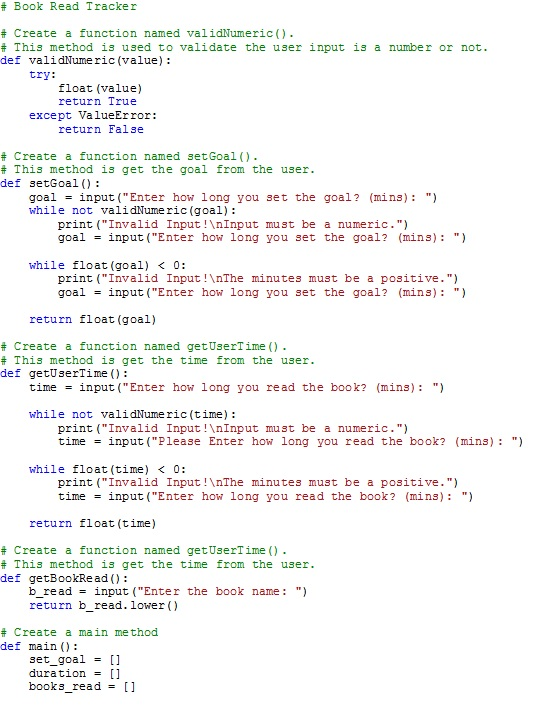
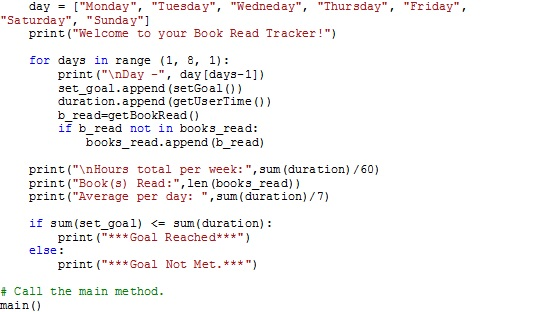
Sample output screenshot:
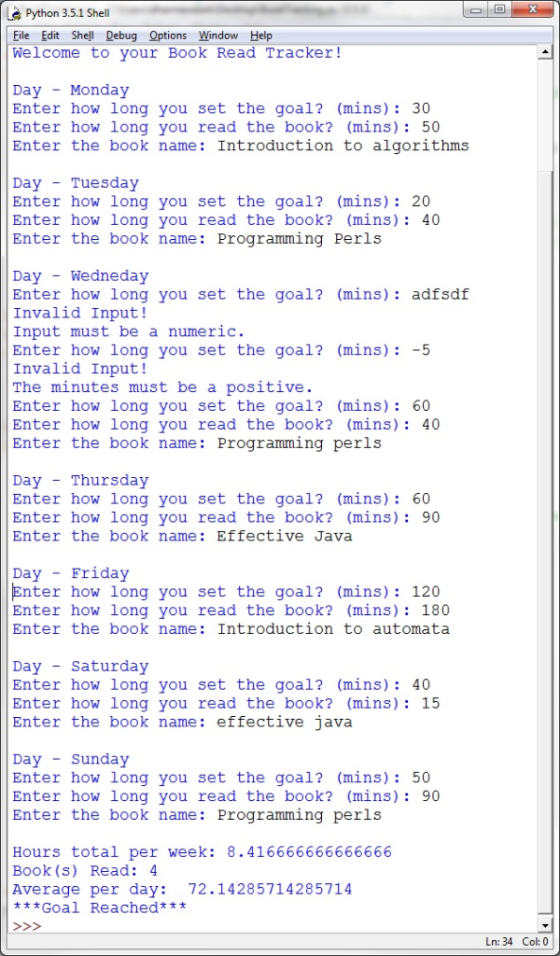
Code to copy:
# Book Read Tracker
# Create a function named validNumeric().
# This method is used to validate the user input is a number or
not.
def validNumeric(value):
try:
float(value)
return True
except ValueError:
return False
# Create a function named setGoal().
# This method is get the goal from the user.
def setGoal():
goal = input("Enter how long you set the goal?
(mins): ")
while not validNumeric(goal):
print("Invalid
Input!\nInput must be a numeric.")
goal = input("Enter how
long you set the goal? (mins): ")
while float(goal) < 0:
print("Invalid
Input!\nThe minutes must be a positive.")
goal = input("Enter how
long you set the goal? (mins): ")
return float(goal)
# Create a function named getUserTime().
# This method is get the time from the user.
def getUserTime():
time = input("Enter how long you read the book?
(mins): ")
while not validNumeric(time):
print("Invalid
Input!\nInput must be a numeric.")
time = input("Please
Enter how long you read the book? (mins): ")
while float(time) < 0:
print("Invalid
Input!\nThe minutes must be a positive.")
time = input("Enter how
long you read the book? (mins): ")
return float(time)
# Create a function named getUserTime().
# This method is get the time from the user.
def getBookRead():
b_read = input("Enter the book name: ")
return b_read.lower()
# Create a main method
def main():
set_goal = []
duration = []
books_read = []
day = ["Monday", "Tuesday", "Wedneday",
"Thursday", "Friday", "Saturday", "Sunday"]
print("Welcome to your Book Read Tracker!")
for days in range (1, 8, 1):
print("\nDay -",
day[days-1])
set_goal.append(setGoal())
duration.append(getUserTime())
b_read=getBookRead()
if b_read not in
books_read:
books_read.append(b_read)
print("\nHours total per
week:",sum(duration)/60)
print("Book(s) Read:",len(books_read))
print("Average per day: ",sum(duration)/7)
if sum(set_goal) <= sum(duration):
print("***Goal
Reached***")
else:
print("***Goal Not
Met.***")
# Call the main method.
main()
Pseduo Code:
// Book Read Tracker
// Create a function named validNumeric().
// This method is used to validate the user input is a number or
not.
Function validNumeric(value):
Try:
float(value)
Return True
Catch ValueError Exception:
Return False
// Create a function named setGoal().
// This method is get the goal from the user.
Function setGoal():
Print request for input
"Enter how long you set
the goal? (mins): "
Declare a variable named goal = store the user
input
// Call the function validNumeric(goal) to
check
// the user input is integer or not.
WHILE user input n is NOT a float:
Print request for input
"Invalid Input! Input must be a numeric."
goal = store the user
input in a variable named goal
END-WHILE
Return user input goal in float format.
// Create a function named getUserTime().
// This method is used to get the time from the user.
Function getUserTime():
Print request for input
"Enter how long you read
the book? (mins): "
WHILE user input n is NOT a float:
Print request for input
Print request for
input
"Enter how long you read the book? (mins): "
END-WHILE
Return user input TIME in float format.
// Create a function named getBookRead ().
// This method is used to get the book name from the user.
Function getBookRead():
Print request for input
"Enter the book name:
"
Declare a variable b_read = Assign the user input
Return the user input value in lowercase
// Create a main method
Function main():
Delcare a list named set_goal to store the
everyday goals
Delcare a list named duration to store the
everyday reading duration
Delcare a list named books_read to store the
book names
// Declare a list named day to store the days
in a week.
day = ["Monday", "Tuesday", "Wedneday",
"Thursday", "Friday", "Saturday", "Sunday"]
Print greeting
"Welcome to your Book
Read Tracker!"
FOR days in range 1 to 7 increment by
1:
Print day from the day
list according the range days
Call the setGoal()
function and append the goal to the set_goal list
Call the getUserTime()
function and append the time to the duration list
Declare a variable named
b_read.
Call the getBookRead()
function and assign the book name to the b_read variable.
// Create an
if-statement to check the book
// name is present in
the list or not.
IF b_read not in
books_read:
books_read.append(b_read)
print response
"\nHours total per
week:",sum(duration)
"Book(s)
Read:",len(books_read)
"Average per day:
",format(sum(duration) / 7, '.2f')
IF sum(set_goal) <= sum(duration):
Print goal message
"***Goal Reached***"
ELSE:
Print
"***Goal Not Met.***"
// Call the main method.
Call main() function
TEST PLAN BOOK READ TRACKER:
|
Program Description Calculates hours total per week, books read, average per day and goal reached in the daily book read tracking activity in a week. Input
Output
Test Plan Overview System tests using black-box testing of all functions of the program. Valid as well as invalid inputs are tested. Test Cases Test Case 1: Invalid Inputs
Test Case 2: Valid Inputs Producing No Output
Test Case 3: First 3 inputs of Day 1
Test Case 3: Multiple inputs in a week
|
Add Answer to:
This needs to be written in Python. I'm writing this but I'd
love to see how...
I am writing a Python program to serve as a fitness tracker. I would love some...
I am writing a Python program to serve as a fitness tracker. I would love some input as to how you would code this. I've included what I want this program to accomplish, what I will keep track of, and below all of that I have posted the assignment guidelines. Any suggestions on how to make this better/ more efficient would be welcome! I'm thinking of making a weekly tracker that takes input per day, and outputs at the end...
Lab 5 Instructions For Lab 5, you will be writing a more complex modular program that...
Lab 5 Instructions For Lab 5, you will be writing a more complex modular program that uses at least two arrays, and has at least one loop that accesses the data in the arrays. As long as your program satisfies the requirements listed below, you are free to design and write any type of program that you care to. You are encouraged to be creative, and pick something that has meaning for you, because you'll have more fun. Feel free...
Lab 8 python code for Cell Phone Bill
Lab 8: Cell Phone Bill CalculatorWrite the Python code for the following programming problem definition.Use modular design according to the modules specified below.Design and write a program that calculates and displays the number of minutes over the monthly contract minutes that a cell phone user incurred. The program should askthe user how many minutes were used during the month and how many minutes they were allowed. Validate the input as follows:• The minimum minutes allowed should be at least 100,...
In python Simply write the Euclid algorithm in a form that takes two numbers from input...
In python Simply write the Euclid algorithm in a form that takes two numbers from input and prints the gcd. The code does not need to check for valid input. It must work for any pair of positive integers. Create a separate program that uses the python timeit module to provide test run-times for your code. Provide at-least 5 sample runs. Create a third file that implements another algorithm to find the gcd. Provide a program that uses the timeit...
The following program MUST be written in Flowgorithm and MUST use modules. Could someone please add...
The following program MUST be written in Flowgorithm and MUST use modules. Could someone please add screenshots to show me how this is supposed to look in Flowgorithm? I'm confused as to how to break it up into extra functions. For the programming problem, create the flowchart and enter it into the Flowgorithm program to test the accuracy of your logic. Save the file as Ch7Lab1. Payroll Program with Input Validation Design a payroll program that prompts the user to...
This problem demonstrates the use of import module. The Python programming language has many strengths, but...
This problem demonstrates the use of import module. The Python programming language has many strengths, but one of its best is the availability to use many existing modules for various tasks, and you do not need to be an experienced computer programmer to start using these modules. We have given you some incomplete code; note that the very first line of that code contains an import statement as follows: import math This statement enables your program to use a math...
Hello! I'm looking for help with this assignment. Complete a program in pseudocode and Python that...
Hello! I'm looking for help with this assignment. Complete a program in pseudocode and Python that performs the following tasks. Open the file called M4Lab1ii.py linked below these instructions in your M4 Content module in IDLE. Save as M4Lab1ii.py. Replace ii with your initials. [example for someone with the initials cc: M4Lab1cc.py] Complete Steps 1-7 as requested within the code’s comments. Run your program and test all four calculations, then exit the program. Save your program as M4Lab1ii.py using your...
Hello! I'd greatly appreciate it if someone could help me out with this problem. "Complete the...
Hello! I'd greatly appreciate it if someone could help me out with this problem. "Complete the following program, which should allow the user to repeatedly enter input until a sentinel value of 0 is seen. Once input has finished, the program should show the average of the user's data, excluding the sentinel value itself. You may assume that the user will enter at least one non-sentinel value" import java.util.Scanner; public class SentinelValue { public static void main(String [] args) {...
Homework 3: Input Validation 1 Objectives control structures console-based user input using Scanner class writing complete...
Homework 3: Input Validation 1 Objectives control structures console-based user input using Scanner class writing complete programs using two classes: client and supplier 2 User Interface Specification This is a console-based I/O program. Display should go to System.out (print or println) and the program will get user input using the Scanner class. The flow of execution should be as follows: When the program starts, display a one-line introduction to the user Display a menu with 5 options 1. validate zip...
just the extra credit part please Your customer needs an automated system to patrol the highways....
 just the extra credit part please
Your customer needs an automated system to patrol the highways. The job of the system is to collect the following information on vehicles traveling down a certain stretch of highway: license plate number, current speed, and speed limit. A program is required to determine if a speeding ticket is needed for each set of data. Ticket will only be issued when number of miles per hours (mph) over the speed limit is at least...
just the extra credit part please
Your customer needs an automated system to patrol the highways. The job of the system is to collect the following information on vehicles traveling down a certain stretch of highway: license plate number, current speed, and speed limit. A program is required to determine if a speeding ticket is needed for each set of data. Ticket will only be issued when number of miles per hours (mph) over the speed limit is at least...
 just the extra credit part please
Your customer needs an automated system to patrol the highways. The job of the system is to collect the following information on vehicles traveling down a certain stretch of highway: license plate number, current speed, and speed limit. A program is required to determine if a speeding ticket is needed for each set of data. Ticket will only be issued when number of miles per hours (mph) over the speed limit is at least...
just the extra credit part please
Your customer needs an automated system to patrol the highways. The job of the system is to collect the following information on vehicles traveling down a certain stretch of highway: license plate number, current speed, and speed limit. A program is required to determine if a speeding ticket is needed for each set of data. Ticket will only be issued when number of miles per hours (mph) over the speed limit is at least...
Most questions answered within 3 hours.
-
Where is the error in this code sequence?
String s1 = "Hello";
String s2 = "ello";...
asked 11 months ago -
Financial data for Joel de Paris, Inc., for last year
follow:
Joel de Paris, Inc.
Balance...
asked 11 months ago -
Consider this reaction:
Al2(SO4)3 (aq)+ BaCl3
(aq) Al2Cl6 (aq)- +
3BaSO4(s) . What is the...
asked 11 months ago -
Suppose that Savneet is considering increasing her
recent random sample from 20 car rentals to 40...
asked 11 months ago -
Trucks arrive at an unloading terminal at an average rate of 120
per hour.
Trucks arrive...
asked 11 months ago -
Why are methanol and ethanol completely soluble in water while
octanol is not very little soluble....
asked 11 months ago -
A facilities manager at a university reads in a research report
that the mean amount of...
asked 11 months ago -
When the CuSO4 is rehydrated by adding water to the anhydrous
compound, is this an endothermic...
asked 11 months ago -
A ray of sunlight is passing from diamond into crown glass; the
angle of incidence is...
asked 11 months ago -
A block of mass 0.249 kg is placed on top of a light, vertical
spring of...
asked 11 months ago -
how do the kidneys compensate in the presences of acidosis
a) trigger hyperventilate
b) reserve acid...
asked 11 months ago -
Question 501 pts
The rental rate of capital to the firm increases. Which of the
following...
asked 11 months ago